Įvadas
This manual provides detailed instructions for the safe and effective use of the NJTY T3 Digital Multimeter. Please read this manual thoroughly before operation and retain it for future reference. The NJTY T3 is a rechargeable, auto-ranging digital multimeter designed for accurate measurements of AC/DC voltage, resistance, and features Non-Contact Voltage (NCV) detection and live wire testing.

Image: The NJTY T3 Digital Multimeter, showing its main unit, red and black test probes, and a USB-C charging cable connected.
Saugos informacija
Always adhere to safety precautions when using any electrical testing equipment. Failure to do so may result in injury or damage to the device.
- Neviršykite kiekvienai funkcijai nurodytų didžiausių įvesties verčių.
- Ensure test leads are in good condition and properly connected before making measurements.
- Būkite atsargūs dirbdami su voltagaukštesnėje nei 30 V kintamosios srovės RMS, 42 V maksimalios įtampos arba 60 V nuolatinės srovės įtampoje, nes kyla elektros smūgio pavojus.
- Do not operate the multimeter if it appears damaged or if the case is open.
- Prieš matuodami varžą ar laidumą, visada atjunkite bandomosios grandinės maitinimą.
- Naudokite bekontakčius tūrio matuokliustage (NCV) function as an initial check, but always verify with direct contact measurements when safety is critical.
Pakuotės turinys
Patikrinkite, ar pakuotėje yra visi reikalingi daiktai:
- NJTY T3 Multimeter (1 unit)
- Test Leads (1 pair, red and black)
- C tipo įkrovimo laidas (1 vnt.)
- Naudojimo instrukcija (1 vnt.)
Sąranka
1. Pradinis įkrovimas
The NJTY T3 Multimeter features a built-in rechargeable Lithium Ion battery. Before first use, or if the low battery indicator is displayed, charge the device using the provided Type-C charging cable.
- Prijunkite įkrovimo laido C tipo galą prie multimetro įkrovimo prievado.
- Connect the USB-A end of the charging cable to a standard USB power adapter (not included) or a computer's USB port.
- The charging indicator on the multimeter will illuminate during charging and turn off when fully charged.

Image: The NJTY T3 Multimeter being charged via its Type-C port, connected to a laptop.
2. Bandymo laidų prijungimas
Insert the red test lead into the "VΩ" input jack and the black test lead into the "COM" input jack. Ensure they are securely seated.
Naudojimo instrukcijos
The NJTY T3 Multimeter features an auto-ranging function, simplifying operation by automatically detecting the measurement type and range.
1. Maitinimo įjungimas/išjungimas
Press and hold the power button to turn the multimeter on or off. The device will automatically shut off after approximately 15 minutes of inactivity to conserve battery life.
2. Automatic Measurement (Auto-Ranging)
In auto-ranging mode, the multimeter will automatically identify and measure AC voltage, DC ttage, or resistance when the test leads are applied to a circuit. The display will show the measurement type (AC, DC, Ω) and the value.
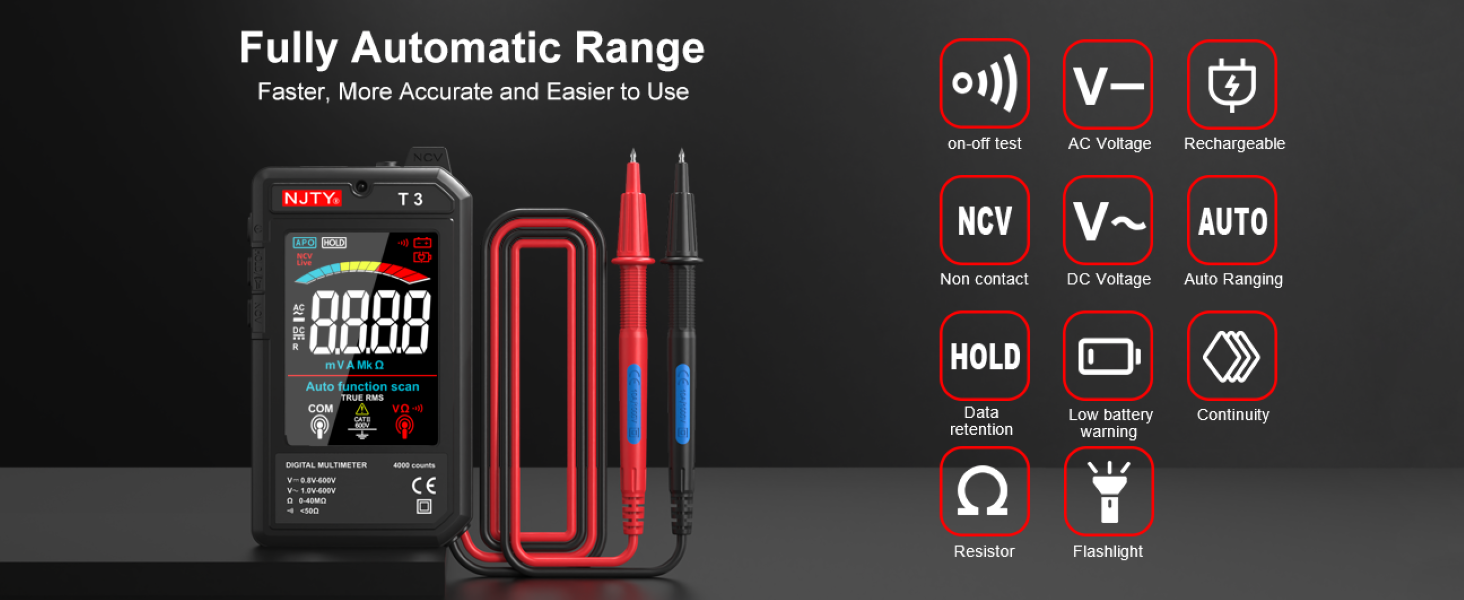
Image: The NJTY T3 Multimeter screen showing "Auto function scan" and icons representing AC/DC voltage, resistance, continuity, NCV, and flashlight functions.
3. AC/DC ttage Matavimas
- Ensure the multimeter is powered on.
- Prijunkite bandymo laidus prie grandinės taškų, kuriuose yra įtampatage needs to be measured. The multimeter will automatically detect AC or DC voltage.
- Perskaitykite ttage reikšmė rodoma ekrane.
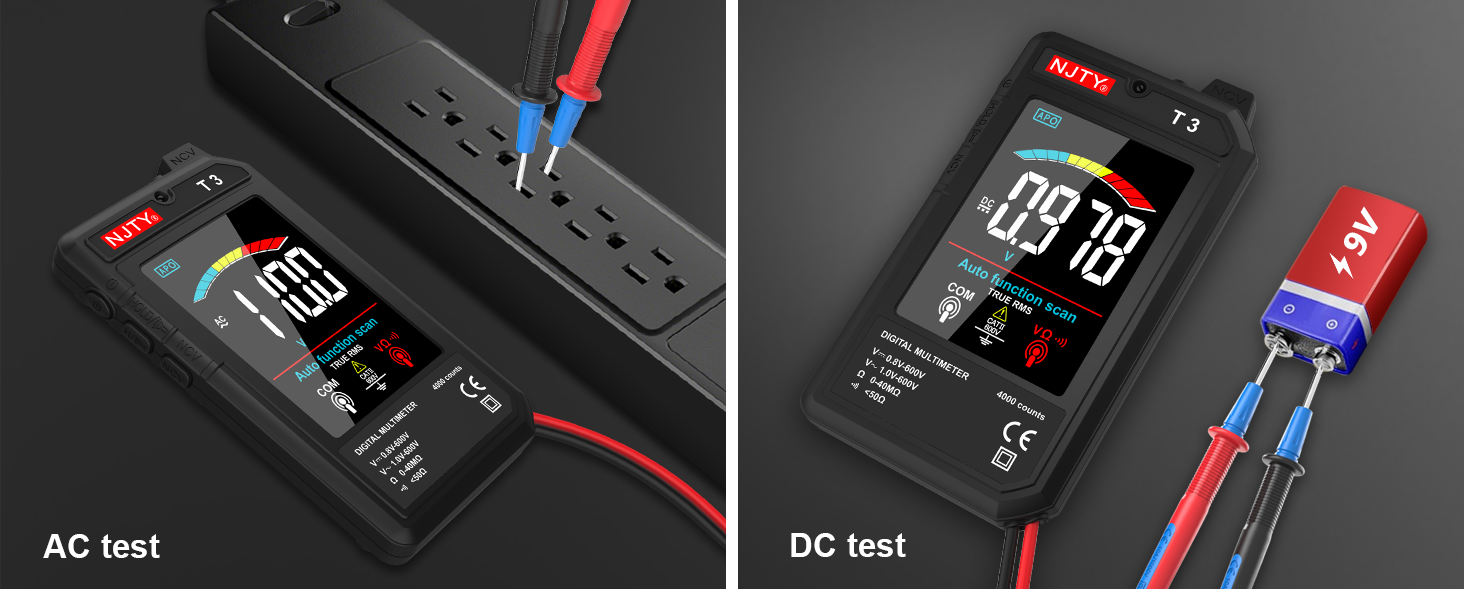
Image: Two separate images showing the NJTY T3 Multimeter measuring AC voltage from a power strip and DC voltage from a 9V battery.
4. Atsparumo matavimas
- Svarbu: Prieš matuodami varžą, įsitikinkite, kad grandinė yra atjungta nuo įtampos.
- Connect the test leads across the component or circuit section where resistance is to be measured.
- The multimeter will display the resistance value in Ohms (Ω), Kilo-Ohms (KΩ), or Mega-Ohms (MΩ).

Image: Two separate images showing the NJTY T3 Multimeter measuring resistance of a resistor and performing a continuity test on a wire.
5. Nekontaktinis ttage (NCV) aptikimas
The NCV function allows for safe detection of live wires without direct contact.
- Press the NCV button (if available, or ensure NCV mode is active).
- Bring the NCV sensor at the top of the multimeter close to the wire or outlet.
- The multimeter will emit an audible beep and the display will indicate the presence of AC voltage, with increasing intensity as it gets closer to the source.

Image: The NJTY T3 Multimeter detecting non-contact voltage near an electrical wall outlet, with the screen showing "EF" and a signal strength indicator.
6. Live Wire Testing
This function helps identify live wires in an AC circuit.
- Insert the red test probe into the socket or touch it to the wire you want to test.
- If the multimeter emits an alarm sound and the screen changes to indicate "LIVE", it signifies a live wire.

Image: The NJTY T3 Multimeter's red probe inserted into an electrical outlet for live wire testing, with the screen displaying "LIVE".
7. Tęstinumo testas
- Svarbu: Prieš atlikdami tęstinumo testą, įsitikinkite, kad grandinėje nėra įtampos.
- Connect the test leads across the component or wire to be tested.
- If continuity exists (resistance is low, typically below 50Ω), the multimeter will emit an audible beep.
8. Duomenų sulaikymas
Norėdami sustabdyti dabartinį rodmenį ekrane, paspauskite mygtuką „HOLD“. Norėdami atšaukti laikymo funkciją, paspauskite jį dar kartą.
9. Žibintuvėlis ir foninis apšvietimas
The multimeter includes a built-in flashlight for illuminating the test area and a backlight for the display, enhancing visibility in low-light conditions. Refer to the device buttons for activation (typically a short press of the power button or a dedicated light button).
Image: The NJTY T3 Multimeter with its integrated flashlight active, illuminating a dark electrical panel.
Priežiūra
1. Valymas
Wipe the multimeter's case with a damp cloth and mild detergent. Do not use abrasives or solvents. Ensure the device is off and disconnected from any power source before cleaning.
2. Akumuliatoriaus priežiūra
The built-in Lithium Ion battery should be charged regularly, especially if the device is not used for extended periods. The automatic shut-off feature helps prolong battery life. A low battery indicator will appear on the display when charging is required.
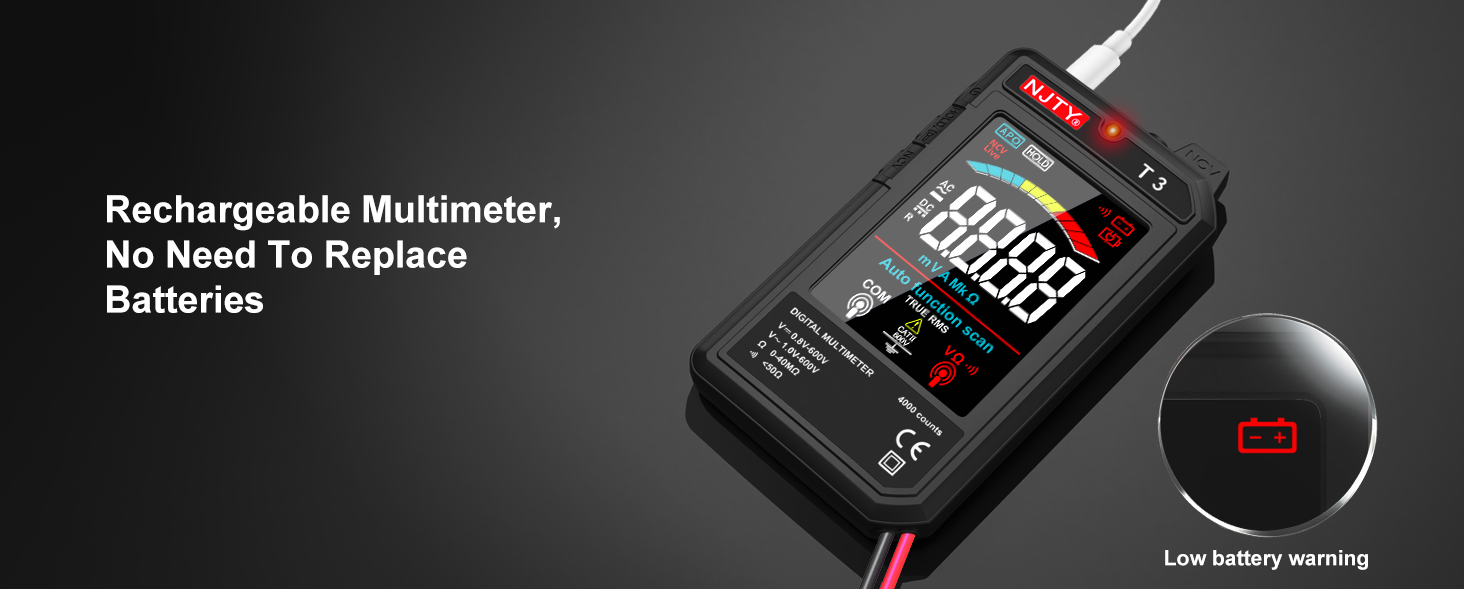
Image: The NJTY T3 Multimeter screen showing a low battery warning icon, indicating the need for recharging.
3. Sandėliavimas
Store the multimeter in a cool, dry place, away from direct sunlight and extreme temperatures. Disconnect test leads when storing.
Trikčių šalinimas
| Problema | Galima priežastis | Sprendimas |
|---|---|---|
| No display or device won't turn on. | Išsikrovęs akumuliatorius arba įrenginys išjungtas. | Charge the battery using the Type-C cable. Press and hold the power button to turn on. |
| Netikslūs rodmenys. | Poor test lead connection, incorrect measurement technique, or exceeding input limits. | Ensure test leads are firmly connected. Review operating instructions for correct measurement procedures. Do not exceed specified input ranges. |
| Multimeter automatically shuts off. | Automatic power-off feature activated due to inactivity. | This is normal behavior to conserve battery. Press the power button to turn it back on. |
| NCV detection not working or inconsistent. | Distance to voltage source too far, or interference. | Bring the NCV sensor closer to the suspected live wire. Ensure no other strong electromagnetic fields are present. |
Specifikacijos
| Funkcija | Detalė |
|---|---|
| Ekranas | 4000 Counts, 3.19-inch Color LCD |
| DC ttage Diapazonas | 0.8V - 600V (Accuracy: ±(0.8%+5)) |
| AC ttage Diapazonas | 1V - 600V (Accuracy: ±(1.0%+5)) |
| Atsparumo diapazonas | 0 - 40MΩ (Accuracy: ±(1.0%+10)) |
| Minimum Resolution (DCV/ACV) | 0.001 V |
| Minimum Resolution (Resistance) | 1Ω |
| Maitinimo šaltinis | Įkraunama ličio jonų baterija (pridedama) |
| Įkrovimo prievadas | C tipas |
| Automatinis išjungimas | Maždaug 15 minučių neaktyvumo |
| Žibintuvėlis | Yes (1 minute auto shut-off) |
| Foninis apšvietimas | Taip |
| Skambutis | Yes (for continuity, internal resistance less than 50Ω) |
| NCV aptikimas | Taip |
| Tikras RMS | Yes (45Hz-2KHz) |
| Senkančios baterijos indikatorius | Taip |
| Tiesioginio laido identifikavimas | Taip |
| Gaminio matmenys | 5.51 x 1.18 x 0.79 colio |
| Prekės svoris | 150 gramų (5.29 uncijos) |
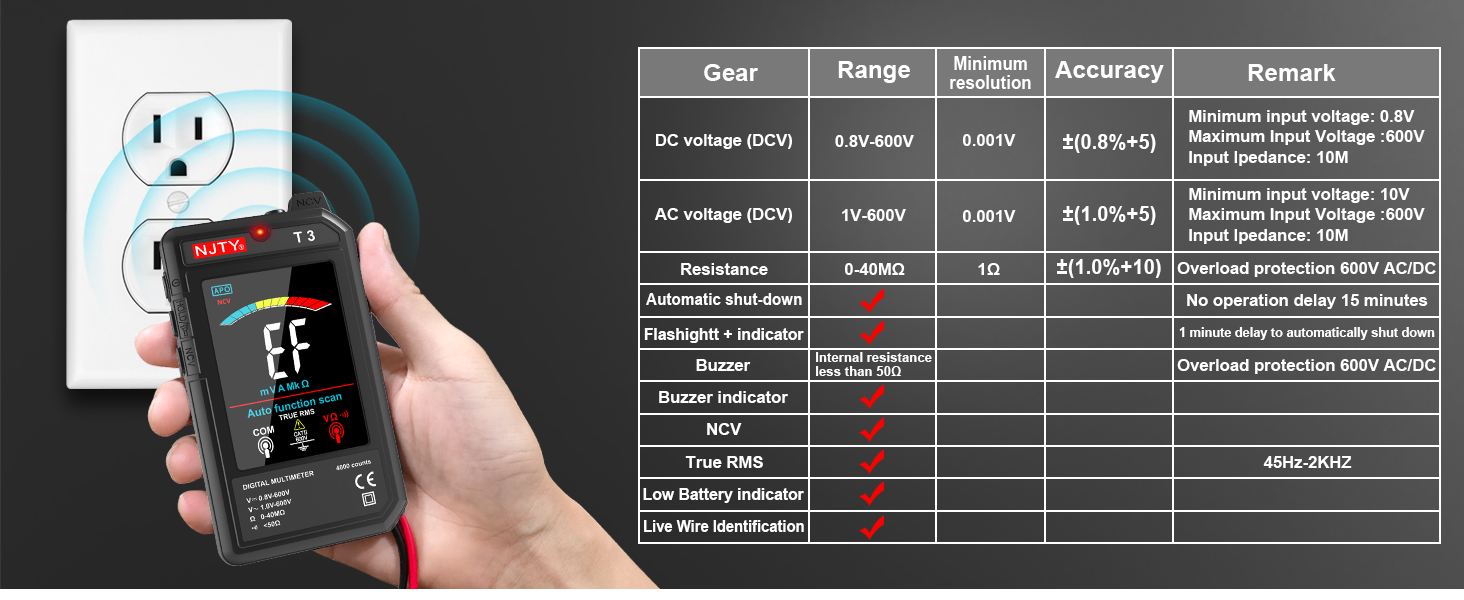
Image: The NJTY T3 Multimeter demonstrating NCV detection alongside a table detailing its technical specifications.
Garantija ir palaikymas
Informacija apie garantiją
For specific warranty terms and conditions, please refer to the warranty card included with your product or contact the seller directly. Warranty coverage typically addresses manufacturing defects under normal use.
Pagalba klientams
If you encounter any issues or have questions regarding the NJTY T3 Multimeter, please contact your retailer or the manufacturer's customer support channel. Refer to the "after-sales channel" information provided in your product packaging for contact details.