1. Įvadas
This manual provides essential information for the installation, operation, and maintenance of the Cisco IE-3400-8T2S-E Catalyst IE3400 Rugged Series Network Essential Switch. This device is designed for industrial environments, offering robust network connectivity. Please read this manual thoroughly before operating the device.
2. Saugos informacija
Kad išvengtumėte sužalojimų ir įrangos sugadinimo, laikykitės šių saugos priemonių:
- Užtikrinkite tinkamą įrenginio įžeminimą.
- Prieš atlikdami bet kokias techninės priežiūros ar montavimo procedūras, atjunkite maitinimą.
- Operate the switch within the specified environmental conditions (temperature, humidity).
- Šią įrangą turėtų montuoti ir aptarnauti tik kvalifikuoti darbuotojai.
- Saugokite, kad prietaisas nepatektų į drėgmę ar ekstremalią temperatūrą.
3. Pakuotės turinys
Patikrinkite, ar jūsų pakuotėje yra šie elementai:
- Cisco IE-3400-8T2S-E Catalyst IE3400 Rugged Series Network Essential Switch
- Dokumentacija (greito paleidimo vadovas, saugos informacija)
- Tvirtinimo detalės (jei yra su konkrečiu modelio variantu)
- Power connector terminal blocks
Jei trūksta kokių nors daiktų arba jie pažeisti, nedelsdami susisiekite su tiekėju.
4. Fizinis viršusview
The following diagram illustrates the front panel components of the Cisco IE-3400-8T2S-E switch.
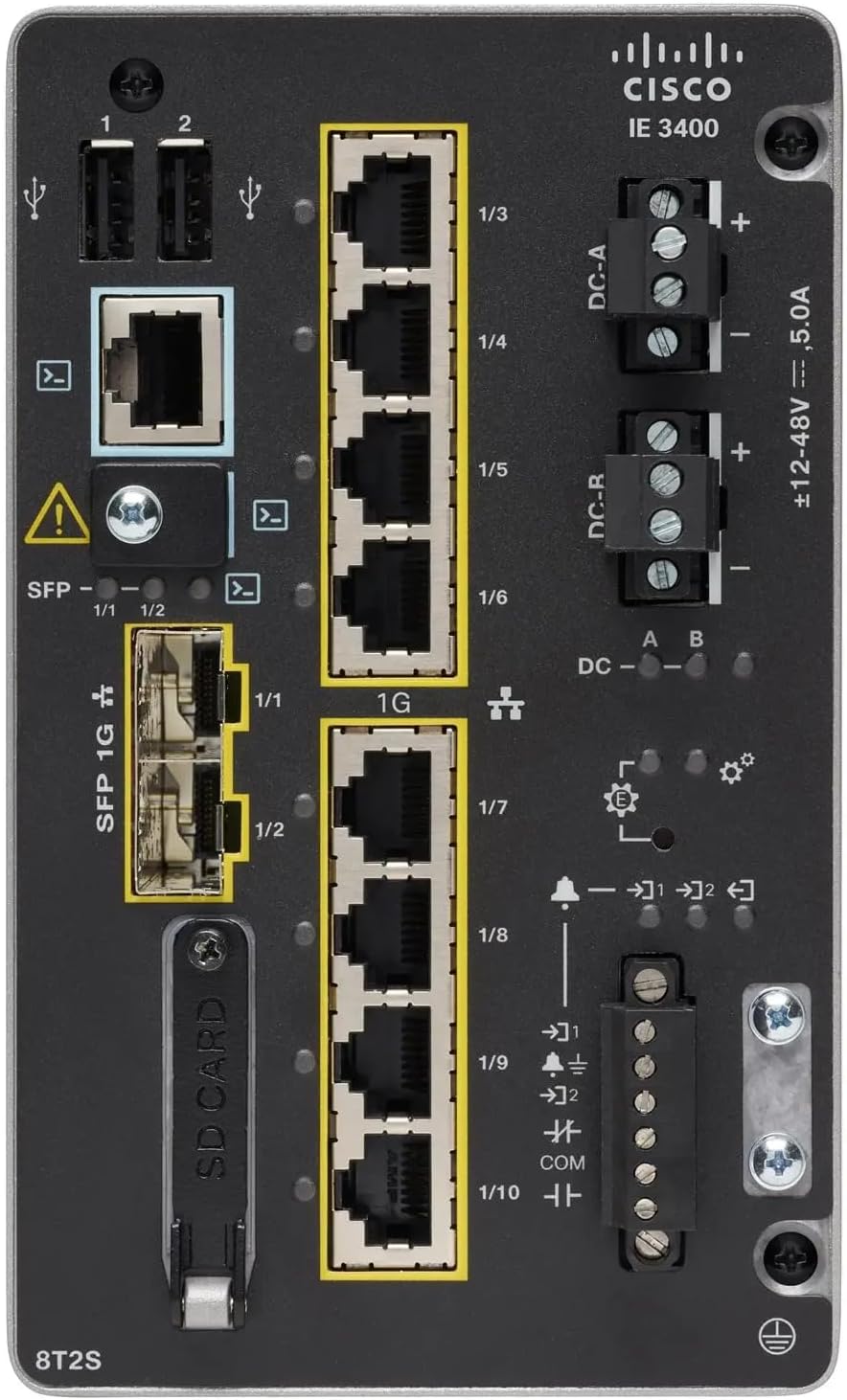
1 paveikslas: Front Panel Layout of the Cisco IE-3400-8T2S-E Switch
4.1. Front Panel Components Description
- USB prievadai (1, 2): Two USB ports for connecting external devices or for configuration.
- Konsolės prievadas: An RJ45 console port for local management and initial configuration.
- SFP 1G Ports (1/1, 1/2): Two Small Form-Factor Pluggable (SFP) ports supporting 1 Gigabit Ethernet for fiber optic connections.
- 1G Ethernet Ports (1/3 - 1/10): Eight 1 Gigabit Ethernet RJ45 ports for standard network connections.
- DC Power Inputs (DC-A, DC-R): Redundant DC power input terminals, supporting a voltage range of ±12-48V at 5.0A.
- Įžeminimo varžtas: Terminal for connecting the chassis to earth ground.
- SD kortelės lizdas: Slot for an SD card, typically used for configuration backup or software storage.
- Alarm/Relay Ports (1/9, 1/10): Terminals for connecting external alarm systems or relay controls.
- LED indikatoriai: Various LEDs indicating power status (DC A/B), system status, link/activity for ports, and alarm status.
5. Sąranka
5.1. Jungiklio montavimas
The IE3400 series switches are designed for industrial environments and typically support DIN rail or wall mounting. Refer to the specific mounting instructions provided with your mounting kit for detailed steps.
5.2. Maitinimo prijungimas
- Ensure the power source is off before connecting.
- Connect the DC power cables to the DC-A and/or DC-R terminal blocks, observing polarity (+ and -). The switch supports redundant power inputs.
- Connect the grounding wire to the grounding screw on the front panel.
- Once all connections are secure, apply power to the switch. The DC-A and/or DC-B LEDs should illuminate.
5.3. Tinklo ryšiai
- Ethernet prievadai: Connect standard RJ45 Ethernet cables from your network devices to the 1G Ethernet ports (1/3 - 1/10).
- SFP prievadai: Insert compatible SFP transceivers into the SFP 1G ports (1/1, 1/2) and connect fiber optic cables as required.
- Konsolės prievadas: For initial configuration, connect a console cable from your management workstation to the RJ45 console port.
6. Naudojimo instrukcijos
6.1. Pradinis įjungimas
Upon applying power, the switch will perform a power-on self-test (POST). The system LED will indicate the boot status. Once the boot process is complete, the switch will be ready for configuration.
6.2. Configuration Access
The switch can be configured via the console port using a terminal emulator or remotely via Telnet/SSH once an IP address is assigned. Refer to the Cisco IOS documentation for detailed configuration commands and procedures.
6.3. LED indikatoriai
Monitor the LED indicators on the front panel to understand the switch's operational status:
- DC-A/DC-B LEDs: Indicate the status of the primary and redundant DC power inputs.
- Sistemos šviesos diodas: Indicates the overall operational status of the switch (e.g., green for normal operation, amber for warning, red for fault).
- Link/Activity LEDs (per port): Indicate network link status and data activity on each Ethernet and SFP port.
- Signalizacijos šviesos diodas: Illuminates when a critical system alarm is triggered.
7. Priežiūra
7.1. Valymas
Periodiškai valykite jungiklio išorę minkštu, sausu skudurėliu. Nenaudokite skystų ar aerozolinių valiklių. Įsitikinkite, kad ventiliacijos angose nėra dulkių ir šiukšlių.
7.2. Firmware atnaujinimai
Reguliariai tikrinkite „Cisco“ palaikymo tarnybą website for the latest firmware updates. Applying updates can improve performance, add features, and address security vulnerabilities. Follow Cisco's official procedures for firmware upgrades.
7.3. Aplinkosaugos svarstymai
Ensure the switch operates within its specified temperature and humidity ranges. Proper airflow around the device is crucial for heat dissipation.
8. Problemų sprendimas
Šiame skyriuje pateikiami pagrindiniai dažniausiai pasitaikančių problemų sprendimo veiksmai.
8.1. Nėra elektros
- Verify that the power source is active and the power cables are securely connected to the DC-A/DC-R terminals.
- Check the DC-A/DC-B LEDs. If they are off, there is no power or a power supply issue.
8.2. No Network Link
- Ensure Ethernet or fiber optic cables are properly connected to both the switch port and the connected device.
- Check the Link/Activity LED for the specific port. If it is off, there is no link.
- Patikrinkite, ar prijungtas įrenginys įjungtas ir veikia tinkamai.
8.3. System Alarm
- If the Alarm LED is illuminated, consult the Cisco IOS documentation for specific alarm codes and their meanings.
- Check system logs via the console or network management interface for detailed error messages.
9. Specifikacijos
| Funkcija | Specifikacija |
|---|---|
| Modelis | IE-3400-8T2S-E |
| Gamintojas | Cisco |
| Ethernet prievadai | 8 x 1 Gigabit RJ45 |
| SFP uostai | 2 x 1 Gigabit SFP |
| Sąsajos tipas | RJ45, SFP, PoE, PoE+ (model dependent) |
| Maitinimo įvestis | ±12-48V DC, 5.0A (Redundant) |
| Gaminio matmenys | 36 x 9 x 55 cm |
| Prekės svoris | 2.28 kilogramo |
| Suderinami įrenginiai | Stalinis kompiuteris, nešiojamas kompiuteris, spausdintuvas |
| UPC | 703670760433 |
10. Garantija ir palaikymas
This product is offered as an Amazon Renewed item. Warranty and return policies are typically managed by the reseller (Amazon Renewed) for a specified period. Please refer to your purchase documentation or contact Amazon Renewed support for details regarding your specific warranty coverage.
For technical documentation, software downloads, and advanced support for the Cisco IE-3400-8T2S-E switch, please visit the official Cisco support website and search for your specific model.


