1. Įvadas
This manual provides detailed instructions for the setup, operation, and maintenance of your PUTRIMS S28 Projector. Please read this manual thoroughly before using the projector to ensure proper function and to extend the product's lifespan. Keep this manual for future reference.
2. Pakuotės turinys
Patikrinkite, ar pakuotėje yra visi reikalingi daiktai:
- PUTRIMS S28 Projector
- Nuotolinio valdymo pultas
- HDMI kabelis
- Maitinimo laidas
- Adapteris
- Vartotojo vadovas (šis dokumentas)
3. Produktas baigtasview
Familiarize yourself with the components of your PUTRIMS S28 Projector.

Vaizdas: priekis view of the PUTRIMS S28 Projector, showcasing objektyvą ir pagrindinį korpusą.
3.1. Pagrindinės savybės
- Elektrinis fokusavimas: Adjust image sharpness using the remote control.
- Auto Keystone korekcija: Automatically corrects image distortion for a rectangular display.
- 145° reguliuojamas stovas: Integrated stand allows for flexible projection angles, including ceiling projection.
- Dviejų dažnių belaidis internetas (5 G + 2.4 G): For fast and stable wireless connectivity.
- "Bluetooth 5.2": Connect external audio devices wirelessly.
- Short Throw Ratio (1.36:1): Projects a large screen from a shorter distance.
- 50% Zoom Function: Adjust image size without moving the projector.
- Fully Sealed Optical Engine: Designed to prevent dust accumulation and maintain brightness.
4. Sąrankos vadovas
4.1. Padėtis ir maitinimo prijungimas
- Place the projector on a stable, flat surface. Ensure adequate ventilation around the device.
- Prijunkite maitinimo laidą prie projektoriaus, o tada – prie elektros lizdo.
4.2. Reguliuojamas stovas
The integrated 145° adjustable stand allows you to easily change the projection angle to suit your needs, whether projecting onto a wall or ceiling.
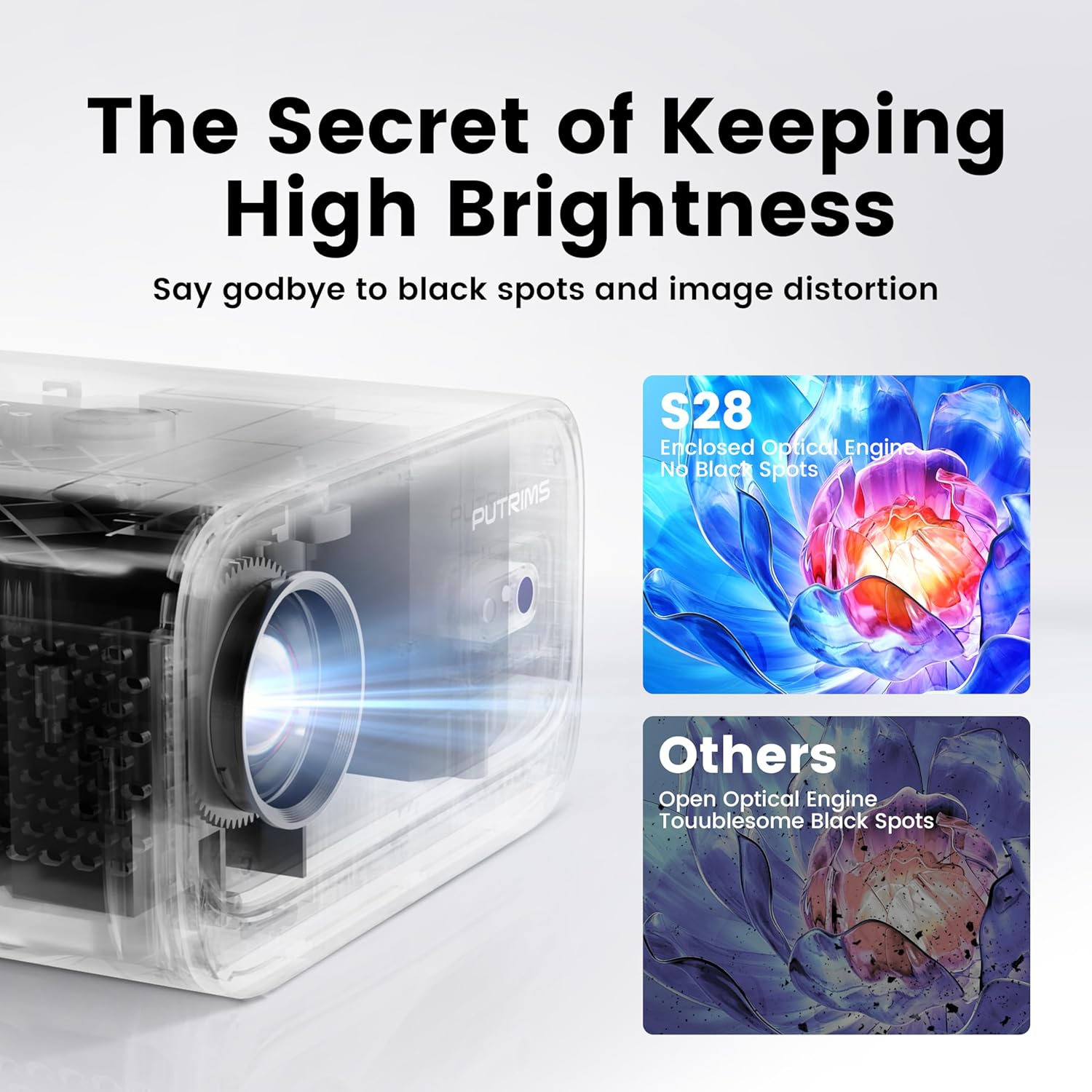
Image: The PUTRIMS S28 Projector positioned with its adjustable stand, demonstrating angle flexibility.
4.3. Focus Adjustment (Electric Focus)
The projector features electric focus for quick and precise image sharpness. Use the F+/F- buttons on the remote control to adjust the focus until the image is clear.

Image: A remote control highlighting the F+ and F- buttons used for electric focus adjustment, with a projected image in the background.
4.4. Keystone Correction (Automatic)
The S28 projector is equipped with automatic keystone correction (±30° auto / ±50° manual). When the projector is tilted, it will automatically adjust the image to a perfect rectangle within 1 second. Manual adjustment options are also available if needed.

Image: A visual representation of automatic keystone correction, demonstrating how a tilted projection is squared into a perfect rectangle.
5. Operacija
5.1. Belaidis ryšys („Wi-Fi“ ir „Bluetooth“)
The projector supports both 5G and 2.4G WiFi for stable internet connection and Bluetooth 5.2 for audio output.

Image: An illustration depicting the projector's dual-band WiFi (5G and 2.4G) and Bluetooth 5.2 capabilities, connecting to a phone and external speaker.
- „WiFi“ ryšys: Navigate to the projector's settings menu, select 'Network' or 'WiFi', and connect to your desired 5G or 2.4G network.
- „Bluetooth“ ryšys: In the settings menu, select 'Bluetooth', turn it on, and pair with your Bluetooth headphones, speakers, or AirPods.
5.2. Ekrano atspindėjimas
The S28 supports wireless screen mirroring via Miracast and Airplay, and also wired screen mirroring for seamless content display from your devices.
- Belaidis veidrodinis atspindėjimas: Ensure your smartphone or tablet is connected to the same WiFi network as the projector. Select the appropriate mirroring function (Miracast for Android, Airplay for iOS) on the projector and your device.
- Laidinis veidrodinis atspindėjimas: Connect your device directly to the projector using a compatible cable (e.g., USB-C to HDMI adapter, sold separately) for stable streaming.
5.3. Išorinių įrenginių prijungimas
The projector features HDMI, USB, and 3.5mm audio output ports for compatibility with various devices.
- HDMI: Connect devices such as TV Sticks, laptops, PCs, PS5, or Switch using an HDMI cable.
- USB: Įkiškite USB atmintines, kad galėtumėte leisti mediją files tiesiogiai.
- 3.5 mm garso išvestis: Prijunkite laidinius išorinius garsiakalbius arba ausines.
5.4. Priartinimo funkcija
The 100%-50% zoom function allows you to adjust the image size without physically moving the projector, providing flexibility in placement.

Image: A visual guide demonstrating the projector's ability to zoom out the projected image from 100% to 50% without moving the unit.
5.5. Automatinis miego režimas
The projector includes a sleep timer (60/120/180 minutes) that can be set to automatically turn off the device after a specified period.
6. Priežiūra
6.1. Optical Engine Care
The PUTRIMS S28 features a fully sealed optical engine designed to effectively block dust and blue spots, ensuring consistent brightness and image quality over time. No special user maintenance is required for the optical engine itself.

Paveikslėlis: Pjūvis view of the S28's enclosed optical engine, highlighting its dust-blocking design, contrasted with an open optical engine prone to black spots.
6.2. Bendras valymas
- Projektoriaus išorę valykite minkštu, sausu skudurėliu.
- Objektyvui valyti naudokite specializuotą šluostę ir tirpalą, kad išvengtumėte įbrėžimų.
- Ensure ventilation ports are clear of dust and obstructions.
7. Problemų sprendimas
Jei kyla problemų, žr. šiuos įprastus sprendimus:
- No Signal/Picture: Ensure all cables are securely connected. Verify the correct input source is selected on the projector.
- Nėra garso: Check the projector's volume settings and ensure any external audio devices are properly connected and powered on. Verify Bluetooth connection if using wireless audio.
- „Wi-Fi“ / „Bluetooth“ ryšio problemos: Restart the projector and your device. Ensure you are within range of the WiFi router or Bluetooth device.
- Neryškus vaizdas: Adjust the electric focus using the remote control (F+/F- buttons). Ensure the projection surface is flat.
- Vaizdo iškraipymas: The auto keystone correction should resolve most distortions. If not, check for manual keystone adjustment options in the settings.
- Streaming Service Limitations: Due to HDCP copyright restrictions, streaming services like Netflix and Disney+ may require a TV stick (sold separately) for playback. The projector itself does not bypass these restrictions.
- Projector Not Powering On: Ensure the power cord is firmly connected and the power outlet is functional. The projector is not battery-powered and must be plugged in during use.
Jei problemos išlieka, susisiekite su klientų aptarnavimo tarnyba.
8. Specifikacijos
| Funkcija | Detalė |
|---|---|
| Modelio numeris | S28 |
| Prekės ženklas | PUTRIMS |
| Ekrano raiška | 1280 x 720 (natyvioji) |
| Ryšio technologija | HDMI, USB, 3.5mm Audio Out, WiFi (5G+2.4G), Bluetooth 5.2 |
| Ypatingos savybės | Electric Focus, Auto Keystone, 145° Adjustable Stand, Built-in WiFi, Built-in Bluetooth, Built-in Speaker |
| Prekės svoris | 1.76 svaro |
| Gaminio matmenys | 7.87 x 7.08 x 7.87 colio |
| Spalva | Baltas |
| Rekomenduojami naudojimo būdai | Verslas, švietimas, žaidimai, namų kinas |
9. Garantija ir palaikymas
PUTRIMS is committed to providing excellent customer service and product support.
- Pinigų grąžinimo garantija: 2-year money-back guarantee.
- Remonto aprėptis: 3-year repair coverage.
- Techninė pagalba: Techninė pagalba visą gyvenimą.
- Klientų aptarnavimas: 24/7 email support.
For any questions, technical support, or assistance, please contact us at:
El. paštas: support@putrims.com

Image: A graphic representing customer support, with text indicating 24/7 availability and the support email address.


