KOOSMILE Mini PC KT-M9 User Manual
Model: KT-M9
1. Įvadas
Thank you for choosing the KOOSMILE Mini PC KT-M9. This compact yet powerful desktop computer is designed for a wide range of applications, from demanding professional tasks to immersive home entertainment. Equipped with an Intel Core i9-12900HK processor, ample memory, and high-speed storage, it delivers exceptional performance in a small form factor. This manual provides essential information for setting up, operating, maintaining, and troubleshooting your Mini PC.
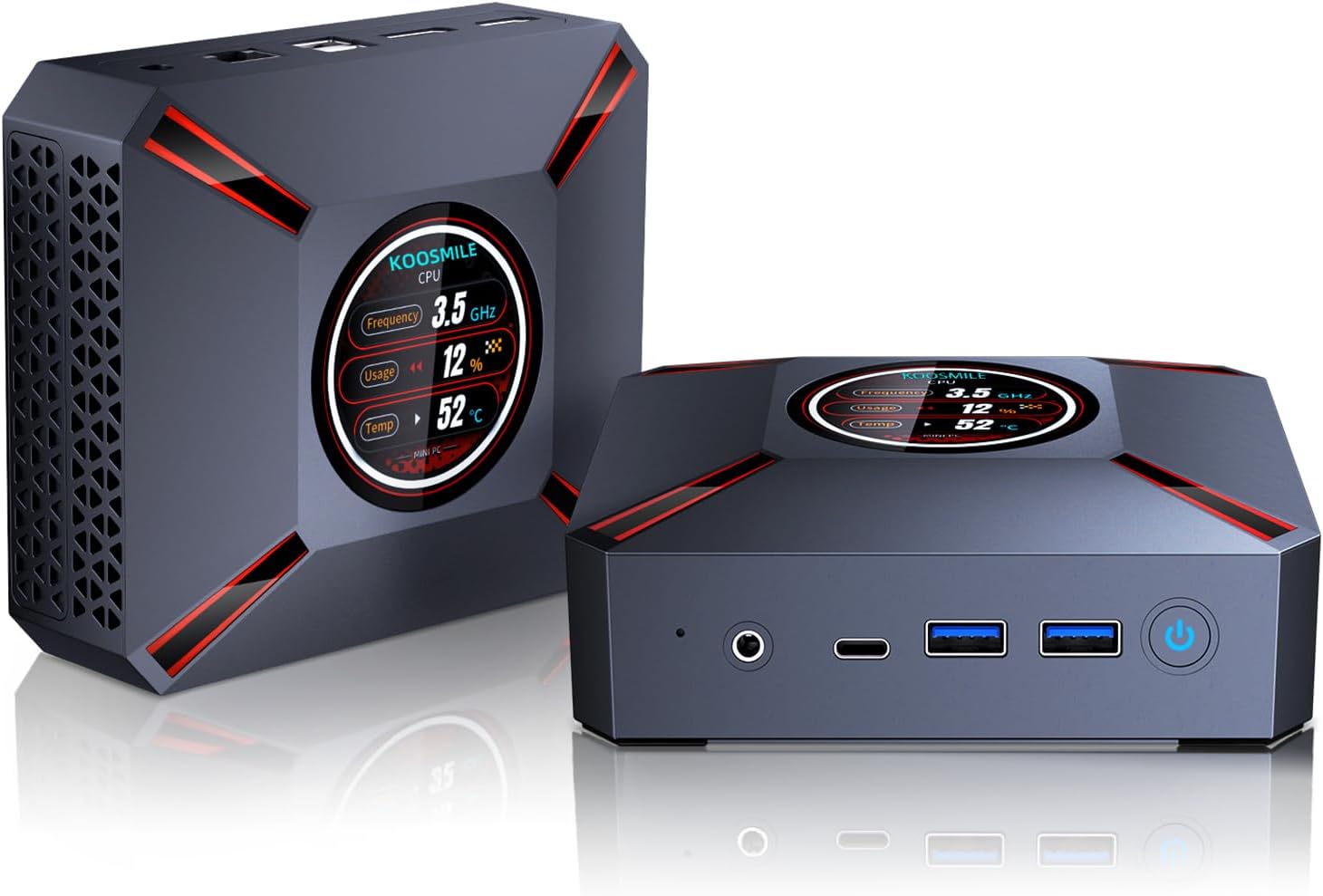
Figure 1.1: The KOOSMILE Mini PC KT-M9, showcasing its compact design and smart display.

1.2 pav. Baigtaview of the Mini PC's core features, including its powerful processor, memory, storage, and connectivity options.
2. Pakuotės turinys
Please verify that all items are present and in good condition upon opening the package. If any items are missing or damaged, please contact customer support.
- 1 x KOOSMILE Mini PC KT-M9
- 1x HDMI laidas
- 1x maitinimo adapteris
- 1 x DisplayPort (DP) kabelis
- 1 x USB Hub
- 1 x Metal Sheet Bracket (for mounting)
- 1 x Naudotojo vadovas (šis dokumentas)
3. Produktas baigtasview
The KOOSMILE Mini PC KT-M9 is designed for efficiency and versatility. Its compact chassis houses high-performance components and a variety of ports for extensive connectivity.
3.1. Fiziniai matmenys
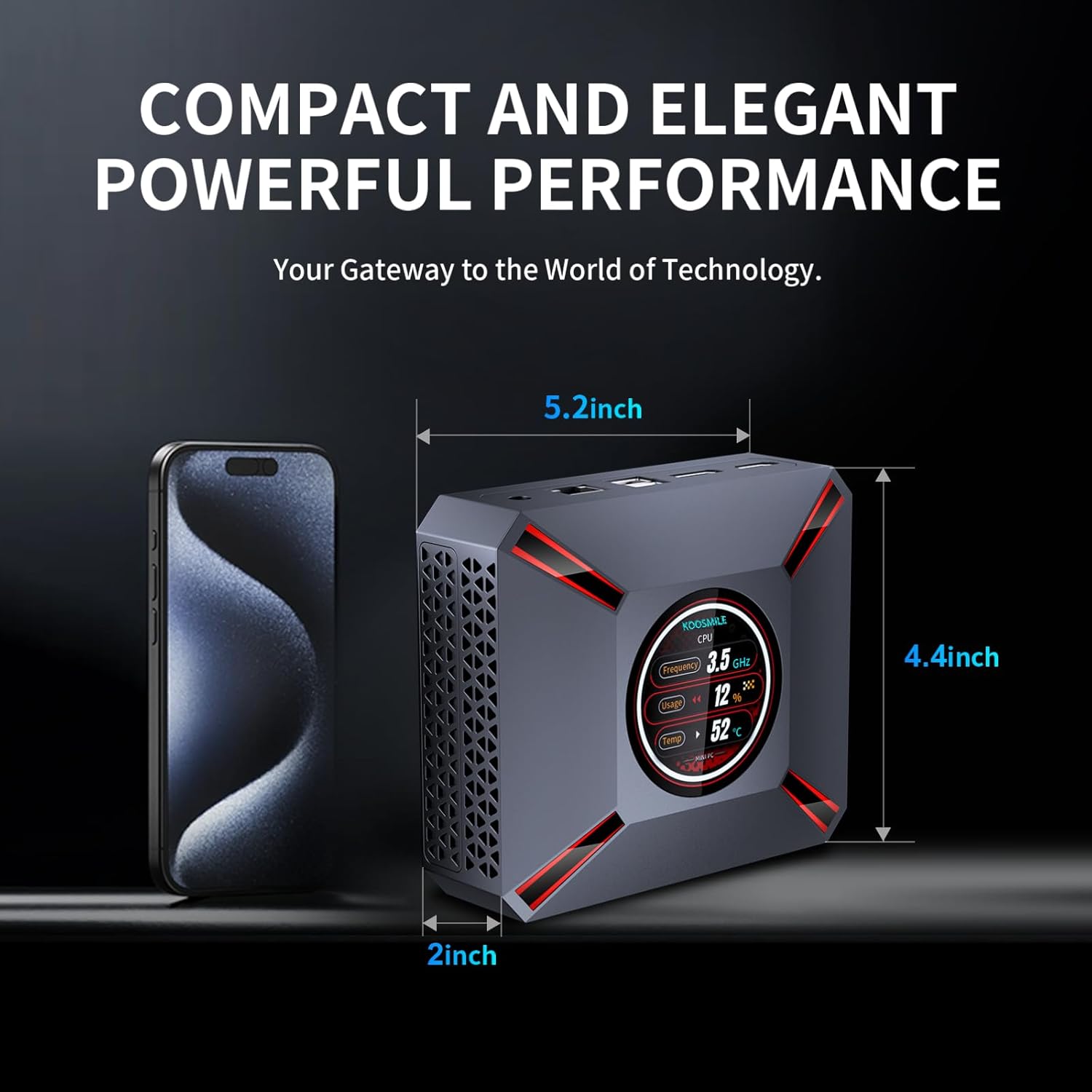
Figure 3.1: The compact size of the Mini PC, approximately 5.2 inches in length, 4.4 inches in width, and 2 inches in height, shown next to a smartphone for scale.
3.2. Prievadai ir jungtys
Familiarize yourself with the various input/output ports on your Mini PC:

Figure 3.2: Detailed diagram of the Mini PC's front and rear ports, including power, video outputs, USB, and audio connections.
- Priekinis skydelis:
- 3.5mm Audio/Mic Jack
- USB Type-C Port (Full-feature)
- 2 x USB 3.0 prievadai
- Maitinimo mygtukas
- CMOS Reset Pinhole
- Galinis skydas:
- DC-IN lizdas (maitinimo įvestis)
- Ethernet (RJ-45) prievadas
- 2 x USB 2.0 prievadai
- DisplayPort (DP 1.4a)
- HDMI 2.1 išvestis
3.3. Smart Display Monitoring
The Mini PC features a built-in smart display on the lid that provides real-time system information. This display allows you to quickly monitor key performance metrics without needing additional software.

Figure 3.3: The smart display interface, showing real-time data such as CPU frequency, usage, temperature, network upload/download speeds, and disk usage.
Rodoma informacija apima:
- CPU dažnis
- CPU Usage Percentage
- CPU Temperature (°C)
- Network Upload/Download Speeds
- Atminties naudojimas
4. Sąrankos vadovas
Follow these steps to set up your KOOSMILE Mini PC for the first time.
4.1. Pradinis aparatinės įrangos prijungimas
- Prijunkite išorinius įrenginius: Plug in your USB keyboard and mouse to the available USB ports (USB 3.0 ports are recommended for faster response).
- Prijungti ekraną(-ius): Connect your monitor(s) to the Mini PC using the provided HDMI cable, DisplayPort cable, or a USB-C to display cable. Important: Ensure the display device is connected before turning on the computer. Use the included HDMI cable and avoid other adapter cables for the HDMI interface to prevent compatibility issues.
- Prijunkite maitinimą: Insert the power adapter cable into the DC-IN jack on the rear panel of the Mini PC, then plug the power adapter into a wall outlet.
- Tinklo ryšys (neprivaloma): For a wired connection, connect an Ethernet cable from your router or modem to the RJ-45 port on the Mini PC. For wireless connection, Wi-Fi 6 is enabled by default.
4.2. Pirmasis paleidimas ir „Windows 11 Pro“ sąranka
- Maitinimas: Press the Power Button on the front panel of the Mini PC. The smart display will illuminate, and the system will begin to boot.
- „Windows 11 Pro“ sąranka: The Mini PC comes pre-installed with Windows 11 Pro. On the first boot, you will be guided through the Windows Out-Of-Box Experience (OOBE) to configure language, region, network, and user accounts. Follow the on-screen prompts to complete the setup.
- Tvarkyklės diegimas: All necessary drivers are pre-installed. Please avoid installing third-party drivers unless specifically instructed by KOOSMILE support to prevent compatibility issues.
4.3. Triple Display Configuration
The Mini PC supports up to three displays simultaneously via HDMI 2.1, DisplayPort 1.4a, and the full-feature USB Type-C port. This allows for an extended workspace or multi-monitor setups for productivity or entertainment.
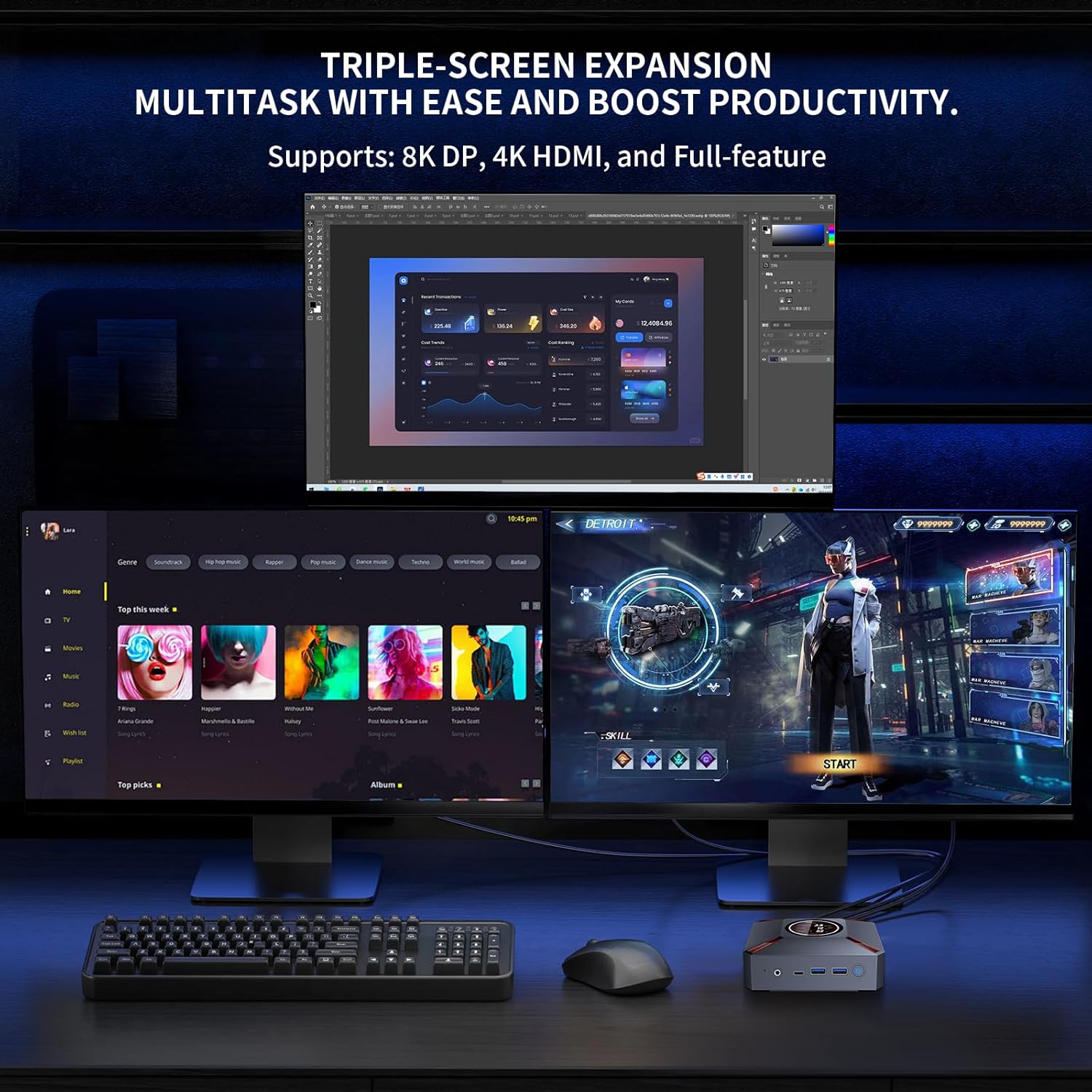
4.1 pav. Pvzample of a triple-monitor setup connected to the Mini PC, demonstrating its multi-display capability.
To configure multiple displays in Windows 11:
- Ensure all monitors are physically connected to the Mini PC and powered on.
- Right-click on an empty area of your desktop and select "Display settings."
- In the Display settings window, Windows should detect all connected displays. You can arrange them by dragging and dropping the display icons.
- Under "Multiple displays," choose how you want to use your displays (e.g., "Extend these displays," "Duplicate these displays").
- Adjust resolution, orientation, and scaling for each display as needed.
5. Naudojimo instrukcijos
This section covers basic operation and utilization of your Mini PC.
5.1. Įjungimas / išjungimas ir paleidimas iš naujo
- Maitinimas: Paspauskite maitinimo mygtuką, esantį „Mini PC“ priekyje.
- Išjungti: „Windows“ sistemoje spustelėkite mygtuką „Pradėti“, tada pasirinkite „Maitinimas“ > „Išjungti“.
- Paleisti iš naujo: „Windows“ sistemoje spustelėkite mygtuką „Pradėti“, tada pasirinkite „Maitinimas“ > „Paleisti iš naujo“.
- Miegas: „Windows“ sistemoje spustelėkite mygtuką „Pradėti“, tada pasirinkite „Maitinimas“ > „Miego režimas“.
5.2. Using the Smart Display
The smart display on the lid provides real-time system metrics. It operates automatically and requires no user input. Monitor these values to understand your system's current load and health.
5.3. Tinklo ryšys
- „Wi-Fi 6“: To connect to a wireless network, click the Wi-Fi icon in the Windows taskbar, select your desired network, enter the password, and click Connect.
- Ethernet: If an Ethernet cable is connected, the Mini PC will automatically establish a wired network connection.
5.4. Sandėliavimo valdymas
Your Mini PC comes with a 1TB NVMe SSD. You can manage disk partitions through Windows Disk Management. If you wish to adjust the hard disk partition structure, please refer to online resources or contact KOOSMILE customer support for guidance.
6. Priežiūra
Tinkama priežiūra užtikrina jūsų mini kompiuterio ilgaamžiškumą ir optimalų veikimą.
6.1. Valymas
- Išorė: Mini kompiuterio išorę nuvalykite minkšta, sausa, nepūkuota šluoste. Įsisenėjusias dėmes šiek tiek nuvalykite.ampNuvalykite šluostę vandeniu. Venkite stiprių cheminių medžiagų ar abrazyvinių valiklių.
- angos: Periodically use compressed air to clear dust from the ventilation grilles to ensure proper airflow.
6.2. Aušinimo sistema
The Mini PC features an advanced copper cooling fan and multiple vents for efficient heat dissipation. This system is designed to keep your PC running smoothly even under intense tasks.

6.1 pav. Vidinis view highlighting the efficient cooling system with its copper fan, designed to maintain optimal operating temperatures.
Ensure the Mini PC is placed in a well-ventilated area and that the vents are not obstructed. A slight heating of the metal housing during operation is normal and indicates effective heat dissipation.
6.3. Programinės įrangos atnaujinimai
Reguliariai tikrinkite, ar yra „Windows“ naujinimų, ir juos įdiekite, kad užtikrintumėte sistemos stabilumą, saugumą ir našumą. Eikite į Nustatymai > „Windows“ naujinimas norėdami patikrinti, ar nėra atnaujinimų.
7. Problemų sprendimas
Šiame skyriuje aptariamos dažniausiai pasitaikančios problemos, su kuriomis galite susidurti naudodami „Mini PC“.
7.1. Nėra vaizdo išvesties
- Ensure the monitor is powered on and correctly connected to the Mini PC's HDMI, DisplayPort, or USB-C video output.
- Patikrinkite, ar monitoriuje pasirinktas teisingas įvesties šaltinis.
- Svarbu: Always connect the display device before powering on the Mini PC.
- Try using a different video cable or monitor to rule out faulty peripherals.
7.2. Sistema neįsijungia
- Patikrinkite, ar maitinimo adapteris yra tvirtai prijungtas prie „Mini PC“ ir veikiančio maitinimo lizdo.
- Įsitikinkite, kad maitinimo lizdas veikia, išbandydami jį su kitu įrenginiu.
7.3. Buzzing Sound
- A slight buzzing sound might occur. Try restarting the computer. If the sound persists or is unusually loud, contact customer support.
7.4. Ryšio problemos („Wi-Fi“ / „Bluetooth“)
- „Wi-Fi“: Ensure Wi-Fi is enabled in Windows settings. Restart your router/modem. Check for interference from other devices.
- Bluetooth: Ensure Bluetooth is enabled in Windows settings. Try re-pairing your Bluetooth device.
7.5. Bendrosios našumo problemos
- Uždarykite nereikalingas programas, veikiančias fone.
- Įsitikinkite, kad „Windows“ ir tvarkyklės yra atnaujintos.
- Check the smart display for high CPU usage or temperature, which might indicate a heavy workload or cooling issue.
8. Specifikacijos
Detailed technical specifications for the KOOSMILE Mini PC KT-M9.

Figure 8.1: Key specifications of the Intel Core i9-12900HK processor, highlighting its core count, threads, cache, and maximum turbo frequency.

Figure 8.2: Information on the high-speed DDR4 memory and PCIe 3.0 SSD, crucial for fast data processing and quick loading times.

Figure 8.3: Comparison of wireless and wired connectivity speeds, highlighting the advantages of Wi-Fi 6 and USB 3.0.
| Komponentas | Specifikacija |
|---|---|
| Procesorius | Intel Core i9-12900HK (14 Cores, 20 Threads, up to 5.0GHz, 24MB Cache) |
| Operacinė sistema | Windows 11 Pro |
| RAM | 32GB DDR4 3200MHz |
| Sandėliavimas | 1 TB PCIe 3.0 NVMe SSD diskas |
| Grafika | „Intel Iris Xe“ grafika (integruota) |
| Vaizdo išvestis | HDMI 2.1 (4K @ 60Hz), DisplayPort 1.4a (8K @ 60Hz), USB Type-C (Full-feature) |
| Belaidis ryšys | „Wi-Fi 6“ (802.11ax), „Bluetooth 5.2“ |
| Laidinis ryšys | 1000M RJ45 Ethernet |
| USB prievadai | 2 x USB 3.0, 2 x USB 2.0, 1 x USB Type-C (Full-feature) |
| Garsas | 3.5mm Audio/Mic Jack |
| Aušinimo sistema | Advanced Copper Cooling Fan with Multiple Vents |
| Išmanusis ekranas | Real-time CPU Frequency, Usage, Temperature, Network, Memory |
| Matmenys | apytiksliai 5.2 x 4.4 x 2 colių (13.2 x 11.2 x 5.1 cm) |
| Svoris | apytiksliai 2.57 svaro (1.17 kg) |
9. Garantija ir palaikymas
KOOSMILE is committed to providing high-quality products and excellent customer service.
9.1. Informacija apie garantiją
Your KOOSMILE Mini PC KT-M9 comes with a 1 metų nemokama garantija from the date of purchase. This warranty covers manufacturing defects and hardware malfunctions under normal use. It does not cover damage caused by misuse, accidents, unauthorized modifications, or natural disasters.
9.2. Techninė pagalba
For any technical assistance, troubleshooting, or warranty claims, please contact our customer service team via email. Provide your product model (KT-M9), purchase date, and a detailed description of the issue to receive prompt support.
El. paštas: [Insert Customer Support Email Here - e.g., support@koosmile.com]
Our team is dedicated to helping you resolve any issues and ensure your satisfaction with your KOOSMILE Mini PC.


