1. Įvadas
Thank you for choosing the GENBOLT 2K Wireless Outdoor Solar Security Camera. This advanced security solution features a dual-lens system, 360° pan-tilt-zoom (PTZ) functionality, and is powered by an integrated 8W solar panel and a 15600mAh rechargeable battery. Designed for outdoor use, it offers comprehensive surveillance with PIR motion detection, automatic tracking, color night vision, and two-way audio communication. This manual provides essential information for proper installation, operation, and maintenance to ensure optimal performance and longevity of your device.
2. Produktas baigtasview
2.1 Pagrindinės savybės
- 2K (4MP) Resolution: Pateikia aiškų ir detalų vaizdo įrašątage.
- Dviejų lęšių sistema: Combines a fixed lens and a PTZ lens for broader coverage.
- 360° PTZ funkcionalumas: Offers 355° horizontal pan and 90° vertical tilt for comprehensive area monitoring.
- Varomas saulės energija: Equipped with an 8W solar panel for continuous charging, reducing the need for manual recharging.
- Didelės talpos baterija: Built-in 15600mAh rechargeable battery ensures extended operation.
- PIR Motion Detection & Auto Tracking: Detects human movement and automatically tracks the subject.
- Spalvotas naktinis matymas: Provides full-color video even in low-light conditions.
- Dvipusis garsas: Integruotas mikrofonas ir garsiakalbis bendravimui realiuoju laiku.
- Enhanced WiFi Connectivity: Features 5dBi dual antennas for stable 2.4GHz WiFi signal.
- Cloud & SD Card Storage: Supports cloud storage (7-day free trial available) and local storage via TF card.
- Multi-Platform Access: View and control via iOS/Android app, macOS, and Windows software.
2.2 Produkto komponentai

Vaizdas: Išsamus view of the camera components.
- Dviguba antena: For improved WiFi signal reception.
- PIR jutiklis: Pasyvus infraraudonųjų spindulių jutiklis judesio aptikimui.
- HD objektyvas: High-definition optical lens for clear imaging.
- 8 IR/White LEDs: Infrared LEDs for black and white night vision, white LEDs for color night vision and spotlight.
- Pranešėjas: Dvipusiam garso ryšiui ir aliarmo garsams.
- TF kortelės lizdas: Vietiniam vaizdo įrašų saugojimui (palaiko iki 128 GB, kortelė nepridedama).
- Atkūrimo mygtukas: Norėdami atkurti gamyklinius nustatymus.
- Type-C Slot & Power ON/OFF: For charging and power control.
- Infrared LED (4pcs): Additional infrared illumination.
- Rodiklis L.amp: Rodo įrenginio būseną.
2.3 Pakuotės turinys
- GENBOLT 2K Wireless Outdoor Solar Security Camera
- 8W Solar Panel (integrated)
- USB C tipo laidas (0.7 m)
- Network Cable (1m)
- Tvirtinimo varžtai ir sieniniai kaiščiai
- Vartotojo vadovas
3. Sąranka
3.1 Akumuliatoriaus įkrovimas
Before initial use, fully charge the camera's built-in 15600mAh battery using the provided USB Type-C cable and a 5V/2A power adapter (not included). The solar panel will maintain the charge once installed, but a full initial charge is recommended.
3.2 Installing a TF Card (Optional)
If you plan to use local storage, insert a TF (microSD) card (up to 128GB, Class 10 or higher recommended) into the TF card slot. Ensure the camera is powered off before inserting or removing the card.
3.3 Fotoaparato montavimas
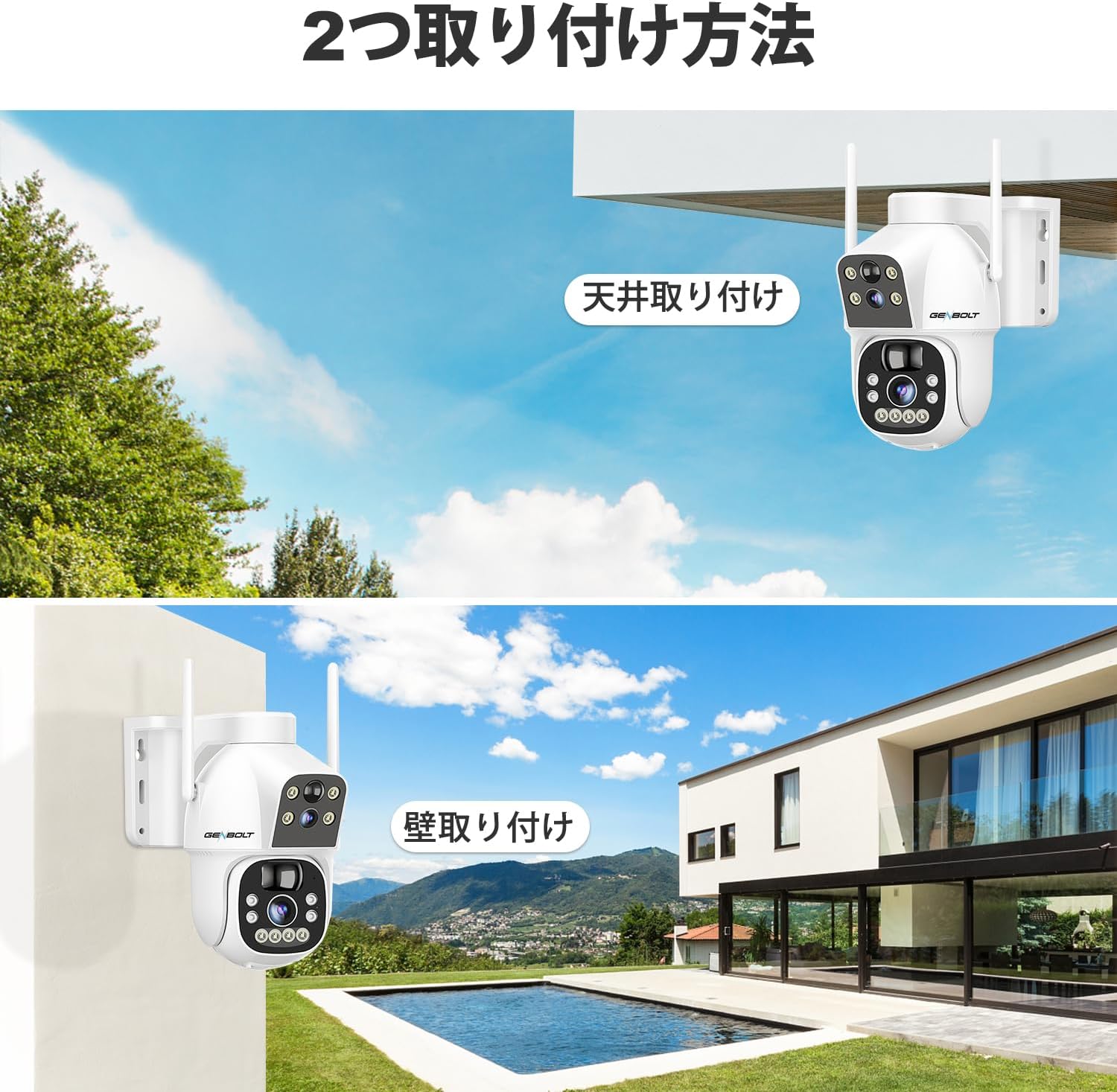
Vaizdas: Two common installation methods: wall mounting and ceiling mounting.
The camera supports both wall and ceiling mounting. Choose a location with optimal sunlight exposure for the solar panel and a strong 2.4GHz WiFi signal. Use the provided screws and wall plugs to securely attach the camera bracket. Adjust the camera angle for the desired viewzonoje.
3.4 Programėlės diegimas ir „Wi-Fi“ ryšys

Vaizdas: Step-by-step guide for connecting the camera to WiFi via the mobile app.
- Download the official GENBOLT app from the iOS App Store or Google Play Store.
- Užregistruokite paskyrą ir prisijunkite.
- Tap 'Add Device' or the '+' icon and select your camera model.
- Follow the on-screen instructions to connect the camera to your 2.4GHz WiFi network. This typically involves scanning a QR code displayed on your phone with the camera lens.
- Ensure your phone's location services are enabled during setup for proper network detection.
Pastaba: The camera does not support 5GHz WiFi networks. If you encounter issues, ensure your router is broadcasting a 2.4GHz signal and that your phone is connected to it during the setup process. Some users have reported difficulties with initial wired LAN connection instructions in the manual; this camera primarily uses wireless setup.
4. Naudojimo instrukcijos
4.1 Tiesiogiai View ir PTZ valdymas

Vaizdas: The camera's pan and tilt range for flexible monitoring.
Prisijungę atidarykite programėlę, kad view the live feed. Use the on-screen controls to pan (355° horizontally) and tilt (90° vertically) the camera. The dual-lens system allows you to switch between a fixed wide-angle view and a movable PTZ view.
4.2 Judesio aptikimas ir automatinis sekimas

Vaizdas: PIR motion detection in action, highlighting the detection area.
Enable PIR motion detection in the app settings. When motion is detected, the camera will automatically begin recording and can track the moving object. You will receive instant alerts on your mobile device. Adjust sensitivity settings to minimize false alarms.
4.3 Įrašymas ir atkūrimas

Vaizdas: The app interface for accessing recorded footage from cloud storage.
Recordings are triggered by motion detection or can be scheduled. Access recorded footage through the app's playback feature. Videos are stored either on the inserted TF card or in the cloud (subscription may apply after the initial free trial). The app allows you to review past events by date and time.
4.4 Naktinio matymo režimai

Vaizdas: Visual comparison between color night vision and standard infrared night vision.
The camera supports multiple night vision modes: infrared (black and white), full-color (using white LEDs), and smart mode (switches between IR and color based on detected motion). Configure your preferred mode in the app settings.
4.5 Dvipusis garsas
Use the microphone and speaker functions in the app to communicate with visitors or deter intruders in real-time.
4.6 Kelių vartotojų bendrinimas

Vaizdas: App interface demonstrating the multi-user sharing feature.
You can share access to your camera's live feed and recordings with family members or trusted individuals through the app. Each user can have different permission levels.
5. Priežiūra
- Saulės baterijų valymas: Reguliariai valykite saulės bateriją minkšta,amp šluoste pašalinkite dulkes, nešvarumus ar šiukšles, kurios gali sumažinti įkrovimo efektyvumą.
- Objektyvo valymas: Švelniai nuvalykite kameros objektyvus mikropluošto šluoste, kad užtikrintumėte aiškią vaizdo kokybę. Venkite abrazyvinių medžiagų.
- Firmware atnaujinimai: Check the app periodically for firmware updates to ensure your camera has the latest features and security enhancements.
- Baterijos būklė: While the solar panel helps maintain charge, prolonged periods of low sunlight may require occasional manual charging via the Type-C port to preserve battery health.
6. Problemų sprendimas
| problema | Galima priežastis / sprendimas |
|---|---|
| Kamera neprisijungia prie „Wi-Fi“ |
|
| Poor image quality or blurry video |
|
| Motion detection alerts are delayed or missed |
|
| Baterija greitai išsikrauna |
|
| Cloud storage issues or plan changes |
|
| SD card recording not working |
|
| No response from camera |
|
7. Specifikacijos
| Funkcija | Detalė |
|---|---|
| Prekės ženklas | GENBOLTAS |
| Modelis | B0DNFMMMQN |
| Rezoliucija | 2K (4MP) |
| Laukas View | Dual Lens (Fixed & PTZ) |
| Panardinimo / pakreipimo diapazonas | Horizontaliai 355°, vertikaliai 90° |
| Maitinimo šaltinis | 8W Solar Panel, 15600mAh Rechargeable Battery |
| Ryšys | 2.4GHz WiFi (IEEE 802.11b/g/n) |
| Naktinis matymas | Infrared, Full-Color, Smart Mode |
| Judesio aptikimas | PIR Human Motion Detection, Auto Tracking |
| Garsas | Dvipusis garsas (įmontuotas mikrofonas ir garsiakalbis) |
| Sandėliavimas | TF kortelė (iki 128 GB), debesies saugykla |
| Operacinės sistemos palaikymas | iOS, Android, macOS, Windows |
| Apsaugos funkcijos | RSA Encryption, SSL Data Transmission |
| Matmenys | 26.4 x 21.7 x 18.1 cm |
| Svoris | 1.96 kg |
8. Garantija ir palaikymas
8.1 Informacija apie garantiją
- 1 metų garantija: Your GENBOLT camera is covered by a 1-year warranty from the date of purchase, protecting against manufacturing defects.
- 30 dienų grąžinimas / keitimas: You are eligible for a return or exchange within 30 days of purchase, subject to the retailer's policy.
Išsaugokite pirkimo įrodymą, kad galėtumėte kreiptis dėl garantijos.
8.2 Pagalba klientams
For technical assistance, troubleshooting, or warranty inquiries, please contact GENBOLT customer support. We offer 24/7 technical support to ensure your satisfaction.
- Palaikymas internetu: Visit the official GENBOLT webDUK, pagalbos straipsnių ir kontaktinių formų svetainė.
- Pagalba el. paštu: Reach out via email for detailed assistance.
We are committed to providing reliable home security solutions and excellent customer service.


