1. Įvadas
This manual provides detailed instructions for the setup, operation, and maintenance of your ECHTPower Wireless Switch Controller. Please read this manual thoroughly before using the product to ensure proper functionality and to maximize your gaming experience. This controller is designed for use with Nintendo Switch, PC, iOS, and Android devices.

Image 1.1: ECHTPower Wireless Switch Controller in purple. This image displays the front view of the controller, highlighting its ergonomic design and button layout.
2. Produktas baigtasview
2.1 Pakuotės turinys
- ECHTPower Wireless Switch Controller
- USB-C įkrovimo laidas
- Vartotojo vadovas (šis dokumentas)
2.2 Valdiklio išdėstymas
Susipažinkite su valdiklio mygtukais ir funkcijomis:

2.1 vaizdas: priekis view of the ECHTPower Wireless Switch Controller. This image shows the left and right analog sticks, D-pad, A/B/X/Y buttons, Home button, Capture button, Plus/Minus buttons, and shoulder buttons.
- Kairysis analoginis vairasvirtis: For movement and camera control. Features Hall Effect technology for precision.
- Dešinė analoginė svirtis: For camera control and aiming. Features Hall Effect technology for precision.
- D-Pad: Kryptinis įvedimas.
- A/B/X/Y mygtukai: Veiksmų mygtukai.
- Kairysis/dešinysis mygtukai: Pečių sagos.
- ZL/ZR paleidikliai: Analoginiai trigeriai.
- HOME mygtukas: Grąžina į sistemos pagrindinį ekraną.
- CAPTURE Button: Daro ekrano kopijas arba įrašo vaizdo įrašus.
- +/- mygtukai: Start/Select functions.
- M mygtukas: Macro/Customization button (refer to advanced settings for programming).
- LED indikatoriai: Žaidėjo numeris ir įkrovimo būsena.

2.2 paveikslėlis: Stambus planas view of the Hall Effect joystick. This image highlights the advanced sensor technology used in the analog sticks for enhanced durability and drift-free performance.
The controller features Hall Effect joysticks, which utilize electromagnetic induction for precise, drift-free control and extended lifespan compared to traditional potentiometers.
3. Sąranka ir prijungimas
3.1 Valdiklio įkrovimas
Before first use, fully charge the controller. Connect the supplied USB-C cable to the controller's charging port and the other end to a USB power source (e.g., console, PC, USB wall adapter). The LED indicators will show charging status and turn off when fully charged.
3.2 Prijungimas prie „Nintendo Switch“
- HOME meniu pasirinkite „Valdikliai“ > „Keisti rankeną / tvarką“.
- On the next screen, press and hold the SYNC button on the top of the ECHTPower controller for a few seconds until the player LEDs begin to flash.
- Sujungus grotuvo šviesos diodą (-us), atitinkantį valdiklio numerį, liks degti.
Note: The SYNC button is usually a small, recessed button on the top edge of the controller.
3.3 Prijungimas prie kompiuterio („Windows“)
The controller supports both wired and wireless connections to PC.
3.3.1 Laidinis ryšys
- Prijunkite valdiklį prie kompiuterio naudodami USB-C laidą.
- Kompiuteris turėtų automatiškai aptikti ir įdiegti reikiamas tvarkykles.
- The controller will be recognized as an XInput device.
3.3.2 Belaidis ryšys („Bluetooth“)
- Įsitikinkite, kad jūsų kompiuteryje įjungtas „Bluetooth“ ryšys.
- Go to "Settings" > "Devices" > "Bluetooth & other devices" and select "Add Bluetooth or other device".
- Choose "Bluetooth".
- Press and hold the SYNC button on the controller until the LEDs flash rapidly.
- Select the "Pro Controller" or similar device name from the list on your PC.
- Once paired, the controller LEDs will stop flashing and remain lit.
3.4 Prisijungimas prie „iOS“ / „Android“ įrenginių

Image 3.1: The ECHTPower Wireless Switch Controller shown alongside various devices, including a tablet, smartphone, and laptop, illustrating its multi-device compatibility.
- Įgalinkite „Bluetooth“ savo „iOS“ arba „Android“ įrenginyje.
- Eikite į „Bluetooth“ nustatymus ir ieškokite naujų įrenginių.
- Press and hold the SYNC button on the controller until the LEDs flash rapidly.
- Select the "Pro Controller" or similar device name from the list on your mobile device.
- Once paired, the controller LEDs will stop flashing and remain lit.
Compatibility may vary with specific games and applications on mobile platforms.
4. Naudojimo instrukcijos
4.1 Pagrindiniai valdikliai
The controller functions similarly to standard gaming controllers. Refer to the in-game instructions for specific button mappings.
- Analoginės lazdelės: Used for movement, camera control, and menu navigation.
- D-Pad: Used for directional input, often for menu navigation or specific game actions.
- A/B/X/Y mygtukai: Primary action buttons, typically for jumping, attacking, interacting, etc.
- Kairysis/dešinysis/žemyninis/žemyninis mygtukai: Used for various in-game actions such as aiming, shooting, or special abilities.
- HOME mygtukas: Returns to the console's home screen or main menu.
- CAPTURE Button: Captures screenshots or video clips (Nintendo Switch specific).
- +/- mygtukai: Often used for pausing games, opening menus, or selecting options.
4.2 Advanced Features (Hall Effect Joysticks)
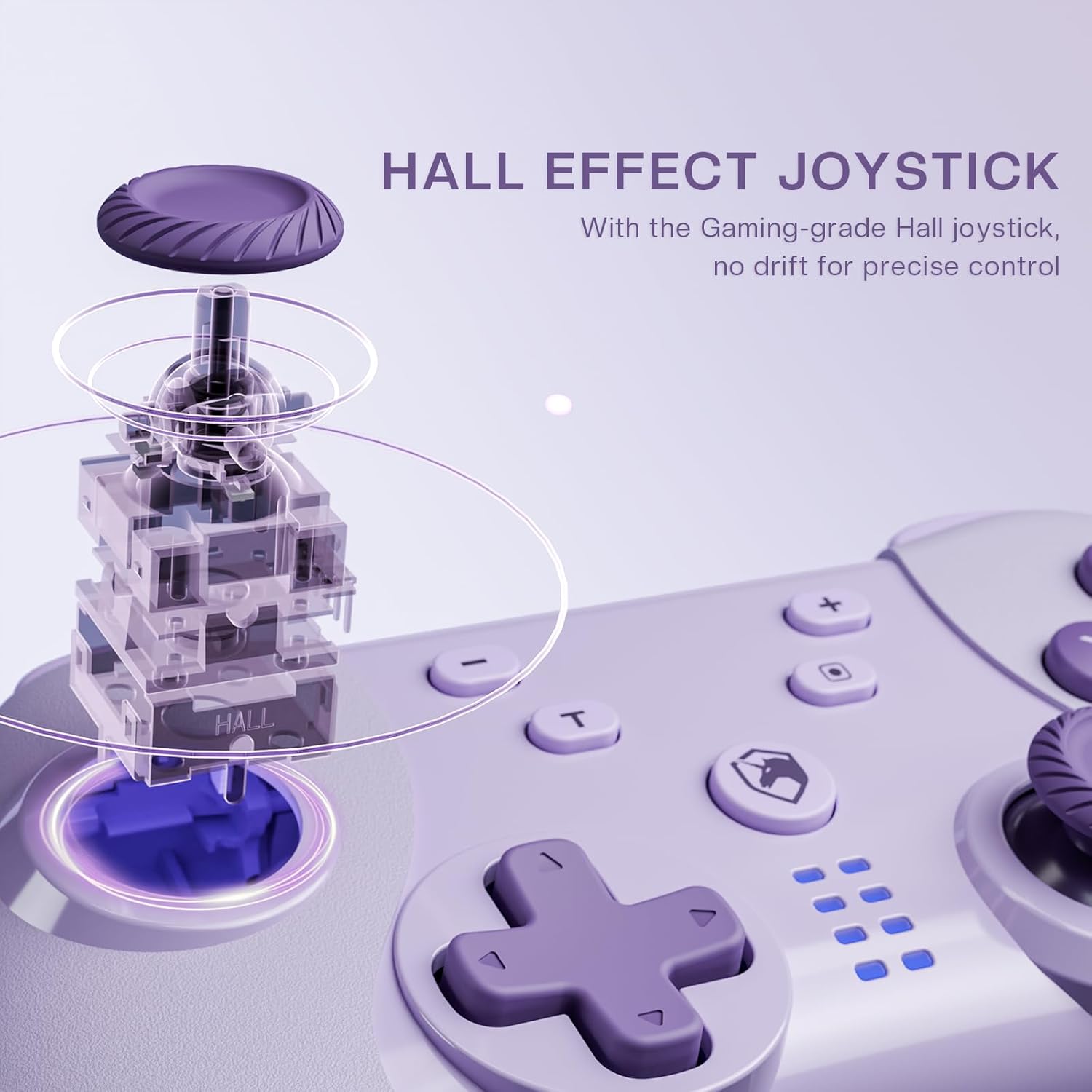
Image 4.1: Diagram illustrating the internal mechanism of a Hall Effect joystick. This image demonstrates how magnetic fields are used for position detection, contributing to drift-free and precise control.
The Hall Effect joysticks provide enhanced precision and durability. This technology uses magnetic fields instead of physical contact, virtually eliminating stick drift and extending the lifespan of the joysticks. No special operation is required; simply enjoy the improved responsiveness and accuracy.
4.3 Macro Function (M Button)
The 'M' button can be programmed for macro functions. Refer to the ECHTPower official website or advanced user guides for detailed instructions on how to program and utilize macro functions for specific gaming scenarios.
5. Priežiūra
- Valymas: Valdiklį valykite minkštu, sausu skudurėliu. Nenaudokite stiprių cheminių medžiagų ar abrazyvinių medžiagų.
- Saugykla: Laikykite valdiklį vėsioje, sausoje vietoje, apsaugotoje nuo tiesioginių saulės spindulių ir ekstremalių temperatūrų.
- Akumuliatoriaus priežiūra: Norėdami pailginti baterijos veikimo laiką, venkite dažnai visiškai iškrauti valdiklį. Reguliariai jį įkraukite, net jei ilgesnį laiką nenaudojate.
- Venkite lašų: Saugokite valdiklį nuo kritimų ir smūgių, kurie gali pažeisti vidinius komponentus.
6. Problemų sprendimas
| Problema | Galima priežastis | Sprendimas |
|---|---|---|
| Valdiklis neįsijungia. | Senka baterija. | Charge the controller using the USB-C cable. |
| Cannot connect to device. | Not in pairing mode; Bluetooth interference; device's Bluetooth off. | Ensure controller is in pairing mode (flashing LEDs). Check device's Bluetooth settings. Try restarting both controller and device. |
| Įvesties delsa arba atjungimas. | Distance from device; low battery; wireless interference. | Move closer to the device. Charge the controller. Reduce other wireless devices nearby. |
| Joystick drift. | Rare with Hall Effect, but possible calibration issue or extreme wear. | Try recalibrating the joysticks through your device's settings (e.g., Nintendo Switch system settings). If issue persists, contact support. |
7. Specifikacijos
- Modelis: Belaidis jungiklio valdiklis
- Ryšys: Bluetooth Wireless, USB-C Wired
- Suderinamumas: Nintendo Switch, PC (Windows), iOS, Android
- Joystick Technology: Salės efektas
- Maitinimo šaltinis: Integruota įkraunama baterija
- Įkrovimo prievadas: USB-C
- ASIN: B0DNN1BP4F
8. Garantija ir palaikymas
ECHTPower products come with a standard manufacturer's warranty. For specific warranty terms and conditions, please refer to the warranty card included with your product or visit the official ECHTPower websvetainę.
If you encounter any issues or have questions not covered in this manual, please contact ECHTPower customer support:
- Websvetainė: ECHTPower Official Store on Amazon
- El. paštas: Žiūrėkite produkto pakuotę arba oficialų websvetainė kontaktiniam el. paštui.


