1. Įvadas
This manual provides detailed instructions for the installation, operation, and maintenance of your Transcend DrivePro DP550B Dash Cam. The DrivePro DP550B is a dual-lens dash camera designed to record both the road ahead and the vehicle's interior, offering comprehensive protection and advanced safety features for your journeys.

Priekyje view of the Transcend DrivePro DP550B Dash Cam, showing the main lens and display.
2. Pakuotės turinys
Patikrinkite, ar pakuotėje yra visi toliau išvardyti daiktai:
- Transcend DrivePro DP550B Dash Cam
- microSD memory card (128GB)
- Car Mount (suction cup or adhesive)
- Automobilio žiebtuvėlio adapteris
- Trumpas vadovas
3. Produktas baigtasview ir Pagrindinės funkcijos
The DrivePro DP550B offers a range of features to enhance your driving safety and recording capabilities:
- Dvigubo objektyvo dizainas: Equipped with a 2K QHD 1440P front camera and a 1080P Full HD rear camera, providing a 140° wide-angle view for the front and a 180° rotatable rear lens for interior recording.
- Advanced ADAS Safety Features: Includes Lane Departure Warning System (LDWS), Forward Collision Warning System (FCWS), speed alerts, headlight reminder, and driver fatigue alert.
- Parkavimo stebėjimas: Records when motion is detected while the vehicle is parked. Requires external power supply after the car engine is switched off.
- Impact Emergency Lock: G-sensor automatically locks emergency files during an impact to prevent overwriting.
- „Time-Lapse“ įrašymas: Helps highlight key events and conserve storage space. Requires external power supply after the car engine is switched off.
- Momentinės nuotraukos mygtukas: Allows capturing photos during video recording or documenting accident scenes.
- WDR (platus dinaminis diapazonas): Balances light and dark areas for clear, detailed video in various lighting conditions.
- Naktinis matymas: Enhanced night vision capabilities for clear footage esant prastam apšvietimui.
- „Wi-Fi“ ryšys: For real-time footage playback and download via the DrivePro App.
- GPS/GLONASS Receiver: For geotagging videos and images, allowing route viewing on a map display.
- Integruota baterija: Provides temporary power to safely store files during a power outage.

The dual-lens design captures both exterior and interior views for comprehensive recording.

The dash cam provides clear vision in the dark, capturing high-resolution images even in low light.
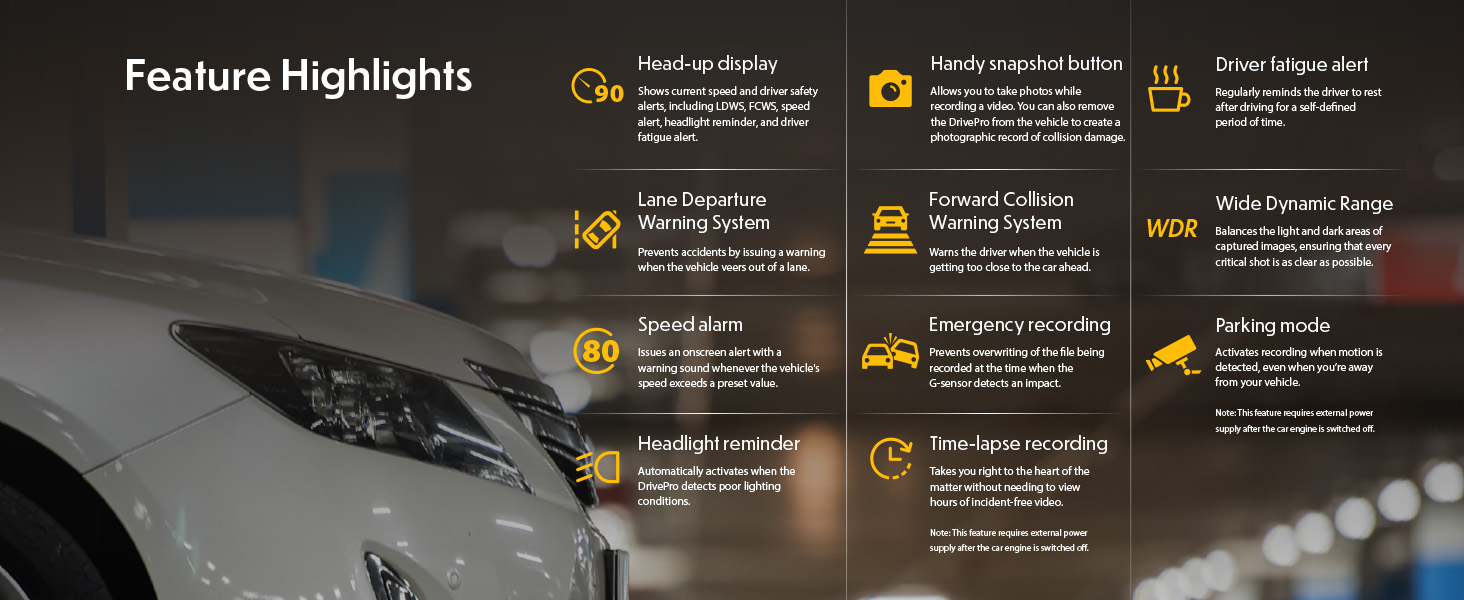
Baigėsiview of key features including Head-up display, Lane Departure Warning System, Forward Collision Warning System, Speed alarm, Headlight reminder, Driver fatigue alert, Parking mode, Wide Dynamic Range, and Time-lapse recording.
Šiame vaizdo įraše pateikiama išsami informacijaview of the Transcend DrivePro DP550B Dash Cam's features and capabilities.
4. Sąranka
4.1 Installing the microSD Card
- Locate the microSD card slot on the side of the DrivePro DP550B.
- Insert the provided microSD card into the slot until it clicks into place. Ensure the card is inserted with the correct orientation.
- Norėdami išimti, švelniai stumkite kortelę į vidų, kol ji iššoks.
4.2 Vaizdo registratoriaus montavimas
- Nuvalykite priekinio stiklo vietą, kurioje ketinate montuoti vaizdo registratorių.
- Attach the car mount (suction cup or adhesive) to the windshield, ensuring it does not obstruct your view.
- Securely attach the DrivePro DP550B to the mount.
- Sureguliuokite kameros kampą, kad užtikrintumėte aiškų vaizdą view of the road ahead and the vehicle interior.
4.3 Prijungimas prie elektros tinklo
- Connect the car lighter adapter to your vehicle's 12V power outlet.
- Connect the other end of the adapter cable to the power input port on the DrivePro DP550B.
- The dash cam will typically power on automatically when the vehicle engine starts.
5. Naudojimo instrukcijos
5.1 Maitinimo įjungimas/išjungimas
- Automatinis: The dash cam powers on and begins recording automatically when connected to power and the vehicle engine starts. It powers off automatically when the engine is turned off.
- Rankinis: Norėdami rankiniu būdu įjungti arba išjungti įrenginį, paspauskite ir palaikykite nuspaudę maitinimo mygtuką.
5.2 Įrašymo režimai
- Nepertraukiamas įrašymas: The dash cam continuously records video in a loop. Older files are overwritten when the memory card is full, except for locked emergency files.
- Avarinės situacijos įrašymas: Activated by the G-sensor upon impact or by manually pressing the emergency button. These files yra apsaugotos nuo perrašymo.
5.3 Nustatymų reguliavimas
Settings can be adjusted directly on the device using the physical buttons or more conveniently via the DrivePro App (see Section 7).
6. Išplėstinės funkcijos
6.1 ADAS (pažangios vairuotojo pagalbos sistemos)
The DrivePro DP550B includes several ADAS features to assist drivers:
- Eismo juostos išvažiavimo įspėjimo sistema (LDWS): Alerts the driver if the vehicle drifts out of its lane.
- Priekinio susidūrimo įspėjimo sistema (FCWS): Warns the driver when the vehicle is approaching the car ahead too closely.
- Įspėjimas apie greitį: Notifies the driver when a preset speed limit is exceeded.
- Headlight Reminder: Activates when the DrivePro detects poor lighting conditions.
- Įspėjimas apie vairuotojo nuovargį: Reminds the driver to rest after a defined period of driving.
6.2 Parkavimo režimas
When enabled, Parking Mode automatically records video when motion is detected around your parked vehicle. This feature requires a continuous power supply to the dash cam after the engine is off, typically through a hardwire kit (sold separately) or a dedicated power bank.
6.3 Time-Lapse Recording
Time-Lapse Recording condenses long periods of footage into shorter videos, making it easier to review events. This mode is particularly useful for monitoring parking or long journeys. Similar to Parking Mode, it requires continuous power after the engine is off.
7. Wi-Fi Connectivity and DrivePro App
The DrivePro DP550B features built-in Wi-Fi, allowing you to connect to your smartphone or tablet via the Transcend DrivePro App. This app provides convenient access to recorded footage, live view, and device settings.
- Atsisiųskite programą: Ieškokite "DrivePro" on the App Store (iOS) or Google Play (Android) and install it.
- Įjunkite „Wi-Fi“ vaizdo registratoriuje: Turn on the DrivePro DP550B and activate its Wi-Fi function through the device menu.
- Prisijunkite prie „Wi-Fi“: On your mobile device, go to Wi-Fi settings and select the DrivePro's network (SSID typically starts with "DP"). Enter the default password (usually 12345678).
- Open DrivePro App: Once connected, open the DrivePro App. You can now use features like Live View to watch real-time video, Browser to manage and download recorded files, and adjust device settings.

Wi-Fi connectivity allows real-time footage playback and download to your mobile device.
This video demonstrates how to connect your DrivePro Dash Cam to the DrivePro App via Wi-Fi and utilize its features.
8. GPS/GLONASS Functionality
The integrated GPS/GLONASS receiver records driving coordinates, date, and time information with your video footage. This data can be viewed during playback using the DrivePro App or Transcend's DrivePro Toolbox software on a computer, allowing you to track your route and pinpoint the exact location of events.
9. Priežiūra
9.1 Prietaiso valymas
- Vaizdo registratoriaus korpusą valykite minkšta, sausa šluoste.
- Objektyvui valyti naudokite specializuotą šluostę ir tirpalą, kad išvengtumėte įbrėžimų.
- Nenaudokite abrazyvinių valiklių ar tirpiklių.
9.2 Atminties kortelės priežiūra
- Regularly format the microSD card (e.g., once a month) to maintain optimal performance and prevent data corruption. This can usually be done through the dash cam's settings or the DrivePro App.
- Use only high-endurance microSD cards designed for continuous recording in dash cams.
10. Problemų sprendimas
| Problema | Galima priežastis | Sprendimas |
|---|---|---|
| Vaizdo registratorius neįsijungia. | No power supply; faulty cable/adapter. | Check power connection; try a different power outlet or cable. |
| Įrašymas netikėtai nutrūksta. | Memory card full or corrupted; low power. | Format the microSD card; ensure continuous power supply. |
| Vaizdo įrašo kokybė prasta. | Dirty lens; incorrect resolution settings. | Clean the lens; check video resolution settings in the menu or app. |
| „Wi-Fi“ ryšys neveikia. | Incorrect password; Wi-Fi not enabled. | Verify Wi-Fi is enabled on the dash cam; re-enter password; restart both devices. |
| ADAS features not working. | Features disabled; improper calibration. | Enable ADAS features in settings; ensure proper dash cam alignment. |
11. Specifikacijos
| Funkcija | Detalė |
|---|---|
| Gaminio matmenys | 1.59 x 3.76 x 2.59 colio |
| Prekės svoris | 13 uncijos |
| Modelio pavadinimas | TS-DP550B-128G |
| Baterijos | 1 ličio polimero baterija (pridedama) |
| Transporto priemonės paslaugos tipas | Bus, Car, Truck |
| Ryšio technologija | Wi-Fi |
| Vaizdo įrašymo raiška | 1080p, 2K |
| Montavimo tipas | Prietaisų skydelio laikiklis |
| Laukas View | 140 laipsnių |
12. Garantija ir palaikymas
For warranty information and technical support, please refer to the official Transcend websvetainėje arba susisiekite su jų klientų aptarnavimo tarnyba. Išsaugokite pirkimo kvitą kaip pirkimo įrodymą garantijos pretenzijoms.


