1. Įvadas
This manual provides detailed instructions for the setup, operation, and maintenance of your THOMSON 8-inch Digital Photo Frame (Model: TRDF-8001C). Please read this manual thoroughly before using the device to ensure proper functionality and to maximize your enjoyment of its features. This digital photo frame is designed to display your cherished photos and videos with an 8-inch IPS HD screen, offering a clear and vibrant viewpatirtį.
2. Kas yra dėžutėje
Išpakuodami įsitikinkite, kad visi toliau išvardyti daiktai yra pakuotėje ir yra geros būklės:
- THOMSON 8-inch Digital Photo Frame
- Nuotolinio valdymo pultas
- Maitinimo adapteris
- Photo Frame Stand
- Vartotojo vadovas

Figure 2.1: Contents of the THOMSON Digital Photo Frame package.
3. Sąranka
3.1 Maitinimo jungtis
- Connect the power adapter to the DC-IN port on the back of the digital photo frame.
- Įjunkite maitinimo adapterį į standartinį elektros lizdą.
- Rėmelis įsijungs automatiškai.
3.2 Pradinė sąranka
- Upon first startup, you will be prompted to select your preferred language. Use the navigation buttons on the remote control or the physical buttons on the back of the frame to select and confirm.
- Nustatykite dabartinę datą ir laiką.
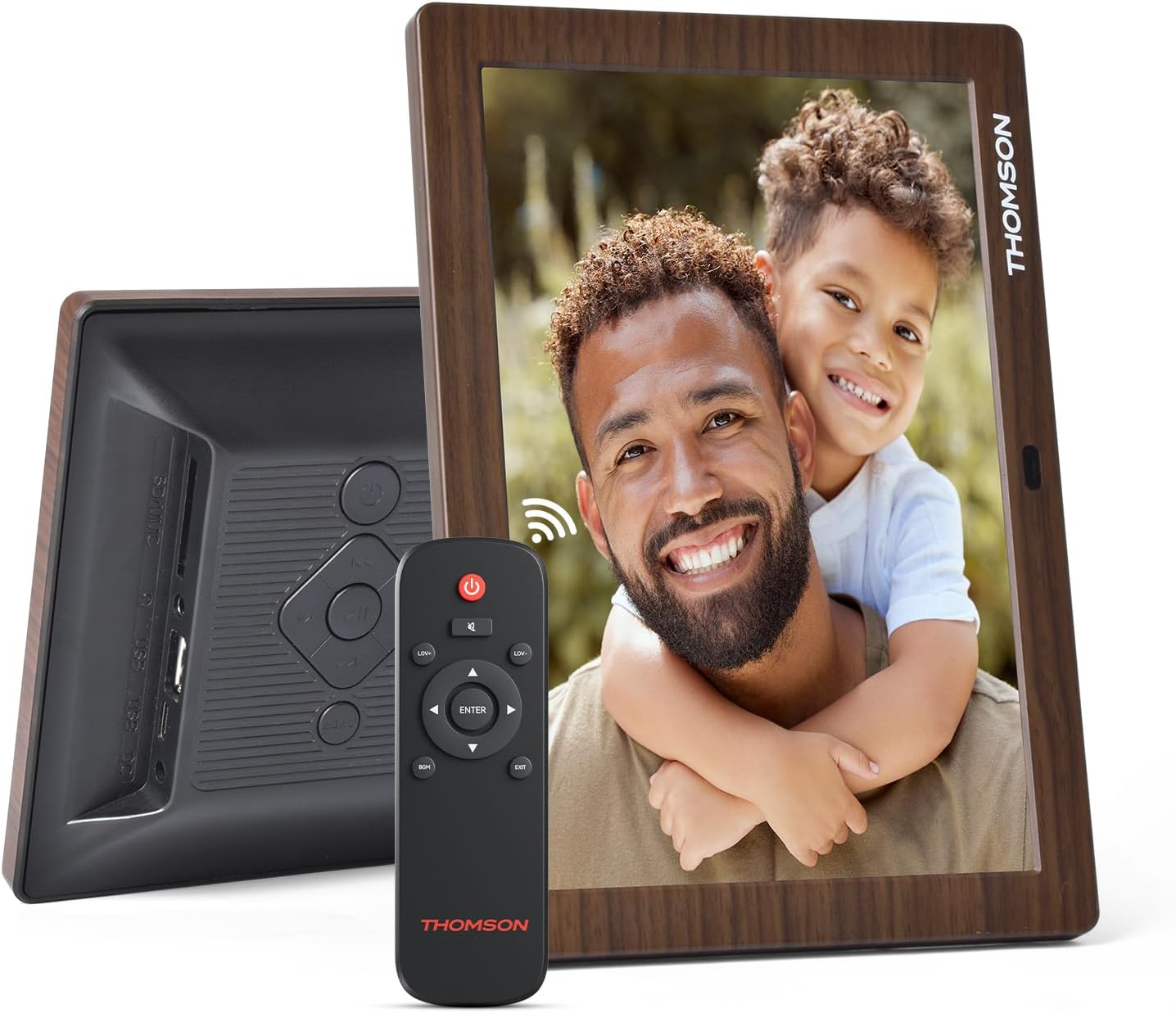
3.1 pav.: galinis view of the frame with power input and physical controls.
3.3 Stovo montavimas
The digital photo frame can be placed on a flat surface using the included stand. Insert the stand into the designated slot on the back of the frame. The frame also supports wall mounting using the integrated mounting holes.
4. Naudojimo instrukcijos
4.1 Ekrano funkcijos
- 8 colių IPS HD ekranas: Enjoy clear and vibrant images with a 1280x800 resolution from various viewkampų.
- Automatinis sukimasis: The built-in gravity sensor automatically adjusts the photo orientation (landscape or portrait) for optimal viewing.

Figure 4.1: The 8-inch IPS HD screen provides a high-quality display for your memories.
4.2 Medijos atkūrimas
The frame supports playback of photos, music, and videos. You can navigate through your media using the remote control or the physical buttons.
- Nuotraukų skaidrių demonstravimas: Configure slideshow intervals and transition effects in the settings.
- Muzikos atkūrimas: Leiskite foninę muziką tuo metu viewnuotraukas.
- Vaizdo įrašo atkūrimas: Enjoy your favorite video clips directly on the frame.

Figure 4.2: User interface for media selection and playback options.
4.3 Remote Control and Physical Buttons
Control your digital photo frame conveniently using the included remote control or the physical buttons located on the back of the frame.
- Nuotolinio valdymo pulto funkcijos: Power on/off, adjust volume, navigate images, control background music, and access menus.
- Fiziniai mygtukai: Provide direct control for essential functions, useful for elderly users.

Figure 4.3: Remote control for convenient operation of the frame.
4.4 Expansion Modes
The frame supports various expansion options for storing your media:
- SD/SDHC/MMC Card: Expand storage up to 32 GB.
- USB-A/Type-C/U-disk: Connect USB drives for additional media.
- Pastaba: This frame does not have built-in storage. An external memory card or USB drive is required for media storage.

Figure 4.4: Memory expansion slots on the back of the frame.
4.5 Automatic Power On/Off
You can set a customized automatic start and stop time for the frame to conserve energy and manage display times.

Figure 4.5: Setting automatic power on/off times for convenience.
5. Priežiūra
- Ekrano valymas: Use a soft, dry, lint-free cloth to gently wipe the screen. For stubborn marks, slightly dampNuvalykite šluostę vandeniu arba ekrano valymo tirpalu. Venkite stiprių cheminių medžiagų.
- Rėmo valymas: Nuvalykite rėmą minkštu, sausu skudurėliu.
- Saugykla: When not in use for extended periods, disconnect the power adapter and store the frame in a cool, dry place away from direct sunlight.
6. Problemų sprendimas
| Problema | Galima priežastis | Sprendimas |
|---|---|---|
| Rėmelis neįsijungia. | Maitinimo adapteris neprijungtas arba sugedęs. | Įsitikinkite, kad maitinimo adapteris yra tvirtai prijungtas prie rėmelio ir veikiančio maitinimo lizdo. Išbandykite kitą lizdą. |
| No images/videos displayed. | No memory card/USB drive inserted or media files are corrupted/unsupported. | Insert a memory card or USB drive with supported media files. Patikrinkite file formats (JPEG for photos, MP4 for videos). Ensure the memory card/USB drive is properly inserted. |
| Nuotolinio valdymo pultas neveikia. | Išsikrovęs akumuliatorius arba kliūtis. | Replace the remote control battery. Ensure there are no obstructions between the remote and the frame's IR receiver. |
| Images are distorted or incorrect orientation. | Incorrect display settings or disabled auto-rotation. | Check display settings in the menu. Ensure the auto-rotation feature is enabled if desired. |
7. Specifikacijos
- Modelio numeris: TRDF-8001C
- Ekrano dydis: 8 colių
- Rezoliucija: 1280x800 (WXGA)
- Kraštinių santykis: 16:10
- Ekrano technologija: IPS HD
- Ryšys: DC-4.0, USB-A, Type-C, SD Card, 3.5MM earphone jack
- Atminties išplėtimas: SD/SDHC/MMC card up to 32GB, U-disk
- Maitinimo šaltinis: Su laidu elektra
- Vartotojo sąsajos įvestis: Mygtukai, nuotolinio valdymo pultas
- Rėmo medžiaga: Plastikiniai
- Gaminio matmenys: 24.4 x 18 x 2.51 cm
- Produkto svoris: 240 gramų
8. Garantija ir palaikymas
For warranty information and customer support, please refer to the documentation included in your product packaging or visit the official Thomson websvetainėje. Išsaugokite pirkimo kvitą kaip pirkimo įrodymą bet kokiems garantiniams prašymams.


