1. Produktas baigtasview
The Rosewill Helium NAS Black ATX Mid Tower Computer Case is engineered for optimal performance and extensive storage capabilities, making it suitable for DIY NAS, media servers, and small business applications. Its design prioritizes airflow, efficient cooling, and versatile component compatibility.
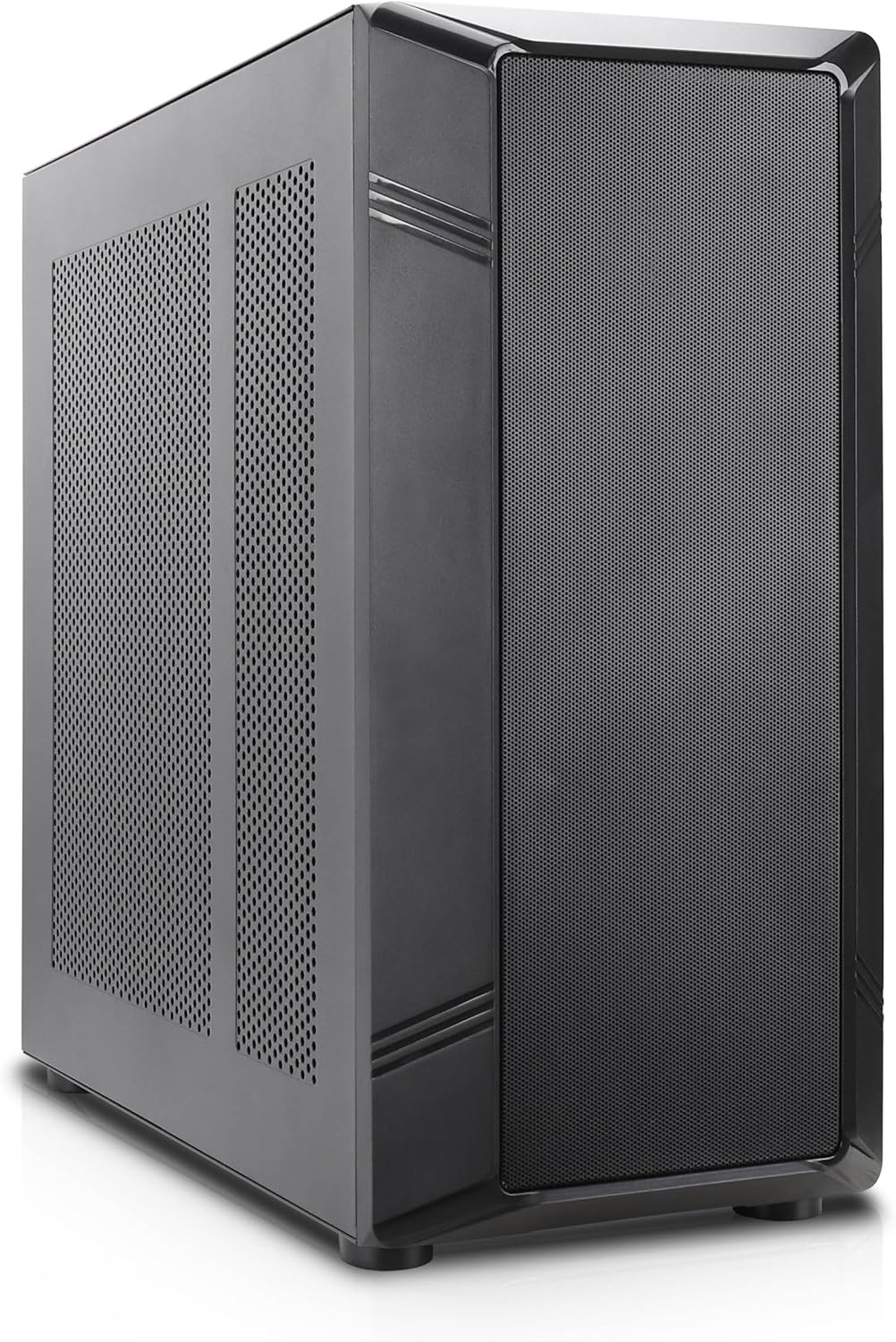
1 pav.: Kampinis priekis view of the Rosewill Helium NAS Black ATX Mid Tower Computer Case.
Pagrindinės funkcijos:
- Maximized Airflow: All-mesh side panels ensure unrestricted airflow for optimal cooling and prevention of thermal throttling.
- Quiet, Efficient Cooling: Four pre-installed 140mm PWM fans provide silent and efficient cooling, maintaining system stability under heavy workloads.
- Didelė saugojimo talpa: Supports up to 10 x 3.5" HDDs and 3 x 2.5" SSDs, ideal for large media libraries, virtual machines, and data-intensive applications.
- Universalus suderinamumas: Supports ATX motherboards and 360 AIO Radiators, offering flexibility for various system configurations and high-performance cooling solutions.
2. Sąranka ir diegimas
Follow these steps for proper installation of your computer components.
2.1 Bylos parengimas
- Padėkite dėklą ant stabilaus, lygaus paviršiaus.
- Remove the side panels by unscrewing the thumbscrews at the rear and sliding the panels off.

Figure 2: Interior layout of the Rosewill Helium NAS case, showing component mounting areas.
2.2 Pagrindinės plokštės montavimas
- Install the I/O shield into the motherboard tray opening.
- Align your ATX motherboard with the standoffs inside the case.
- Pritvirtinkite pagrindinę plokštę pridėtais varžtais.
2.3 Atminties disko diegimas
The case supports up to 10 x 3.5" HDDs and 3 x 2.5" SSDs. Utilize the dedicated drive cages for secure mounting.
Video 1: Demonstration of hard drive cage installation and cabling. This video illustrates the process of securing and connecting multiple hard drives within a PC case, which is applicable to the Rosewill Helium NAS case's storage capabilities.
- For 3.5" HDDs, slide the drives into the designated bays within the drive cages and secure them with screws.
- For 2.5" SSDs, mount them in the dedicated SSD trays, typically located behind the motherboard tray or on top of the HDD cages, and secure with screws.
- Connect SATA power and data cables to each installed drive.
2.4 Maitinimo šaltinio įrengimas
- Mount the power supply unit (PSU) in the bottom rear compartment of the case.
- Pritvirtinkite maitinimo bloką varžtais iš korpuso galo.
- Route the necessary power cables to your motherboard and other components.
2.5 Vaizdo plokštės ir išplėtimo plokštės įdiegimas
- Nuimkite reikiamus PCIe lizdų dangtelius nuo korpuso galo.
- Įdėkite vaizdo plokštę arba kitas išplėtimo korteles į atitinkamus pagrindinės plokštės PCIe lizdus.
- Pritvirtinkite korteles varžtais.
2.6 Kabelių valdymas
Utilize the cable routing cutouts and tie-down points behind the motherboard tray to organize cables. This improves airflow and aesthetics. Zip ties are included for assistance.
3. Naudojimo instrukcijos
3.1 Priekinio skydelio įvestis/išvestis

Figure 3: Front panel I/O ports located on the top of the case.
- Maitinimo mygtukas: Paspauskite, kad įjungtumėte / išjungtumėte sistemą.
- Atkūrimo mygtukas: Paspauskite, kad paleistumėte sistemą iš naujo.
- USB 3.1 Type-C prievadas: Dėl didelės spartos duomenų perdavimo.
- USB 3.0 prievadai: Skirta prijungti įrenginius, suderinamus su USB 3.0.
- USB 2.0 prievadai: Skirta prijungti įrenginius, suderinamus su USB 2.0.
- HD garso lizdai: Skirta ausinėms ir mikrofonams prijungti.
3.2 Pradinis įjungimas
- Ensure all components are securely installed and cables are properly connected.
- Prijunkite maitinimo laidą prie maitinimo bloko ir sieninio lizdo.
- Press the power button on the front panel to start your system.
4. Priežiūra
Reguliarus kompiuterio korpuso ir komponentų aptarnavimas užtikrina optimalų našumą ir ilgaamžiškumą.
4.1 Dulkių filtrų valymas
The Rosewill Helium NAS case features removable dust filters on the top and bottom for easy cleaning.
- Gently pull out the bottom dust filter.
- The top mesh panel is magnetic and can be easily lifted off.
- Clean the filters using compressed air or a soft brush to remove accumulated dust.
- Reinstall the filters once clean.
4.2 Bendras valymas
- Išorinius korpuso paviršius nuvalykite minkštu, sausu skudurėliu.
- For interior cleaning, use compressed air to remove dust from fans and components. Ensure the system is powered off and unplugged before cleaning.
5. Problemų sprendimas
Šiame skyriuje pateikiami dažniausiai pasitaikančių problemų, su kuriomis galite susidurti, sprendimai.
- Sistema neįsijungia:
- Check all power connections, including the PSU, motherboard, and front panel power switch cables.
- Įsitikinkite, kad maitinimo šaltinio jungiklis yra „ĮJUNGTA“ padėtyje.
- Perkaitimo komponentai:
- Patikrinkite, ar visi korpuso ventiliatoriai sukasi tinkamai.
- Išvalykite dulkių filtrus ir vidinius komponentus, kad pagerintumėte oro srautą.
- Įsitikinkite, kad veikia procesoriaus aušintuvas ir vaizdo plokštės ventiliatoriai.
- Per didelis ventiliatoriaus triukšmas:
- Check for loose cables or obstructions hitting fan blades.
- Ensure fans are securely mounted.
- Adjust fan speeds through motherboard BIOS or software if supported.
- Priekinio skydelio įvestis/išvestis neveikia:
- Verify that all front panel cables (USB, Audio, Power, Reset) are correctly connected to the motherboard headers.
6. Specifikacijos
| Funkcija | Specifikacija |
|---|---|
| Prekės ženklas | Rosewill |
| Serija | Helium NAS |
| Modelio pavadinimas | Helium NAS |
| Prekės modelio numeris | B0DP3PQFKW |
| Atvejo tipas | Mid Tower |
| Pagrindinės plokštės suderinamumas | ATX |
| Spalva | Juoda |
| Medžiaga | Aliuminis, Nerūdijantis plienas |
| Prekės svoris | 19.71 svaro |
| Gaminio matmenys (IxPxH) | 25 x 24.41 x 12.68 colio |
| 3.5" HDD Support | Iki 10 |
| 2.5" SSD Support | Iki 3 |
| Iš anksto įdiegti ventiliatoriai | 4 x 140 mm PWM ventiliatoriai |
| Aušinimo būdas | Air, Water (360 AIO Radiator Support) |
| Front Panel USB 2.0 Ports | 2 |
| Front Panel USB 3.0 Ports | 2 |
| Rekomenduojami naudojimo būdai | AI Server, Media Server, NAS, Workstation |
7. Garantija ir palaikymas
For warranty information, technical support, or further assistance, please refer to the official Rosewill websvetainėje arba susisiekite su jų klientų aptarnavimo skyriumi. Išsaugokite pirkimo kvitą, jei prireiktų pateikti pretenziją dėl garantijos.


