1. Įvadas
This manual provides essential information for the safe and efficient operation of your Meizu mblu 21 smartphone. Please read it thoroughly before using the device.
The Meizu mblu 21 features a Prism Edge Design with a radiant gradient and a large immersive 6.79-inch HD display. It is equipped with a 13MP main camera and an 8MP front camera, powered by Android 14. The device includes a 4900mAh battery for extended use and supports 4G LTE connectivity, Dual-Band Wi-Fi, and Bluetooth 5.0.
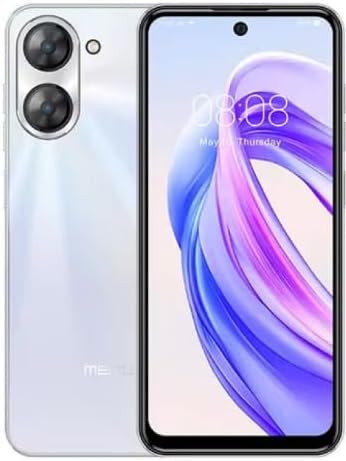
1.1 pav.: Priekinė ir galinė dalys view of the Meizu mblu 21 smartphone in White Diamond color.
2. Kas yra dėžutėje
Patikrinkite, ar pakuotėje yra visi reikalingi daiktai:
- Meizu mblu 21 Smartphone
- Maitinimo adapteris
- USB kabelis
- SIM išstūmimo įrankis
- Greitos pradžios vadovas

Figure 2.1: Meizu mblu 21 smartphone alongside its power adapter.
3. Sąranka
3.1. SIM kortelių ir „MicroSD“ kortelių įdėjimas
The Meizu mblu 21 supports Dual Nano SIM cards and a MicroSD card for expandable storage. Locate the SIM tray on the side of the device.
- Power off the device before inserting or removing SIM/MicroSD cards.
- SIM kortelės dėklui atidaryti naudokite pateiktą SIM kortelės išstūmimo įrankį.
- Carefully place the Nano SIM cards and/or MicroSD card into the designated slots on the tray, ensuring correct orientation.
- Švelniai stumkite dėklą atgal į įrenginį, kol jis bus lygus.
3.2. Pradinis įjungimo ir sąrankos vedlys
- Press and hold the Power button until the Meizu logo appears.
- Follow the on-screen instructions to complete the initial setup, including selecting your language, connecting to a Wi-Fi network, and setting up your Google account.
4. Prietaiso valdymas
4.1. Ekranas ir navigacija
The 6.79-inch HD display features a 90Hz adaptive refresh rate for smooth visuals. Navigate the interface using touch gestures: tap, swipe, pinch-to-zoom.
4.2. Kameros funkcijos
The device is equipped with a 13MP main camera and an 8MP front camera. Open the Camera application to capture photos and videos.
- 13MP Smart Camera: Ideal for capturing everyday moments with sharpness and true-to-life colors.
- 8MP priekinė kamera: Designed for clear selfies and video calls.
4.3. Apsaugos priemonės
- Side Unlock: A fast and secure fingerprint sensor integrated into the side power button for instant access.
- Smart Face Unlock: Use the front camera to unlock your device quickly and conveniently.
4.4. Ryšys
Your mblu 21 supports various connectivity options:
- 4G LTE: For mobile data connectivity. In the USA, this device is compatible with T-Mobile. Outside the USA, it works with any carrier worldwide.
- Dviejų juostų „Wi-Fi“: Supports both 2.4GHz and 5GHz bands for seamless internet access.
- "Bluetooth 5.0": For connecting wireless accessories with improved energy efficiency.
- VoLTE HD Calls: Enjoy sharper, clearer voice calls over LTE networks.

Figure 4.1: Key technology features of the Meizu mblu 21, including Android 14, Dual-Band Wi-Fi, Bluetooth 5.0, and VoLTE.
5. Priežiūra
5.1. Akumuliatoriaus priežiūra
The mblu 21 is equipped with a 4900mAh battery. To maximize battery lifespan:
- Venkite ekstremalių temperatūrų.
- Use only the provided power adapter or certified compatible chargers.
- Venkite dažnai visiškai iškrauti akumuliatorių.

5.1 pav. Vidinis view of the Meizu mblu 21, showcasing the 4900mAh battery and internal components.
5.2. Įrenginio valymas
Telefono ekraną ir korpusą valykite minkštu, nepūkuotu audiniu. Venkite naudoti stiprias chemines medžiagas ar abrazyvines medžiagas.
5.3. Programinės įrangos atnaujinimai
Regularly check for and install software updates to ensure optimal performance and security. Updates can be found in the device's settings menu.
6. Problemų sprendimas
If you encounter issues with your Meizu mblu 21, try the following solutions:
- Įrenginys nereaguoja: Paspauskite ir palaikykite maitinimo mygtuką maždaug 10–15 sekundžių, kad priverstumėte paleisti iš naujo.
- Tinklo ryšio problemos:
- Įsitikinkite, kad SIM kortelė tinkamai įdėta.
- Įjungti ir išjungti lėktuvo režimą.
- Check network settings (APN, preferred network type).
- Greitai išsikrauna baterija:
- Uždarykite nenaudojamas programas, veikiančias fone.
- Sumažinkite ekrano ryškumą.
- Išjunkite nereikalingas funkcijas, tokias kaip GPS ar „Bluetooth“, kai jų nenaudojate.
- Našumo problemos:
- Clear cache and data of problematic apps.
- Atlaisvinkite vietos saugykloje.
- Consider a factory reset (Note: This will erase all data on your device. Back up important data first.).
7. Specifikacijos
| Funkcija | Detalė |
|---|---|
| Modelio pavadinimas | mblu 21 |
| Modelio numeris | M416L |
| Operacinė sistema | Android 14 |
| Ekrano dydis | 6.79 colių |
| Atminties talpa | 64 GB |
| Įdiegtos RAM atminties dydis | 4 GB |
| Baterijos talpa | 4900 milijonųamp Valandos |
| Pagrindinė kamera | 13 MP |
| Priekinė kamera | 8 MP |
| Belaidžio ryšio operatorius (JAV) | T-Mobile |
| Korinio ryšio technologija | 4G LTE |
| Ryšio technologijos | 4G, Dual-Band Wi-Fi, Bluetooth 5.0 |
| Prekės svoris | 14 uncijos |
| Pakuotės matmenys | 7 x 4 x 2 colio |
| Spalva | White Diamond |
8. Garantija ir palaikymas
Your Meizu mblu 21 smartphone comes with a manufacturer's warranty. Please refer to the warranty card included in your product packaging for specific terms and conditions.
For technical support, service, or further inquiries, please contact Meizu customer support through their official channels. Contact information can typically be found on the manufacturer's websvetainėje arba gaminio dokumentacijoje.


