1. Įvadas
Thank you for choosing the MESWAO 15.6 inch Android 14 Tablet Pro. This tablet is designed to provide a superior visual and performance experience with its large Full HD display, powerful octa-core processor, and extended battery life. This manual will guide you through the setup, operation, maintenance, and troubleshooting of your new device, ensuring you get the most out of its advanced features.
2. Kas yra dėžutėje
Patikrinkite siuntinio turinį. Jei trūksta kokių nors daiktų arba jie pažeisti, susisiekite su klientų aptarnavimo tarnyba.
- 1 x MESWAO 15.6 inch Android Tablet
- 1x maitinimo adapteris
- 1 x tipo C laidas
- 1 x Vartotojo vadovas
- 1 x tipo C į USB adapteris
- 1 x Stuck pin (SIM ejector tool)

Image: Visual representation of the MESWAO tablet and its included accessories.
3. Produktas baigtasview
3.1 Pagrindinės savybės
- 15.6-inch 1080P FHD IPS Display: Large screen with 1920x1080p resolution, 16:9 aspect ratio, 85% screen-to-body ratio, and 350 nits adjustable brightness for clear visuals.
- Android 14 OS: Latest Android version for faster app launches, intuitive user interface, split-screen multitasking, and GMS certification for Google Play access.
- MediaTek Helio G99 CPU: Octa-core processor (6nm, up to 2.2GHz) and ARM Mali-G57 GPU for smooth performance in multitasking, streaming, and gaming.
- 12,000mAh Mega Battery & 30W Fast Charging: Provides up to 15 hours of video playback and 12+ hours of daily use, with 90% charge in 3 hours.
- 6GB RAM + 128GB ROM (Expandable to 1TB): Ample storage for apps, photos, and videos, with expandable memory via microSD card (FAT32 format).
- Dual-band Wi-Fi & Bluetooth 5.0: High-speed 2.4G/5G Wi-Fi and efficient Bluetooth connectivity for peripherals.
- 5MP Front + 32MP Rear Cameras: Capture moments and conduct clear video calls.
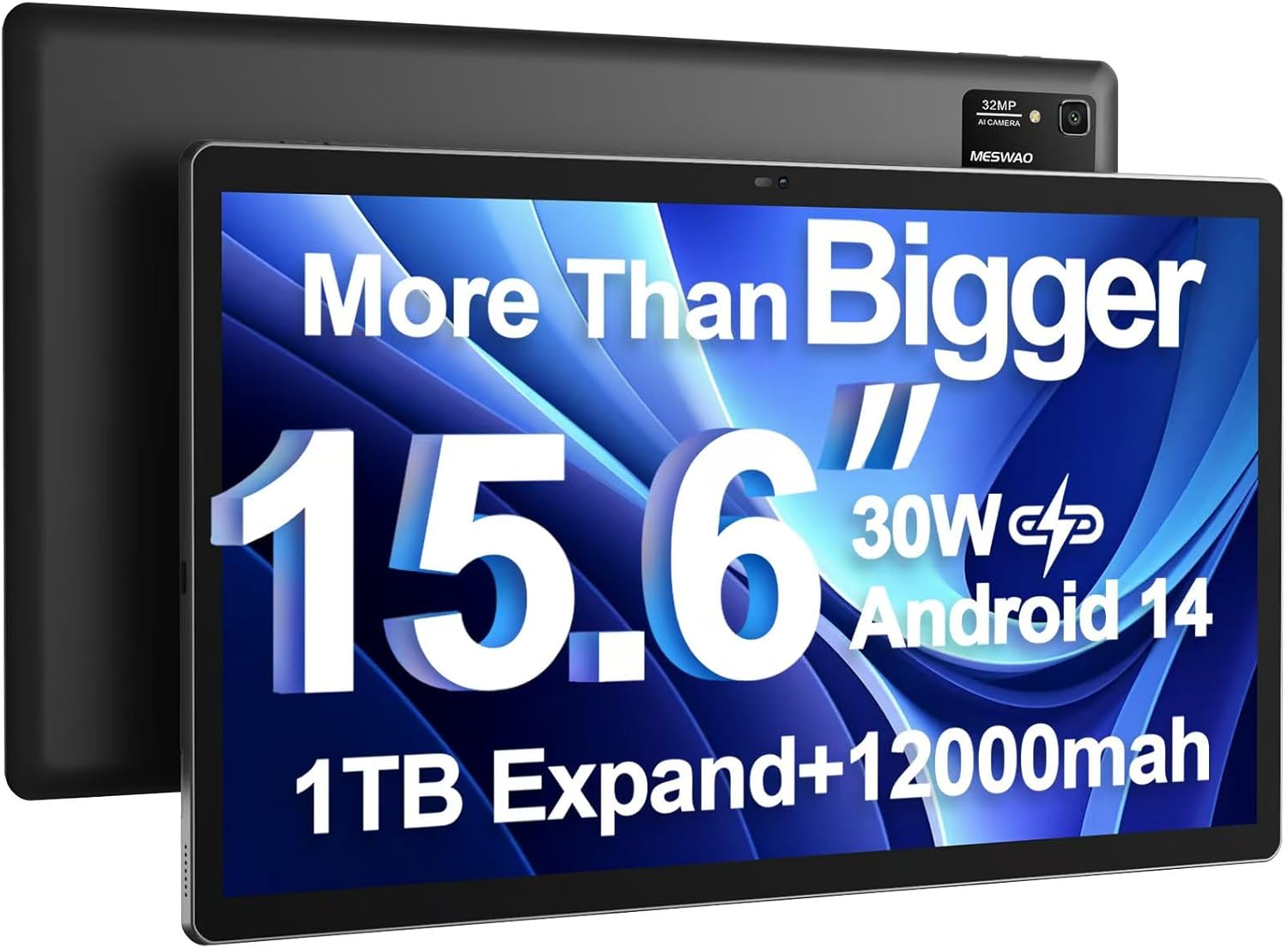
Image: The MESWAO 15.6 inch Android 14 Tablet Pro, showcasing its large display and rear camera module.

Image: Visual comparison highlighting the significantly larger screen area of the 15.6-inch tablet compared to a standard 10-inch tablet.

Image: Illustration of the tablet's 12,000mAh ultra-large capacity battery and 30W fast charging, indicating quick charge times and extended usage.
3.2 Planšetinio kompiuterio komponentai
Familiarize yourself with the physical components of your MESWAO tablet:
- Maitinimo mygtukas: Esantis šone, naudojamas planšetiniam kompiuteriui įjungti / išjungti arba ekranui pažadinti / užmigdyti.
- Garsumo mygtukai: Adjust audio output levels.
- Priekinė kamera: 5 MP kamera vaizdo skambučiams ir asmenukėms.
- Galinė kamera: 32MP camera with flash for high-resolution photos and videos.
- C tipo prievadas: Įkrovimui ir duomenų perdavimui.
- TF kortelės lizdas: For expanding storage with a microSD card.
- Stereo garsiakalbiai: Keturi garsiakalbiai pagerintai garso patirčiai.
- 3.5 mm ausinių lizdas: For wired audio connection (requires included Type-C to 3.5mm adapter).
4. Sąranka
4.1 Pradinis įjungimas
- Paspauskite ir palaikykite Maitinimo mygtukas until the MESWAO logo appears on the screen.
- Vykdykite ekrane pateikiamus nurodymus, kad pasirinktumėte kalbą, regioną ir prisijungtumėte prie „Wi-Fi“ tinklo.
- Prisijunkite naudodami „Google“ paskyrą arba sukurkite naują, kad galėtumėte pasiekti „Google Play“ parduotuvę ir kitas paslaugas.
4.2 Planšetinio kompiuterio įkrovimas
Before first use, fully charge the tablet. Use the provided power adapter and Type-C cable.
- Connect the Type-C cable to the tablet's Type-C port.
- Įkiškite maitinimo adapterį į sieninį lizdą.
- The charging indicator will appear on the screen. A full charge takes approximately 3 hours with the 30W fast charger.
4.3 „MicroSD“ kortelės įdėjimas
To expand storage, insert a microSD card (FAT32 format, up to 1TB, sold separately).
- Planšetinio kompiuterio šone raskite TF kortelės lizdą.
- Use the provided stuck pin to gently press into the small hole next to the slot to eject the tray.
- Įdėkite „microSD“ kortelę į dėklą auksiniais kontaktais žemyn.
- Atsargiai įstatykite dėklą atgal į angą, kol jis spragtelės ir užsifiksuos.
5. Naudojimo instrukcijos
5.1 Pagrindinė navigacija
- Pagrindinis ekranas: Braukite kairėn arba dešinėn, kad naršytumėte tarp pagrindinių ekranų.
- Programėlių stalčius: Access all installed applications (if using a launcher with an app drawer, otherwise apps are on home screens).
- Pranešimai ir greitieji nustatymai: Swipe down from the top of the screen to access notifications and quick settings toggles (Wi-Fi, Bluetooth, Brightness, etc.).
- Naujausios programos: Palieskite kvadratinę piktogramą (arba braukite aukštyn ir palaikykite iš apačios, jei naudojate gestų navigaciją), kad view ir perjungti neseniai naudotas programas.
5.2 Daugiaprogramis veikimas naudojant padalintą ekraną
The Android 14 OS supports split-screen functionality for enhanced productivity.
- Atidarykite pirmąją norimą naudoti programėlę.
- Go to the Recent Apps view.
- Palieskite programėlės piktogramą pirmosios programėlės kortelės viršuje ir pasirinkite „Padalinti ekraną“.
- Choose the second app from your recent apps or app drawer to open it in the other half of the screen.
- Adjust the size of each app by dragging the divider in the middle.

Vaizdas: Viršview of key features of the Android 14 operating system on the tablet, including multitasking capabilities.
5.3 Ryšys
- „Wi-Fi“: Eikite į Nustatymai > Tinklas ir internetas > „Wi-Fi“ to connect to available networks. Supports 2.4Ghz and 5Ghz bands.
- Bluetooth: Eikite į Nustatymai> Prijungti įrenginiai> Ryšio nuostatos> „Bluetooth“ to pair with Bluetooth headphones, keyboards, or other devices.
- Ekrano transliacija: The tablet supports wireless screen casting to compatible displays. Access this feature from Quick Settings or Settings > Connected devices > Connection preferences > Cast.

Image: Depiction of the tablet's stable dual-band Wi-Fi and Bluetooth 5.0 capabilities, enabling seamless wireless connections.
6. Priežiūra
6.1 Akumuliatoriaus priežiūra
- Venkite ekstremalių temperatūrų (karštos ar šaltos), nes jos gali sutrumpinti akumuliatoriaus veikimo laiką.
- Neleiskite akumuliatoriui dažnai visiškai išsikrauti. Įkraukite jį, kol jis nepasiekė 0 %.
- Use only the provided charger or a certified 30W PD fast charger.
6.2 Valymas
- Ekranui ir korpusui valyti naudokite minkštą, nepūkuotą šluostę.
- Įsisenėjusioms dėmėms šiek tiek pamirkykiteampNuvalykite šluostę vandeniu arba ekrano valikliu. Venkite stiprių cheminių medžiagų.
- Nepurkškite skysčių tiesiai ant planšetinio kompiuterio.
6.3 Programinės įrangos naujiniai
Reguliariai tikrinkite, ar yra sistemos naujinimų, ir įdiekite juos, kad užtikrintumėte optimalų našumą ir saugumą.
- Connect your tablet to a stable Wi-Fi network.
- Eikite į Nustatymai > Sistema > Sistemos naujinimas.
- Vykdykite ekrane pateikiamus nurodymus, kad atsisiųstumėte ir įdiegtumėte visus galimus naujinimus.
7. Problemų sprendimas
Jei kyla problemų dėl planšetinio kompiuterio, žr. šiuos dažniausiai pasitaikančius sprendimus:
| Problema | Galima priežastis | Sprendimas |
|---|---|---|
| Planšetinis kompiuteris neįsijungia | Žemas akumuliatoriaus lygis; sistemos gedimas | Kraukite planšetinį kompiuterį bent 30 minučių. Paspauskite ir palaikykite maitinimo mygtuką 10–15 sekundžių, kad priverstumėte jį paleisti iš naujo. |
| Slow performance/Lag | Too many apps running; Low storage; Outdated software | Uždarykite fonines programas. Išvalykite talpyklą. Atlaisvinkite vietos saugykloje. Patikrinkite, ar yra sistemos atnaujinimų. |
| Wi-Fi ryšio problemos | Incorrect password; Router issue; Tablet Wi-Fi off | Ensure Wi-Fi is on. Re-enter password. Restart router. Forget and reconnect to network. |
| Baterija greitai išsikrauna | High screen brightness; Background apps; Heavy usage | Reduce screen brightness. Close unused apps. Limit background data. Check battery usage in settings. |
| Touchscreen unresponsive/Phantom touches | Temporary software glitch; Defective unit | Restart the tablet. If the issue persists, contact MESWAO customer support for assistance. |
If the problem persists after trying these solutions, please contact MESWAO customer support for further assistance.
8. Specifikacijos
| Funkcija | Detalė |
|---|---|
| Modelio pavadinimas | MES-B3 Pro |
| Operacinė sistema | Android 14 |
| Ekrano dydis | 15.6 colių |
| Ekrano raiška | 1920 x 1080 pikselių (Full HD IPS) |
| Procesorius | „MediaTek Helio G99“ aštuonių branduolių procesorius (iki 2.2 GHz) |
| Grafikos koprocesorius | ARM Mali-G57 |
| RAM | 6 GB |
| Vidinė atmintis (ROM) | 128 GB |
| Išplečiama saugykla | Up to 1TB via MicroSD card (FAT32 format) |
| Baterijos talpa | 12,000 mAh |
| Baterijos veikimo laikas (vidutinis) | 13 Hours (up to 15 hours video playback) |
| Įkrovimas | 30 W PD greitas įkrovimas |
| Belaidis ryšys | 802.11a/b/ac/ax (2.4G/5G Dual-band Wi-Fi), Bluetooth 5.0 |
| Priekinė kamera | 5 MP |
| Galinė kamera | 32 MP |
| Prekės svoris | 4.42 svaro (apie 2 kg) |
| Gaminio matmenys | 14.49 x 8.66 x 0.39 colio (36.8 x 22 x 1 cm) |
9. Garantija ir palaikymas
MESWAO products come with a standard manufacturer's warranty. Please refer to the warranty card included in your package for specific terms and conditions. For technical support, troubleshooting assistance, or warranty claims, please contact MESWAO customer service through the contact information provided on the official MESWAO websvetainėje arba jūsų pirkimo platformoje.
Kontaktinė informacija: Please visit the official MESWAO website or refer to the support card included in your product packaging for the most up-to-date contact details.


