Įvadas
The 1Mii SafeFly Pro is a versatile Bluetooth 5.3 audio adapter designed to transmit and receive audio wirelessly. It features an OLED screen for clear status display and supports advanced audio codecs for high-quality sound. This device allows you to connect your wireless headphones to non-Bluetooth audio sources or stream audio from your Bluetooth-enabled devices to wired audio systems.
Kas yra dėžutėje

This image displays all items included in the 1Mii SafeFly Pro package. You will find the SafeFly Pro Bluetooth Audio Adapter, a USB-C Charging Cable, a 3.5mm Female to Female Audio Adapter, and a Keychain.
- SafeFly Pro Bluetooth Audio Adapter
- USB-C įkrovimo laidas
- 3.5mm Female to Female Audio Adapter
- Raktų pakabukas
- Vartotojo vadovas (šis dokumentas)
Produktas baigtasview

Šis paveikslėlis pateikia išsamų view of the 1Mii SafeFly Pro, highlighting its key components. These include the flexible audio cable with a 3.5mm audio connection, an audio plug protector, the OLED display screen, the 'M' key, the 'OK' key, the TX/RX sliding switch, a one-click reset button, and the USB-C charging port.
Komponentai ir funkcijos:
- 3.5 mm garso jungtis: Connects to audio source (TX mode) or audio receiver (RX mode).
- Garso kištuko apsauga: Protects the 3.5mm audio plug when not in use.
- OLED ekranas: Shows battery level, volume, paired device names, and active audio codecs.
- „M“ klavišas: In pairing mode, press once to select the connected device. In TX mode, press twice to switch the Bluetooth decoding format.
- 'OK' Key: Power ON/OFF (long press for 1 second). Long press for 2 seconds to enter pairing mode. Also functions as Play/Pause.
- TX/RX Sliding Switch: Pasirenka siųstuvo (TX) arba imtuvo (RX) režimą.
- Atkūrimo mygtukas: Norėdami iš naujo nustatyti įrenginį, paspauskite ir palaikykite 3 sekundes.
- USB-C įkrovimo prievadas: Skirta vidinei baterijai įkrauti.
Sąranka
1. Įrenginio įkrovimas
Before first use, fully charge the SafeFly Pro using the provided USB-C charging cable. Connect the cable to the USB-C port on the device and a standard USB power adapter (not included). The OLED screen will indicate charging status.
2. Įjungimas/išjungimas
- Norėdami įjungti: Long press the 'OK' button for 1 second.
- Norėdami išjungti: Long press the 'OK' button for 1 second.
3. Veikimo režimo pasirinkimas (TX/RX)
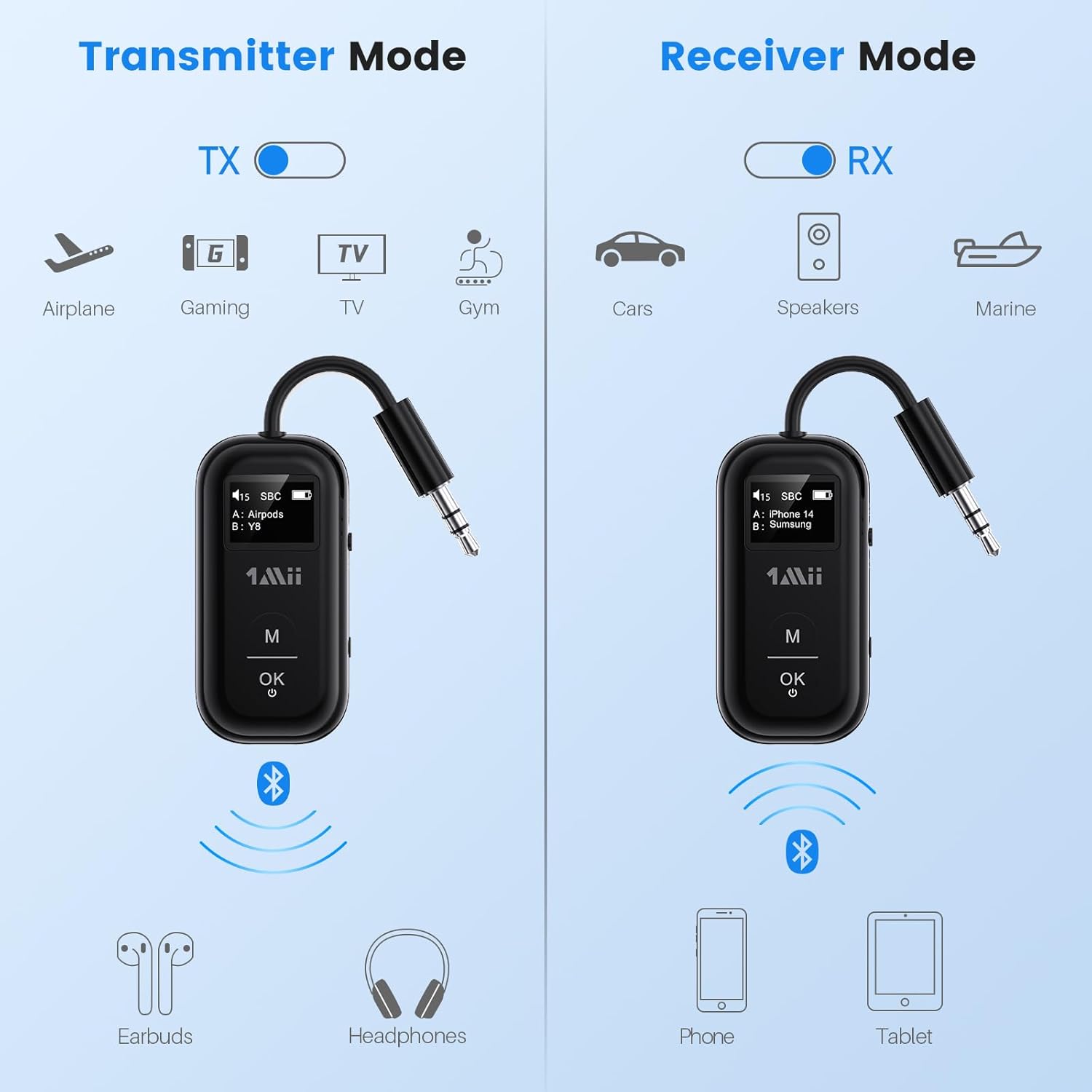
This image illustrates the two operating modes: Transmitter (TX) and Receiver (RX). TX mode is used for devices like airplanes, gaming consoles, TVs, and gym equipment to transmit audio to earbuds or headphones. RX mode is used for cars, speakers, and marine systems to receive audio from phones or tablets.
Use the TX/RX sliding switch on the side of the device to select the desired mode:
- TX (siųstuvo) režimas: For sending audio from non-Bluetooth devices (e.g., airplane entertainment, TV, gym equipment) to Bluetooth headphones or speakers.
- RX (imtuvo) režimas: For receiving audio from Bluetooth-enabled devices (e.g., smartphones, tablets) to wired audio systems (e.g., car stereo, home speakers).
4. Pairing in TX Mode (Connecting to Headphones)

- Set the SafeFly Pro to TX mode using the sliding switch.
- Plug the 3.5mm audio connection into your audio source (e.g., airplane entertainment system, TV headphone jack). If needed, use the dual-prong airplane adapter.
- Long press the 'OK' button on the SafeFly Pro for 2 seconds to enter pairing mode. The screen will display "Searching".
- Put your Bluetooth headphones or speakers into pairing mode. Refer to your headphone's manual for specific instructions.
- The SafeFly Pro will automatically search for and connect to nearby Bluetooth devices. Once connected, the device name will appear on the OLED screen.
- To connect a second pair of headphones: After the first device is connected, long press the 'OK' button again for 2 seconds to enter pairing mode for the second device. Put the second pair of headphones into pairing mode. Both devices will then be connected simultaneously.

This image shows the 1Mii SafeFly Pro connected to an airplane's in-flight entertainment system, enabling wireless audio streaming to a user's Bluetooth headphones.
5. Pairing in RX Mode (Connecting to Smartphones/Tablets)
- Set the SafeFly Pro to RX mode using the sliding switch.
- Plug the 3.5mm audio connection into your wired audio system's AUX input (e.g., car stereo, home speaker).
- Long press the 'OK' button on the SafeFly Pro for 2 seconds to enter pairing mode. The screen will display "Searching".
- On your smartphone or tablet, go to Bluetooth settings and select "1Mii SafeFly Pro" from the list of available devices to connect.
- Once connected, the device name will appear on the OLED screen.
- To connect a second smartphone/tablet: After the first device is connected, long press the 'OK' button again for 2 seconds to enter pairing mode for the second device. Connect the second smartphone/tablet via its Bluetooth settings.

This image shows the 1Mii SafeFly Pro in RX mode, connected to a car's audio system, receiving audio wirelessly from a smartphone.
Naudojimo instrukcijos
OLED ekranas

Šis paveikslėlis pateikia stambų planą view of the OLED screen, indicating the power status, audio format (e.g., SBC), volume level, battery level, and the names of the two currently paired devices (A and B).
The OLED screen provides real-time information:
- Baterijos lygis: Rodo likusį akumuliatoriaus įkrovą.
- Garsumo lygis: Displays the current audio output volume.
- Suporuotas įrenginys: Shows the name(s) of the connected Bluetooth headphones or smartphones.
- Garso kodekas: Displays the active audio codec (e.g., aptX LL, aptX HD, aptX Adaptive, aptX, AAC, SBC).
Mygtukų funkcijos
- 'OK' Button: Short press to Play/Pause audio.
- „M“ mygtukas: In TX mode, press twice to cycle through available audio codecs (aptX LL, aptX HD, aptX Adaptive, AAC, SBC) if supported by your connected headphones.
Priežiūra
To ensure the longevity and optimal performance of your 1Mii SafeFly Pro, follow these maintenance guidelines:
- Valymas: Nuvalykite įrenginį minkštu, sausu skudurėliu. Nenaudokite skystų valiklių ar abrazyvinių medžiagų.
- Saugykla: Laikykite prietaisą vėsioje, sausoje vietoje, apsaugotoje nuo tiesioginių saulės spindulių ir ekstremalių temperatūrų.
- Akumuliatoriaus priežiūra: Venkite dažnai visiškai iškrauti akumuliatorių. Reguliariai įkraukite įrenginį, net jei jo nenaudojate, kad palaikytumėte akumuliatoriaus būklę.
- Tvarkymas: Elkitės su įrenginiu atsargiai. Venkite jo numesti ir stipriai sutrenkti.
Trikčių šalinimas
If you encounter issues with your SafeFly Pro, try the following steps:
- Įrenginys neįsijungia: Įsitikinkite, kad įrenginys yra visiškai įkrautas. Prijunkite jį prie maitinimo šaltinio naudodami USB-C laidą.
- Nepavyko susieti:
- Ensure the SafeFly Pro is in the correct TX or RX mode.
- Make sure both the SafeFly Pro and your target Bluetooth device are in pairing mode.
- Perkelkite įrenginius arčiau vienas kito.
- Išjunkite ir įjunkite abu įrenginius, tada bandykite susieti dar kartą.
- Nėra garso / prasta garso kokybė:
- Check that the 3.5mm audio cable is securely connected to both the SafeFly Pro and the audio source/receiver.
- Ensure the volume on both the SafeFly Pro and the connected device is turned up.
- Verify that the correct audio codec is selected (in TX mode, press 'M' twice to cycle).
- Test with a different audio cable or source/receiver if possible.
- Device Frozen/Unresponsive: Long press the Reset Button (small hole on the side) for 3 seconds using a thin object (e.g., paperclip) to restart the device.
Specifikacijos
| Gaminio matmenys | 2.24 x 1.18 x 0.51 colio |
| Prekės svoris | 0.64 uncijos |
| Prekės modelio numeris | SafeFly Pro |
| Baterijos | 1 ličio polimero baterija (pridedama) |
| Ryšio technologija | AUX, „Bluetooth 5.3“ |
| Maitinimo šaltinis | Maitinamas baterijomis |
| Medžiaga | Akrilnitrilo butadieno stirenas (ABS) |
| Ypatingos savybės | AptX LL/HD/Adaptive, Bluetooth Transmitter & Receiver, Built-in Battery, Connect 2 Devices, with Screen |
Saugos informacija
Kad nesugadintumėte įrenginio ar nesusižalotumėte, perskaitykite ir laikykitės šių saugos nurodymų:
- Venkite ekstremalių temperatūrų (karštos ar šaltos) poveikio.
- Handle the battery with care. Do not puncture, disassemble, or expose to fire.
- Atkreipkite dėmesį į galimus trukdžius kitiems belaidžiams įrenginiams.
- Saugokite prietaisą nuo vandens ir kitų skysčių.
- Nebandykite patys taisyti ar modifikuoti įrenginio. Dėl pagalbos kreipkitės į klientų aptarnavimo tarnybą.
Garantija ir palaikymas
1Mii products are designed for reliability and performance. For warranty information, technical support, or customer service inquiries, please refer to the official 1Mii websvetainėje arba susisiekite tiesiogiai su jų klientų aptarnavimo komanda. Išsaugokite pirkimo kvitą kaip pirkimo įrodymą garantijos pretenzijoms.


