1. Įvadas
Thank you for choosing the OMAIC Rechargeable Voice Remote Control. This manual provides detailed instructions for the setup, operation, and maintenance of your new remote controls (models BN59-01432A and BN59-01312A). These remotes are designed to be compatible with a wide range of Samsung Smart TVs, offering convenient control and voice functionality.

Image: The OMAIC BN59-01432A and BN59-01312A remote controls.
2. Pakuotės turinys
Jūsų pakuotėje turėtų būti šie elementai:
- 1 x OMAIC BN59-01432A Rechargeable Voice Remote Control
- 1 x OMAIC BN59-01312A Voice Remote Control
- 1 x Naudotojo vadovas (šis dokumentas)
3. Specifikacijos
| Funkcija | Aprašymas |
|---|---|
| Prekės ženklas | OMAIC |
| Modelių numeriai | BN59-01432A, BN59-01312A |
| Ypatinga funkcija | Balso paieška |
| Spalva | Juoda |
| Maksimalus palaikomų įrenginių skaičius | 2 (kiekvienam nuotolinio valdymo pultui) |
| Suderinami įrenginiai | Samsung Televisions, Samsung Smart TVs |
| Ryšys | Bevielis |
| Rechargeable (BN59-01432A) | C tipo USB prievadas |
| Veikimo atstumas | Iki 45 pėdų (apie 13.7 metrų) |
| Reagavimo laikas | 0.1 sekundžių |

Image: Key features and specifications of the OMAIC remote controls.
4. Sąranka ir susiejimas
Before first use, please ensure the BN59-01432A rechargeable remote is fully charged. Charging typically takes 1-2 hours via its USB Type-C port.
4.1. Nuotolinio valdymo pulto suporavimas
Both BN59-01432A and BN59-01312A remotes use the same pairing method:
- Įsitikinkite, kad jūsų „Samsung“ išmanusis televizorius įjungtas.
- Nukreipkite nuotolinio valdymo pultą į televizorių.
- Paspauskite ir palaikykite Atgal (
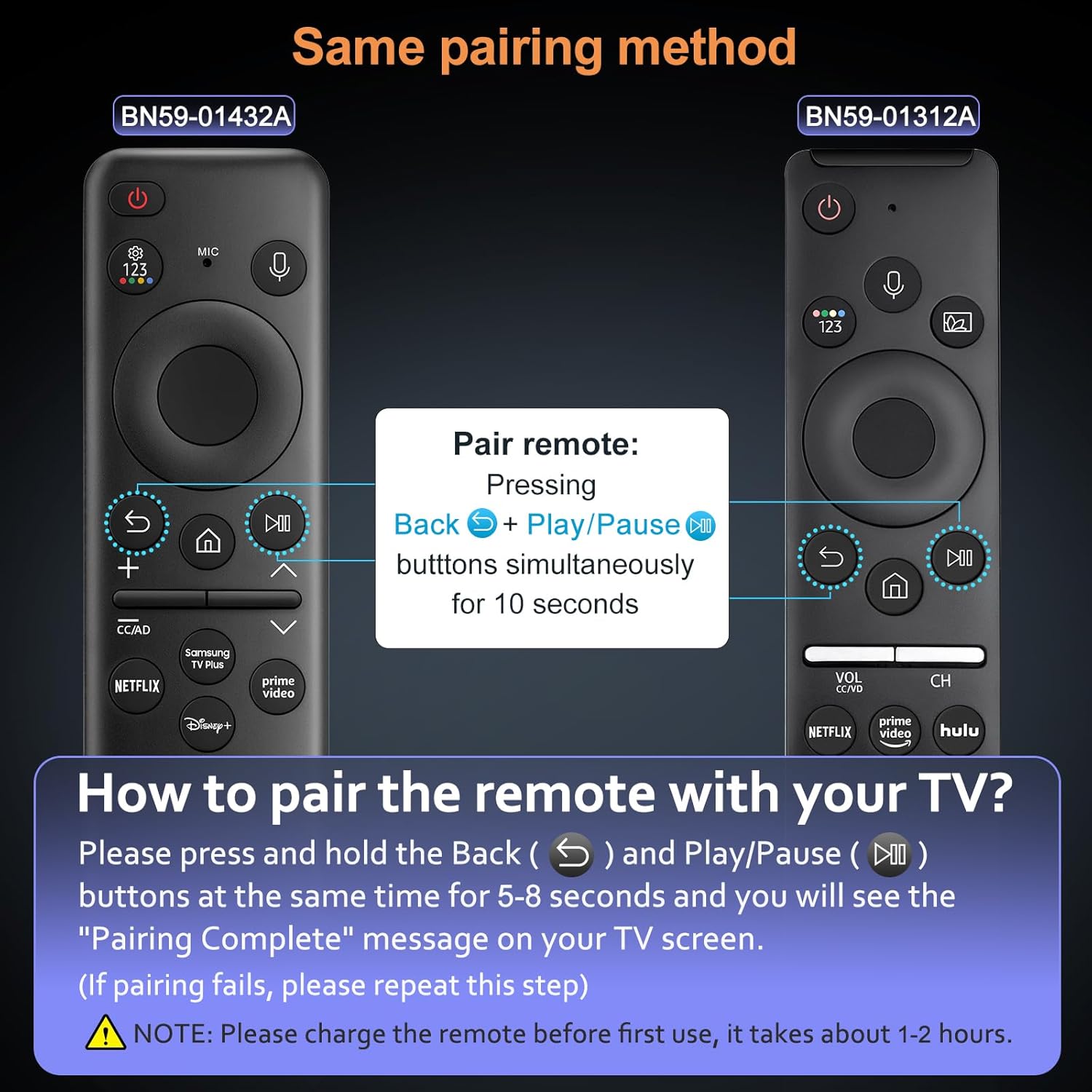 ) ir Leisti / pristabdyti () buttons simultaneously for 5-8 seconds.
 - A "Pairing Complete" message should appear on your TV screen, indicating successful pairing.
Pastaba:
- If pairing fails, please repeat the steps.
- The voice function requires your TV to support this feature. Please check your TV settings if the voice function does not work after pairing.
Image: Visual guide for pairing the OMAIC remote control with a Samsung TV.
5. Naudojimo instrukcijos
5.1. Balso funkcija
The voice function allows you to control your TV using voice commands. To use this feature:
- Paspauskite ir palaikykite Mikrofonas mygtukas (
 ) nuotolinio valdymo pulte.
 - Aiškiai ištarkite komandą į nuotolinio valdymo pultą. Pavyzdžiui,ample, "Turn the volume up to 20" or "Open Netflix."
- Baigę kalbėti, atleiskite mikrofono mygtuką.
Ensure your TV's voice assistant is enabled and configured for optimal performance.
Image: User demonstrating the voice control feature of the remote.
5.2. Spartieji mygtukai
Both remote models feature dedicated shortcut buttons for quick access to popular streaming services:
- „Netflix“: Directly opens the Netflix application.
- Pagrindinis vaizdo įrašas: Directly opens the Amazon Prime Video application.
- Hulu: Directly opens the Hulu application.
- Samsung TV Plus / Disney+: Depending on the remote model, one of these buttons will directly open the respective application.

Image: Shortcut buttons for popular streaming services on the OMAIC remote controls.
6. Charging (BN59-01432A Only)
The BN59-01432A remote control is rechargeable via a USB Type-C port, eliminating the need for frequent battery replacements.
6.1. Įkrovimo procedūra
- Locate the USB Type-C port on the bottom edge of the BN59-01432A remote control.
- Connect a standard USB Type-C charging cable (not included) to the remote's port.
- Kitą laido galą prijunkite prie USB maitinimo šaltinio (pvz., sieninio adapterio, kompiuterio USB prievado).
- The remote's indicator light (if present) may show charging status.
- Visiškas įkrovimas paprastai trunka 1–2 valandas.
It is recommended to fully charge the remote before its first use to ensure optimal battery life.

Image: The USB Type-C charging port on the BN59-01432A remote control.
7. Suderinamumas
These OMAIC remote controls are compatible with a wide range of Samsung Smart TVs. The voice function specifically requires your TV to support voice commands.
7.1. Compatible Samsung TV Models (Partial List)
- QE1C, QN990C, LST9C, S90C, Q80C, Q80CD, CU8000D, Q70CD, QN85CD, QN90CD, Q60C, QN800C, QN900C, CU8000, QN850C, Q70C, QN85C, QN90C, S95C
- Q80D, Q70D, Q60D, DU8000, QN90D, QN85D, S90D, S95D, QN800D, QN900D, LS03D, LS03B, LS03C
- M70C, S9, M80C, M50C, LSP3B, G85SB, G7, G70B, G65B, M70B, M8
- And other Samsung Smart TV models that support BN59-01330A, BN59-01312B, BN59-01312D, BN59-01312E, BN59-01312F, BN59-01330B, BN59-01330C, BN59-01330N, BN59-01330Q, BN59-01329A, BN59-01329C, BN59-01329F, BN59-01455A, BP59-00149A, BN59-01456A, BN59-01385A, BN59-01391A, BN59-01330H, BN59-01363A, BN59-01357A remotes.
Please verify your TV's model number and voice function support for full compatibility.

Image: OMAIC remotes compatible with various Samsung Smart TV models.
8. Problemų sprendimas
| Problema | Galima priežastis | Sprendimas |
|---|---|---|
| Nuotolinio valdymo pultas nesusiejamas | Incorrect pairing procedure, low battery (BN59-01432A) | Ensure BN59-01432A is charged. Repeat pairing steps (hold Back and Play/Pause for 5-8 seconds). Ensure TV is on. |
| Voice function not working | TV does not support voice function, remote not paired correctly, microphone blocked | Verify your TV model supports voice control. Re-pair the remote. Ensure nothing is obstructing the microphone on the remote. |
| Nuotolinis nereaguoja | Low battery (BN59-01432A), remote out of range, interference | Charge BN59-01432A. Move closer to the TV (within 45 feet). Remove any obstructions between the remote and TV. |
| Shortcut buttons not working | App not installed on TV, TV not connected to internet | Ensure the respective app (Netflix, Prime Video, Hulu, etc.) is installed and updated on your Samsung TV. Verify your TV has an active internet connection. |
9. Priežiūra
- Valymas: Nuotolinio valdymo pultą valykite minkšta, sausa šluoste. Nenaudokite skystų valiklių ar abrazyvinių medžiagų.
- Saugykla: Nuotolinio valdymo pultą laikykite vėsioje, sausoje vietoje, apsaugotoje nuo tiesioginių saulės spindulių ir ekstremalių temperatūrų.
- Battery Care (BN59-01432A): For optimal battery life, avoid fully discharging the remote frequently. Charge it when the battery indicator is low.
- Venkite lašų: Saugokite nuotolinio valdymo pultą nuo kritimų ir smūgių, kurie gali pažeisti vidinius komponentus.
10. Garantija ir palaikymas
OMAIC provides a 90-day after-sales service for this product. If you encounter any issues or have questions regarding your remote controls, please contact our customer support team.
We are committed to responding within 12 hours and will endeavor to resolve any problems as quickly as possible.
For support, please refer to the contact information provided with your purchase or visit the OMAIC brand store on Amazon.


