1. Įvadas
This manual provides comprehensive instructions for the installation, operation, maintenance, and troubleshooting of your Xigmatek Bano EN44250 computer case. Please read this manual thoroughly before beginning assembly to ensure proper setup and optimal performance.
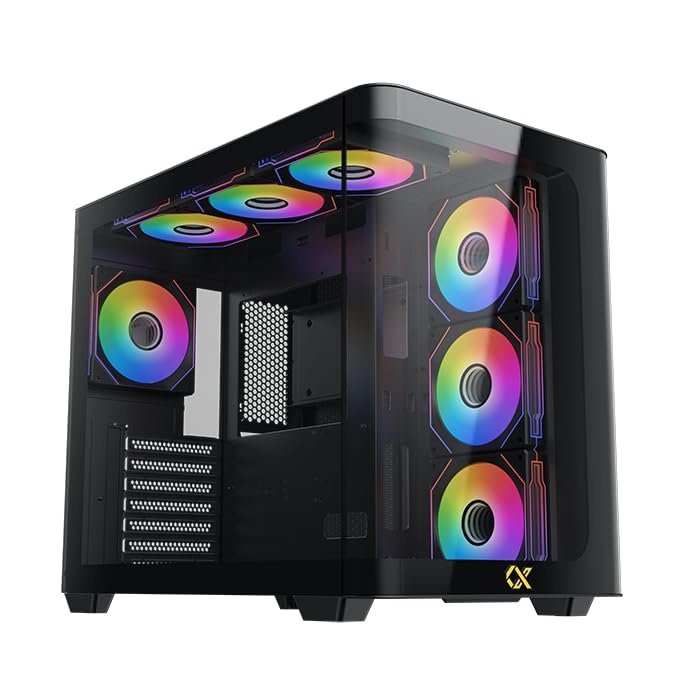
Figure 1: Xigmatek Bano EN44250 Computer Case (Exterior View)
2. Savybės
- Medžiaga: Constructed from high-quality steel alloy for durability and long-term use.
- Pagrindinės plokštės palaikymas: Compatible with E-ATX, ATX, Micro ATX, and Mini ITX motherboards.
- Aušinimo sistema: Supports both air and liquid cooling solutions, with multiple fan and radiator mounting options.
- Važiavimo įlankos: Features five internal drive bays compatible with both 2.5-inch and 3.5-inch hard drives/SSDs.
- Įvesties / išvesties skydelis: Equipped with one USB 3.0 port, two USB 2.0 ports, and HD audio jacks for seamless connectivity.
- Dizainas: Stylish black finish with a curved tempered glass panel for showcasing internal components and superior airflow.
- Išplėtimo lizdai: Includes 7 expansion slots.
- Maitinimo bloko tvirtinimas: Supports rear-mounted power supplies.

Figure 2: Internal Layout of the Case
3. Sąrankos instrukcijos
3.1 Bylos parengimas
- Išpakuokite dėklą ir nuimkite visas pakavimo medžiagas.
- Atsargiai nuimkite grūdinto stiklo šoninį skydelį, atsukdami varžtus. Padėkite jį ant minkšto, lygaus paviršiaus, kad nesubraižytumėte.
- Identify the accessory box inside the case, which contains screws, standoffs, and cable ties.
3.2 Pagrindinės plokštės montavimas
- Install the I/O shield (if not pre-installed) into the rear opening of the case.
- Align your motherboard with the pre-installed standoffs. If your motherboard form factor (E-ATX, ATX, Micro ATX, Mini ITX) requires additional standoffs, install them in the appropriate holes.
- Atsargiai uždėkite pagrindinę plokštę ant laikiklių ir pritvirtinkite ją pridedamais varžtais.
3.3 Maitinimo bloko (PSU) montavimas
- Mount the PSU into the designated rear compartment of the case.
- Pritvirtinkite maitinimo bloką varžtais iš korpuso galo.
- Route the necessary power cables through the cable management cutouts to the motherboard and other components.
3.4 Storage Drive Installation (2.5"/3.5" HDDs/SSDs)
- Locate the internal drive bays. The case supports five drive bays compatible with 2.5-inch and 3.5-inch drives.
- For 3.5-inch drives, slide the drive into the tool-less tray (if applicable) or secure it with screws.
- For 2.5-inch drives, secure them to the designated mounting points or adapters.
- Connect SATA data and power cables to each installed drive.
3.5 Aušinimo sistemos įrengimas (ventiliatoriai / radiatoriai)
The Xigmatek Bano EN44250 supports various fan and radiator configurations for optimal airflow. Refer to the diagrams below for compatible sizes and locations.

Figure 3: Fan and Radiator Mounting Options (Side View)

Figure 4: Fan and Radiator Mounting Options (Top View)
- Install case fans or liquid cooling radiators into the desired mounting positions using the appropriate screws.
- Connect fan power cables to the motherboard fan headers or a fan controller.
3.6 Priekinio įvesties/išvesties skydelio jungtys
Connect the front I/O panel cables to the corresponding headers on your motherboard. These include:
- USB 3.0 antraštė
- USB 2.0 antraštės
- HD Audio header
- Power switch, reset switch, HDD LED, and power LED headers

Figure 5: Front I/O Panel
4. Eksploatacijos gairės
Once all components are installed and connected, replace the side panel. Ensure all cables are neatly managed to avoid obstructing airflow. Power on your system using the front panel power button. Monitor temperatures and fan speeds to ensure optimal cooling performance.
5. Priežiūra
Regular maintenance helps prolong the life of your computer components and ensures efficient cooling.
- Dulkių valymas: Reguliariai valykite dulkių filtrus (jei yra) ir vidinius komponentus suslėgtu oru. Prieš valydami įsitikinkite, kad sistema išjungta ir atjungta nuo elektros tinklo.
- Kabelių valdymas: Review cable routing periodically to ensure no cables are obstructing fan blades or airflow paths.
- Išorinis valymas: Išorinius paviršius nuvalykite minkšta, damp skudurėliu. Venkite abrazyvinių valiklių ar tirpiklių.
6. Problemų sprendimas
If you encounter issues during or after assembly, consider the following common troubleshooting steps:
- Sistema neįsijungia:
- Patikrinkite visas maitinimo jungtis, įskaitant maitinimo bloko jungtį prie sieninio lizdo, maitinimo bloko jungtį prie pagrindinės plokštės (24 kontaktų ir procesoriaus 8 kontaktų) ir priekinio skydelio maitinimo jungiklio jungtį.
- Įsitikinkite, kad maitinimo šaltinio jungiklis yra „ĮJUNGTA“ padėtyje.
- Nėra ekrano išvesties:
- Verify that your monitor is connected to the graphics card (not the motherboard I/O if using a dedicated GPU).
- Iš naujo įstatykite grafikos plokštę ir RAM modulius.
- Perkaitimo problemos:
- Ensure all case fans are spinning and correctly oriented for optimal airflow (intake/exhaust).
- Check CPU cooler installation and thermal paste application.
- Clean any dust buildup from fans and radiators.
- Priekinio skydelio USB/garsas neveikia:
- Patikrinkite, ar priekinio skydelio USB ir garso lizdai tinkamai prijungti prie pagrindinės plokštės.
7. Specifikacijos
| Funkcija | Detalė |
|---|---|
| Gamintojas | XIGMATEK Co., Ltd. |
| Modelio numeris | EN44250 |
| Gaminio matmenys (I x P x A) | 45 x 53.3 x 25.8 cm |
| Svoris | 9.44 kg |
| Pagrindinės plokštės suderinamumas | E-ATX, ATX, Micro ATX, Mini ITX |
| Atvejo tipas | Bokštas |
| Spalva | Juoda |
| Medžiaga | Plieno lydinys |
| Maitinimo bloko montavimas | Galinis tvirtinimas |
| Aušinimo būdas | Oras, vanduo |
| CPU aušintuvo atstumas | Iki 16 cm |
| VGA Card Length Support | Iki 41 cm |
| PSU Length Support | Iki 22 cm |
| Išplėtimo lizdai | 7 |
| Vidinės pavaros skyriai | 5 (compatible with 2.5" and 3.5" drives) |
| Priekinės įvesties / išvesties prievadai | 1x USB 3.0, 2x USB 2.0, HD garsas |
8. Garantija ir palaikymas
For warranty information and technical support, please refer to the official Xigmatek websvetainėje arba susisiekite su vietiniu pardavėju. Išsaugokite pirkimo įrodymą, jei prireiktų pateikti garantinį prašymą.
Internetiniai ištekliai: www.xigmatek.com


