1. Įvadas
This manual provides detailed instructions for the installation, operation, and maintenance of your ZUMIMALL BK05 3MP Outdoor Security Camera. Please read this manual thoroughly before using the product to ensure proper functionality and safety.
Pakuotės turinys
Patikrinkite, ar pakuotėje yra visi toliau išvardyti daiktai:
- BK05 Camera x1
- Vartotojo vadovas x1
- Charging Set (10ft USB-C Cable & Adapter) x1
- Varžtų rinkinys x1
- Warning Card x1
- Padėties lipdukas x1

Image: Contents of the ZUMIMALL BK05 Security Camera package.
2. Produktas baigtasview
The ZUMIMALL BK05 is a 3MP outdoor security camera designed for comprehensive surveillance. It features 360° PTZ (Pan-Tilt-Zoom) auto-tracking, 24/7 continuous recording, dual-band 2.4G/5G WiFi connectivity, color night vision with a built-in floodlight, and two-way audio communication. The camera is also compatible with Alexa for voice control.
Pagrindinės savybės
- 3MP raiška: Pateikia aiškų ir ryškų vaizdo įrašątage.
- 360° PTZ Auto-Tracking: Automatically follows moving targets with 355° horizontal and 90° vertical rotation.
- Nepertraukiamas įrašymas visą parą: Wired power ensures constant surveillance.
- Dviejų juostų WiFi: Supports both 2.4GHz and 5GHz networks for flexible connectivity.
- Spalvotas naktinis matymas: Built-in floodlight enables full-color video even in low-light conditions.
- Dvipusis garsas: Integrated microphone and speaker for real-time communication.
- Judesio ir triukšmo aptikimas: Sends real-time alerts upon detecting activity.
- IP66 atsparumas oro sąlygoms: Sukurta atlaikyti įvairias lauko oro sąlygas.

Image: Visual comparison highlighting the detail captured by the ZUMIMALL 3MP camera.
3. Sąranka ir diegimas
3.1 Fizinis įrengimas
The camera supports both ceiling and wall mounting. Use the included positioning sticker and screw set to mark and secure the installation location.
- Choose an ideal spot for mounting, ensuring a clear view ir prieigą prie elektros lizdo.
- Use the positioning sticker to mark drill holes.
- Išgręžkite skyles ir, jei reikia, įstatykite sieninius inkarus.
- Secure the camera base with the provided screws.
- Connect the camera to the power adapter using the 10ft USB-C cable and plug it into a power outlet. Ensure the Type-C cable connector is waterproofed.

Image: Illustration of the two-step installation process for wall or ceiling mounting.
3.2 Programėlės prijungimas ir „Wi-Fi“ sąranka
The ZUMIMALL BK05 camera connects via dual-band 2.4GHz or 5GHz Wi-Fi. For optimal performance, check signal stability via the ZUMIMALL app before setup.
- Download the ZUMIMALL app from your device's app store.
- Susikurkite paskyrą arba prisijunkite.
- Tap 'Add Device' and select your camera model (BK05).
- Follow the in-app instructions to connect the camera to your Wi-Fi network. You will be prompted to select either a 2.4GHz or 5GHz network and enter the password.
- Nuskaitykite telefone rodomą QR kodą kameros objektyvu.
- Once connected, the camera will indicate successful pairing, and you can begin live viewing.
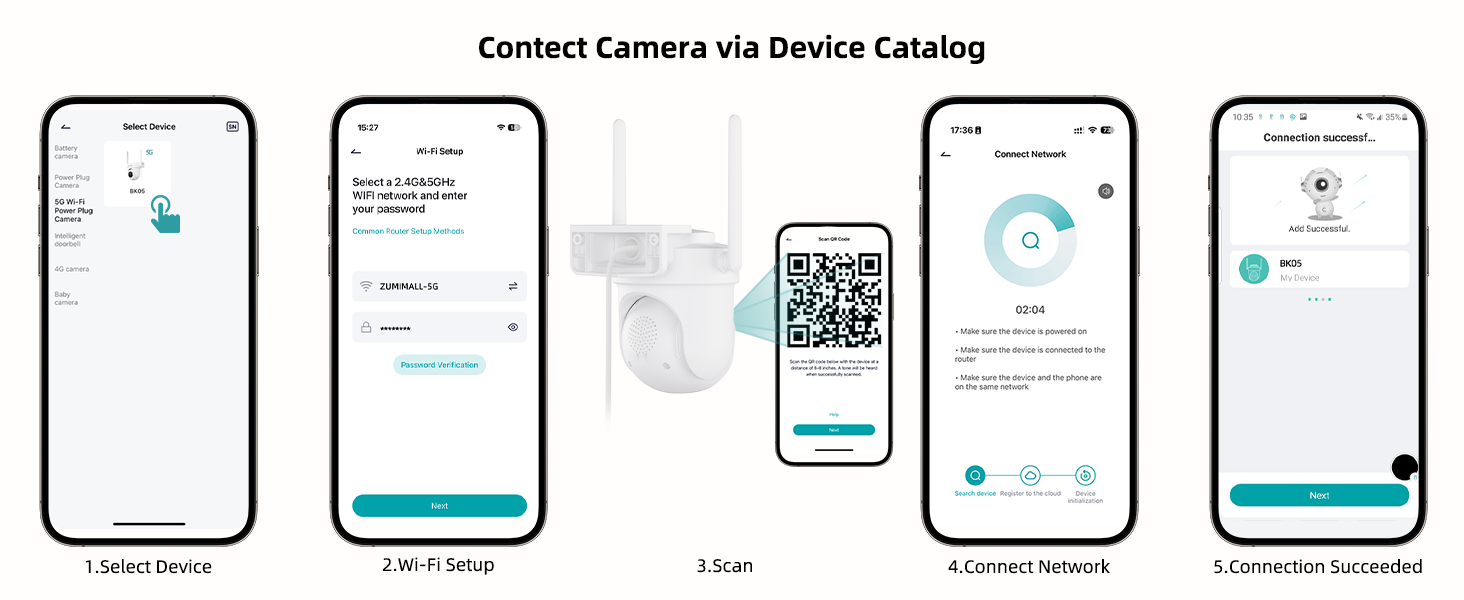
Image: Step-by-step guide for connecting the camera to the ZUMIMALL app.

Image: Explanation of dual-band Wi-Fi support (2.4GHz and 5GHz).
4. Naudojimo instrukcijos
4.1 Tiesiogiai View ir PTZ valdymas
Access the live feed through the ZUMIMALL app. You can remotely control the camera's pan (horizontal) and tilt (vertical) movements to adjust the viewing kampas.
- From the app's home screen, tap on your camera to view gyvas pašaras.
- Use the on-screen controls to pan (355°) and tilt (90°) the camera.

Image: PTZ control in action, showing the camera tracking movement.
4.2 Auto-Tracking and Motion Detection
The camera can automatically detect and track moving objects, sending alerts to your smartphone.
- Enable 'Motion Detection' and 'Auto-Tracking' in the camera settings within the app.
- Customize detection sensitivity (Low, Medium, High) to reduce false notifications.
- Set specific detection zones to monitor critical areas and ignore irrelevant ones.

Image: Demonstration of 360° motion tracking.

Image: Accurate detection settings within the app.

Image: Setting up a custom detection zone.
4.3 Įrašymas ir saugojimas
The camera supports 24/7 continuous recording and offers flexible storage options.
- „Micro SD“ kortelė: Insert a Micro SD card (up to 128GB, not included) for local storage. The camera will automatically overwrite old footage, kai kortelė pilna.
- Saugykla debesyje: Optional cloud storage plans are available for event recordings (6-second clips, saved for 7 days free). Premium cloud storage offers additional features.

Image: 24/7 continuous recording feature.

Image: Non-subscription storage options with Micro SD card and cloud.
4.4 Night Vision and Floodlight
The camera provides clear night vision, including full-color options with its built-in floodlight.
- The built-in floodlight provides 33ft (10 meters) of color night vision.
- Adjust night vision settings in the app to choose between infrared (black and white) or color night vision.

Image: 2K Color Night Vision with spotlight functionality.
4.5 Dvipusis garsas
Bendraukite su lankytojais arba atbaidykite įsibrovėlius naudodami kameros dvipusio garso funkciją.
- Tiesioginio transliavimo metu palieskite mikrofono piktogramą view sąsaja, skirta kalbėti per kameros garsiakalbį.
- The camera's microphone captures audio from the surveillance area.

Image: Two-way audio communication feature.
4.6 Smart AI Analysis and Audible Alarm
The camera utilizes AI for intelligent detection and can trigger audible alarms.
- The camera can differentiate between humans, pets, cars, and packages (some features may require premium cloud plans).
- An audible alarm can be triggered when noise exceeds 65 decibels, providing proactive protection.
- When motion or humanoids are detected, the camera can trigger both audio and strobe light alarms.

Image: Smart AI analysis detecting different objects.

Image: Audible alarm feature with noise sensitivity settings.

Image: Audio warning and strobe light feature.
4.7 „Alexa“ integracija
Connect your ZUMIMALL camera with Amazon Alexa for convenient voice control.
- Ensure the camera is already added to the ZUMIMALL app.
- Atidarykite „Alexa“ programą.
- Tap the "More" button in the bottom left corner.
- Select "Skills & Games" and search for "Zumimall."
- Click on the "Zumimall" skill, then tap "ENABLE TO USE."
- Log in to your Zumimall account and click "Authorize."

Image: Voice assistant integration with Alexa and Google Assistant.
4.8 Įrenginio bendrinimas
Share access to your camera with family members or trusted individuals.
- The ZUMIMALL app allows sharing with up to 5 online devices.
- There is no limit to the number of users you can share access with.

Image: Device sharing feature for multiple users and devices.
5. Priežiūra
5.1 Atsparumas oro sąlygoms
The ZUMIMALL BK05 camera is IP66-rated, ensuring protection against dust and water jets. It is designed to function in temperatures ranging from -20°C to 50°C.
- Ensure the camera is installed correctly, following the instructions, especially regarding the waterproof Type-C cable connector.
- Do not install the camera upside down to maintain waterproof performance and proper feed display.
5.2 Bendroji priežiūra
- Regularly check the camera lens for dirt or obstructions and clean gently with a soft, dry cloth.
- Ensure the power adapter remains dry for optimal performance.
- Periodically check the mounting for stability.
6. Problemų sprendimas
6.1 Bendrosios problemos ir sprendimai
- Kamera neprisijungia prie „Wi-Fi“:
Ensure your Wi-Fi network is 2.4GHz or 5GHz. Check Wi-Fi signal strength at the camera's location using the ZUMIMALL app. Verify the Wi-Fi password is correct. Try restarting your router and the camera. - Dažni atjungimai:
Improve Wi-Fi signal strength by moving the camera closer to the router or using a Wi-Fi extender. Ensure there are no major obstructions (e.g., thick walls) between the camera and the router. - Motion detection alerts are too frequent/infrequent:
Adjust the detection sensitivity settings in the app. Configure specific detection zones to focus on relevant areas. - Night vision is unclear:
Ensure the camera lens is clean. Check if the floodlight is enabled for color night vision. Ensure there are no reflective surfaces close to the camera that could interfere with infrared or floodlight illumination. - Dvipusio garso problemos:
Check the volume settings in the app. Ensure there are no obstructions blocking the microphone or speaker on the camera. Verify your phone's microphone permissions for the ZUMIMALL app. - Camera not recording 24/7:
Ensure the camera is continuously powered via the included adapter. If using an SD card, verify it is inserted correctly, formatted, and has sufficient storage capacity.
7. Specifikacijos
| Funkcija | Specifikacija |
|---|---|
| Modelio pavadinimas | BK05 |
| Vaizdo įrašymo raiška | 3 MP (2K) |
| Ryšio technologija | Wireless (2.4G & 5G Wi-Fi), Plug-in Power |
| Viewing kampas | 360 laipsnių (355° pasukimas, 90° pakreipimas) |
| Naktinio matymo diapazonas | 10 metrų (33 pėdų) |
| Saugojimo parinktys | „Micro SD“ (iki 128 GB), debesies saugykla |
| Atsparumas oro sąlygoms | IP66 |
| Darbinė temperatūra | -20°C iki 50°C |
| Suderinami įrenginiai | Alexa, Smartphone (Android, iOS) |
| Maitinimo šaltinis | Su laidu elektra |
| Prekės matmenys (I x P x A) | 5.9 x 5 x 5 colio |
| Prekės svoris | 16 uncijos (0.45 kilogramo) |
8. Garantija ir palaikymas
ZUMIMALL is committed to providing quality products and customer support.
8.1 Pagalba klientams
For any technical queries or assistance, please contact ZUMIMALL customer support. The brand offers one-on-one online support to ensure you receive the help you need.
8.2 Apsaugos planai
Extended protection plans are available for purchase to cover your device beyond the standard warranty period:
- 2 metų apsaugos planas
- 3 metų apsaugos planas
- „Complete Protect“ (mėnesinis planas, apimantis tinkamus pirkinius)
For details on these plans, please refer to the product listing or contact ZUMIMALL directly.


