1. Įvadas
This manual provides essential information for the safe and effective operation of your BETAFPV ELRS V3 Air65 Brushless Whoop Quadcopter. Please read it thoroughly before first use and retain it for future reference.

Image 1: The BETAFPV ELRS V3 Air65 Brushless Whoop Quadcopter, an ultralight 1S 65mm micro FPV drone.
2. Kas įskaičiuota
Pakuotėje yra šie elementai:
- 1 * „Air65“ bešepetėlinis „Whoop“ kvadrokopteris
- 1 * Oro gaubtas
- 4 * HQ 31mm Ultralight 3-Blade Propellers
- 1 * 4 kontaktų adapterio kabelis
- 1 * USB C tipo adapterio plokštė
- 1 * Varžtų pakuotė

Image 2: Contents of the Air65 package, including the quadcopter, spare propellers, and accessories.
3. Pagrindinės savybės
- Ultralengvas dizainas: Weighs approximately 17.3g, featuring an Air canopy and Air65 brushless whoop frame for enhanced freestyle flying.
- Advanced Flight Controller: Equipped with a new 5IN1 Air brushless flight controller utilizing a G473 processor and ICM42688P gyroscope, offering a thrust-to-weight ratio of 5.26:1 and 13% increased propulsion efficiency. It integrates FC, ESC, OSD, RX, and Onboard 5.8 25~400 VTX, weighing only 3.6g.
- High-Performance Motors: Features 0702SE II 23000KV brushless motors and HQ 31mm Ultralight 3-blade propellers for responsive and precise control.
- ELRS V3 Protocol: Comes with ELRS V3 firmware for reliable binding with compatible controllers.
- C03 FPV Micro Camera: Includes a lightweight 1.45g C03 FPV Micro camera with an onboard VTX adjustable from 25-400mW.
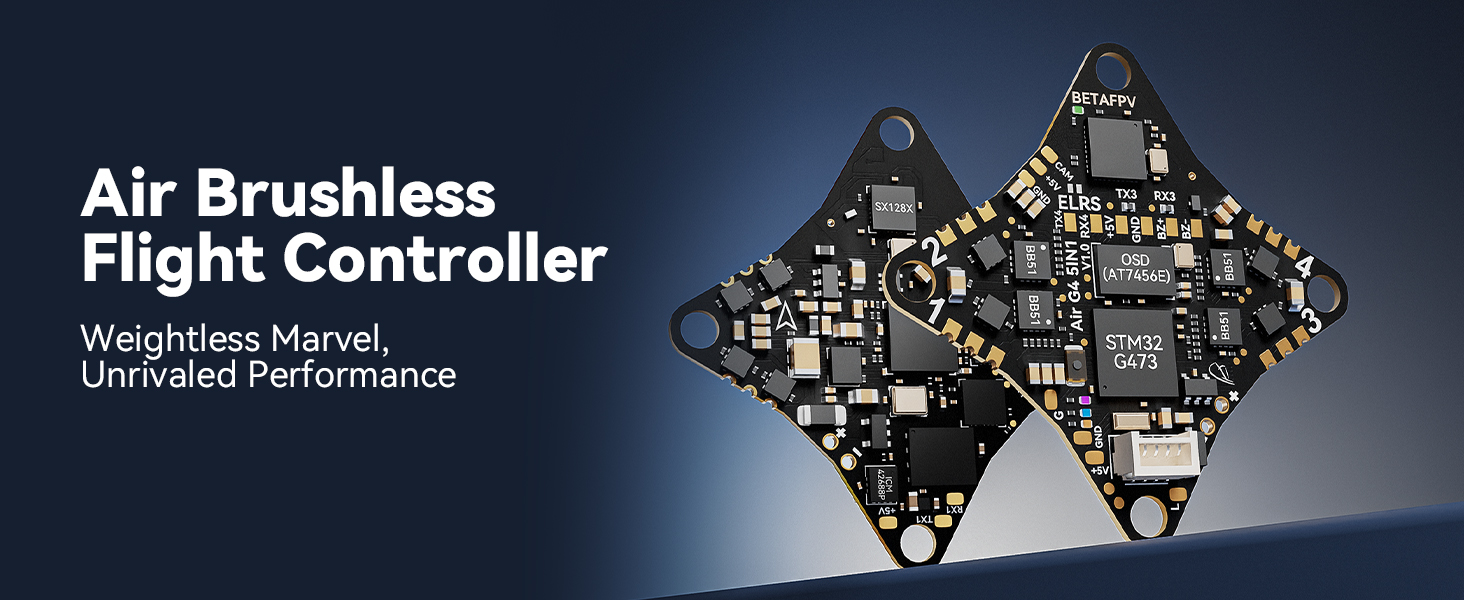
Image 3: Close-up of the Air Brushless Flight Controller, highlighting its integrated components.

Image 4: Detail of the 0702SE II 23000KV motors and HQ 31mm Ultralight propellers.

Image 5: The C03 FPV Micro Camera and the durable Air Canopy.
4. Sąranka
4.1. Akumuliatoriaus įdėjimas
The Air65 requires a 1S LiPo battery (not included). Carefully insert the battery into the designated slot on the quadcopter. Ensure the connector is securely attached.

Image 6: Illustration of how to properly install the 1S LiPo battery into the Air65 quadcopter.
4.2. Binding with Controller
The Air65 drone uses the ELRS protocol with V3 firmware. To bind the drone with your controller or TX module, ensure both devices are running the same protocol and firmware version. Refer to your controller's manual for specific binding procedures. If binding issues occur, recalibrate the drone and attempt to re-bind.
5. Naudojimo instrukcijos
5.1. Priešskrydinis patikrinimas
- Įsitikinkite, kad akumuliatorius yra visiškai įkrautas ir saugiai prijungtas.
- Verify propellers are correctly installed and free from damage.
- Confirm successful binding with your remote controller.
- Check the flight area for any obstacles or hazards.
5.2. Skrydžio aplinka
The Air65 is designed for both indoor and outdoor freestyle flying. For outdoor use, it is recommended to fly in conditions with minimal wind to maintain optimal control and performance.
5.3. VTX Power Adjustment
The onboard VTX allows power adjustment from 25mW to 400mW. Higher VTX power consumes more energy and generates more heat, which can reduce flight time. For daily indoor flight, it is recommended to use 25mW to 100mW to achieve better flight duration.
6. Priežiūra
6.1. Propelerio priežiūra
Regularly inspect propellers for any signs of damage (cracks, bends, chips). Damaged propellers can affect flight performance and stability. Replace them with new HQ 31mm Ultralight 3-blade propellers as needed.
6.2. Motor Inspection
If you experience issues with a motor or it stops working, first attempt to recalibrate the drone. If the problem persists, inspect the motor for any visible damage or debris. Consult BETAFPV support for further assistance if necessary.
6.3. Bendras valymas
Keep the drone clean from dust, dirt, and debris. Use a soft, dry cloth to wipe down the frame and components. Avoid using liquids directly on the electronics.
7. Problemų sprendimas
7.1. Privalomi klausimai
If the drone fails to bind with your controller, ensure both devices have the correct ELRS protocol and V3 firmware version. Try recalibrating the drone and then re-attempt the binding process.
7.2. Motor Malfunction
For any motor issues or if a motor is not working, recalibrate the drone first. If the problem persists, check for any physical obstructions or loose connections to the motor. Contact customer support if the issue cannot be resolved.
7.3. Short Flight Time
If you experience shorter than expected flight times, consider reducing the VTX power setting. Higher VTX power consumes more battery. Ensure your battery is fully charged and in good condition.
8. Specifikacijos
| Funkcija | Specifikacija |
|---|---|
| Prekės ženklas | BETAFPV |
| Modelio pavadinimas | Oras65 |
| Spalva | Baltas |
| Prekės svoris | 4.2 ounces (approx. 119g, though product description states 17.3g for drone only) |
| Gaminio matmenys | 4.5 colio ilgio x 4.5 colių pločio x 2.2 colio aukščio |
| Skrydžio kontrolierius | 5IN1 Air Brushless Flight Controller (G473 processor, ICM42688P gyroscope, integrated FC, ESC, OSD, RX, Onboard 5.8 25~400 VTX) |
| Varikliai | 0702SE II 23000KV bešepetėliniai varikliai |
| Propeleriai | HQ 31mm Ultralight 3-Blade Propellers |
| Fotoaparatas | C03 FPV Micro Camera (1.45g) |
| Vaizdo įrašymo raiška | 720p |
| Ryšio technologija | Radijo dažnis (ELRS V3) |
| Baterijos talpa | 260 milijonųamp Hours (typical for compatible batteries, not included) |
| Valdymo tipas | Nuotolinio valdymo pultas |
| Medžiaga | Plastikiniai |
9. Garantija ir palaikymas
For warranty information, technical support, or service inquiries, please visit the official BETAFPV websvetainėje arba susisiekite tiesiogiai su jų klientų aptarnavimo tarnyba. Išsaugokite pirkimo kvitą kaip pirkimo įrodymą.
You can visit the BETAFPV Store for more products and support: BETAFPV Store


