1. Įvadas
This manual provides essential instructions for the proper setup, operation, and maintenance of your OnePlus Nord N30 5G smartphone. Please read this guide thoroughly before using your device to ensure optimal performance and longevity.
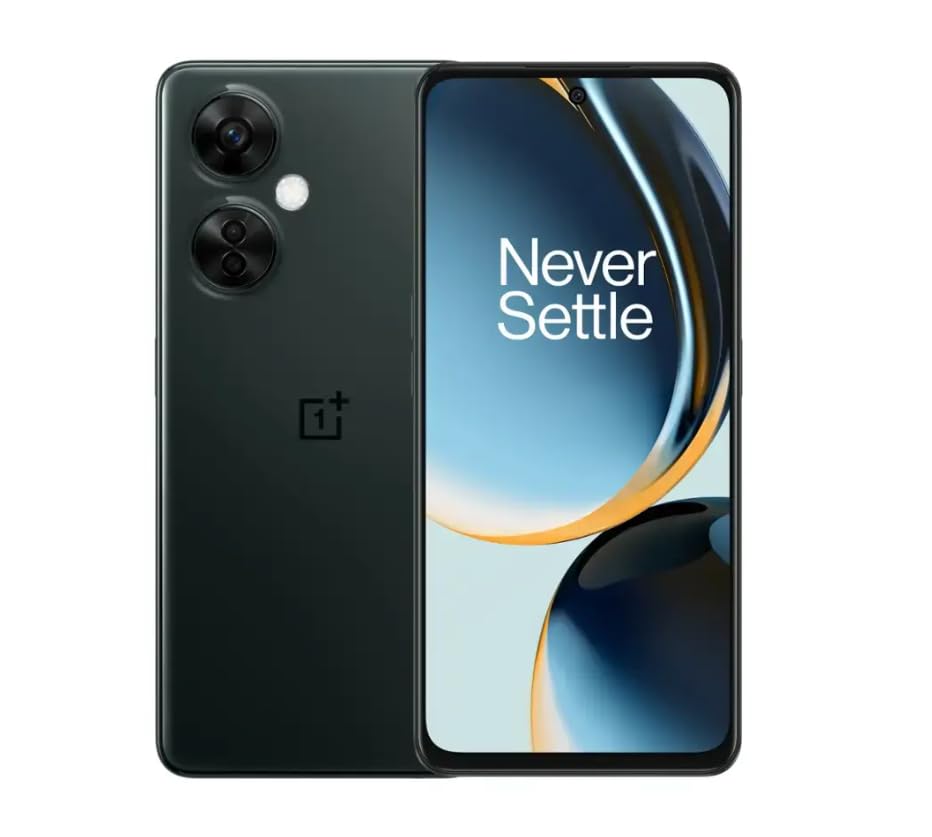
Image 1.1: OnePlus Nord N30 5G smartphone. This image displays the overall design of the device, highlighting its screen and camera module.
2. Kas yra dėžutėje
Patikrinkite, ar pakuotėje yra visi reikalingi daiktai:
- „OnePlus Nord N30 5G“ išmanusis telefonas
- Maitinimo adapteris
- USB kabelis
Pastaba: Priedai gali skirtis priklausomai nuo regiono.
3. Sąranka
3.1. SIM kortelės įdėjimas
- Suraskite SIM kortelės dėklą įrenginio šone.
- Insert the SIM ejector tool (not included, use a paperclip if necessary) into the small hole next to the tray to open it.
- Place your Nano-SIM card(s) into the tray with the gold contacts facing down. The device supports a single SIM card and a microSDXC card for expandable storage.
- Atsargiai stumkite dėklą atgal į angą, kol jis bus lygiai su telefono korpusu.
3.2. Pradinis įkrovimas ir įjungimas
Prieš pirmąjį naudojimą rekomenduojama visiškai įkrauti įrenginį.
- Connect the USB cable to the power adapter and then to the phone's USB-C port.
- Plug the power adapter into a wall outlet. The device supports 50W SUPERVOOC fast charging.
- Once sufficiently charged, press and hold the Power button (located on the side) until the OnePlus logo appears.
3.3. Pradinė įrenginio konfigūracija
Vykdykite ekrane pateikiamus nurodymus, kad užbaigtumėte pradinę sąranką:
- Pasirinkite norimą kalbą.
- Prisijunkite prie „Wi-Fi“ tinklo.
- Review ir sutikite su sąlygomis ir nuostatomis.
- Prisijunkite naudodami „Google“ paskyrą arba sukurkite naują.
- Set up security features such as fingerprint unlock or face unlock.
4. Naudojimo instrukcijos
4.1. Ekranas ir navigacija
The OnePlus Nord N30 5G features a 6.72-inch LCD display with a 120Hz refresh rate for smooth visuals. Navigate the OxygenOS interface using gestures or traditional navigation buttons.
- Braukite aukštyn: Pasiekite programėlių stalčių.
- Braukite žemyn: Access notifications and quick settings.
- Bakstelėkite: Pasirinkite elementus.
- Žiupsnelis: Priartinti arba nutolinti.
4.2. Kameros naudojimas
The device is equipped with a triple rear camera system and a front camera.
- Pagrindinė kamera: 108 MP, f/1.7 (wide) for high-resolution photos.
- Makrokamera: 2 MP, f/2.4 – stambaus plano nuotraukoms.
- Gylio kamera: 2 MP, f/2.4 for portrait mode effects.
- Priekinė kamera: 16 MP, f/2.4 for selfies and video calls.
Open the Camera app and select your desired mode (Photo, Video, Portrait, Macro, etc.) from the interface. Tap the shutter button to capture images or start/stop video recording.
4.3. Sandėliavimo valdymas
The phone comes with 128GB of internal storage. You can expand this up to 1TB using a microSDXC card inserted into the SIM tray.
- To check storage usage: Go to Nustatymai > Sandėliavimas.
- Norėdami judėti files to microSD: Use the File Valdytojo programa.
4.4. Ryšys
The device supports 5G cellular technology, Wi-Fi, and Bluetooth 5.1.
- 5G: Ensure your SIM card and plan support 5G for faster mobile data speeds.
- „Wi-Fi“: Prisijunkite prie belaidžių tinklų per Nustatymai > Wi-Fi.
- Bluetooth: Susiekite su belaidėmis ausinėmis ar kitais įrenginiais per Nustatymai > Bluetooth.
4.5. Apsaugos priemonės
Secure your device using the side-mounted fingerprint sensor or face unlock.
- To set up fingerprint unlock: Go to Nustatymai > Saugumas ir privatumas > Atrakinimas piršto atspaudu.
- To set up face unlock: Go to Nustatymai > Saugumas ir privatumas > Atrakinimas pagal veidą.
4.6. Garso įrašas
The device features dual stereo speakers for enhanced audio experience. It also includes a 3.5 mm audio jack for wired headphones.
5. Priežiūra
5.1. Akumuliatoriaus priežiūra
5000 mAh baterija užtikrina ilgesnį naudojimą. Norėdami pailginti baterijos veikimo laiką:
- Venkite ekstremalių temperatūrų.
- Use the provided 50W SUPERVOOC charger for optimal charging speed and battery health.
- Venkite dažnai visiškai iškrauti akumuliatorių.
5.2. Programinės įrangos atnaujinimai
Keep your OxygenOS (based on Android 13) updated to ensure optimal performance, security, and access to new features.
- Norėdami patikrinti, ar yra atnaujinimų: eikite į Nustatymai > Apie įrenginį > „OxygenOS“ versija.
5.3. Prietaiso valymas
Telefono ekraną ir korpusą valykite minkštu, nepūkuotu audiniu. Venkite naudoti stiprias chemines medžiagas ar abrazyvines medžiagas.
6. Problemų sprendimas
Šiame skyriuje aptariamos dažniausiai pasitaikančios problemos, su kuriomis galite susidurti.
6.1. Įrenginys neįsijungia
- Įsitikinkite, kad akumuliatorius įkrautas. Prijunkite įrenginį prie įkroviklio bent 15 minučių.
- Paspauskite ir palaikykite maitinimo mygtuką 10–15 sekundžių, kad priverstumėte paleisti iš naujo.
6.2. Tinklo ryšio problemos
- Patikrinkite, ar SIM kortelė tinkamai įdėta.
- Patikrinkite, ar įjungti mobilieji duomenys Nustatymai > Mobilusis tinklas.
- Iš naujo paleiskite įrenginį.
- Contact your carrier (T-Mobile) to confirm service availability in your area.
6.3. Programėlių strigimas arba užstrigimas
- Uždarykite ir vėl atidarykite programą.
- Išvalykite programėlės talpyklą: Nustatymai > Programėlės > [Programėlės pavadinimas] > Saugyklos naudojimas > Išvalyti talpyklą.
- Ensure the app and OxygenOS are updated to the latest versions.
6.4. Greitai išsikrauna baterija
- Sumažinkite ekrano ryškumą.
- Išjunkite nenaudojamas funkcijas, tokias kaip „Bluetooth“, GPS arba „Wi-Fi“, kai jų nereikia.
- Patikrinkite akumuliatoriaus naudojimą Nustatymai > Baterija kad būtų galima atpažinti daug energijos reikalaujančias programas.
- Ensure background app refresh is limited for non-essential apps.
7. Specifikacijos
| Modelio pavadinimas | OnePlus Nord N30 5G |
| Operacinė sistema | „OxygenOS“ (pagrįsta „Android 13“) |
| Procesorius | „Qualcomm Snapdragon 695“ aštuonių branduolių procesorius |
| RAM | 8 GB |
| Vidinė saugykla | 128GB (Expandable up to 1TB via microSDXC) |
| Ekranas | 6.72 inches LCD, 2400 x 1080 resolution, 120Hz Refresh Rate |
| Galinė kamera | 108 MP (plačiakampis), 2 MP (makro), 2 MP (gylio) |
| Priekinė kamera | 16 MP |
| Baterijos talpa | 5000 mAh |
| Įkrovimas | 50W SUPERVOOC Fast Charging (approx. 47 minutes for full charge) |
| Ryšys | 5G, Wi-Fi, Bluetooth 5.1, USB-C |
| Garso lizdas | 3.5 mm |
| Matmenys | 6 x 4 x 4 colio |
| Svoris | 10.8 uncijos |
| Ypatingos savybės | Dual SIM, Side-mounted Fingerprint Sensor, Face Unlock, Dual Stereo Speakers |
8. Renewed Product Information
This OnePlus Nord N30 5G is an Amazon Renewed product. Renewed products are pre-owned and professionally inspected, tested, and cleaned to work like new. They come with generic or original accessories and packaging.
8.1. Atnaujintos „Amazon“ sąlygos
Amazon Renewed products are categorized based on their cosmetic condition and battery life. All renewed products are fully functional and have a battery life greater than 80% of a new equivalent.

Image 8.1: Amazon Renewed conditions overview. This image illustrates the criteria for Excellent, Good, and Acceptable cosmetic conditions for renewed products.

8.2 paveikslėlis: Vizualinis pavyzdysamples of renewed product cosmetic conditions. This image provides visual examples of what 'Excellent', 'Good', and 'Acceptable' cosmetic conditions might look like on a phone's back.

Image 8.3: Customer feedback on Amazon Renewed. This image presents testimonials from customers regarding their positive experiences with Amazon Renewed products.
9. Garantija ir palaikymas
9.1. Informacija apie garantiją
As an Amazon Renewed product, this device is backed by the Amazon Renewed Guarantee. Please refer to the Amazon Renewed program terms and conditions for specific warranty details and coverage. This typically includes a limited warranty for a specified period from the date of purchase, covering defects in materials and workmanship.
9.2. Pagalba klientams
For technical assistance, troubleshooting, or warranty claims, please contact Amazon Customer Service or refer to the official OnePlus support websvetainėje, kur rasite papildomų išteklių ir DUK.
- „Amazon“ klientų aptarnavimas: Apsilankykite amazon.com/susisiekite-su-mus
- „OnePlus“ palaikymas: Visit the official OnePlus support websvetainė jūsų regionui.


