Įvadas
Welcome to your JLab Go Lux ANC Wireless Headphones. This manual provides detailed instructions to help you get the most out of your new headphones, covering setup, operation, maintenance, and troubleshooting.
Kas yra dėžutėje
- JLab Go Lux ANC Wireless Headphones
- USB-C įkrovimo laidas

Image: JLab Go Lux ANC Headphones and included USB-C charging cable.
Produktas baigtasview
Familiarize yourself with the key components and controls of your JLab Go Lux ANC Wireless Headphones.

Vaizdas: Stambus planas view of the right earcup, highlighting the power button, volume controls, and ANC/Be Aware mode button.
Pagrindinės funkcijos:
- Hibridinis aktyvus triukšmo slopinimas (ANC): Reduces external distractions by up to 30 dB.
- Būkite budrūs: Leidžia girdėti aplinką klausantis garso.
- Debesų putų komfortas: Ergonomically shaped Form-Fit Earcups with 1-inch Cloud Foam cushions and adjustable hinges for extended comfort.
- JLab programėlės pritaikymas: Personalize ANC/Be Aware settings, touch controls, and sound preferences.
- Krištolo skaidrumo skambučiai: Equipped with noise-canceling microphones for clear communication.
- „Bluetooth“ daugiataškis ryšys: Prijunkite prie dviejų įrenginių vienu metu.
- Belaidžio bendrinimo režimas: Share audio wirelessly between two Lux headphones.
- „Google Fast Pair“ ir „Microsoft Swift Pair“: Effortless pairing with Android and Windows devices.
- „Google“ raskite mano įrenginį: Suraskite ausines, jei jų neradote.
- Sulankstomas dizainas: Rotating earcups for compact storage and portability.
Sąranka
1. Pradinis įkrovimas
Before first use, fully charge your headphones using the provided USB-C cable. The LED indicator will show charging status.
2. Maitinimo įjungimas/išjungimas
- Maitinimas: Paspauskite ir palaikykite maitinimo mygtuką, kol užsidegs LED indikatorius.
- Išjungti: Paspauskite ir palaikykite maitinimo mygtuką, kol užges LED indikatorius.
3. „Bluetooth“ poravimas
- Turn on your JLab Go Lux ANC headphones.
- The headphones will automatically enter pairing mode (LED will flash blue/red).
- On your device (smartphone, laptop, etc.), open Bluetooth settings and select "JLab Go Lux ANC" from the list of available devices.
- Prijungus, šviesos diodas ims šviesti mėlynai.
„Google Fast Pair“ ir „Microsoft Swift Pair“: For supported Android and Windows 10/11 devices, simply turn on your headphones near the device, and a pop-up notification will prompt you to connect with a single click.
4. JLab programėlės pritaikymas
Download the JLab App from the App Store or Google Play Store to unlock full customization options for your headphones.
- Tinkinkite ANC / Būkite budrūs nustatymus.
- Koreguokite jutiklinius valdiklius.
- Fine-tune sound with the equalizer (JLab Signature, Balance, Bass Boost presets available).
- Enable Safe Hearing with volume limits.
- Gaukite programinės įrangos atnaujinimus.

Image: The JLab App interface on a smartphone, demonstrating sound and noise control customization options.
Naudojimo instrukcijos
1. Active Noise Cancelling (ANC) & Be Aware Mode
Toggle between ANC, Be Aware, and ANC Off modes using the dedicated button on the earcup.
- Hibridinis ANC: Eliminates external distractions for an immersive audio experience.
- Būkite budrūs: Praleidžia aplinkos garsus, todėl jaučiate aplinką.

Image: A person wearing the headphones, demonstrating the use of ANC or Be Aware mode in a public environment.
2. Skambinimo funkcijos
The built-in noise-canceling microphones ensure clear calls.
- Atsiliepti / Baigti skambutį: Vieną kartą paspauskite daugiafunkcį mygtuką.
- Atmesti skambutį: Paspauskite ir palaikykite daugiafunkcį mygtuką.
- Suaktyvinti „Voice Assistant“: Dukart paspauskite daugiafunkcį mygtuką.

Image: A person engaged in a phone call while wearing JLab Go Lux ANC headphones, emphasizing the clear call feature.
3. Muzikos atkūrimas
- Leisti / pristabdyti: Vieną kartą paspauskite daugiafunkcį mygtuką.
- Pagarsink: Trumpai paspauskite mygtuką „+“.
- Patildyti: Trumpai paspauskite mygtuką „-“.
- Kitas takelis: Ilgai paspauskite mygtuką „+“.
- Ankstesnis takelis: Ilgai paspauskite mygtuką „-“.
4. „Bluetooth“ daugiataškis ryšys
Connect your headphones to two devices simultaneously. For example, connect to your laptop for work calls and your phone for music. The headphones will intelligently switch between devices.
5. Wireless Share Mode
Share your audio with another pair of JLab Lux headphones. Refer to the JLab App or JLab support for detailed instructions on activating Wireless Share Mode.
6. Google Find My Device
If you misplace your headphones, use the Google Find My Device feature to locate them. Ensure this feature is enabled and configured on your connected Android device.

Image: A person using the Google Find My Device app on a smartphone to locate their JLab headphones.
Patogus ir tinkamas
The JLab Go Lux ANC headphones are designed for comfort during extended use.
- Form-Fit Earcups: Ergonomically shaped to the natural outline of the ear.
- Cloud Foam Cushions: 1-inch thick cushions provide plush comfort.
- Reguliuojami vyriai: Customize the fit for various head sizes and shapes.

Image: A person wearing JLab Go Lux ANC headphones, showcasing the comfortable Cloud Foam earcups.
Įkrovimas ir akumuliatoriaus veikimo laikas
Your JLab Go Lux ANC headphones offer extended battery life.
- Baterijos veikimo laikas: Up to 70+ hours of playtime (40+ hours with ANC on).
- Įkrovimas: Use the included USB-C cable to charge. A full charge typically takes a few hours.
- LED indikatorius: The LED light on the earcup indicates charging status and battery level.
Priežiūra
- Clean headphones with a soft, damp audinys. Venkite stiprių cheminių medžiagų.
- Kai nenaudojate, laikykite vėsioje, sausoje vietoje.
- Saugokite nuo ekstremalių temperatūrų ar drėgmės.
- The headphones are not water resistant. Avoid contact with liquids.
- The foldable design with rotating earcups allows for compact storage.
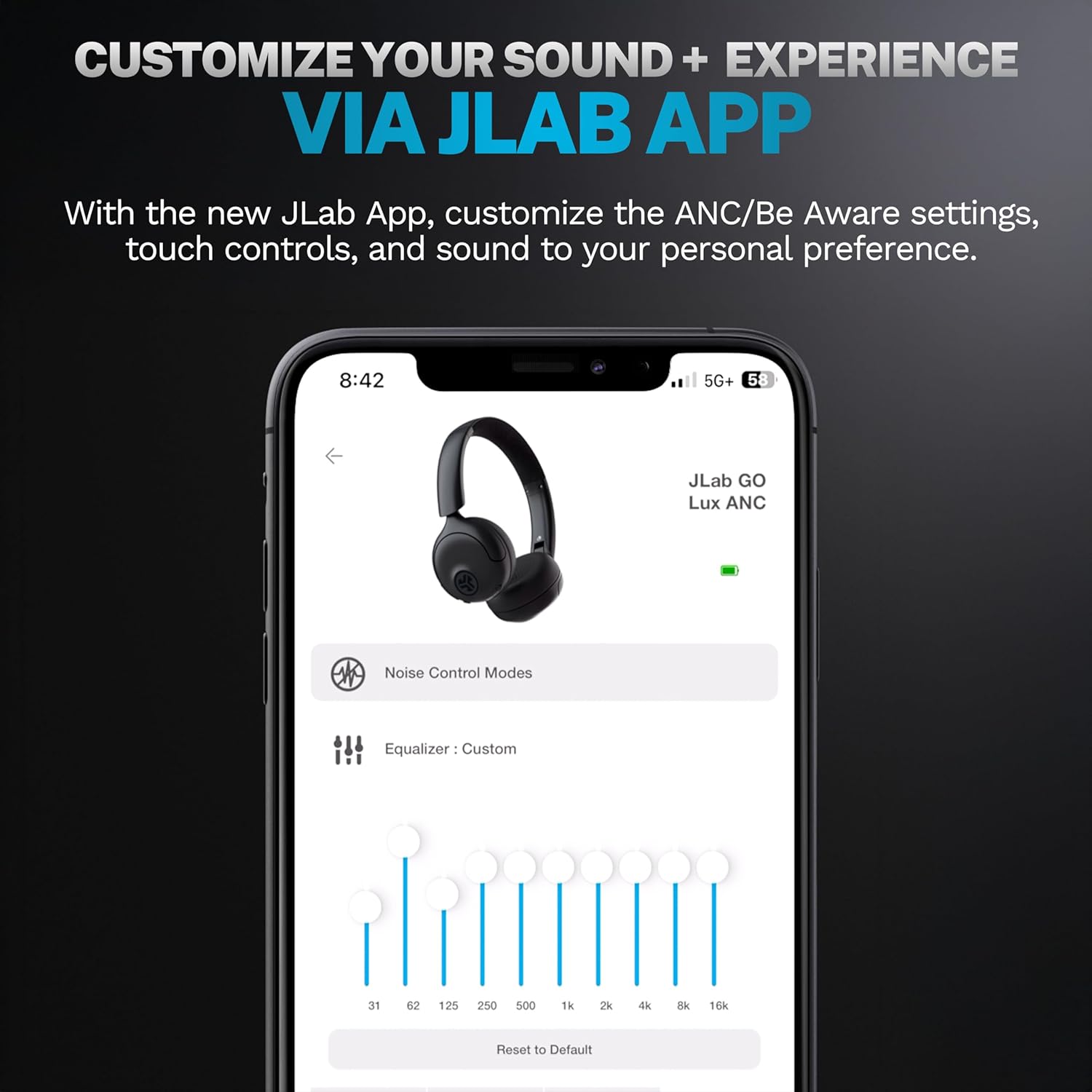
Image: JLab Go Lux ANC headphones in their folded position, demonstrating portability.
Trikčių šalinimas
| Problema | Sprendimas |
|---|---|
| Ausinės neįsijungia | Ensure headphones are charged. Press and hold the power button for 3-5 seconds. |
| Nepavyksta susieti su įrenginiu | Make sure Bluetooth is enabled on your device. Ensure headphones are in pairing mode (flashing blue/red LED). Forget the device in your Bluetooth settings and re-pair. |
| Nėra garso ar mažas garsumas | Check volume levels on both headphones and your connected device. Ensure headphones are properly connected. |
| ANC neveikia efektyviai | Įsitikinkite, kad įjungtas ANC režimas. Pritaikykite ausines taip, kad jos gerai priglustų prie ausų. |
| Skambučių kokybės problemos | Ensure microphones are not obstructed. Check your device's connection and signal strength. |
Specifikacijos
| Funkcija | Detalė |
|---|---|
| Modelio pavadinimas | HBGOLUXANCMVE20WEB |
| Ryšio technologija | Belaidis ryšys („Bluetooth“) |
| Bluetooth versija | 5.0 |
| Ausinės forma | Ant ausies |
| Triukšmo kontrolės funkcijos | Hybrid Active Noise Canceling, Be Aware Mode |
| Garso tvarkyklės tipas | Dinaminis garsiakalbis (40 mm) |
| Dažnio atsakas | 20 Hz–20 kHz |
| Jautrumas | 104 dB |
| Baterijos veikimo laikas | Up to 70+ hours (40+ hours with ANC) |
| Kontrolės metodas | Palieskite, programėlių valdymas |
| Prekės svoris | 10.6 uncijos (0.3 kilogramo) |
| Gaminio matmenys | 2.95 x 6.1 x 7.48 colio |
| Atsparumo vandeniui lygis | Neatsparus vandeniui |
Garantija ir palaikymas
Your JLab Go Lux ANC Wireless Headphones come with a JLab 2 Year Warranty.
For detailed warranty information, product support, or to contact customer service, please visit the official JLab websvetainėje arba žr. prie gaminio pridėtą garantinę kortelę.
Taip pat galite apsilankyti JLab parduotuvė „Amazon“ platformoje daugiau informacijos ir priedų.


