Įvadas
This manual provides essential information for the proper setup, operation, and maintenance of your CNAPXAIA Electronic Drum Set. Please read this manual thoroughly before using the product to ensure optimal performance and longevity.
Pakuotės turinys
Patikrinkite, ar pakuotėje yra visi reikalingi daiktai:
- Electronic Drum Kit (main unit with 9 pads)
- Drumsticks (1 pair)
- Foot Pedals (2 units)
- Vartotojo vadovas (šis dokumentas)
Produkto savybės
The CNAPXAIA Electronic Drum Set offers the following key features:
- 9 Professional Drum Pads: Includes various drum and cymbal sounds for a comprehensive drumming experience.
- Integruotas stereofoninis garsiakalbis: Delivers clear audio with adjustable volume levels (0 to 10).
- Ausinių lizdas: Allows for private practice without disturbing others (3.5mm).
- Portable and Roll-Up Design: Made with flexible silicone, making it lightweight and easy to transport and store.
- Universalus naudojimas: Suitable for beginners and experienced drummers, and an engaging musical toy for children aged 3 and above.
Sąranka
- Išpakuoti: Atsargiai išimkite visus komponentus iš pakuotės.
- Unroll the Drum Pad: Place the electronic drum pad on a flat, stable surface. The silicone material allows it to unroll easily.
- Connect Foot Pedals: Locate the pedal input jacks on the drum pad unit. Insert the cables from the two foot pedals into their respective jacks. These pedals control the bass drum and hi-hat sounds.
- Maitinimas: Connect the drum set to a power source using the provided cable. The unit is powered by an internal Lithium Polymer battery (included). Ensure the battery is charged for optimal performance.
- Reguliuoti garsumą: Use the volume controls on the main unit to set a comfortable listening level.
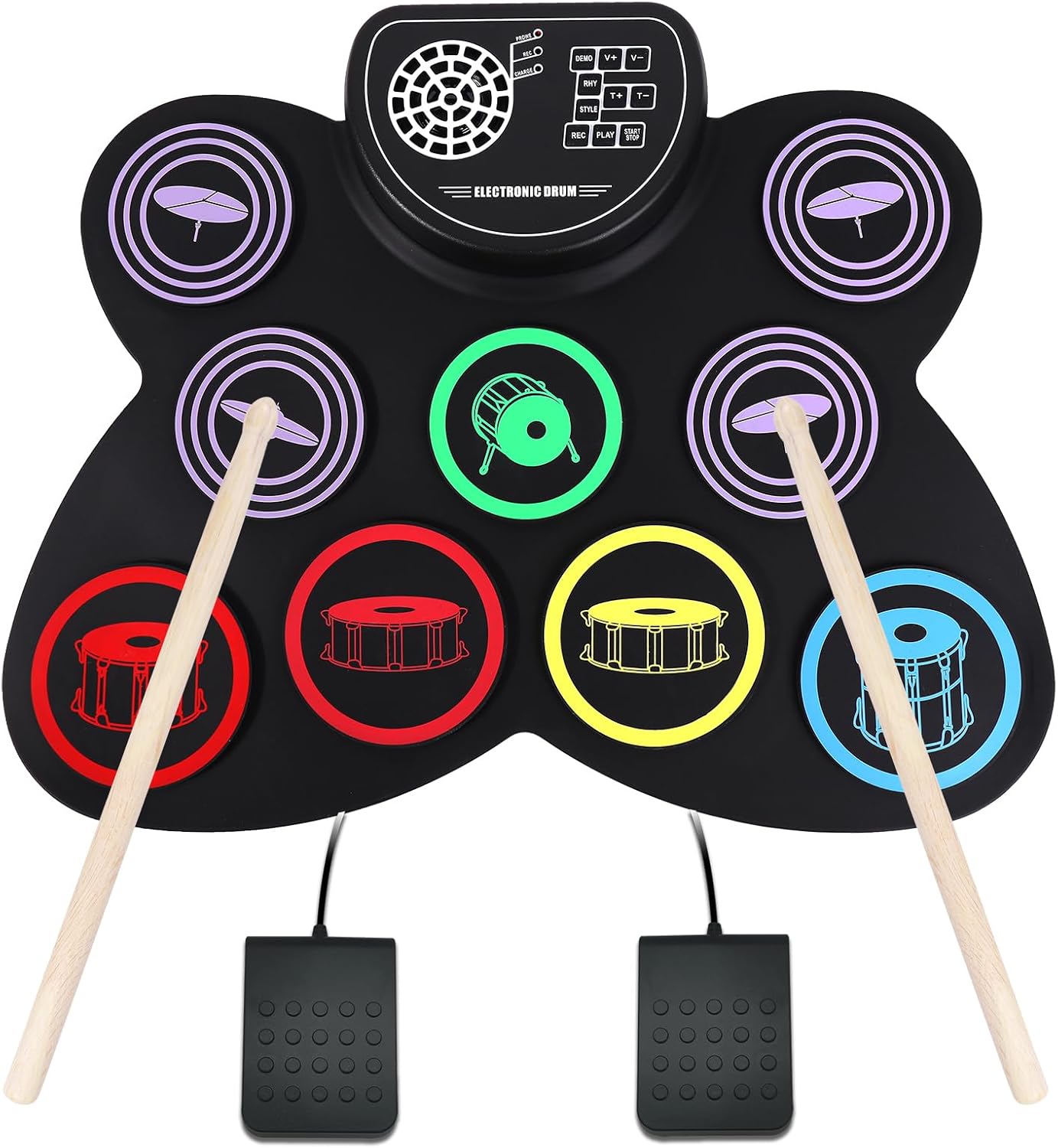
Image: The CNAPXAIA Electronic Drum Set, showing the 9 drum pads, central control panel, drumsticks, and foot pedals. The pads are color-coded for different drum sounds, and the control panel features buttons for various functions.
Naudojimo instrukcijos
Būgnų trinkelės
The drum set features 9 sensitive pads that respond to touch from the drumsticks. Each pad is assigned a specific drum or cymbal sound. Experiment with different pads to discover the full range of sounds.
Valdymo skydelio funkcijos
The central control panel provides various functions to enhance your drumming experience:
- DEMO: Plays pre-recorded demo songs. Press to cycle through available demos.
- V+ / V-: Adjusts the main volume of the drum set. V+ increases volume, V- decreases volume.
- RHY: Selects different rhythm patterns. Press to cycle through available rhythms.
- T+ / T-: Adjusts the tempo (speed) of the rhythm patterns. T+ increases tempo, T- decreases tempo.
- STILIUS: Changes the drum kit sound style (e.g., rock, pop, jazz). Press to cycle through different styles.
- REC: Initiates recording mode. Press once to start recording your drumming.
- ŽAISTI: Plays back your recorded drumming.
- START/STOP: Starts or stops the selected demo song or rhythm pattern.
Ausinių naudojimas
To practice silently, connect standard 3.5mm headphones to the headphone jack located on the control panel. The internal speaker will automatically mute when headphones are connected.
Priežiūra
- Valymas: Use a soft, dry cloth to wipe down the drum pad and control panel. Do not use abrasive cleaners or solvents.
- Saugykla: When not in use, roll up the drum pad gently and store it in a cool, dry place away from direct sunlight and extreme temperatures.
- Akumuliatoriaus priežiūra: If the unit will not be used for an extended period, ensure the battery is fully charged before storage. Recharge periodically to maintain battery health.
- Venkite pradūrimų: The silicone material is durable but can be damaged by sharp objects. Handle with care.
Trikčių šalinimas
| Problema | Galima priežastis | Sprendimas |
|---|---|---|
| Iš garsiakalbio nėra garso. | Garsumas per mažas arba nutildytas. Prijungtos ausinės. | Increase volume using V+ button. Disconnect headphones. |
| Įrenginys neįsijungia. | Battery is depleted. Power cable not connected properly. | Charge the battery. Ensure power cable is securely connected. |
| Neveikia kojų pedalai. | Pedalai netinkamai prijungti. | Check that pedal cables are fully inserted into their respective jacks. |
| Pagalvėlės nereaguoja. | Unit may be in an incorrect mode or power issue. | Įsitikinkite, kad įrenginys įjungtas. Pabandykite paleisti įrenginį iš naujo. |
Specifikacijos
| Funkcija | Detalė |
|---|---|
| Modelio pavadinimas | Elektroninis būgnų rinkinys |
| Modelio numeris | CNKD001 |
| Prekės ženklas | CNPXAIA |
| Trinkelių skaičius | 9 |
| Korpuso Medžiaga | Silikonas |
| Viršutinė medžiaga | Plastikiniai |
| Matmenys (I x P x A) | 15.75 x 12.2 x 1.18 colio |
| Prekės svoris | 1.76 svaro (800 gramų) |
| Baterijos tipas | 1 ličio polimeras (pridedamas) |
| ttage | 5 volto (DC) |
| Vattage | 2 vatų |
| Jungties tipas | Pagalbinis (3.5 mm ausinių lizdas) |
Garantija ir palaikymas
Specific warranty details for the CNAPXAIA Electronic Drum Set are not provided in this manual. For information regarding warranty coverage, technical support, or service inquiries, please refer to the manufacturer's official websvetainėje arba susisiekite tiesiogiai su jų klientų aptarnavimo tarnyba. Išsaugokite pirkimo kvitą kaip pirkimo įrodymą bet kokiems garantiniams prašymams.