1. Produktas baigtasview
The MOVE SPEED 145W Laptop Power Bank is a high-capacity portable charging solution designed for a wide range of electronic devices, including laptops, smartphones, and tablets. Featuring PD 3.1 fast charging technology and a 25,000mAh capacity, it ensures your devices remain powered during travel, work, or outdoor activities. The integrated digital display provides real-time charging insights, enhancing user convenience.
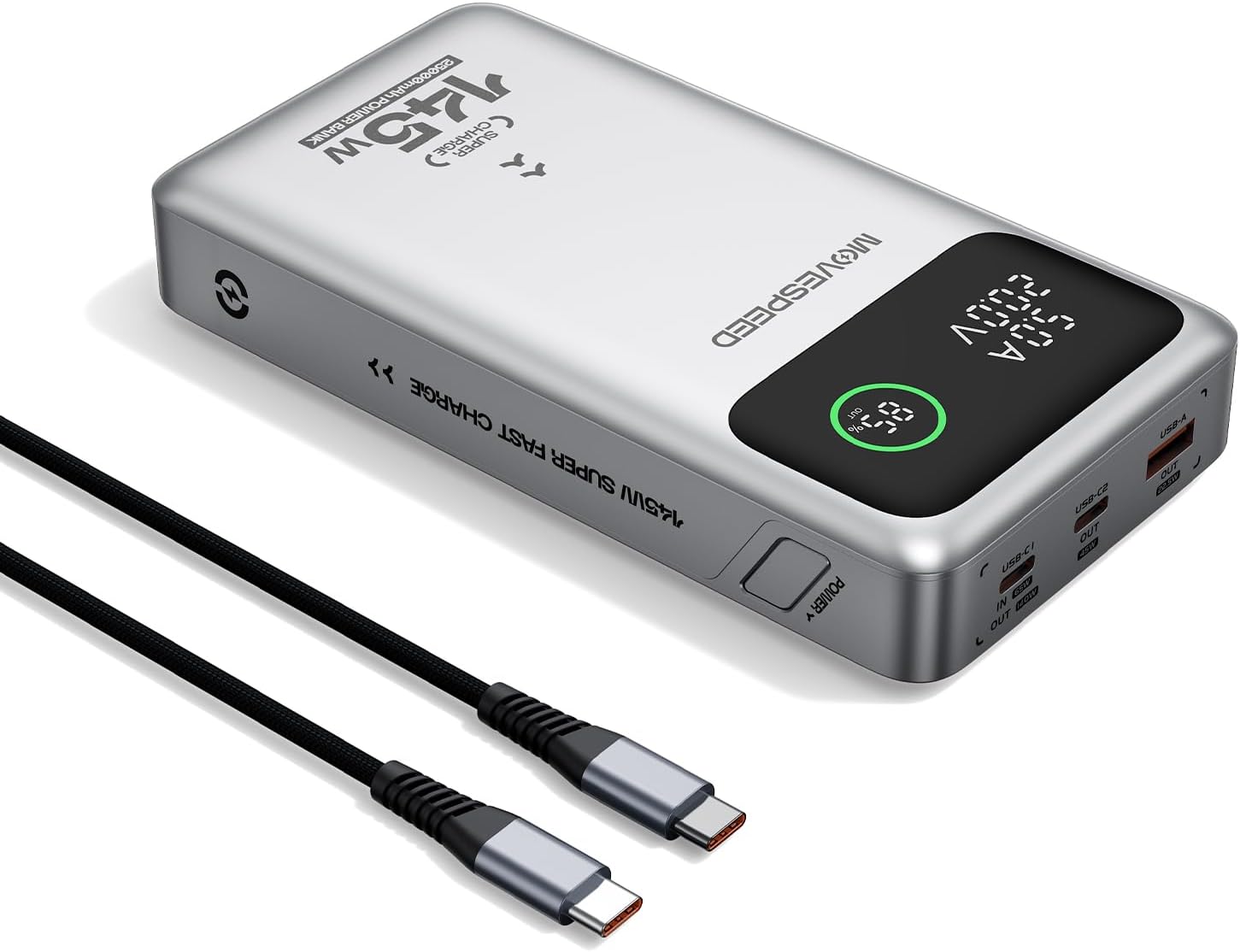
Figure 1.1: MOVE SPEED 145W Laptop Power Bank and 240W Type-C Cable.
2. Saugos informacija
Svarbios saugos priemonės:
- Nelaikykite išorinės baterijos ekstremaliose temperatūrose, tiesioginiuose saulės spinduliuose ar ugnies vietoje.
- Venkite numesti, išardyti ar bandyti taisyti įrenginį patys.
- Laikyti atokiau nuo vandens ir didelės drėgmės.
- Naudojimo ir įkrovimo metu užtikrinkite tinkamą vėdinimą.
- This power bank is flight-approved (25000mAh/92.5Wh) and meets FAA and TSA carry-on regulations.
- The device incorporates 9-layer protection against overcharging, overheating, and short circuits.

Figure 2.1: The power bank is designed to be air-travel friendly.

Figure 2.2: Built-in NTC Temperature Sensor and comprehensive protection features.
3. Pakuotės turinys
Patikrinkite, ar pakuotėje yra visi reikalingi daiktai:
- MOVE SPEED 145W Laptop Power Bank x 1
- 240W 3.28Ft Type-C Cable x 1
- Vartotojo vadovas x 1

3.1 pav.: Gaminio pakuotėje esantys elementai.
4. Produkto ypatybės
- 140W Ultra-Fast Single-Port Charging: Supports PD 3.1, capable of charging a 16-inch MacBook Pro to 56% in approximately 30 minutes.
- 65W Ultra-Fast Recharging: Fully recharges the power bank in about 2 hours using a compatible high-wattage įkroviklis.
- Didžiulė 25,000 XNUMX mAh talpa: Provides multiple charges for various devices (e.g., 4 full charges for iPhone 16, 3 for Galaxy S24, 2 for iPad 11).
- Triple-Port Output:
- USB-C1 (IN/OUT): Up to 140W output, 65W input.
- USB-C2 (OUT): Up to 45W output.
- USB-A (OUT): Up to 22.5W output.

Figure 4.1: Single port output capabilities.

Figure 4.2: Two-port simultaneous output capabilities.

Figure 4.3: Three-port simultaneous output capabilities.
- Smart Dynamic Charging: Optimizes power distribution up to 145W combined output when multiple USB-C ports are active.
- Išmanusis LED ekranas: Shows precise battery percentage, charging status (INPUT/OUTPUT), and real-time voltage and current for each active port.
- Pereinantis įkrovimas: Allows simultaneous charging of devices while the power bank itself is being recharged.

Figure 4.4: Key features of the MOVE SPEED 145W Power Bank.

Figure 4.5: Fast charging capability for laptops.

Figure 4.6: Extended power supply for multiple devices.

Figure 4.7: Simultaneous charging of up to three devices.

Figure 4.8: Rapid recharging of the power bank.

Figure 4.9: The smart LED display provides comprehensive charging information.

Figure 4.10: Pass-through charging capability for convenience.
5. Sąranka
Prieš pirmą kartą naudojant, rekomenduojama visiškai įkrauti išorinę bateriją.
- Connect the included 240W Type-C cable to the USB-C1 port (IN/OUT) on the power bank.
- Connect the other end of the cable to a compatible USB-C wall charger (65W or higher recommended for optimal charging speed).
- The digital display will show "IN" and the battery percentage padidėjimasasing, indicating that the power bank is charging.
- Kai ekrane rodoma 100 %, išorinė baterija yra visiškai įkrauta ir paruošta naudoti.
6. Naudojimo instrukcijos
6.1 Įkrovimo įrenginiai
Norėdami įkrauti elektroninius prietaisus:
- Connect your device's charging cable to the appropriate output port on the power bank (USB-C1, USB-C2, or USB-A).
- Prijunkite kitą kabelio galą prie savo prietaiso.
- The digital display will show "OUT" and the real-time voltage and current, indicating that your device is charging.
- Išorinė baterija automatiškai aptiks prijungtą įrenginį ir užtikrins optimalų įkrovimo greitį.
Video 6.1: Demonstration of the MOVE SPEED power bank charging a laptop. This video highlights the product's ability to provide power to larger devices.
6.2 vaizdo įrašas: Viršview of the MOVE SPEED laptop power bank's features and usage. This video provides a general demonstration of the product.
Video 6.3: Demonstration of the MOVESPEED portable laptop charger and its 145W power bank capabilities. This video showcases the power bank in action with various devices.
6.2 Išorinės baterijos įkrovimas
Norėdami įkrauti išorinę bateriją:
- Connect the included 240W Type-C cable to the USB-C1 port (IN/OUT) on the power bank.
- Connect the other end of the cable to a power source, such as a wall adapter or a computer's USB-C port.
- The digital display will indicate "IN" and the charging progress.
Note: For optimal recharging speed, use a power adapter that supports 65W Power Delivery (PD) or higher.
7. Specifikacijos
| Funkcija | Detalė |
|---|---|
| Modelio numeris | YSPB-M25pro-US |
| Baterijos talpa | 25,000 mAh / 92.5 Wh |
| USB-C1 įvestis | 65W maks |
| USB-C1 išvestis | 140W Max (PD 3.1) |
| USB-C2 išvestis | 45W maks |
| USB-A išvestis | 22.5W maks |
| Bendra produkcija | 145W Max (Dynamic Distribution) |
| Matmenys | 8.19 x 4.49 x 1.56 colio |
| Svoris | 1.41 svaro |
| Komplekte Kabelis | 240W 3.28Ft Type-C Cable |
| Saugos ypatybės | 9-layer protection (overcharging, overheating, short circuits, etc.), UN38.3 certified |
| Skrydis patvirtintas | Yes (under 100Wh limit) |
8. Priežiūra
- Išorinę bateriją valykite minkštu, sausu skudurėliu. Nenaudokite stiprių cheminių medžiagų ar abrazyvinių medžiagų.
- Laikykite išorinę bateriją vėsioje, sausoje vietoje, toliau nuo tiesioginių saulės spindulių ir ekstremalių temperatūrų.
- Jei ilgesnį laiką nenaudosite išorinės baterijos, įkraukite ją kas 3–6 mėnesius, kad palaikytumėte baterijos veikimo laiką.
- Saugokite prievadus nuo dulkių ar šiukšlių.
9. Problemų sprendimas
Dažnos problemos ir sprendimai:
- Nesikrauna išorinė baterija:
- Ensure the charging cable is securely connected to both the power bank (USB-C1 port) and the power adapter.
- Patikrinkite, ar sieninis adapteris veikia tinkamai ir tiekia pakankamai galios (rekomenduojama 65 W).
- Išbandykite kitą įkrovimo laidą arba maitinimo adapterį.
- Įrenginys neįkraunamas iš išorinės baterijos:
- Patikrinkite, ar maitinimo blokas yra pakankamai įkrautas.
- Įsitikinkite, kad įkrovimo laidas yra tvirtai prijungtas tiek prie išorinės baterijos, tiek prie jūsų įrenginio.
- Išbandykite kitą išorinės baterijos išvesties prievadą.
- Patikrinkite, ar jūsų įrenginio įkrovimo laidas nepažeistas.
- Lėtas įkrovimas:
- Ensure you are using the included 240W Type-C cable or another high-quality cable that supports fast charging.
- For recharging the power bank, use a 65W or higher PD-compatible wall adapter.
- When charging multiple devices, the total output power is dynamically distributed, which may result in slower charging for individual devices compared to single-port charging.
- Skaitmeninis ekranas neveikia:
- Įsitikinkite, kad išorinė baterija yra pakankamai įkrauta.
- Jei problema išlieka, susisiekite su klientų aptarnavimo tarnyba.
10. Garantija ir palaikymas
MOVE SPEED offers a 36-month protection plan for this product. If you encounter any issues or have questions regarding your MOVE SPEED 145W Laptop Power Bank, please contact our customer support team for assistance.
For further support, visit the official MOVE SPEED store on Amazon: MOVE SPEED Store


