1. Įvadas
This user manual provides comprehensive instructions for the NiPoGi Hyper H1 Mini PC. Please read this manual thoroughly before operating the device to ensure proper usage and to maximize its performance and lifespan. Keep this manual for future reference.
2. Saugos informacija
- Naudokite tik su prietaisu pateiktą maitinimo adapterį.
- Saugokite įrenginį nuo vandens, drėgmės ar ekstremalių temperatūrų.
- Nestatykite prietaiso šalia šilumos šaltinių arba tiesioginiuose saulės spinduliuose.
- Užtikrinkite tinkamą vėdinimą, kad išvengtumėte perkaitimo. Neužblokuokite ventiliacijos angų.
- Do not attempt to disassemble or repair the device yourself. Contact technical support for assistance.
- Saugokite įrenginį nuo stiprių magnetinių laukų.
3. Pakuotės turinys
Patikrinkite, ar pakuotėje yra visi reikalingi daiktai:
- NiPoGi Hyper H1 Mini PC
- Maitinimo adapteris
- HDMI kabelis
- VESA tvirtinimo laikiklis ir varžtai
- Vartotojo vadovas
4. Produktas baigtasview
The NiPoGi Hyper H1 is a compact Mini PC designed for various applications, from office work to multimedia entertainment. It features an AMD Ryzen 7 6800H processor, DDR5 memory, and M.2 NVMe SSD storage.
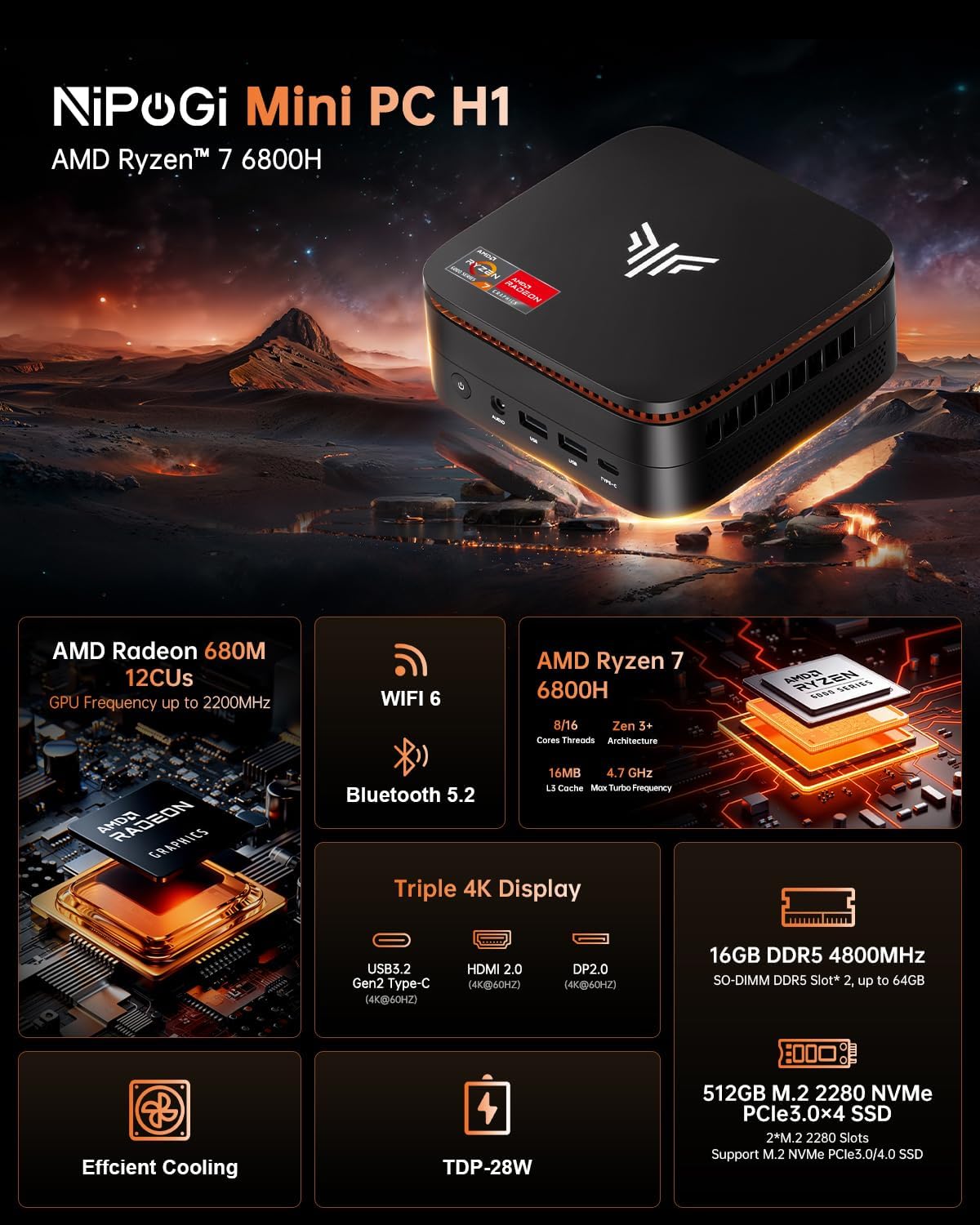
Image 1: NiPoGi Hyper H1 Mini PC with an overview of its main features including AMD Radeon 680M, WiFi 6, Bluetooth 5.2, AMD Ryzen 7 6800H, Triple 4K Display support, DDR5 memory, M.2 NVMe SSD, Efficient Cooling, and TDP-28W.
4.1. Interfaces and Ports
The Mini PC is equipped with multiple ports for connectivity. Familiarize yourself with the front and back panel interfaces:

2 pav.: Išsamus view of the front and back ports of the NiPoGi Hyper H1 Mini PC. The front includes a power button, 3.5mm audio jack, two USB 3.2 Gen2 Type-A ports, and one USB 3.2 Gen2 Type-C port. The back features four USB 3.2 Gen1 Type-A ports, a 2.5Gbps LAN port, a DP2.0 port, an HDMI 2.0 port, and a DC IN port.
Priekinis skydelis:
- Maitinimo mygtukas: Norėdami įjungti/išjungti įrenginį.
- 3.5 mm garso lizdas: Ausinėms ar garsiakalbiams.
- USB 3.2 Gen2 Type-A (x2): High-speed data transfer (10Gbps).
- USB 3.2 Gen2 Type-C (x1): High-speed data transfer and 4K@60Hz display output.
Atgal grupė:
- USB 3.2 Gen1 Type-A (x4): Standard data transfer (5Gbps).
- LAN (RJ45): 2.5Gbps Ethernet port for wired network connection.
- DP 2.0: DisplayPort for video output (4K@60Hz).
- HDMI 2.0: HDMI port for video output (4K@60Hz).
- DC in: Maitinimo įvesties prievadas.
5. Sąranka
- Prijunkite maitinimą: Plug the power adapter into the DC IN port on the back of the Mini PC, then connect it to a power outlet.
- Prijungti ekraną: Connect your monitor(s) to the Mini PC using the HDMI 2.0, DP 2.0, or USB 3.2 Gen2 Type-C ports.
- Prijunkite išorinius įrenginius: Connect your USB keyboard and mouse to any available USB Type-A ports.
- Maitinimas: Press the power button on the front panel. The system will boot up.
- Pradiniai nustatymai: Follow the on-screen instructions to complete the operating system setup (e.g., Windows 11 Pro).
6. Naudojimo instrukcijos
6.1. Triple Display Setup
The NiPoGi Hyper H1 Mini PC supports connecting up to three monitors simultaneously, enhancing productivity and entertainment experiences. Use the HDMI 2.0, DP 2.0, and USB 3.2 Gen2 Type-C ports for this configuration.

Image 3: An illustration of the NiPoGi Hyper H1 Mini PC connected to three monitors, demonstrating its triple 4K display capability via USB3.2 Gen2 Type-C, HDMI 2.0, and DP2.0 ports, all supporting 4K resolution at 60Hz.
6.2. Belaidis ryšys
The Mini PC is equipped with advanced wireless technologies for stable and fast connections.

Image 4: Visual representation of Wi-Fi 6 and Bluetooth 5.2 capabilities. It highlights Wi-Fi 6's faster upload and download rates compared to Wi-Fi 5, ensuring stable performance.
- „Wi-Fi 6“ (802.11ax): Provides a more stable and faster wireless network connection, with speeds up to 2400 Mbps/s, approximately 3 times faster than Wi-Fi 5.
- "Bluetooth 5.2": Allows for seamless connection with various Bluetooth-enabled devices such as keyboards, mice, headphones, and speakers.
7. Saugykla ir atminties išplėtimas
The NiPoGi Hyper H1 Mini PC offers flexible options for upgrading its memory and storage to meet your evolving needs.
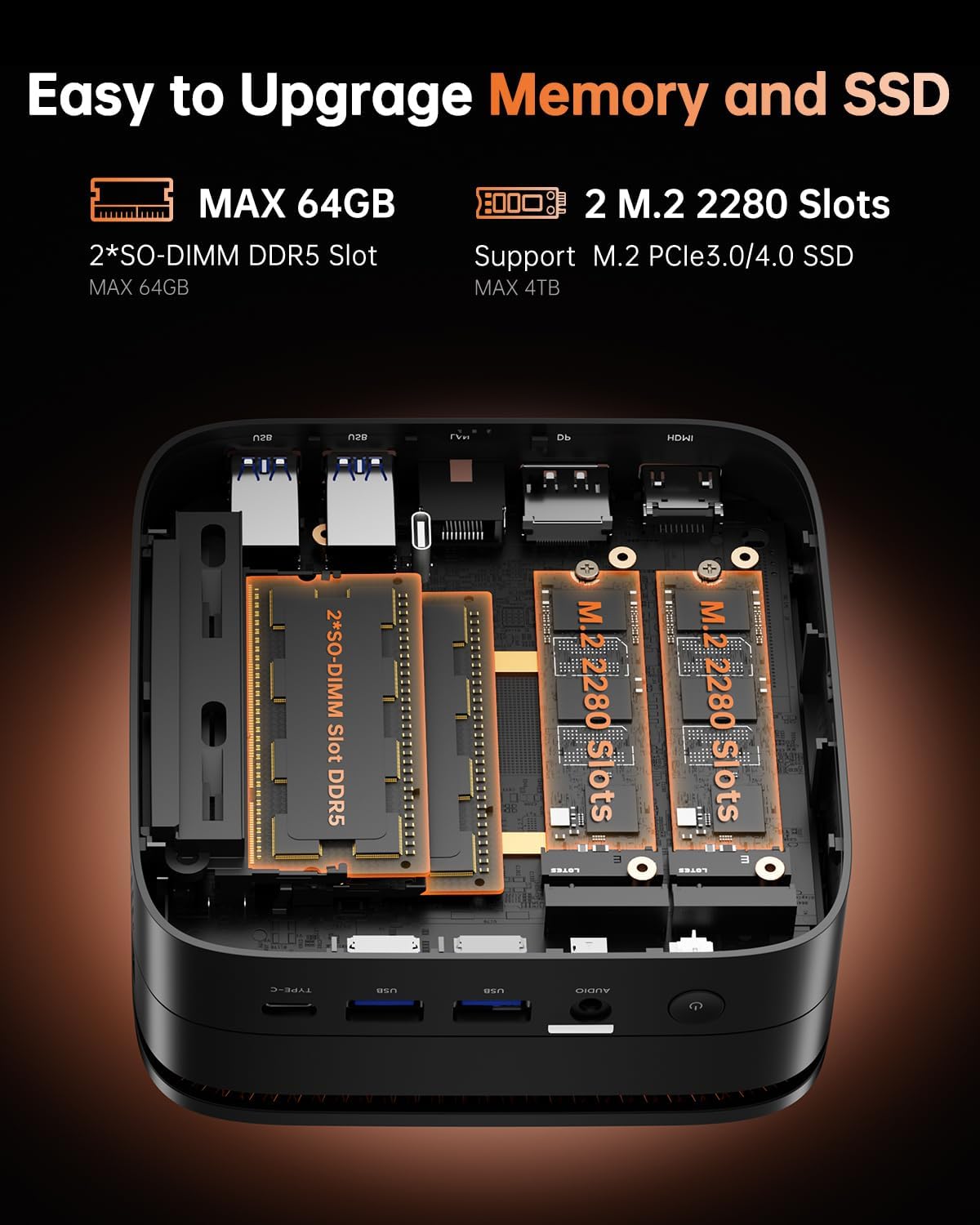
5 pav.: Vidinis view of the NiPoGi Hyper H1 Mini PC, illustrating the two SO-DIMM DDR5 slots for memory expansion up to 64GB and two M.2 2280 slots for SSD expansion up to 4TB, supporting PCIe3.0/4.0 SSDs.
7.1. RAM Expansion
- The Mini PC comes with 16GB DDR5 memory.
- It features 2 SO-DIMM slots, allowing for expansion up to a maximum of 64GB DDR5 RAM.
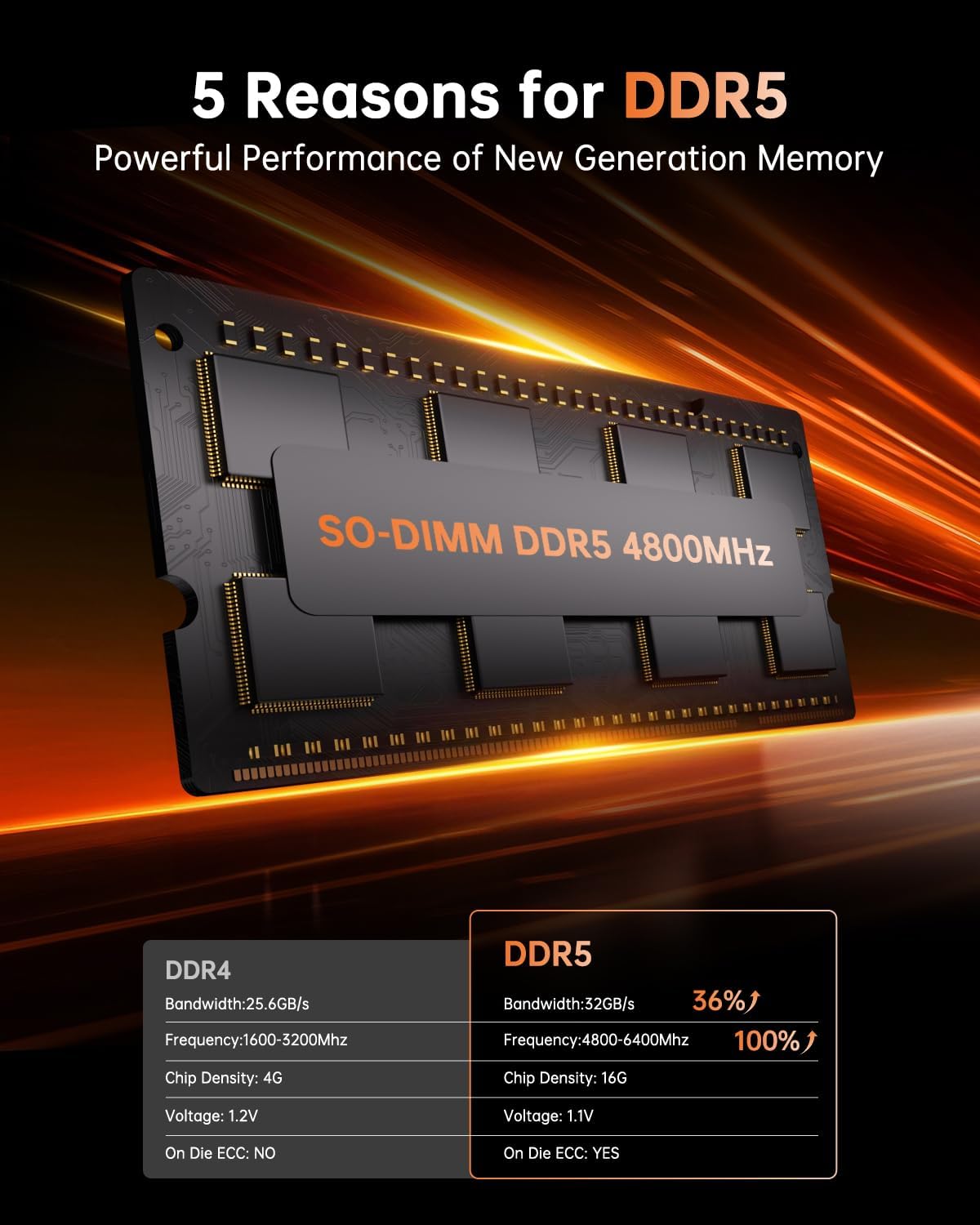
Image 6: A close-up of a SO-DIMM DDR5 4800MHz memory module, alongside a comparison table highlighting the performance advantages of DDR5 over DDR4, including higher bandwidth, frequency, and the presence of On Die ECC.
7.2. SSD Expansion
- The Mini PC includes a 512GB M.2 2280 NVMe PCIe3.0 SSD.
- It has 2 M.2 2280 slots, supporting M.2 NVMe PCIe3.0 or PCIe4.0 SSDs, allowing for storage expansion up to 4TB.
8. VESA tvirtinimas
The NiPoGi Hyper H1 Mini PC supports VESA mounting, allowing you to attach it to the back of a compatible monitor or to a wall mount. This helps in creating a tidy and space-saving workspace.
- Pritvirtinkite VESA tvirtinimo laikiklį prie monitoriaus galinės dalies arba norimo paviršiaus naudodami pateiktus varžtus.
- Stumkite mini kompiuterį ant laikiklio, kol jis tvirtai užsifiksuos.
9. Problemų sprendimas
If you encounter issues with your NiPoGi Hyper H1 Mini PC, refer to the following common troubleshooting steps:
- Nėra galios: Įsitikinkite, kad maitinimo adapteris yra tvirtai prijungtas ir prie „Mini PC“, ir prie veikiančio maitinimo lizdo. Išbandykite kitą lizdą.
- Nėra ekrano: Verify that the monitor is powered on and the display cable (HDMI, DP, or Type-C) is securely connected to both the Mini PC and the monitor. Try a different display cable or port.
- Nėra interneto ryšio: For wired connection, check the Ethernet cable and router. For Wi-Fi, ensure Wi-Fi is enabled in the operating system and you are connected to the correct network with the correct password.
- Periferinis įrenginys neaptiktas: Ensure USB devices are properly connected. Try connecting them to a different USB port.
- Sistemos sulėtėjimas: Check for background applications consuming resources. Ensure sufficient free storage space. Consider upgrading RAM or SSD if performance issues persist.
For persistent issues, please contact NiPoGi technical support.
10. Specifikacijos
Detailed technical specifications for the NiPoGi Hyper H1 Mini PC:
| Funkcija | Specifikacija |
|---|---|
| Prekės ženklas | NiPoGi |
| Modelio numeris | H1 |
| Procesorius | AMD Ryzen 7 6800H (8 Cores, 16 Threads, Base 3.2 GHz, Max Turbo 4.7 GHz) |
| Grafika | Integrated AMD Radeon 680M (12 CUs, up to 2200 MHz) |
| RAM | 16GB DDR5 4800MHz (Expandable up to 64GB via 2 SO-DIMM slots) |
| Sandėliavimas | 512GB M.2 2280 NVMe PCIe3.0 SSD (Expandable up to 4TB via 2 M.2 2280 slots, supports PCIe3.0/4.0) |
| Operacinė sistema | Windows 11 Pro (or Linux compatible) |
| Vaizdo išvestis | 1x HDMI 2.0, 1x DP 2.0, 1x USB 3.2 Gen2 Type-C (Supports Triple 4K@60Hz Display) |
| Belaidis ryšys | „Wi-Fi 6“ (802.11ax), „Bluetooth 5.2“ |
| Laidinis ryšys | 1x 2.5Gbps RJ45 LAN Port |
| USB prievadai | 2x USB 3.2 Gen2 Type-A, 1x USB 3.2 Gen2 Type-C, 4x USB 3.2 Gen1 Type-A |
| Garso prievadas | 1x 3.5 mm garso lizdas |
| Matmenys (I x P x A) | 12.9 x 12.9 x 5.1 cm (5.08 x 5.08 x 2.01 colio) |
| Svoris | 568 gramai (1.25 svaro) |
11. Priežiūra
- Valymas: Use a soft, dry cloth to clean the exterior of the Mini PC. Do not use liquid cleaners or aerosols.
- Vėdinimas: Regularly check that the ventilation openings are clear of dust and debris to ensure optimal airflow and prevent overheating.
- Programinės įrangos atnaujinimai: Nuolat atnaujinkite operacinę sistemą ir tvarkykles, kad užtikrintumėte sistemos stabilumą ir saugumą.
12. Garantija ir palaikymas
NiPoGi is committed to providing excellent customer service. The NiPoGi Hyper H1 Mini PC comes with:
- 24-hour after-sales service.
- Techninė pagalba visą gyvenimą.
If you have any questions, require technical assistance, or need to claim warranty service, please do not hesitate to contact NiPoGi customer support through the official channels or your point of purchase.


