1. Įvadas
This manual provides essential information for the safe and efficient use of your SBS Powerbank 10K Slim. Please read these instructions carefully before using the device and retain them for future reference.
The SBS Powerbank 10K Slim is a portable charging device designed to provide power to various electronic devices, including smartphones, tablets, and other USB-powered gadgets. It features a 10,000 mAh capacity, intelligent charging technology, and multiple output ports for versatile use.
2. Pakuotės turinys
Patikrinkite, ar pakuotėje yra visi reikalingi daiktai:
- SBS Powerbank 10K Slim
- USB-A į USB-C laidas
- Vartotojo vadovas
3. Produkto ypatybės
- 10,000 mAh talpa: Capable of recharging a smartphone up to 4 times or a tablet up to 2 times.
- Intelligent Charge (IC) 10 Watts: Automatically detects the maximum power your device can accept and adjusts output accordingly, providing protection against overheating and short circuits.
- Plonas ir kompaktiškas dizainas: Portable and lightweight for easy transport in a pocket or bag.
- USB-C įvestis / išvestis: The USB-C port functions for both charging the power bank and charging external devices.
- Būsenos LED indikatoriai: Easily monitor the remaining charge level of the power bank.
- Keli išvesties prievadai: Includes 1x USB-C port and 2x USB-A ports for charging various devices simultaneously.
4. Sąranka
4.1 Pradinis išorinės baterijos įkrovimas
Before first use, fully charge the power bank. Connect the supplied USB-A to USB-C cable to the power bank's USB-C port and the USB-A end to a compatible USB wall charger (not included) or a computer's USB port. The LED indicators will illuminate to show the charging progress.

Image: The power bank being charged using the included USB-C to USB-A cable connected to a laptop.
4.2 Uostų identifikavimas
The power bank features various ports for charging and discharging:
- USB 1 (USB-A 1A Standard): Output for standard charging (5W).
- USB-C (Type-C Fast Charge): Input/Output for fast charging (10W).
- USB 2 (USB-A 2.1A Intelligent Charge): Output for intelligent fast charging (10W).

Vaizdas: Išsamus view of the power bank's charging ports, indicating their types and power outputs.
5. Naudojimo instrukcijos
5.1 Išorinių įrenginių įkrovimas
To charge your device, connect it to one of the power bank's output ports (USB 1, USB 2, or USB-C) using an appropriate charging cable. The power bank will automatically begin charging. You can charge up to three devices simultaneously.

Image: The power bank actively charging a smartphone and a pair of wireless earbuds.
5.2 Baterijos būsenos tikrinimas
Press the power button once to activate the LED indicators. The blue LEDs will show the remaining charge level of the power bank. Each LED typically represents approximately 25% of the battery capacity.

Image: The power bank's side with the power button and LED indicators displaying the charge level.
5.3 Intelligent Charge (IC) Function
The Intelligent Charge feature on the USB 2 (USB-A 2.1A) and USB-C ports automatically identifies the connected device and delivers the optimal charging current up to 10W. This ensures efficient and safe charging for a wide range of devices.

Image: The power bank charging a smartphone, highlighting its 10,000 mAh capacity and recharge capability.
6. Priežiūra
6.1 Bendroji priežiūra
- Laikykite išorinę bateriją sausą ir atokiau nuo drėgmės.
- Venkite ekstremalių temperatūrų (karštos ar šaltos).
- Prietaisą valykite minkštu, sausu skudurėliu. Nenaudokite stiprių cheminių medžiagų ar abrazyvinių medžiagų.
- Neišmeskite, neišardykite ir nebandykite patys taisyti išorinės baterijos.
6.2 Saugykla
When storing the power bank for extended periods, ensure it is charged to approximately 50-75% capacity. Recharge it every 3-6 months to maintain battery health.
6.3 Saugos priemonės
- This power bank includes built-in protections against short circuits, overcharging, and over-discharging.
- Do not expose the power bank to fire or direct sunlight.
- Laikyti vaikams nepasiekiamoje vietoje.
7. Problemų sprendimas
7.1 Nesikrauna išorinė baterija
- Įsitikinkite, kad įkrovimo laidas yra tvirtai prijungtas tiek prie išorinės baterijos, tiek prie maitinimo šaltinio.
- Išbandykite kitą USB sieninį adapterį arba USB prievadą.
- Patikrinkite, ar maitinimo šaltinis yra aktyvus.
7.2 Įrenginys neįkraunamas iš išorinės baterijos
- Check if the power bank has sufficient charge (press the button to check LEDs).
- Ensure the charging cable connecting your device to the power bank is functional and correctly inserted.
- Išbandykite kitą išorinės baterijos išvesties prievadą.
- Kai kuriems įrenginiams gali reikėti specialaus įkrovimo laido arba adapterio.
7.3 Lėtas įkrovimas
- Ensure you are using the appropriate port for faster charging (USB-C or USB 2).
- The charging speed can be affected by the cable quality, the device being charged, and the power bank's remaining charge level.
8. Specifikacijos
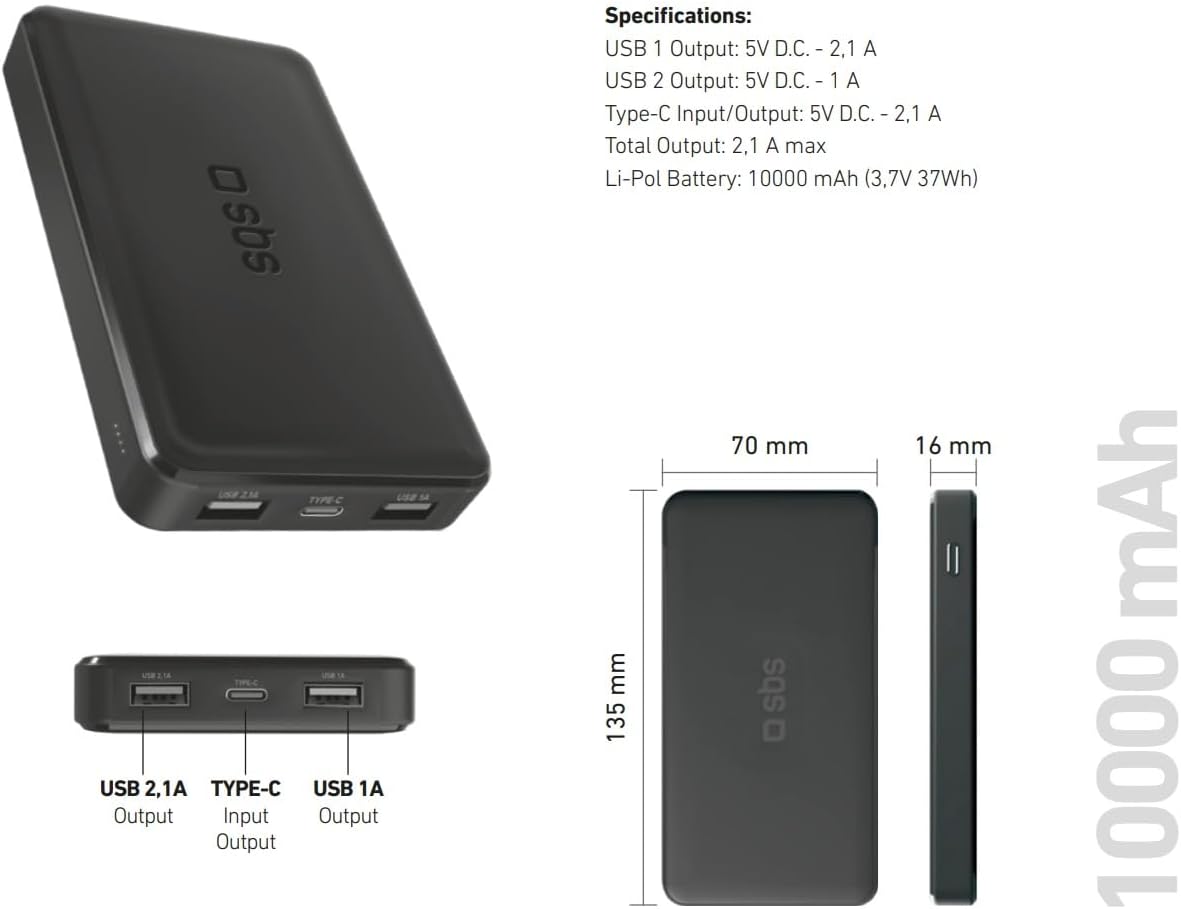
Image: Technical specifications and physical dimensions of the power bank.
| Funkcija | Detalė |
|---|---|
| Modelio pavadinimas | TTBB10000TCK |
| Baterijos talpa | 10,000 3.7 mAh (37 V XNUMX Wh) |
| Baterijos tipas | Ličio polimeras |
| USB 1 išėjimas | 5V D.C. - 1A (5W) |
| USB 2 išėjimas | 5V D.C. - 2.1A (10W Intelligent Charge) |
| USB-C įvestis / išvestis | 5V D.C. - 2.1A (10W Fast Charge) |
| Bendra produkcija | 2.1A maks |
| Spalva | Juoda |
| Matmenys | 135 mm x 70 mm x 16 mm |
| Svoris | 230 gramų |
| Ypatingos savybės | Fast Charge, Lightweight, Short-circuit Protection, Over-discharge Protection, Slim Design |
| Suderinami įrenginiai | Smartphone, Tablet, Smartwatch, Speaker, Laptop (charging only) |
9. Garantija ir palaikymas
9.1 Gamintojo garantija
This SBS Powerbank 10K Slim comes with a 2 metų gamintojo garantijaPrašome išsaugoti pirkimo įrodymą garantiniams reikalavimams. Garantija taikoma medžiagų ir gamybos defektams, atsiradusiems įprasto naudojimo sąlygomis.
9.2 Pagalba klientams
For further assistance, technical support, or warranty inquiries, please visit the official SBS website or contact their customer service department. You can find more information and products from SBS by visiting their official store: SBS Brand Store.


