Įvadas
This manual provides essential information for the setup, operation, maintenance, and troubleshooting of your Onn 22 inch 1080P 100 Hz FHD LED Monitor. Please read this guide thoroughly before using the product to ensure optimal performance and safety.
The Onn 22 inch FHD LED Monitor is designed for a variety of applications, offering a vivid 1920x1080 resolution, a 100Hz refresh rate, and a 6.5ms response time for efficient performance. Its slim profile and T-shaped base are ideal for saving desk space.
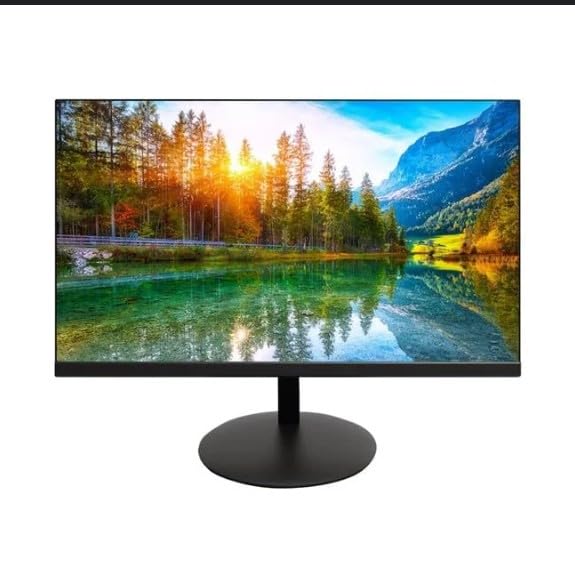
The image shows the Onn 22 inch FHD LED Monitor, highlighting its 100Hz refresh rate and 1080p resolution. The monitor features a slim design and a T-shaped base.
Sąrankos instrukcijos
- Išpakavimas: Carefully remove the monitor and all accessories from the packaging. Ensure all components are present: monitor, T-shaped base, HDMI cable, and power adapter.
- Stovo surinkimas: Attach the T-shaped base to the monitor. The design is screw-less for easy assembly. Ensure it is securely fastened.
- Prisijungimas prie įrenginio:
The monitor supports both HDMI and VGA inputs. Connect the provided HDMI cable from your computer's HDMI output to the HDMI IN port on the monitor. Alternatively, use a VGA cable for VGA input.

This image displays the rear panel of the Onn monitor, illustrating the available input ports: HDMI IN, VGA IN, and the DC 12V power input. These ports are essential for connecting the monitor to a computer or other devices.
- Maitinimo jungtis: Connect the power adapter to the DC 12V input port on the monitor, then plug the adapter into a power outlet.
- Monitoriaus reguliavimas: The monitor is capable of swivel, tilt, rotation, and height adjustment. Adjust the screen to your preferred viewkampas ergonomiškam komfortui.
- Dviejų monitorių sąranka: This monitor is suitable for a fully functioning dual monitor setup. Connect a second monitor using the appropriate cables and configure your operating system's display settings.
Naudojimo instrukcijos
- Maitinimo įjungimas/išjungimas: Press the power button, usually located on the bottom or back of the monitor, to turn it on or off.
- Įvesties pasirinkimas: If the monitor does not automatically detect the input source, use the On-Screen Display (OSD) menu buttons to manually select between HDMI and VGA inputs.
- Naršymas OSD meniu: Use the physical buttons on the monitor (typically on the back or bottom edge) to navigate the OSD menu. This allows you to adjust settings such as brightness, contrast, color temperature, and input source.
- Raiška ir atnaujinimo dažnis: The monitor supports a native resolution of 1920x1080 at a 100Hz refresh rate. Ensure your computer's display settings are configured to these specifications for the best visual experience.
- Adaptyvusis sinchronizavimas: The monitor features Adaptive Sync for gaming, which helps to reduce screen tearing and stuttering. Ensure this feature is enabled in your graphics card settings if supported.
Priežiūra
- Ekrano valymas: Švelniai nuvalykite ekraną minkštu, nepūkuotu skudurėliu. Jei dėmės sunkiai įveikiamos, švelniai nuvalykiteampen the cloth with water or a non-abrasive, monitor-specific cleaning solution. Avoid spraying liquids directly onto the screen.
- C valymasasing: Monitorių valykite minkšta, sausa šluoste.asing. Do not use strong detergents or solvents, as they may damage the finish.
- Vėdinimas: Įsitikinkite, kad monitoriaus ventiliacijos angos nėra užblokuotos, kad jis neperkaistų.
- Saugykla: Kai monitorius ilgesnį laiką nenaudojamas, jį laikykite vėsioje, sausoje vietoje, toliau nuo tiesioginių saulės spindulių ir ekstremalių temperatūrų.
Trikčių šalinimas
- Nėra galios:
- Patikrinkite, ar maitinimo laidas tvirtai prijungtas ir prie monitoriaus, ir prie maitinimo lizdo.
- Patikrinkite, ar maitinimo lizdas veikia tinkamai.
- Nėra signalo:
- Ensure the video cable (HDMI or VGA) is firmly connected to both the monitor and the computer.
- Pasirinkite tinkamą įvesties šaltinį naudodami monitoriaus OSD meniu.
- Patikrinkite, ar jūsų kompiuteris įjungtas ir ar jis nėra miego režime.
- Mirgantis ekranas arba prasta vaizdo kokybė:
- Patikrinkite vaizdo kabelį, ar nėra pažeistų ar atsilaisvinusių jungčių.
- Adjust the resolution and refresh rate settings on your computer to match the monitor's specifications (1920x1080, 100Hz).
- Atkurkite monitoriaus nustatymus į gamyklinius nustatymus per OSD meniu.
- Mygtukai nereaguoja:
- Unplug the monitor from the power outlet, wait for 30 seconds, and then plug it back in.
Jei problemos išlieka, žr. pagalbos informaciją, pateiktą skyriuje „Palaikymas ir garantija“.
Specifikacijos
| Prekės ženklas | Onn |
| Modelio numeris | 100140681 |
| Modelio pavadinimas | OTTO |
| Ekrano dydis | 21.5 colių |
| Ekrano tipas | Šviesos diodas, LCD |
| Rezoliucija | 1920 x 1080 (Full HD 1080p) |
| Atnaujinimo dažnis | 100 Hz |
| Reagavimo laikas | 6.5 milisekundės |
| Techninės įrangos sąsaja | HDMI, VGA |
| Ypatingos savybės | Aukščio reguliavimas |
| Viewing kampas | 160 laipsnių |
| Krašto santykis | 16:9 |
| Gaminio matmenys | 49.2 x 20 x 37.2 cm; 3.24 kg |
Pagalba ir garantija
For technical support, product inquiries, or warranty information, please visit the official Onn support websvetainėje arba susisiekite su jų klientų aptarnavimo tarnyba.
- Oficialus palaikymas Websvetainė: onnsupport.ca
- Garantija: Specific warranty details may vary by region and purchase date. Please refer to the documentation included with your product or visit the support websvetainėje, kurioje pateikiama naujausia informacija apie garantiją.