1. Įvadas
Thank you for choosing the LAMAX W10.2 Outdoor Action Camera. This manual provides detailed instructions on how to set up, operate, and maintain your camera to ensure optimal performance and longevity. The LAMAX W10.2 is designed for capturing high-quality video and photos in various environments, featuring true 4K/60FPS recording, advanced MAXsmooth 2.0 stabilization, and robust waterproofing.
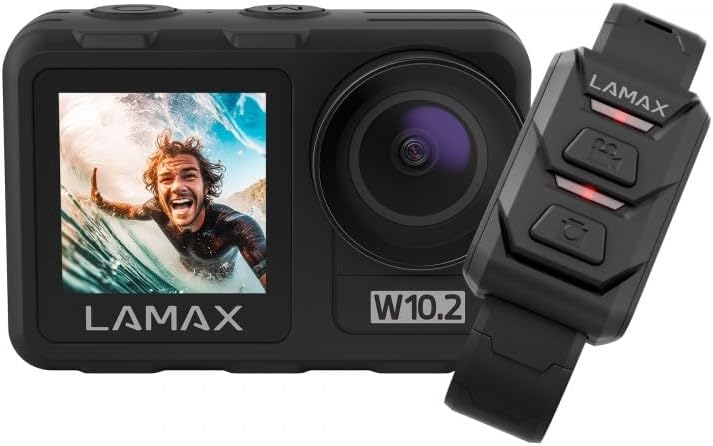
Image 1.1: The LAMAX W10.2 Action Camera shown with its accompanying remote control. The camera features a front display and a main lens, while the remote control has three buttons for easy operation.
2. Kas yra dėžutėje
Upon unboxing your LAMAX W10.2, please verify that all the following components are included:
- LAMAX W10.2 veiksmo kamera
- Waterproof Housing (for depths up to 40 meters)
- Nuotolinio valdymo pultas
- Mini trikojis
- Clear Filter (for lens protection)
- USB įkrovimo laidas
- Mounting Accessories (various mounts and adhesive pads)
- Valymo šluostė
- Battery (C batteries required, included)

2.1 pav.: Išsamus view of all items included in the LAMAX W10.2 package, including the camera, waterproof case, remote, various mounts, cables, and cleaning cloth.
3. Produktas baigtasview
Familiarize yourself with the key components and features of your LAMAX W10.2 camera:
- Dvigubi ekranai: Features both a main rear touchscreen and a front display for easy framing and monitoring.
- Touch Control and Buttons: The touchscreen provides intuitive control, while physical buttons offer practical operation, especially underwater.
- Objektyvas: High-quality lens for capturing sharp images and videos.
- Mikrofonas: Integruotas mikrofonas garso įrašymui.
- Pranešėjas: Garso atkūrimui.
- USB prievadas: Įkrovimui ir duomenų perdavimui.
- HDMI prievadas: Skirta prijungti išorinius ekranus.
- Baterijų skyrius: Located at the bottom for battery insertion.
- MicroSD kortelės lizdas: For memory card insertion (card not included).

3.1 pav.: Išsamus view of the LAMAX W10.2 camera highlighting its 2-inch touchscreen, mode setting/display switch, record ON/OFF button, camera and WLAN power button, and tripod thread for direct attachment.
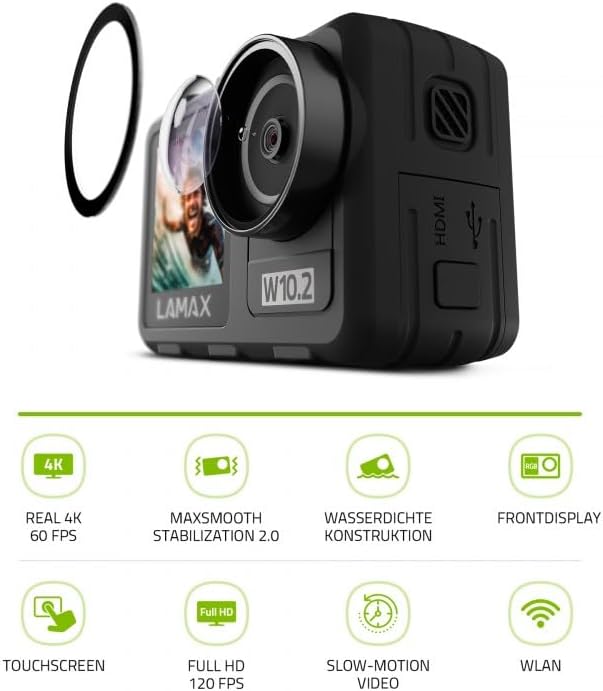
Image 3.2: The LAMAX W10.2 camera accompanied by icons representing its key features: Real 4K 60 FPS, MAXsmooth Stabilization 2.0, Waterproof Construction, Front Display, Touchscreen, Full HD 120 FPS, Slow-Motion Video, and WLAN (Wi-Fi).
4. Sąranka
4.1. Akumuliatoriaus įkrovimas
- Atidarykite akumuliatoriaus skyriaus dangtelį.
- Insert the included battery, ensuring correct polarity.
- Connect the camera to a USB power source using the provided USB cable. The charging indicator light will illuminate.
- Kai akumuliatorius bus visiškai įkrautas, indikatoriaus lemputė pasikeis arba užges.
4.2. „MicroSD“ kortelės įdėjimas
A MicroSD card (not included) is required to store videos and photos. Use a Class 10 or higher MicroSD card with a maximum capacity of 128GB.
- Raskite „MicroSD“ kortelės lizdą kameros šone.
- Įdėkite „MicroSD“ kortelę auksiniais kontaktais į kameros galą, kol ji spragtelės ir užsifiksuos.
- Norėdami išimti, švelniai stumkite kortelę, kol ji iššoks.
4.3. Įjungimas/išjungimas
- Norėdami įjungti: Press and hold the Power button (usually located on the top or side) for a few seconds until the screen illuminates.
- Norėdami išjungti: Dar kartą paspauskite ir palaikykite maitinimo mygtuką, kol kamera išsijungs.
5. Naudojimo instrukcijos
5.1. Pagrindinė operacija
- Režimo perjungimas: Use the Mode button or touchscreen gestures to switch between video, photo, and playback modes.
- Recording/Shutter: Press the Shutter/Record button (usually on top) to start/stop video recording or take a photo.
- Navigacija: Use the touchscreen or physical navigation buttons to browse menus and settings.
5.2. Vaizdo įrašymas
The LAMAX W10.2 supports true 4K video recording at 60 frames per second (FPS) for incredibly detailed footage.
- Rezoliucijos nustatymai: Access video settings to select resolutions such as 4K/60FPS, 2.7K, 1080p, and 720p.
- Lėtas judėjimas: Capture dynamic slow-motion footage at up to 4x in Full HD (1080p).
- MAXsmooth 2.0 Stabilization: This advanced electronic stabilization ensures smooth, shake-free video, even during intense action. It is automatically enabled for optimal performance.
5.3. Nuotraukų fotografavimas
Capture high-resolution still images with various settings:
- Nuotraukų režimai: Standard photo, burst mode, time-lapse photo.
- Nustatymai: Adjust exposure, white balance, and ISO for different lighting conditions.
5.4. Hidroizoliacija
The LAMAX W10.2 is designed for aquatic adventures:
- Without Housing: The camera is waterproof up to 12 meters (approximately 40 feet) without the need for additional housing.
- With Included Housing: When placed in the provided waterproof housing, the camera can be submerged up to 40 meters (approximately 130 feet).
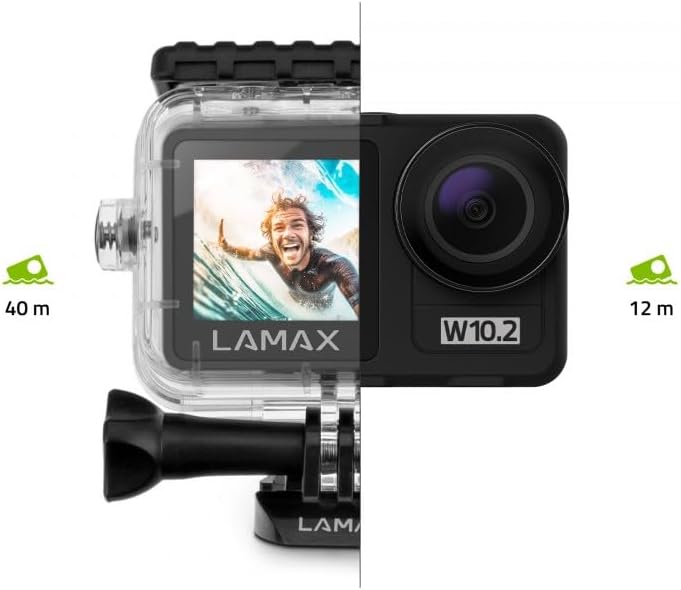
Image 5.1: Visual representation of the LAMAX W10.2's waterproofing capabilities, showing it can go to 12 meters without a case and 40 meters with the included waterproof housing.
5.5. Wi-Fi and Mobile App
Connect your camera to your smartphone via Wi-Fi for remote control, live preview, and easy file perkėlimas.
- Download the official LAMAX mobile app from your device's app store.
- Enable Wi-Fi on your camera through the settings menu.
- Išmaniajame telefone prisijunkite prie fotoaparato „Wi-Fi“ tinklo (SSID ir slaptažodis bus rodomi fotoaparato ekrane).
- Open the LAMAX app to control the camera, view footage, and download filebelaidžiu ryšiu.
5.6. Nuotolinio valdymo pultas
Pridedamas nuotolinio valdymo pultas leidžia patogiai valdyti per atstumą.
- Poravimas: Follow the instructions in the camera's settings menu to pair the remote control.
- Funkcijos: Typically, the remote allows you to start/stop recording and take photos without touching the camera.
6. Priežiūra
Proper maintenance ensures the longevity and performance of your LAMAX W10.2 camera.
- Valymas: Use the provided cleaning cloth to gently wipe the lens and screen. For stubborn smudges, use a lens cleaning solution designed for optics. Do not use abrasive materials.
- Vandeniui atsparaus korpuso priežiūra: After use in water, rinse the waterproof housing with fresh water and allow it to air dry. Inspect the O-ring seal for any debris or damage before each use.
- Saugykla: Laikykite fotoaparatą vėsioje, sausoje vietoje, toliau nuo tiesioginių saulės spindulių ir ekstremalių temperatūrų. Jei fotoaparatą ilgesnį laiką laikysite, išimkite bateriją.
- Akumuliatoriaus priežiūra: Avoid fully discharging the battery frequently. Charge the battery regularly, even if not in use, to maintain its health.
7. Problemų sprendimas
If you encounter issues with your LAMAX W10.2, refer to the following common problems and solutions:
| Problema | Galima priežastis | Sprendimas |
|---|---|---|
| Kamera neįsijungia. | Low battery; battery incorrectly inserted; camera frozen. | Charge the battery; reinsert battery correctly; perform a hard reset (refer to manual for specific button combination). |
| Video footage yra drebantis. | MAXsmooth 2.0 stabilization is off; extreme vibrations. | Ensure MAXsmooth 2.0 is enabled in settings; use appropriate mounts to minimize vibration. |
| Nepavyksta prisijungti prie „Wi-Fi“. | Kameroje neįgalintas „Wi-Fi“; neteisingas slaptažodis; programėlės problema. | Enable Wi-Fi on camera; double-check password; restart camera and app. |
| Kamera nėra atspari vandeniui. | Waterproof housing not properly sealed; O-ring damaged or dirty. | Ensure housing is securely latched; clean and inspect O-ring for damage before each use. |
| „MicroSD“ kortelės klaida. | Incompatible card; card full; card corrupted. | Use a recommended Class 10 or higher card; format the card (this will erase data); try a different card. |
8. Specifikacijos
Detailed technical specifications for the LAMAX W10.2 Action Camera:
| Funkcija | Detalė |
|---|---|
| Prekės ženklas | LAMAX |
| Modelio numeris | 10.2 |
| Gaminio matmenys | 3.2 x 6.4 x 4.2 cm; 127 g |
| Photosensor Technology | CMOS |
| Vaizdo įrašymo raiška | 4K |
| Maksimalus židinio nuotolis | 5.03 milimetro |
| Vaizdo įrašymo formatas | MP4 |
| Ekrano dydis | 2 colių |
| Ryšio technologija | HDMI, Wi-Fi |
| Spalva | Tamsiai Pilka |
| Ypatingos savybės | Remote Control, Shockproof, Slow Motion, Timer, Touchscreen |
| Vaizdo kameros tipas | Veiksmo kamera |
| Baterijos | C batteries required (included) |
| Pirmoji laisva data | 10 m. sausio 2025 d |
9. Garantija ir palaikymas
LAMAX products are designed for reliability and performance. For information regarding warranty coverage, technical support, or service, please refer to the official LAMAX websvetainėje arba susisiekite tiesiogiai su jų klientų aptarnavimo tarnyba.
- Palaikymas internetu: Visit the LAMAX official website for FAQs, software updates, and digital manuals.
- Klientų aptarnavimas: Contact details for customer support can typically be found on the LAMAX website's 'Support' or 'Contact Us' section.


