1. Įvadas
Ačiū, kad pirkoteasing the DANFI AUDIO DF TE-2017 Vinyl Record Player. This manual provides essential information for the safe and correct operation of your new record player. Please read it thoroughly before use and retain it for future reference.
2. Pakuotės turinys
- DANFI AUDIO DF TE-2017 Vinyl Record Player
- 45 RPM adapteris
- Power Cord & Adapter (100-240V~)
- Pakaitinė adata
- Patefono kilimėlis
- Naudotojo vadovas (šis dokumentas)
3. Produktas baigtasview
The DANFI AUDIO DF TE-2017 is a versatile 3-speed belt-drive turntable with built-in speakers, Bluetooth wireless playback, USB/SD recording, AUX input, and RCA output. It features a clear dust cover and a digital display for easy operation.

1 pav.: priekis ir galas View of the TE-2017 Record Player with Labeled Components. This image displays the turntable platter, spindle, 45 RPM adapter, tone arm lift lever, speed selection switch, auto stop on/off switch, tone arm lock, stylus, speakers, AUX input, Mode/TF/USB controls, LED display, RCA audio out, and power port.
4. Sąranka
- Išpakavimas: Carefully remove the record player and all accessories from the packaging. Retain the packaging for future transport or storage.
- Dulkių dangtelio montavimas: Slide the clear plastic dust cover into the brackets located at the rear of the turntable. Ensure it is securely seated.
- Maitinimo jungtis: Connect the power adapter to the DC 5V/1A port on the rear of the record player and plug it into a wall outlet.
- Vieta: Padėkite patefono plokštelių grotuvą ant stabilaus, lygaus paviršiaus, atokiau nuo tiesioginių saulės spindulių, šilumos šaltinių, per didelio dulkių kiekio ar vibracijos.
- Rašiklio apsauga: Remove the stylus protective cap before playing a record.
5. Naudojimo instrukcijos
5.1 Vinilinių plokštelių grojimas
- Maitinimas: Turn the ON/OFF/VOLUME knob clockwise to power on the unit and adjust the volume.
- Pasirinkite režimą: Set the PH/BT/AUX/USB switch to 'PH' (Phono) mode.
- Vietos įrašas: Place a vinyl record on the turntable platter. If playing a 7-inch single, use the included 45 RPM adapter.
- Pasirinkite greitį: Adjust the 3-speed selection switch (33, 45, 78 RPM) to match the record's speed.
- Auto-Stop (Optional): If desired, set the Auto Stop ON/OFF switch to 'ON'. The turntable will stop spinning automatically when the record finishes.
- Tono svirties padėtis: Gently lift the tone arm using the lift lever. Move the tone arm over the desired track of the record.
- Apatinis tono svirties mechanizmas: Slowly lower the tone arm onto the record using the lift lever. The music will begin to play.
- Tono reguliavimas: Use the PITCH control knob to fine-tune the playback speed if necessary.
- Baigti atkūrimą: At the end of the record, lift the tone arm, return it to its rest, and lower the lift lever. Turn the ON/OFF/VOLUME knob counter-clockwise to power off.
Video 1: Demonstration of Vinyl Playback Mode on an LP&No.1 Turntable with Built-in Speakers. This video illustrates how to place a record, position the tone arm, and initiate playback, highlighting the smooth operation of the turntable.
5.2 Bluetooth Wireless Playback
- Maitinimas: Turn the ON/OFF/VOLUME knob clockwise to power on the unit.
- Pasirinkite režimą: Set the PH/BT/AUX/USB switch to 'BT' (Bluetooth) mode. The digital display will show 'BT' and the indicator light will blink blue, indicating pairing mode.
- Suporuoti įrenginį: On your smartphone, tablet, or other Bluetooth-enabled device, search for 'Turntable' in the Bluetooth settings and select it to pair. Once connected, the indicator light will stop blinking and remain solid blue.
- Groti muziką: Start playing music on your paired device. The audio will stream through the record player's built-in speakers.
- Reguliuoti garsumą: Control the volume using the ON/OFF/VOLUME knob on the record player or your paired device.
2 vaizdo įrašas: Viršview of Record Player with Speakers, demonstrating Bluetooth connectivity. This video shows how to switch to Bluetooth mode, pair a mobile device, and stream audio wirelessly to the turntable's speakers.
5.3 USB/SD Recording and Playback
- Insert USB/SD: Insert a USB flash drive or SD card into the corresponding port on the front panel.
- Pasirinkite režimą: Set the PH/BT/AUX/USB switch to 'USB' mode. The digital display will show 'USB'.
- Atkūrimas: The unit will automatically detect and play audio files from the USB/SD device. Use the control buttons (Previous Song, Pause & Play, Next Song) to navigate tracks.
- Recording Vinyl to USB/SD:
- Start playing a vinyl record as described in section 5.1.
- Press the 'REC' button (if available, typically near the USB/SD slot) to begin recording. The indicator light may change to confirm recording is active.
- Press 'REC' again to stop recording. The recorded audio will be saved as an MP3 file on the USB/SD device.
- Use the 'SPLIT' button (if available) to create separate tracks during recording.
Video 3: USB Playback & Vinyl to MP3 Recording demonstration. This video shows how to insert a USB drive, initiate recording from vinyl, and manage recorded files, highlighting the digital conversion feature.
5.4 AUX įvestis
- Maitinimas: Turn the ON/OFF/VOLUME knob clockwise to power on the unit.
- Pasirinkite režimą: Set the PH/BT/AUX/USB switch to 'AUX' mode.
- Prijunkite įrenginį: Connect an external audio device (e.g., MP3 player, CD player) to the AUX IN port on the rear of the record player using a 3.5mm audio cable (not included).
- Groti garso įrašą: Leiskite garsą iš išorinio įrenginio. Garsas bus išvedamas per patefono garsiakalbius.
- Reguliuoti garsumą: Control the volume using the ON/OFF/VOLUME knob on the record player or the external device.
5.5 RCA išvestis
- Connect External Speakers: Connect external powered speakers or an amplifier to the RCA OUT ports (red for right, white for left) on the rear of the record player using an RCA cable (not included).
- Groti garso įrašą: Play a vinyl record or stream via Bluetooth/AUX. The audio will be routed through the connected external audio system.
- Reguliuoti garsumą: Control the volume primarily through your external audio system. The record player's volume knob may still affect the output level.
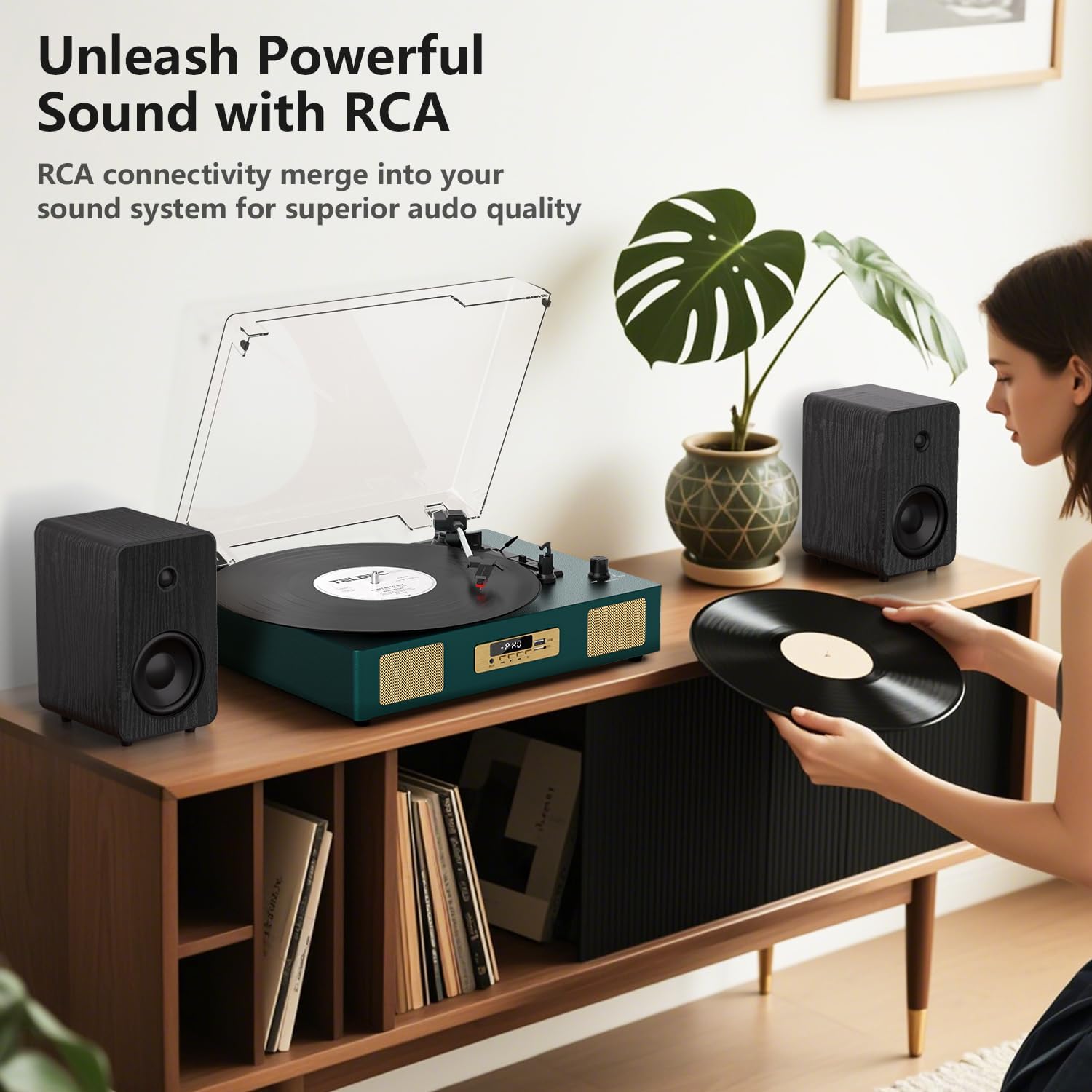
2 pav.: galinis view of the TE-2017 Record Player, illustrating the RCA output ports connected to external speakers for enhanced audio quality.
5.6 Ausinių lizdas
For private listening, plug 3.5mm headphones into the headphone jack located on the front panel. The built-in speakers will be muted automatically.
6. Priežiūra
- Rašiklio valymas: Švelniai valykite rašiklį nuo galo priekio link minkštu šepetėliu (nepridedamas). Nenaudokite per didelės jėgos.
- Plokštelių grotuvo valymas: Nuvalykite įrenginį minkštu, sausu skudurėliu. Nenaudokite abrazyvinių valiklių ar tirpiklių.
- Apsauga nuo dulkių: Kai nenaudojate, laikykite dulkių dangtelį uždarytą, kad apsaugotumėte patefoną nuo dulkių ir šiukšlių.
- Įrašų priežiūra: Handle records by their edges. Store them vertically in their sleeves to prevent warping and dust accumulation.
7. Problemų sprendimas
| Problema | Galima priežastis | Sprendimas |
|---|---|---|
| Nėra galios | Neprijungtas maitinimo adapteris arba sugedęs lizdas. | Įsitikinkite, kad maitinimo adapteris yra tvirtai prijungtas, o lizdas veikia. |
| Iš garsiakalbių nėra garso | Per mažas garsumas; pasirinktas neteisingas režimas; prijungtos ausinės. | Increase volume; select correct mode (PH, BT, AUX, USB); disconnect headphones. |
| Patefonas nesisuka | Išjungtas maitinimas; diržas išjudėjo; automatinis stabdymas įsijungė per anksti. | Ensure power is on; check belt (refer to maintenance); try disabling auto-stop. |
| Praleidžiantis arba iškraipytas garsas | Nešvari arba pažeista plokštelė; nešvari arba susidėvėjusi adata; patefonas nelygus. | Išvalykite plokštelę; nuvalykite arba pakeiskite adatą; įsitikinkite, kad patefonas pastatytas ant lygaus paviršiaus. |
| „Bluetooth“ nesusieja | Incorrect mode; device too far; device already paired. | Ensure 'BT' mode is selected; move device closer; unpair from other devices. |
8. Specifikacijos
- Prekinis ženklas: DANFI AUDIO DF
- Modelis: TE-2017
- Patefono greičiai: 33 1/3, 45, 78 aps./min
- Pavaros tipas: Diržo pavara
- Ryšys: Bluetooth Receiver, USB, SD Card, AUX Input, RCA Output
- Ypatingos savybės: Digital Recorder, WAV Converter, Digital Display, Pitch Control, Auto-Stop
- Maitinimo šaltinis: Laidinis elektrinis (nuolatinė srovė 5 V / 1 A)
- Signal-to-noise ratio (dB): 78 dB
- Gaminio matmenys: 35.56 x 27.94 x 12.45 cm (14 x 11 x 4.9 colio)
- Svoris: 3.07 kg (6.77 svaro)
9. Garantija ir palaikymas
For warranty information or technical support, please refer to the contact details provided with your purchase or visit the official DANFI AUDIO DF websvetainėje. Išsaugokite pirkimo įrodymą, jei prireiktų pateikti garantinį ieškinį.


