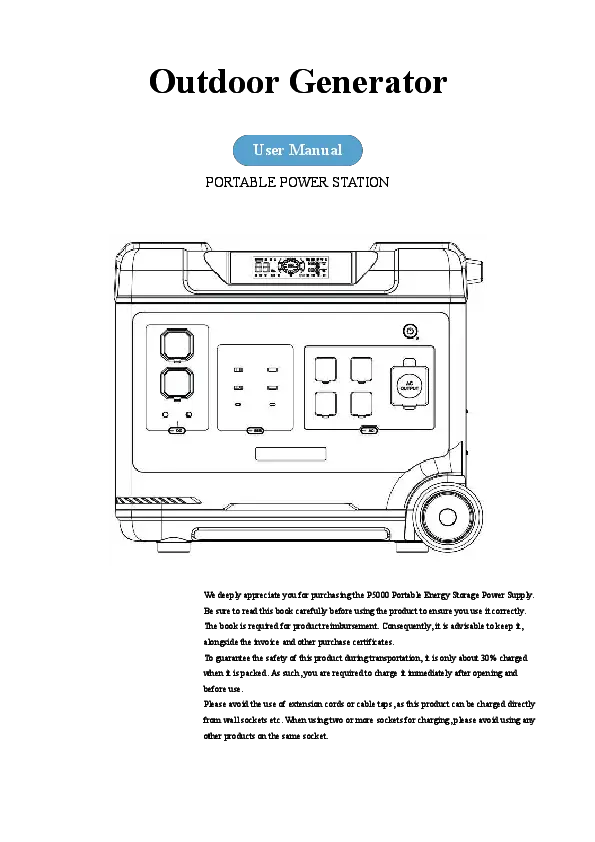
1. Produktas baigtasview
The OUKITEL P5000 Pro is a high-capacity portable power station designed to provide reliable energy for various applications, from home emergency backup to outdoor adventures. Featuring a robust 5120Wh LiFePO4 battery and a powerful 3600W AC output, it ensures your essential devices and appliances remain powered. Its advanced features, including ultra-fast charging and seamless Uninterruptible Power Supply (UPS) functionality, make it an indispensable tool for modern energy needs.
2. Pakuotės turinys
Upon unboxing your OUKITEL P5000 Pro, please ensure all the following items are included:
- 1 x OUKITEL P5000 Pro Power Station
- 1 x 400W saulės baterija
- 1 x kintamosios srovės įkrovimo laidas
- 1x automobilio įkrovimo laidas
- 1 x saulės įkrovimo kabelis
- 1 x Vartotojo vadovas
3. Pagrindinės produkto savybės
- Didelė talpa ir našumas: 5120Wh battery capacity with 3600W continuous AC output (5000W Peak) to power a wide range of devices.
- Patvari LiFePO4 baterija: Built with high-quality Lithium Iron Phosphate (LiFePO4) cells, offering over 3500 charge/discharge cycles for a lifespan of up to 15 years.
- Itin greitas įkrovimas: Achieves 0-100% charge in approximately 3.5 hours using 1800W AC input.
- Seamless UPS Function: Provides Uninterruptible Power Supply (UPS) with a switchover time of less than 0.01 seconds, ensuring continuous power for critical devices during outages.
- Smart APP valdymas: Connects via Bluetooth or WiFi for remote monitoring and control of input/output, remaining power, and other settings.
- Kelios įkrovimo parinktys: Supports AC, solar (up to 1000W), and car charging.
4. Produkto išdėstymas ir prievadai
Familiarize yourself with the various ports and controls on your P5000 Pro for efficient operation.
Priekinis skydelis baigtasview

The front panel features a comprehensive array of output options, including:
- AC lizdai: 5 x AC outlets (3600W total, 5000W peak) for standard household appliances.
- USB prievadai: Multiple USB-A and USB-C ports, including PD 100W for fast charging of mobile devices and laptops.
- DC išėjimai: 12V/10A and 24V/10A DC ports for various DC-powered devices.
- Automobilių išparduotuvė: A 12V/10A car cigarette lighter port.
- Ekranas: A large LCD screen showing real-time power input/output, battery level, and remaining runtime.
Šoninio skydelio jungtys

The side panel houses the primary input ports and cooling vents:
- Kintamosios srovės įkrovimo įvestis: For connecting the AC charging cable to recharge the power station from a wall outlet.
- Solar/Car Input: For connecting solar panels or a car charging cable.
- Apsauga nuo perkrovos: A reset button for overload protection.
- Aušinimo angos: Integrated fans on both sides ensure optimal temperature regulation during operation.
5. Charging Your P5000 Pro
The P5000 Pro offers flexible charging options to suit your needs.
Kintamosios srovės įkrovimas
Connect the provided AC charging cable to the AC input port on the side of the power station and then to a standard wall outlet. The 1800W fast charging technology allows the unit to reach 100% capacity in approximately 3.5 hours.
Saulės įkrovimas

Utilize the 400W solar panel (included) or other compatible solar panels (up to 1000W total) by connecting them to the Solar/Car input port. Under ideal sunlight conditions, the power station can achieve a full charge in about 2 hours.
Automobilio įkrovimas
Use the provided car charging cable to recharge the power station from your vehicle's 12V outlet. This method is suitable for on-the-go charging, though it may be slower than AC or solar charging.
6. Operating the P5000 Pro
Follow these steps to operate your power station safely and effectively.
Maitinimo įjungimas/išjungimas
- To power on, press and hold the main 'Power' button on the front panel for 2-3 seconds. The LCD screen will illuminate.
- To power off, press and hold the main 'Power' button again for 2-3 seconds until the LCD screen turns off.
Kintamosios srovės lizdų naudojimas
- Press the 'AC' button on the front panel to activate the AC output. The AC icon on the LCD screen will light up.
- Plug your AC-powered devices into the desired AC outlets.
- To turn off AC output, press the 'AC' button again.
Using DC and USB Ports
- Press the 'DC' or 'USB' buttons on the front panel to activate the respective outputs. The corresponding icons on the LCD screen will light up.
- Connect your DC or USB-powered devices.
- To turn off DC or USB output, press the respective buttons again.
Adjustable Charge Current
The P5000 Pro features an adjustable charge current knob, allowing you to select input wattage from 400W to 1800W. This is useful for managing power consumption when charging from a generator or a less robust power source, preventing overload.
Nepertraukiamo maitinimo šaltinio (UPS) funkcija

When the power station is connected to a wall outlet and devices are plugged into its AC outputs, it functions as a UPS. In the event of a power outage, the P5000 Pro will automatically switch to battery power within 0.01 seconds, ensuring uninterrupted operation for connected devices.
Programų mobiliesiems valdymas

Download the OUKITEL mobile app (Landbook or Wonderfree, depending on your region) from your smartphone's app store. Connect the power station via Bluetooth or WiFi to remotely monitor battery status, control output ports, and adjust settings. Refer to the app's user manual for detailed setup and features.
This video demonstrates the setup and usage of the OUKITEL Solar Generator's mobile application, allowing users to remotely monitor and control their device via Bluetooth or WiFi.
7. Priežiūra ir sandėliavimas
Proper maintenance ensures the longevity and optimal performance of your P5000 Pro.
- Reguliarus įkrovimas: If the product is left unused for a long time, charge it to 100% every three months to maintain battery health.
- Laikymo sąlygos: Jėgos stotelę laikykite vėsioje, sausoje vietoje, toliau nuo tiesioginių saulės spindulių ir ekstremalių temperatūrų.
- Baterijos lygis: It is recommended to store the product with a battery level of at least 20%.
- Valymas: Išorę valykite sausa, minkšta šluoste. Venkite naudoti stiprias chemines medžiagas ar abrazyvines medžiagas.
8. Problemų sprendimas
If you encounter issues with your P5000 Pro, refer to the following common troubleshooting tips:
- Įrenginys neįkraunamas: Ensure the AC charging cable is securely connected to both the power station and the wall outlet. Verify the wall outlet is functional. For solar charging, ensure panels are correctly connected and receiving adequate sunlight.
- Programos ryšio problemos: Ensure Bluetooth or WiFi is enabled on your smartphone and the power station. Restart both devices and try reconnecting. If issues persist, consult the app's user manual or contact customer support.
- Nėra išvesties iš prievadų: Ensure the specific output (AC, DC, USB) is activated by pressing its respective button. Check the LCD screen for any error indicators. If an overload occurs, press the overload protection reset button on the side panel.
9. Techninės specifikacijos
| Specifikacija | Detalė |
|---|---|
| Prekės ženklas | YOYOSCX (OUKITEL) |
| Modelio pavadinimas | P5000 Pro solar generator |
| Baterijos tipas | Ličio geležies fosfatas (LiFePO4) |
| Talpa | 5120 Wh |
| AC išvestis | 3600W (5000W Peak), 120 Volts, 60Hz |
| AC įkrovimo įvestis | 1800W maks |
| Saulės įkrovimo įvestis | 1000W maks |
| DC išėjimas | 12V/10A, 24V/10A |
| USB prievadai | USB-A (5V/2.4A), USB-C (PD 100W) |
| UPS perjungimo laikas | < 0.01s |
| Gyvenimo trukmė | 3500+ cycles (up to 15 years) |
| Prekės svoris | 112 svarų (51 kg) |
| Gaminio matmenys | 11.8 colio ilgio x 19.17 colių pločio x 21.65 colio aukščio |
10. Garantija ir palaikymas
The OUKITEL P5000 Pro comes with a 12-month warranty covering non-man-made damage. For any quality problems under normal use, warranty service will be provided. Please retain your purchase receipt and warranty card as proof of purchase.
For technical support or warranty claims, please contact OUKITEL customer service. Contact information can typically be found in your user manual or on the official OUKITEL websvetainę.