Majority Darwin Bluetooth Alarm Clock with 10W Wireless Charging
Model: Darwin | Brand: Majority
Įvadas
This manual provides detailed instructions for the operation and maintenance of your Majority Darwin Bluetooth Alarm Clock. This device integrates an FM radio, dual alarm clock, 10W wireless charging, and ambient lighting to enhance your bedside experience.
Saugos informacija
- Prieš naudodami atidžiai perskaitykite visas instrukcijas.
- Saugokite prietaisą nuo vandens ir drėgmės.
- Nelaikykite ekstremaliose temperatūrose.
- Nebandykite patys ardyti ar taisyti įrenginio. Kreipkitės į kvalifikuotus techninės priežiūros darbuotojus.
- Naudodami belaidžio įkrovimo funkciją, užtikrinkite tinkamą vėdinimą.
Pakuotės turinys
Patikrinkite, ar dėžutėje yra visi reikalingi daiktai:
- Majority Darwin Bedside Clock
- Maitinimo adapteris
- Vartotojo vadovas

Image: Package contents of the Majority Darwin alarm clock, including the clock, power adapter, and user manual.
Produktas baigtasview
Familiarize yourself with the main components and control buttons of your Darwin alarm clock.
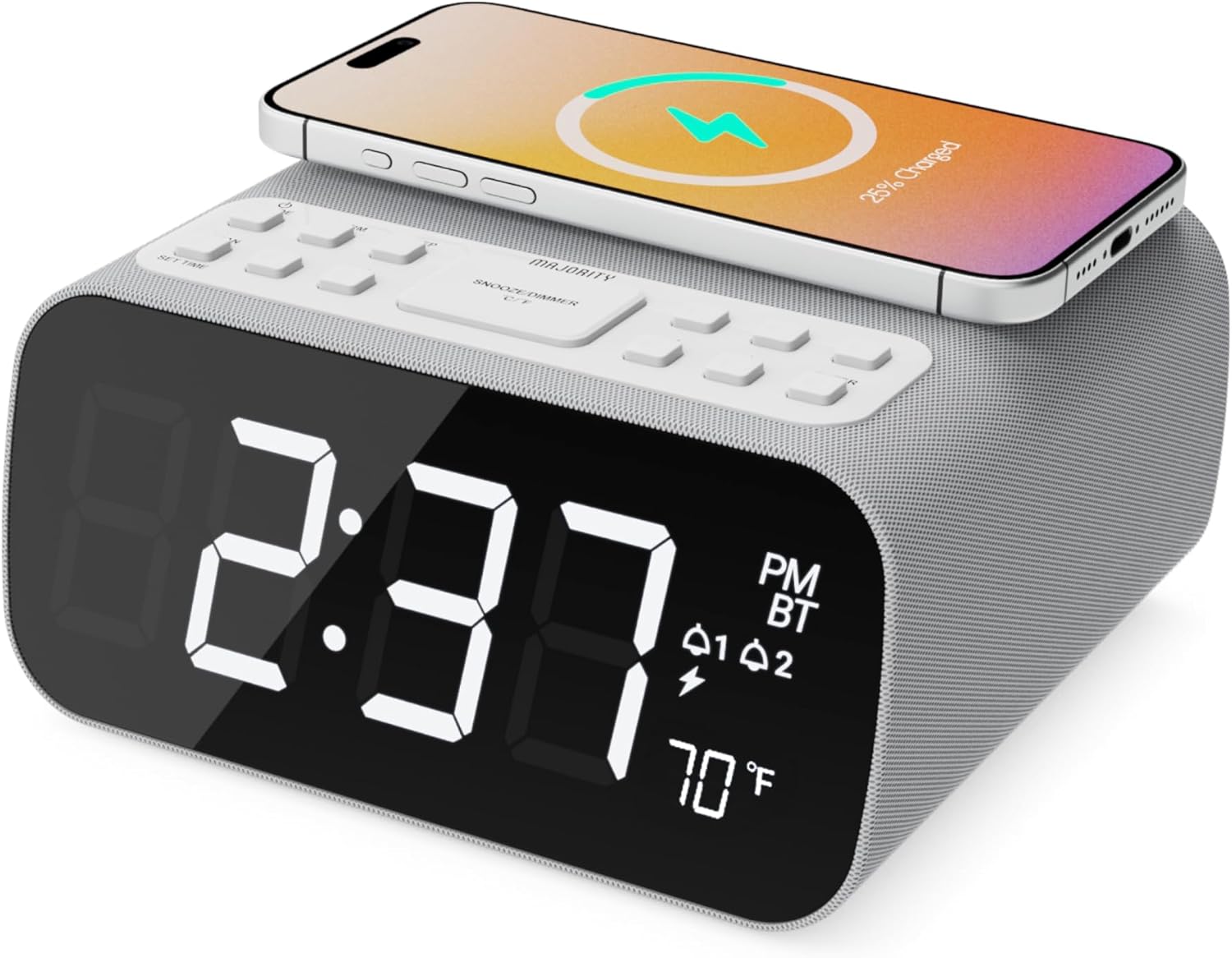
Vaizdas: priekis view of the Majority Darwin alarm clock showing the large digital display, wireless charging pad on top, and control buttons.

Vaizdas: Šoninė view of the Majority Darwin alarm clock highlighting the control panel with buttons for time, alarm, volume, and light settings.
Viršutinio skydelio valdikliai
- Belaidžio įkrovimo padėklas: Place compatible devices here for 10W wireless charging.
- Snaudimo / šviesos mygtukas: Short press to snooze alarm; long press to adjust display brightness or cycle through ambient light colors.
- Time/Date Set Button: Press to enter time/date setting mode.
- Alarm 1/2 Buttons: Press to activate/deactivate Alarm 1 or Alarm 2. Long press to set alarm time.
- Volume/Tune Buttons: Adjust volume or tune FM radio stations.
- Režimo mygtukas: Switch between FM Radio, Bluetooth, and White Noise modes.
Rear Panel Controls & Ports
- DC 12V įvestis: Connect the mains power adapter here.
- USB įkrovimo prievadas: For charging additional devices via USB cable.
- Baterijų skyrius: For backup batteries (not for primary power).
- Display Dimmer Slider: Manually adjust the brightness of the main time display.
- Night Light Dimmer: Adjust brightness of the ambient light.
Sąranka
Maitinimo prijungimas
Connect the provided mains power adapter to the DC 12V input port on the rear of the alarm clock and plug it into a wall outlet. The display will light up.
For battery backup, open the battery compartment on the bottom and insert 2 x AAA batteries (not included). This will retain time settings during a power outage but will not power the display or charging functions.
Vaizdas: Galinis view of the Majority Darwin alarm clock with the power adapter connected to the DC 12V input.
Pradinis laiko nustatymas
- Ilgai paspauskite mygtuką Nustatytas laikas/data button on the top panel. The hour digits will start flashing.
- Naudokite Volume/Tune mygtukai valandoms reguliuoti.
- Paspauskite Nustatytas laikas/data dar kartą paspauskite mygtuką, kad patvirtintumėte valandas ir pereitumėte prie minučių nustatymo.
- Naudokite Volume/Tune mygtukai minutėms reguliuoti.
- Repeat this process for setting the year, month, and day.
- Paspauskite Nustatytas laikas/data button one last time to save all settings.
Naudojimo instrukcijos
Time Display & Dimmer
The large LED display shows the current time.
Rankinis pritemdymas: Naudokite Display Dimmer Slider on the rear panel to manually adjust the brightness of the time display.
Automatinis pritemdymas: The device features an auto-dimming function that adjusts display brightness at fixed time intervals (e.g., dimming at night, brightening during the day).

Vaizdas: priekis view of the Majority Darwin alarm clock displaying time, AM/PM, and temperature, highlighting the dual alarm icons.
Signalizacijos nustatymas
The Darwin alarm clock supports two independent alarms (Alarm 1 and Alarm 2).
- Long press either the Signalas 1 or Signalas 2 button. The hour digits for that alarm will flash.
- Naudokite Volume/Tune mygtukus, kad nustatytumėte norimą žadintuvo valandą.
- Paspauskite atitinkamą Signalizacija dar kartą paspauskite mygtuką, kad patvirtintumėte valandas ir pereitumėte prie minučių nustatymo.
- Naudokite Volume/Tune mygtukus, kad nustatytumėte norimas žadintuvo minutes.
- Paspauskite Signalizacija button again to select the alarm source (FM radio or built-in tone). Use Volume/Tune mygtukai pasirinkti.
- Paspauskite Signalizacija button again to set the alarm volume.
- Paspauskite Signalizacija paskutinį kartą paspauskite mygtuką, kad įjungtumėte žadintuvą. Ekrane pasirodys žadintuvo piktograma.
Deactivating an Alarm: Short press the corresponding Signalas 1 or Signalas 2 button to turn it off. The alarm icon will disappear.
Snaudimo funkcija
When an alarm sounds, short press the Snaudimas/Šviesa button on the top panel to temporarily silence the alarm for 9 minutes. The alarm will sound again after the snooze period.
FM radijo veikimas
- Paspauskite Režimas mygtuką, kol ekrane pasirodys „FM“.
- Naudokite Volume/Tune buttons to manually tune to your desired FM station.
- Auto Scan & Store Presets: Ilgai paspauskite mygtuką Režimas button to automatically scan and save available FM stations as presets.
- Trumpai paspauskite Režimas mygtuką, kad peržiūrėtumėte išsaugotus išankstinius nustatymus.
Bluetooth Pairing & Playback
- Paspauskite Režimas button until "BT" appears on the display and the Bluetooth indicator starts flashing.
- On your smartphone or other Bluetooth device, enable Bluetooth and search for "Majority Darwin".
- Select the device to pair. Once connected, the Bluetooth indicator on the alarm clock will stop flashing.
- You can now play audio from your device through the alarm clock's speaker. Use the Volume/Tune buttons on the alarm clock or your device to adjust volume.

Image: A smartphone displaying music playback, connected via Bluetooth to the Majority Darwin alarm clock.
Belaidis įkrovimas
The top surface of the alarm clock features a 10W wireless charging pad.
- Place your Qi-compatible smartphone directly onto the wireless charging pad.
- Ensure the phone is centered on the charging symbol for optimal charging.
- A charging indicator (e.g., a lightning bolt icon) may appear on your phone's screen or the alarm clock's display to confirm charging.
USB įkrovimo prievadas: An additional USB port on the rear allows you to charge other devices using a USB cable.
Image: The Majority Darwin alarm clock with a smartphone placed on top, indicating active wireless charging.
Night Light / Ambient Light
The alarm clock features an ambient light ring around its base.
- Ilgai paspauskite mygtuką Snaudimas/Šviesa button to turn the ambient light on/off.
- Trumpai paspauskite Snaudimas/Šviesa button to cycle through different color modes (e.g., red, green, blue, purple, white, color cycle).
- Naudokite Nakties šviesos reguliatorius on the rear panel to adjust the brightness of the ambient light.

Image: The Majority Darwin alarm clock illuminated with a vibrant ambient light from its base.
White Noise Function
The device includes various white noise sounds to aid relaxation and sleep.
- Paspauskite Režimas button until the white noise mode is activated (indicated by a specific icon or text on the display).
- Naudokite Volume/Tune buttons to adjust the volume of the white noise.
- Trumpai paspauskite Režimas button again to cycle through different white noise sounds (e.g., nature sounds, fan noise).
Priežiūra
- Prietaisą valykite minkštu, sausu skudurėliu. Nenaudokite abrazyvinių valiklių ar tirpiklių.
- Ventiliacijos angas laikykite laisvas.
- If not in use for an extended period, disconnect from power and remove backup batteries.
Trikčių šalinimas
Nėra maitinimo / ekranas išjungtas
- Įsitikinkite, kad maitinimo adapteris yra tvirtai prijungtas tiek prie įrenginio, tiek prie veikiančio maitinimo lizdo.
- Patikrinkite, ar maitinimo lizdas veikia.
Belaidis įkrovimas neveikia
- Įsitikinkite, kad jūsų įrenginys yra suderinamas su Qi.
- Make sure your phone is centered on the charging pad.
- Remove any thick phone cases or metallic objects between the phone and the charging pad.
„Bluetooth“ poravimo problemos
- Ensure the alarm clock is in Bluetooth pairing mode (BT flashing).
- Make sure your device's Bluetooth is enabled and searching.
- Pabandykite atjungti ir vėl susieti įrenginį.
- Ensure no other devices are currently connected to the alarm clock via Bluetooth.
Signalizacija neskamba
- Patikrinkite, ar įjungtas aliarmas (ekrane matoma aliarmo piktograma).
- Patikrinkite žadintuvo garsumo nustatymą.
- Ensure the correct alarm time is set.
Specifikacijos
| Funkcija | Detalė |
|---|---|
| Prekės ženklas | Dauguma |
| Modelio pavadinimas | Darvinas |
| Belaidžio įkrovimo išvestis | 10W |
| Garsiakalbio išėjimo galia | 12 vatų |
| Ryšio technologija | Bluetooth |
| Maitinimo šaltinis | Mains Power (Battery Backup) |
| Gaminio matmenys | 13.07 x 8.22 x 6.09 colio |
| Prekės svoris | 1.42 svaro (645 gramų) |
| Ypatingos savybės | Adjustable Volume, Dual Alarm, Bluetooth, Wireless Charging, FM Radio, Dimmable Display, Ambient Night Light, White Noise |
Garantija ir palaikymas
The Majority Darwin Bluetooth Alarm Clock comes with a standard manufacturer's warranty. Please refer to the warranty card included in your package for specific terms and conditions.
For technical support, troubleshooting, or warranty claims, please visit the official Majority websvetainėje arba susisiekite su jų klientų aptarnavimo tarnyba.
Online resources and FAQs may also be available on the product support page.