1. Produktas baigtasview
The Grandstream WP816 is a compact, portable Wi-Fi phone designed for clear communication. It features dual-band Wi-Fi 6 for reliable connectivity, supports two SIP accounts and two lines, and delivers HD voice quality with dual microphones, Acoustic Echo Cancellation (AEC), and Noise Shield Technology. The phone includes integrated Bluetooth for headset connectivity, a long-lasting 1500mAh rechargeable battery providing 6 hours of talk time and 120 hours of standby time, and a configurable push-to-talk button. It is equipped with a Type C USB port for fast charging and a 3.5mm headset jack. Additional features include an accelerometer and an emergency button.
Pagrindinės funkcijos:
- Dual-band Wi-Fi 6 with efficient antenna design and advanced roaming support.
- Supports 2 SIP accounts and 2 lines.
- HD voice with dual MIC design, AEC, and Noise Shield Technology.
- Integrated Bluetooth for headset connection.
- Rechargeable 1500mAh battery: 6 hours talk time, 120 hours standby.
- Configurable button for push-to-talk functionality.
- Type C USB port (supports fast charging) and 3.5mm headset jack.
- Built-in accelerometer and emergency button.
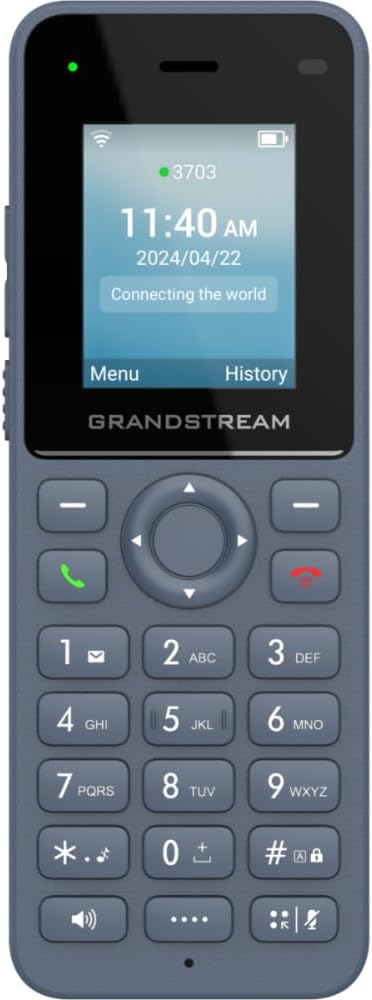
1 pav.: priekis view of the Grandstream WP816 Wi-Fi Phone, displaying its screen, keypad, and branding.
2. Sąranka
2.1. Kas yra dėžutėje:
- Grandstream WP816 Wi-Fi Phone
- (Additional accessories such as power adapter, charging cradle, and battery are typically included but not explicitly detailed in the provided 'whats_in_the_box' field, which only states "Phone". Assuming standard phone accessories.)
2.2. Telefono įkrovimas:
- Prijunkite maitinimo adapterį prie įkrovimo stovo ir maitinimo lizdo.
- Place the WP816 phone into the charging cradle. Ensure the phone is seated correctly and the charging indicator illuminates.
- Allow the phone to charge fully before initial use. This typically takes several hours. The Type C USB port also supports fast charging.
2.3. Pradinė sąranka:
- Maitinimas: Paspauskite ir palaikykite maitinimo / skambučio baigimo mygtuką, kol ekranas įsijungs.
- „Wi-Fi“ ryšys: Navigate to the "Settings" menu, then "Wi-Fi". Select your desired Wi-Fi network and enter the password if prompted. The phone supports dual-band Wi-Fi 6.
- SIP Account Configuration: Access the "Settings" menu to configure your SIP accounts. The phone supports 2 SIP accounts. Refer to your VoIP service provider for specific SIP settings (SIP server, User ID, Password).
- Data ir laikas: Ensure the date and time are correctly set, either manually or via network synchronization.
3. Naudojimo instrukcijos
3.1. Skambinimas:
- Skambinimas: Įveskite telefono numerį naudodami klaviatūrą.
- Pradėti skambutį: Press the Green Call button to place the call.
- Baigti skambutį: Press the Red End Call button to terminate the conversation.
3.2. Receiving Calls:
- When the phone rings, press the Green Call button to answer.
- To reject an incoming call, press the Red End Call button.
3.3. Speakerphone Function:
- During a call, press the Speaker button (often indicated by a speaker icon) to activate the speakerphone.
- Press the Speaker button again to switch back to the earpiece.
3.4. Push-to-Talk (PTT):
- The WP816 features a configurable button for Push-to-Talk functionality.
- Consult your system administrator or service provider for configuration details and usage of the PTT feature.
3.5. Bluetooth Headset Connectivity:
- Ensure your Bluetooth headset is in pairing mode.
- On the WP816, navigate to "Settings" > "Bluetooth".
- Įjunkite „Bluetooth“ ir ieškokite galimų įrenginių.
- Select your headset from the list and follow any on-screen prompts to complete pairing.
4. Priežiūra
4.1. Akumuliatoriaus priežiūra:
- Norėdami pailginti akumuliatoriaus veikimo laiką, venkite ekstremalių temperatūrų.
- Charge the phone regularly. Do not let the battery completely drain for extended periods.
- If the phone will not be used for a long time, charge it to about 50% and store it in a cool, dry place.
4.2. Valymas:
- Telefono išorę valykite minkšta, sausa šluoste.
- Nenaudokite stiprių cheminių medžiagų, valymo tirpiklių ar stiprių ploviklių.
5. Problemų sprendimas
5.1. No Power:
- Įsitikinkite, kad baterija tinkamai įdėta ir įkrauta.
- Patikrinkite, ar įkrovimo stotelė tinkamai prijungta prie maitinimo šaltinio.
5.2. Cannot Connect to Wi-Fi:
- Check if the Wi-Fi network is active and within range.
- Confirm the Wi-Fi password is entered correctly.
- Restart the phone and the Wi-Fi router.
5.3. Poor Call Quality:
- Ensure you are within good Wi-Fi signal range.
- Patikrinkite interneto ryšio greitį ir stabilumą.
- Verify SIP account settings with your service provider.
5.4. Phone Not Responding:
- Atlikite minkštą atstatymą išimdami ir vėl įdėdami bateriją.
- If the issue persists, a factory reset might be necessary (refer to advanced settings, note this will erase all data).
6. Specifikacijos
| Funkcija | Detalė |
|---|---|
| Modelis | WP816 |
| Prekės ženklas | Grandstream |
| Gaminio matmenys | 7 x 5 x 4 colio |
| Prekės svoris | 13.8 uncijos (390 gramų) |
| Baterijos | Reikalinga 1 nestandartinė baterija |
| Ryšys | Dual-band Wi-Fi 6, Integrated Bluetooth |
| SIP sąskaitos | 2 SIP accounts, 2 lines |
| Balso funkcijos | HD voice, Dual MIC design with AEC and Noise Shield Technology |
| Baterijos talpa | 1500 mAh |
| Pokalbių laikas | 6 valandų |
| Budėjimo laikas | 120 valandų |
| Uostai | Type C USB (fast charging support), 3.5mm headset jack |
| Papildomos funkcijos | Accelerometer, Emergency button, Configurable Push-to-Talk button |
| Spalva | Pilka |
| Medžiaga | Plastikiniai |
| Telefono tipas | Belaidis |
| Rinkiklio tipas | Toninis rinkimas |
| Daugiaeilė operacija | Daugiaeilis valdymas |
7. Garantija ir palaikymas
For warranty information and technical support, please refer to the documentation provided with your purchase or visit the official Grandstream websvetainėje. Išsaugokite pirkimo įrodymą garantiniams reikalavimams.


