1. Produktas baigtasview
The Nokia G310 5G Smartphone (Model TA-1573) offers lightning-fast 5G connectivity and modern mobile technology. It features a vibrant display for various tasks, a powerful processor for smooth performance, and an advanced camera system for detailed photos. Designed for daily use, it provides a comfortable grip and durable build quality. Enjoy extensive network compatibility, ample storage, a long-lasting battery with quick charging, and a user-friendly interface with regular software updates.
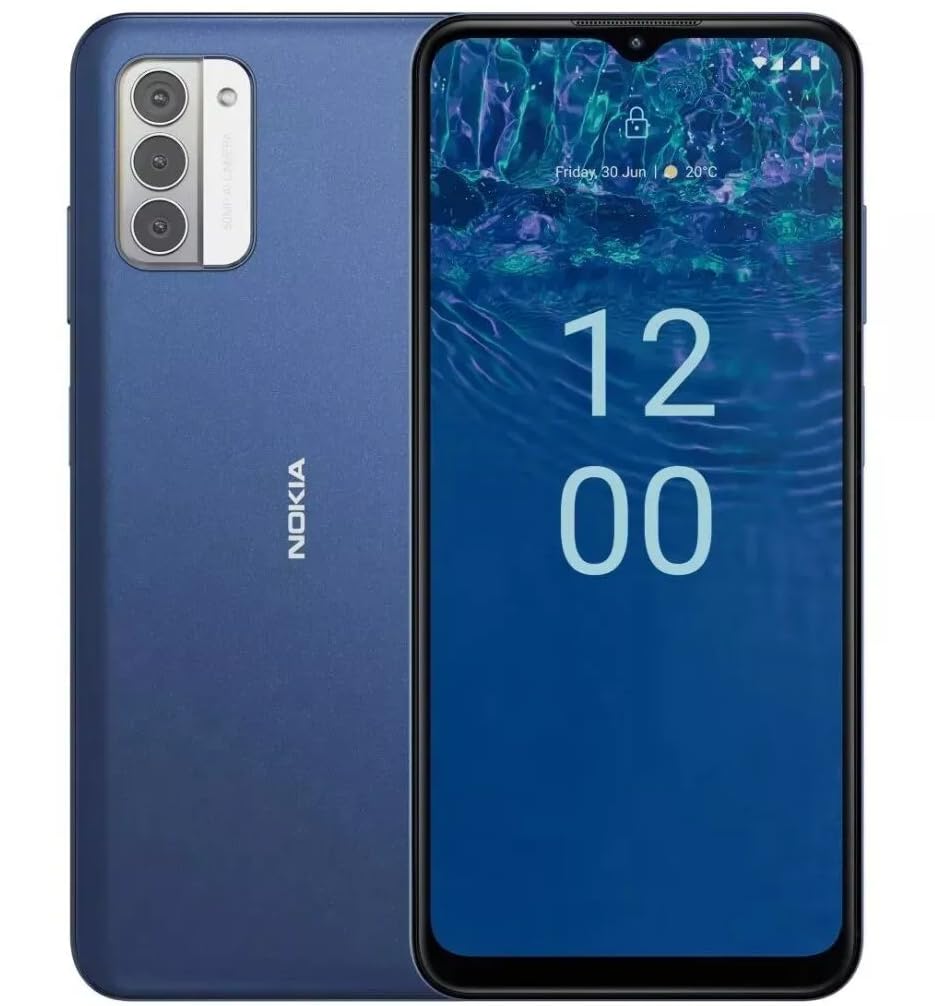
Vaizdas: Galinis view of the Nokia G310 5G Smartphone, showcasing the triple camera module and Nokia branding.
Pagrindinės savybės
- 5G ryšys: Experience ultra-fast mobile data speeds and low latency.
- Ryškus ekranas: Large touchscreen display delivers vibrant colors and sharp visuals.
- Efektyvus našumas: Processor handles everyday tasks smoothly, from browsing to gaming.
- Patvarus dizainas: Sleek and modern smartphone design with durable construction.
2. Darbo pradžia
Kas yra dėžutėje
- Nokia G310 5G išmanusis telefonas
- Įkroviklis
SIM and MicroSD Card Installation
Locate the SIM/MicroSD card tray on the side of your device. Use the provided SIM ejector tool to open the tray. Insert your Nano-SIM card(s) and/or MicroSD card into the designated slots. Ensure the cards are correctly oriented. Gently push the tray back into the device until it clicks into place.
Maitinimo įjungimas/išjungimas
To power on your Nokia G310, press and hold the Power/Fingerprint Sensor button located on the right side of the device until the Nokia logo appears. To power off, press and hold the Power/Fingerprint Sensor button, then select 'Power off' from the options that appear on the screen.
3. Įrenginio išdėstymas
Fiziniai mygtukai ir prievadai
- Garsumo mygtukai: Located on the right side, above the Power/Fingerprint Sensor button, for adjusting media and call volume.
- Power/Fingerprint Sensor Button: Located on the right side, used for powering the device on/off, locking/unlocking the screen, and fingerprint authentication.
- USB-C prievadas: Įsikūręs apačioje, naudojamas įkrovimui ir duomenų perdavimui.
- 3.5 mm garso lizdas: Located at the bottom, for connecting wired headphones.
- Pranešėjas: Įsikūręs apačioje, skirtas garso išvesties jungtiai.
- Mikrofonas: Integruota skambučiams ir balso komandoms.
Kameros modulis
The rear of the device features a multi-lens camera module, including a main camera, along with a flash for low-light photography. The front-facing camera is discreetly placed within a notch at the top of the display.
4. Naudojimo instrukcijos
Pagrindinė navigacija
The Nokia G310 operates on the Android operating system, offering an intuitive touchscreen interface. Swipe up from the bottom of the screen to access the app drawer, swipe down from the top for notifications and quick settings, and use gestures or navigation buttons (configurable in settings) to move between apps and screens.
Ryšys
- 5G korinio ryšio duomenys: The device supports 5G connectivity for ultra-fast mobile data speeds. Ensure your SIM card and plan support 5G.
- „Wi-Fi“: Prisijunkite prie belaidžių tinklų, kad galėtumėte naudotis internetu. Norėdami tvarkyti ryšius, eikite į Nustatymai > Tinklas ir internetas > „Wi-Fi“.
- Bluetooth: Pair with other Bluetooth-enabled devices like headphones or speakers. Go to Settings > Connected devices > Bluetooth.
- GPS: Utilize built-in GPS for location services and navigation.
5. Kameros naudojimas
The Nokia G310 features an advanced camera system designed to capture memorable moments. Access the camera app from your home screen or app drawer.
Fotografavimas
Open the Camera app, frame your shot, and tap the shutter button on the screen to take a picture. The advanced AI camera assists in optimizing settings for various scenes.
Vaizdo įrašų įrašymas
In the Camera app, switch to video mode, then tap the record button to start and stop recording. The phone supports various video resolutions.
Kameros režimai
Explore different camera modes available in the camera app, such as Portrait, Panorama, and Night mode, to enhance your photography experience.
6. Baterijos valdymas
Įrenginio įkrovimas
The Nokia G310 is equipped with a 5000 Milliamp Hours (5000.0 Battery Power Rating) battery. Connect the provided USB-C charger to the port at the bottom of the device. The phone supports quick charging for reduced downtime.
Akumuliatoriaus veikimo trukmės optimizavimas
- Sureguliuokite ekrano ryškumą iki patogaus lygio.
- Įjunkite akumuliatoriaus taupymo režimą, kai akumuliatoriaus įkrova maža.
- Uždarykite nenaudojamas programas, veikiančias fone.
- Išjunkite „Wi-Fi“, „Bluetooth“ arba GPS, kai jų nenaudojate.
7. Techninės specifikacijos
| Modelio numeris | TA-1573 |
| Operacinė sistema | Android |
| CPU modelis | „MediaTek Helio P60T“. |
| Korinio ryšio technologija | 5G |
| Belaidis nešiklis | Atrakinta |
| Atminties talpa | 4 GB |
| Rezoliucija | 1080 x 2340 |
| Žmogaus sąsajos įvestis | Jutiklinis ekranas |
| Baterijos talpa | 5000 milijonųamp Valandos |
| Garso lizdas | 3.5 mm |
| Spalva | Mėlyna |
| Gamintojas | Nokia |
| Pasiekiama pirmoji data | 31 m. sausio 2025 d |
8. Problemų sprendimas
If you encounter issues with your Nokia G310, try the following common troubleshooting steps:
- Įrenginys nereaguoja: Paspauskite ir palaikykite maitinimo mygtuką maždaug 10–15 sekundžių, kad priverstumėte paleisti iš naujo.
- Ryšio problemos: Toggle Wi-Fi or Bluetooth off and on. Restart your device. Check network settings.
- Programėlė neveikia: Išvalykite programėlės talpyklą ir duomenis skiltyje „Nustatymai“ > „Programos“. Jei problema išlieka, pašalinkite programėlę ir įdiekite ją iš naujo.
- Baterija greitai išsikrauna: Review battery usage in Settings > Battery to identify power-hungry apps. Adjust screen brightness and enable Battery Saver.
- Saugykla pilna: Ištrinkite nereikalingus files, photos, or apps. Transfer media to a computer or cloud storage. Consider using a MicroSD card for additional storage.
9. Priežiūra ir priežiūra
- Valymas: Įrenginiui valyti naudokite minkštą, nepūkuotą šluostę. Venkite stiprių cheminių medžiagų ar abrazyvinių medžiagų.
- Programinės įrangos atnaujinimai: Regularly check for and install software updates to ensure your device runs optimally and has the latest security features. Go to Settings > System > System update.
- Saugyklos valdymas: Periodiškai review your device's storage to free up space and maintain performance.
- Aplinkos sąlygos: Venkite įrenginio veikimo ekstremaliose temperatūrose, tiesioginiuose saulės spinduliuose ar per didelėje drėgmėje.
10. Garantija ir palaikymas
For warranty information, please refer to the warranty card included in your product packaging or visit the official Nokia support website. For further assistance, contact Nokia customer support.


