1. Įvadas
The AWANFI GL-528 Walkie Talkies are designed to provide reliable and clear two-way communication for various activities, including family camping, cycling, hiking, and general use. Featuring a compact design, long-lasting rechargeable battery, and multiple functions, these radios are easy to use for both adults and children.
Pagrindinės funkcijos:
- Įkraunama baterija: Upgraded lithium battery provides up to 24 hours of battery life on a single charge with convenient USB charging.
- Lengvas valdymas: Simple Push-to-Talk (PTT) button and intuitive controls.
- VOX (balsu valdoma stotis): Hands-free communication for outdoor exploration.
- Full-Featured Design: Compact, lightweight, with included lanyards and belt clips for portability.
- Integruotas LED žibintuvėlis: Naudoti esant silpnam apšvietimui.
- Back-lit LCD Display: Ensures visibility in various lighting.
- Papildomos funkcijos: Auto Scan, 10 Call Tone Alerts, SOS Siren, Keypad Lock.
- Platus pritaikymas: Ideal for hiking, biking, camping, road trips, cruises, and home use.
2. Pakuotės turinys
Pažymėkite langelį, kad įsitikintumėte, jog yra visi elementai:
- 3 x AWANFI GL-528 racijos
- 3 x diržo segtukai
- 3 x dirželiai
- 1 x 3 viename C tipo kabelis
- 1 x Vartotojo vadovas
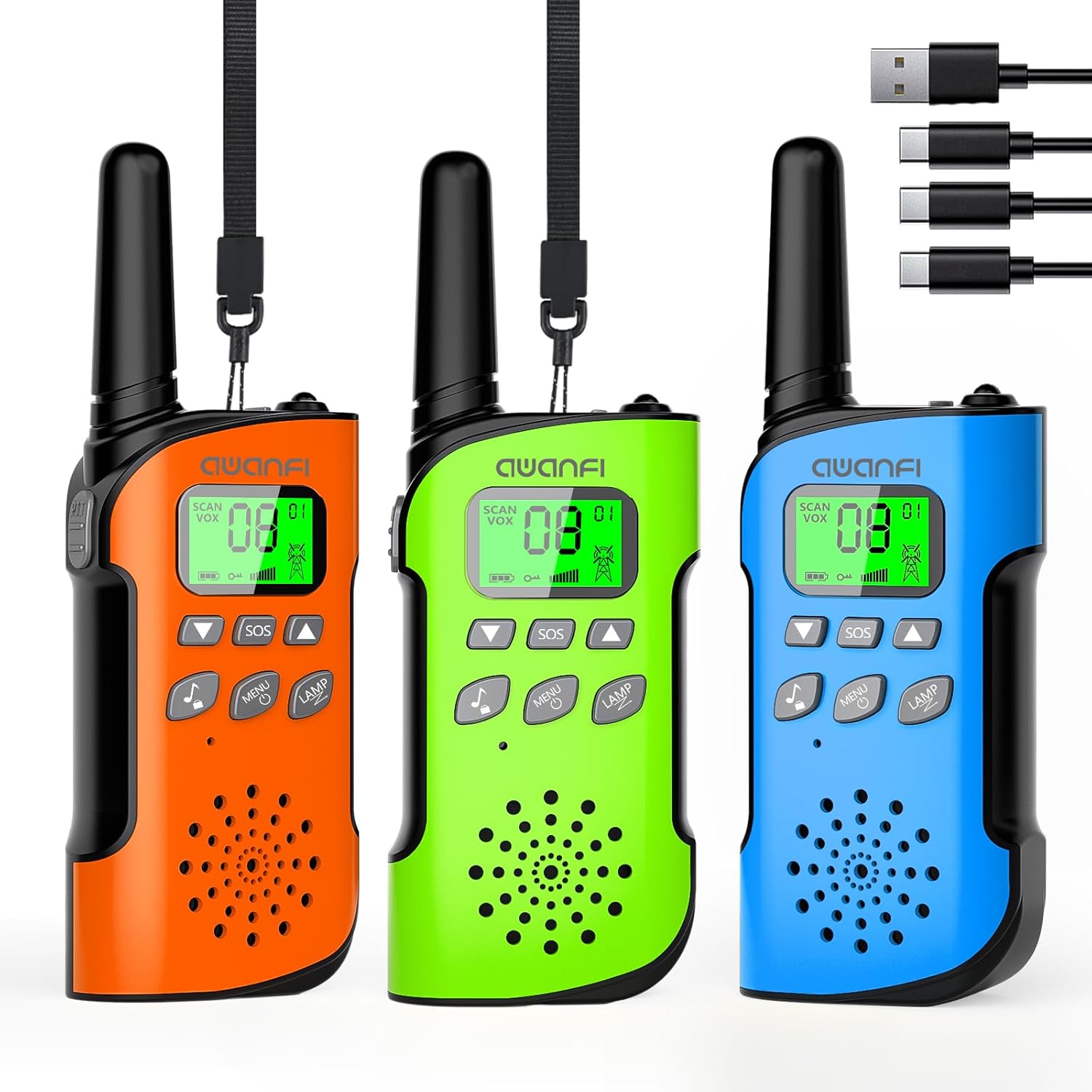
Image: The complete package contents, including three walkie talkies and the charging cable.
3. Produktas baigtasview
Key Features at a Glance:

Image: Visual representation of the walkie talkie's main features, including 22 channels, flashlight, 10 call tones, VOX, keypad lock, LCD display, and HD voice.
Dalių identifikavimas:
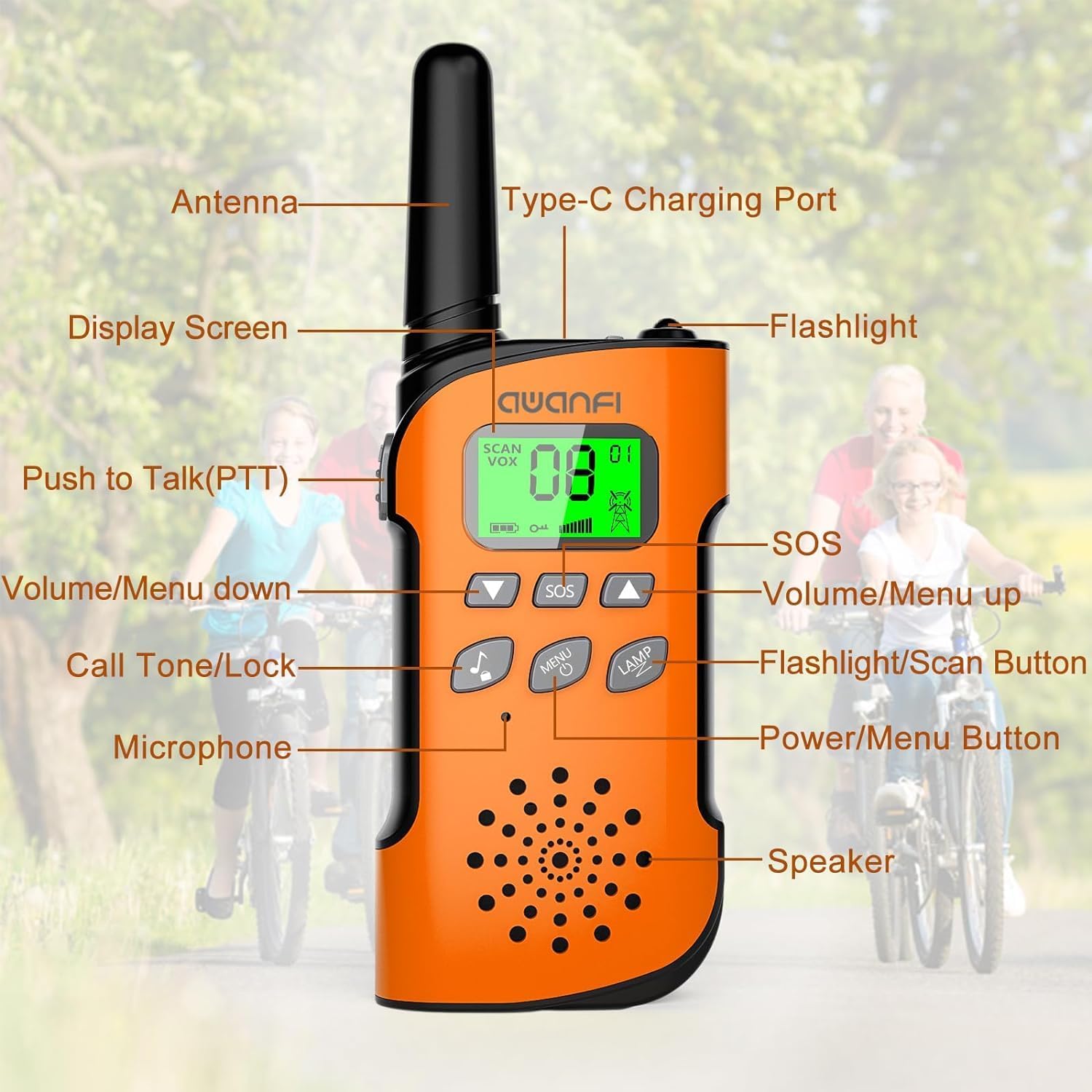
Image: Detailed diagram showing the location and function of each part of the walkie talkie, including buttons, ports, and display.
- Antena: Signalams perduoti ir priimti.
- C tipo įkrovimo prievadas: Skirta vidinei baterijai įkrauti.
- Ekranas: Shows channel, battery level, and feature indicators.
- Žibintuvėlis: Įmontuota LED lemputė.
- „Push to Talk“ (PTT) mygtukas: Paspauskite ir palaikykite, kad perduotumėte savo balsą.
- SOS mygtukas: Activates an emergency distress signal.
- Volume/Menu Up Button: Adjusts volume up or navigates menu up.
- Volume/Menu Down Button: Adjusts volume down or navigates menu down.
- Skambučio tonas / užrakto mygtukas: Sends a call tone or locks/unlocks the keypad.
- Flashlight/Scan Button: Toggles flashlight or initiates channel scan.
- Mikrofonas: Už kalbėjimą į radiją.
- Maitinimo / meniu mygtukas: Turns the radio on/off or enters the menu.
- Pranešėjas: Garso priėmimui.
4. Darbo pradžia
Baterijos įkrovimas:
The AWANFI GL-528 walkie talkies come with a built-in 1000mAh lithium battery, providing up to 48 hours of standby time. Before first use, fully charge the walkie talkies.

Image: Illustration of the walkie talkie's internal 1000mAh battery and its convenient USB-C charging capability.
- Locate the Type-C Charging Port on the side of the walkie talkie.
- Connect the provided 3-in-1 Type-C cable to the charging port.
- Plug the USB end of the cable into any standard USB power source (e.g., car charger, power bank, 5V wall charger).
- LCD ekrane esantis akumuliatoriaus indikatorius rodys įkrovimo būseną. Visiškas įkrovimas paprastai trunka kelias valandas.
- Visiškai įkrovę atjunkite laidą.
Attaching Belt Clip and Lanyard:
For easy portability, attach the included belt clip or lanyard.
- Diržo segtukas: Slide the belt clip into the slot on the back of the walkie talkie until it clicks into place.
- Virvelė: Thread the lanyard through the designated loop at the top of the walkie talkie.
5. Pagrindinė operacija
Maitinimo įjungimas/išjungimas:
- Norėdami įjungti, paspauskite ir palaikykite Maitinimo / meniu mygtukas kol įsijungs LCD ekranas.
- Norėdami išjungti, paspauskite ir palaikykite Maitinimo / meniu mygtukas kol ekranas išsijungs.
Garso reguliavimas:
- Paspauskite Volume/Menu Up Button garsumui padidinti.
- Paspauskite Volume/Menu Down Button norėdami sumažinti garsumą.
Kanalo pasirinkimas:
The walkie talkies have 22 available channels. For communication, all radios must be on the same channel.
- Kai radijas įjungtas, paspauskite Maitinimo / meniu mygtukas once to enter channel selection mode. The channel number will flash.
- Naudokite Volume/Menu Up or Volume/Menu Down Buttons , kad pasirinktumėte norimą kanalą (1–22).
- Paspauskite Maitinimo / meniu mygtukas again to confirm the channel, or wait a few seconds for it to set automatically.
Tiesioginio ryšio funkcija (PTT):
This is the primary method for communication.
- Norėdami kalbėti, paspauskite ir palaikykite TR mygtukas located on the side of the radio.
- Aiškiai kalbėkite į mikrofoną, laikydami radijo stotelę maždaug 2–3 cm atstumu nuo burnos.
- Atleiskite TR mygtukas when you finish speaking to allow others to respond.
6. Išplėstinės funkcijos
VOX (balsu valdoma stotis):
VOX allows for hands-free communication. When activated, the walkie talkie will automatically transmit when it detects your voice.

Image: Demonstrates the convenience of VOX hands-free communication, ideal for activities where holding the radio is inconvenient.
- Paspauskite Maitinimo / meniu mygtukas repeatedly until 'VOX' appears on the display.
- Naudokite Volume/Menu Up or Volume/Menu Down Buttons to select a VOX sensitivity level (1-3, with 3 being most sensitive). 'OF' turns VOX off.
- Paspauskite Maitinimo / meniu mygtukas patvirtinti.
Integruotas LED žibintuvėlis:
The integrated flashlight is useful in low-light conditions.

Image: Shows the walkie talkie's flashlight in action during nighttime, emphasizing its utility for safety and visibility.
- Paspauskite Flashlight/Scan Button once to turn the flashlight on.
- Norėdami išjungti žibintuvėlį, paspauskite jį dar kartą.
SOS funkcija:
In an emergency, the SOS function sends a distress signal.
- Paspauskite ir palaikykite SOS mygtukas to activate the distress alarm. Your companion on the same channel will receive the signal.
- Atleiskite mygtuką, kad sustabdytumėte žadintuvą.
Klaviatūros užraktas:
Norėdami išvengti atsitiktinio mygtukų paspaudimo, galite užrakinti klaviatūrą.
- Paspauskite ir palaikykite Skambučio tonas / užrakto mygtukas until a lock icon appears on the display.
- Norėdami atrakinti, paspauskite ir palaikykite Skambučio tonas / užrakto mygtukas dar kartą, kol užrakto piktograma išnyks.
Kanalo nuskaitymas:
The scan feature allows you to quickly find active channels.
- Paspauskite ir palaikykite Flashlight/Scan Button to initiate channel scanning. The radio will cycle through channels until it detects activity.
- It will pause on an active channel. To stop scanning, press any button.
Call Tone Alerts:
The radio offers 10 different call tones to alert other users.
- Paspauskite Skambučio tonas / užrakto mygtukas vieną kartą, kad išsiųstumėte skambučio toną.
- To change the call tone, enter the menu (press Maitinimo / meniu mygtukas repeatedly until 'CA' appears), then use Volume/Menu Up/Down Buttons to select a tone (0-9). Press Maitinimo / meniu mygtukas patvirtinti.
7. Ryšio diapazonas
The effective communication range of your walkie talkies can vary significantly based on terrain, weather conditions, electromagnetic interference, and obstructions.

Image: Visual guide to typical communication ranges under different environmental conditions.
- Mountain to Valley: Up to 5 KM (optimal conditions with clear line of sight).
- Open Fields: Up to 3 KM (minimal obstructions).
- Neighborhood/Urban Areas: Up to 1 KM (buildings and other structures can significantly reduce range).
8. Priežiūra ir priežiūra
- Valymas: Nuvalykite radiją minkšta, damp audinys. Nenaudokite stiprių cheminių medžiagų ar abrazyvinių valiklių.
- Saugykla: Nenaudojamas racijas laikykite vėsioje, sausoje vietoje. Venkite ekstremalių temperatūrų.
- Akumuliatoriaus priežiūra: To prolong battery life, avoid fully discharging the battery frequently. Recharge regularly. If storing for extended periods, charge the battery to about 50% every few months.
- Atsparumas vandeniui: These walkie talkies are NOT water resistant. Avoid exposure to rain, splashes, or submersion in water.
9. Problemų sprendimas
- Nėra galios: Ensure the battery is charged. Press and hold the Power/Menu button to turn on.
- Negaliu bendrauti: Verify that all walkie talkies are on the same channel. Check battery levels. Ensure you are within range.
- Prasta garso kokybė / statinis triukšmas: Move to an open area. Check for obstructions. Adjust volume. Ensure antenna is not obstructed.
- Trumpas atstumas: Obstructions (buildings, dense foliage) significantly reduce range. Move to higher ground or an open area. Low battery can also affect range.
- Klaviatūra nereaguoja: Check if the keypad lock is activated. Press and hold the Call Tone/Lock button to unlock.
10. Techninės specifikacijos
| Funkcija | Specifikacija |
|---|---|
| Modelio numeris | GL-528 |
| Prekės ženklas | AWANFI |
| Kanalų skaičius | 22 |
| Baterijos tipas | 1000 mAh ličio jonų (nestandartinė baterija) |
| Maksimalus pokalbio diapazonas | 3 Kilometer (Open Fields) |
| Derintuvo technologija | UHF |
| Ypatingos savybės | Call Alert, Integrated Flashlight, Keypad Lock, Lightweight, Long Range |
| Atsparumo vandeniui lygis | Neatsparus vandeniui |
| Gamintojas | Shenzhen Geling Technology Co., Ltd. |
11. Garantija ir palaikymas
Informacija apie garantiją:
The AWANFI GL-528 Walkie Talkies come with a 1-Year Warranty from the date of purchase. This warranty covers manufacturing defects and malfunctions under normal use. It does not cover damage caused by misuse, accidents, unauthorized modifications, or exposure to water.
Klientų aptarnavimas:
For any questions, technical assistance, or warranty claims, please contact the seller directly. The seller for this product is AWANFI DIRECT. Please refer to your purchase platform for specific contact methods or visit the AWANFI brand store for more information.
AWANFI Store: https://www.amazon.com/stores/AWANFI/page/0FF934D6-3A19-484F-9FEF-233A94114233


