Įvadas
The Vorago Portable Air Conditioner is a versatile 4-in-1 device designed to provide personal cooling, humidification, and fan functions, along with a soothing LED night light. This compact and rechargeable unit is ideal for use in various personal spaces such as offices, desks, homes, bedrooms, camping, and cars. Enjoy fresh, cool air powered by just water and ice.
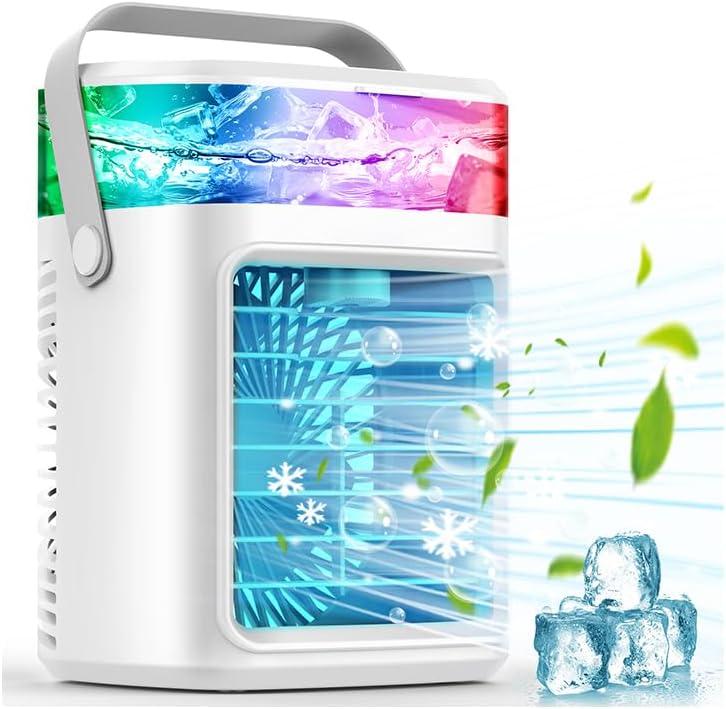
Image: The Vorago Portable Air Conditioner, showcasing its compact design and colorful LED lighting, with cool air and ice cubes depicted.
Produkto savybės
- 4-in-1 Multifunction Design: Combines portable air conditioner, humidifier, fan, and LED night light. Includes an aromatherapy tray for essential oils.
- Adjustable Speeds & Energy-Saving: Offers 3 wind speeds (high, medium, low). Can be used as a standard fan or with water/ice for evaporative cooling. Designed for energy efficiency.
- Didelės talpos vandens bakas: Features a 450ml top-fill water tank for 6-8 hours of continuous cooling. Automatic mist shut-off when water runs out for safety.
- 7 Colorful LED Night Light: Built-in LED light with 7 cycling colors or a fixed color option, creating a calming ambiance.
- Quiet Operation & Built-in Timer: Operates quietly for undisturbed sleep or work. Includes 2-hour or 4-hour timer options.
- Nešiojami ir įkraunami: Powered by a 2200mAh rechargeable battery, providing 3-5 hours of use on a full charge. USB charging compatible with power banks, laptops, car chargers, or adapters. Equipped with a hand strap for easy portability.

Image: Visual representation of the product's four main functions: normal fan, cool humidifier, air conditioner with ice water, and LED mood light.
Kas yra dėžutėje
- 1 x Portable Air Cooler
- 1x USB laidas
- 1 x Vartotojo vadovas
Sąranka
- Išpakuokite įrenginį: Atsargiai išimkite oro aušintuvą ir visus priedus iš pakuotės.
- Įkraukite įrenginį: Connect the provided USB cable to the unit's charging port and plug the other end into a compatible USB power source (e.g., power bank, laptop, USB adapter). Ensure the unit is fully charged before first use for optimal battery life.
- Užpildykite vandens baką:
- Nuimkite viršutinį įrenginio dangtelį.
- Fill the 450ml water tank with clean tap water. For enhanced cooling, add ice cubes to the water. Do not fill with only ice; a small amount of water is necessary for the cooling mechanism.
- Saugiai uždėkite viršutinį dangtelį.
- Įrenginio padėtis: Place the air cooler on a flat, stable surface in your desired personal space. Ensure there is adequate airflow around the unit.

Image: The large capacity water tank being filled with ice and water for up to 8 hours of cooling.
Video: A demonstration of setting up and using the portable air conditioner, including filling the water tank and activating the cooling function.
Naudojimo instrukcijos
- Maitinimo įjungimas/išjungimas: Paspauskite ir palaikykite maitinimo mygtuką (●) on the top panel for a few seconds to turn the unit on or off.
- Sureguliuokite ventiliatoriaus greitį: Short press the fan speed button (●●●) to cycle through 3 fan speeds: Low, Medium, and High.
- Activate Cooling/Humidifying: Press the mist/cool button (●●) to activate the humidifying and cooling mist function. The unit will draw air over the ice water to produce a cooler, humidified breeze.
- Nustatyti laikmatį: Paspauskite laikmačio mygtuką (●●●●) to set the automatic shut-off timer for 2 hours or 4 hours.
- Control LED Night Light: Paspauskite šviesos mygtuką (●●●●●) to cycle through the 7 colorful LED light options or to fix it on a single color.

Image: The control panel of the unit, illustrating the various buttons for operation.

Image: The unit's LED night light function, showing a vibrant color display.
Priežiūra
- Vandens bako valymas:
- Regularly empty and clean the water tank to prevent mold and mildew buildup.
- The detachable design allows for easy access. Use a soft cloth and mild detergent, then rinse thoroughly.
- Prieš pildydami baką arba padėdami jį į sandėliavimo vietą, įsitikinkite, kad jis yra visiškai sausas.
- Išorinis valymas: Nuvalykite įrenginio išorę minkšta, damp audinys. Nenaudokite abrazyvinių valiklių ar tirpiklių.
- Oro filtro valymas: While not explicitly mentioned as replaceable, regularly check the air intake area for dust buildup and gently clean with a soft brush or vacuum cleaner.
- Saugykla: When not in use for extended periods, empty the water tank, clean the unit, and store it in a cool, dry place away from direct sunlight.
Trikčių šalinimas
| Problema | Galima priežastis | Sprendimas |
|---|---|---|
| Įrenginys neįsijungia. | Nėra maitinimo arba išsikrovęs akumuliatorius. | Ensure the USB cable is securely connected and the unit is charged or plugged into a power source. |
| No mist/cooling effect. | Water tank empty or mist function not activated. | Refill the water tank. Press the mist/cool button to activate the function. Ensure water is cold and ice is present for optimal cooling. |
| Silpnas oro srautas. | Fan speed set too low or air intake/outlet blocked. | Increase fan speed. Check for and clear any obstructions around the air intake (back) and outlet (front). |
| Unit making unusual noise. | Unit not on a stable surface or internal component issue. | Padėkite įrenginį ant lygaus, stabilaus paviršiaus. Jei triukšmas išlieka, susisiekite su klientų aptarnavimo tarnyba. |
| Vandens nutekėjimas. | Vandens bakas netinkamai užsandarintas arba perpildytas. | Ensure the top cover is securely closed. Do not overfill the water tank beyond the MAX line. |
Specifikacijos
- Prekinis ženklas: Vorago
- Modelio pavadinimas: H2202
- Spalva: Pilka
- Talpa: 450 mililitrų (vandens bakas)
- Medžiaga: Akrilnitrilo butadieno stirenas
- Prekės svoris: 2.33 svaro
- Pakuotės matmenys: 9.84 x 7.36 x 6.18 colio
- Veikimo režimas: Standartinis
- Ypatingos savybės: Portable air conditioner, aromatherapy machine, air humidifier, fast cooling, adjustable speed, timer, LED screen, leak-proof water tank, low noise, LED night light.
Garantija ir palaikymas
This product comes with a standard limited warranty. For specific warranty details, please refer to the warranty card included in your product packaging or contact Vorago customer support. If you encounter any issues or have questions regarding your Portable Air Conditioner, please reach out to the retailer or manufacturer's customer service for assistance.
For further support, you may visit the official Vorago websvetainėje arba susisiekite su jų klientų aptarnavimo skyriumi, naudodami kontaktinę informaciją, pateiktą jūsų produkto dokumentuose.


