1. Įvadas
Thank you for choosing the Hama WK-300 Multi-Device Wireless Keyboard. This compact office keyboard is designed for wireless control of computers, smartphones, and tablets, offering versatile connectivity via Bluetooth or a 2.4 GHz radio connection with a USB-A receiver. It allows simultaneous connection to up to three devices, providing a seamless experience for various tasks.
2. Saugos instrukcijos
- Neatidarykite prietaiso ir nenaudokite jo, jei jis sugadintas.
- Nemėginkite patys prižiūrėti ar taisyti gaminio. Bet kokius aptarnavimo darbus patikėkite kvalifikuotiems specialistams.
- Saugokite gaminį nuo purvo, drėgmės ir perkaitimo ir naudokite tik sausoje aplinkoje.
- Šį gaminį, kaip ir visus elektros gaminius, laikykite vaikams nepasiekiamoje vietoje.
- Nenaudokite gaminio vietose, kuriose draudžiama naudoti elektroninius prietaisus.
- Nedelsdami išmeskite pakavimo medžiagas pagal vietines galiojančias taisykles.
3. Pakuotės turinys
Patikrinkite, ar pakuotėje yra šie elementai:
- 1 Hama WK-300 Multi-Device Wireless Keyboard
- 1 USB-A Receiver (typically stored in the battery compartment)
- 1 Naudojimo instrukcija
Pastaba: AAA batteries are required for operation and are not included in the package.
4. Sąranka
4.1 Akumuliatoriaus įdėjimas
- Raskite baterijų skyrių klaviatūros apačioje.
- Atidarykite akumuliatoriaus skyriaus dangtelį.
- Įdėkite vieną AAA bateriją, užtikrindami teisingą poliškumą (+/-).
- Saugiai uždarykite akumuliatoriaus skyriaus dangtelį.
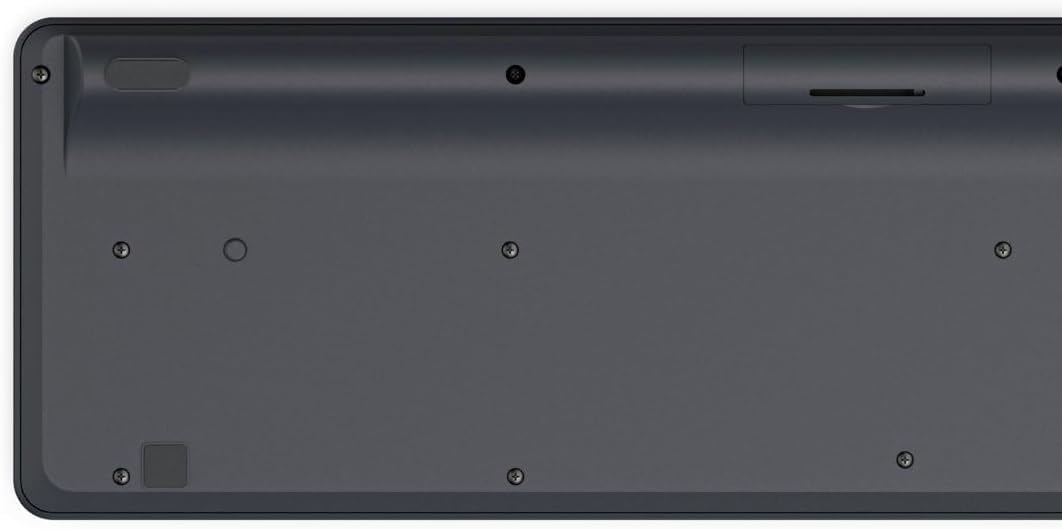
Image: Underside of the Hama WK-300 keyboard, illustrating the battery compartment and the storage slot for the USB receiver.
4.2 Prisijungimas prie įrenginių
The Hama WK-300 keyboard supports connection to up to three devices simultaneously via 2.4 GHz radio (channel 1) and Bluetooth (channels 2 and 3).
4.2.1 2.4 GHz Radio Connection (Channel 1)
- Remove the USB-A receiver from its storage slot in the battery compartment.
- Plug the USB-A receiver into a free USB port on your computer.
- Switch the keyboard to channel 1 (usually indicated by a switch or button on the keyboard). The keyboard should automatically connect to your computer.
4.2.2 Bluetooth Connection (Channels 2 & 3)
- Switch the keyboard to either channel 2 or channel 3.
- Press and hold the pairing button (refer to keyboard layout for exact location, often combined with the channel switch) until the indicator light flashes, signifying pairing mode.
- On your device (smartphone, tablet, computer), go to Bluetooth settings and search for new devices.
- Select "Hama WK-300" from the list of available devices to complete the pairing process.
4.3 Įrenginių perjungimas
To switch between connected devices, simply press the corresponding channel button (1, 2, or 3) on the keyboard. The keyboard will instantly connect to the selected device.
5. Klaviatūros valdymas
5.1 Basic Typing Functions
The Hama WK-300 features a QWERTY layout with quiet keys, ensuring a comfortable and undisturbed typing experience. Simply begin typing after connecting to your device.

Vaizdas: Iš viršaus į apačią view of the Hama WK-300 keyboard, highlighting its 90% layout and key functions, including the Fn key for multimedia controls.
5.2 Multimedia Functions (Fn Keys)
The F keys (F1-F12) have secondary assignments for multimedia control. To activate these functions, press and hold the Fn key simultaneously with the desired F key. This allows for quick control of media playback, volume, and other system functions without navigating through system settings.
5.3 AI Assist Button
The dedicated Assist button activates a cross-program AI assistant, enhancing productivity by providing quick access to intelligent features.
5.4 Energijos taupymas
The keyboard is battery-operated and designed for efficiency, making it ideal for mobile use. It will enter a low-power state after a period of inactivity to conserve battery life.
6. Priežiūra
6.1 Klaviatūros valymas
To clean your keyboard, ensure it is turned off and disconnected from any devices. Use a soft, lint-free cloth slightly dampened with water or a mild cleaning solution. Avoid excessive moisture and abrasive cleaners. Do not immerse the keyboard in water.
6.2 Akumuliatoriaus keitimas
When the keyboard's performance diminishes or it stops responding, it may be time to replace the AAA battery. Follow the battery installation steps outlined in Section 4.1.
7. Problemų sprendimas
- Klaviatūra neprisijungia: Ensure the keyboard has fresh batteries and is switched to the correct channel (1 for 2.4 GHz, 2 or 3 for Bluetooth). For Bluetooth, ensure the keyboard is in pairing mode and your device's Bluetooth is enabled. For 2.4 GHz, ensure the USB receiver is properly inserted into your device.
- Klavišai nereaguoja: Check battery level. If using 2.4 GHz, try plugging the USB receiver into a different USB port. If using Bluetooth, try re-pairing the keyboard with your device.
- Pertraukiamas ryšys: Ensure there are no strong interference sources nearby (e.g., other wireless devices, large metal objects). Try moving closer to your device.
- Neveikia daugialypės terpės klavišai: Įsitikinkite, kad paspaudžiate Fn key simultaneously with the desired F key.
8. Specifikacijos
| Prekės ženklas | Hama |
| Modelio numeris | 182641 |
| Spalva | Juoda |
| Ryšys | 2.4 GHz Radio (USB-A receiver), Bluetooth (2 channels) |
| Įrenginių skaičius | Iki 3 vienu metu veikiančių įrenginių |
| Klaviatūros išdėstymas | QWERTY |
| Gaminio matmenys (IxPxH) | 16x43.8x2.6 cm |
| Prekės svoris | 447 g |
| Reikalingos baterijos | 1 AAA baterija (neįtraukta) |
9. Garantija
The Hama WK-300 Multi-Device Wireless Keyboard comes with a 5 metų garantija. Please retain your proof of purchase for warranty claims. For detailed warranty terms and conditions, refer to the official Hama websvetainėje arba susisiekite su klientų aptarnavimo tarnyba.
10. Parama
For further assistance, technical support, or to inquire about spare parts, please contact Hama customer service. You can find contact information on the official Hama websvetainė (www.hama.com) or through your local retailer.


