1. Įvadas
Thank you for choosing the MONODEAL 707-Black Portable CD Player. This device is designed to provide a versatile audio experience, supporting various formats including CD, CD-R, CD-RW, MP3, and WMA. It features built-in high-fidelity speakers, a 2.0-inch TFT color display, Bluetooth 5.3 for wireless connections, TF card support for expanded music options and recording, and AUX input for wired connections. Its compact and portable design makes it ideal for use at home, in the car, or on the go.

Image 1.1: The MONODEAL 707-Black Portable CD Player, showcasing its compact design and TFT color display.
2. Pakuotės turinys
Patikrinkite pakuotę, ar joje yra šie daiktai:
- MONODEAL 707-Black Portable CD Player
- C tipo USB įkrovimo laidas
- 3.5 mm AUX kabelis
- Laidinė laisvų rankų įranga
- Vartotojo vadovas (šis dokumentas)
- Registracijos kortelė

Image 2.1: All items included in the MONODEAL 707-Black Portable CD Player package.
3. Produktas baigtasview
The MONODEAL 707-Black features a user-friendly interface with clearly labeled buttons and a vibrant TFT color display. Key components include:
- 2.0 colio TFT spalvotas ekranas: Provides clear and colorful information.
- Integruoti garsiakalbiai: High-fidelity audio output without external headphones.
- Valdymo mygtukai: Play/Pause, Skip/Fast Forward/Rewind, Mode, Repeat, Program, Function, Volume Up/Down.
- Prievadai: USB-C for charging, 3.5mm Headphone Jack, AUX In, TF Card Slot.
- Maitinimo jungiklis: Located on the side for easy on/off control.

Image 3.1: The 2.0-inch TFT color display offers vibrant colors and sharp details compared to older LCD screens.
4. Sąranka
4.1 Įrenginio įkrovimas
The CD player has a built-in 2000mAh rechargeable battery. Before first use, fully charge the device using the provided USB Type-C cable.
- Prijunkite USB C tipo laidą prie įrenginio įkrovimo prievado.
- Kitą laido galą prijunkite prie USB maitinimo adapterio (nepridedamas) arba kompiuterio USB prievado.
- The charging indicator on the display will show charging status. A full charge typically takes 3-4 hours and provides 7-10 hours of continuous playback.

Image 4.1: The CD player being charged via its USB-C port, indicating its large capacity battery.
4.2 Kompaktinio disko įdėjimas
- Pastumkite maitinimo jungiklį į padėtį „ĮJUNGTA“.
- Gently open the CD compartment cover.
- Place the CD with the label side facing up onto the spindle.
- Tvirtai uždarykite CD skyriaus dangtelį, kol jis spragtelės.
- The player will automatically read the disc.

Image 4.2: Proper method for inserting a CD into the player.
5. Naudojimo instrukcijos
5.1 Pagrindinis CD atkūrimas
- After inserting a CD, the player will automatically begin playback.
- Paspauskite [Paleisti / pristabdyti] mygtuką, norėdami pristabdyti arba tęsti atkūrimą.
- Paspauskite [Ankstesnis Kitas] mygtukai, norėdami pereiti prie ankstesnio arba kito takelio.
- Ilgai paspauskite mygtuką [Ankstesnis Kitas] mygtukai, skirti persukti takelį į priekį arba atgal.
- Sureguliuokite garsumą naudodami tam skirtus garsumo valdiklius.

Image 5.1: The player supports various playback modes for CDs.
5.2 Bluetooth Connectivity (BT 5.3)
The player supports both Bluetooth receiving (RX) and transmitting (TX) modes. Note: Car Bluetooth connection is not supported for direct audio streaming from the player to the car's Bluetooth system. Use AUX or FM transmission for car audio.
- „Bluetooth“ priėmimas (RX): Connect your smartphone or tablet to the CD player to use its built-in speakers.
- „Bluetooth“ perdavimas (TX): Connect the CD player to Bluetooth headphones or speakers for wireless audio output.
- To activate Bluetooth mode, press the [BT] button. The Bluetooth icon on the display will flash.
- On your external Bluetooth device (headphones/speaker), search for "CD Player" or similar and pair.

Image 5.2: The CD player supports both receiving and transmitting Bluetooth signals.
For a visual guide on connecting to Bluetooth in a car (via FM transmission), refer to the video below:
Video 5.1: Demonstration of connecting the CD player to a car's audio system, likely via FM transmission, as direct Bluetooth car connection is not supported by the player itself.
5.3 TF Card Playback and Recording
The CD player supports TF card music playback and can transcribe CD contents to a TF card (up to 32GB).
- Insert a TF card into the designated slot.
- To play music from the TF card, select the TF card mode using the [Režimas] mygtuką.
- To transcribe a CD to the TF card, ensure a CD is playing and a TF card is inserted. Follow the on-screen prompts or refer to the full function demonstration video for specific steps.

Image 5.3: The CD player supports TF card functionality for playback and direct recording from CDs.
5.4 FM siųstuvas
Use the FM transmitter function to broadcast audio from the CD player to an FM radio, useful for car audio systems without an AUX input.
- Paspauskite [FM] button to activate the FM transmitter.
- Tune your car's FM radio to the same frequency displayed on the CD player's screen.
- Adjust the volume on both the CD player and your car stereo for optimal sound.

Image 5.4: The CD player can connect to car audio systems via AUX cable or FM transmission.
5.5 AUX jungtis
Connect the CD player to external audio devices, such as car stereos or home audio systems, using the provided 3.5mm AUX cable.
- Prijunkite vieną 3.5 mm AUX laido galą prie [AUX In] port on the CD player.
- Connect the other end to the AUX input of your external audio system.
- Select the AUX input on your external audio system to hear the CD player's audio.
5.6 Repeat Modes and Song Programming
The player offers various repeat modes and the ability to program a sequence of songs.
- Kartojimo režimai: Paspauskite [Pakartoti] button to cycle through repeat options (e.g., repeat one, repeat all, random play, A-B repeat).
- Song Programming: Sustabdymo režimu paspauskite [PROG] mygtuką. Naudokite [Ankstesnis Kitas] buttons to select tracks, then press [PROG] again to add them to the program list. Press [Žaisti] , kad pradėtumėte užprogramuotą atkūrimą.
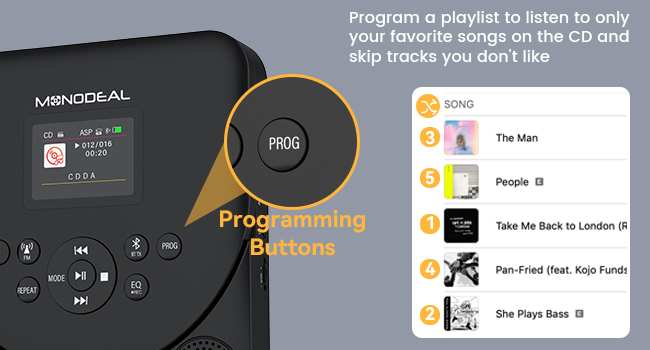
Image 5.5: The programming buttons allow users to create custom playlists.
5.7 Miego laikmatis
Set a sleep timer to automatically turn off the player after a specified duration.
- Ilgai paspauskite mygtuką [MIEGAS] mygtuką.
- Naudokite [Ankstesnis Kitas] buttons to select a sleep time from 10 to 90 minutes.
- The player will automatically power off after the set time.
For a comprehensive demonstration of various functions including CD mode, repeat, programming, sleep timer, Bluetooth receiver, Bluetooth transmitter, and FM transmitter, please watch the video below:
Video 5.2: Detailed function operation demonstration for the CD player, covering various playback and connectivity features.
6. Priežiūra
- Įrenginį valykite minkštu, sausu skudurėliu. Venkite naudoti abrazyvinius valiklius ar tirpiklius.
- Ensure the CD compartment is free of dust and debris.
- Handle CDs by their edges to prevent scratches and fingerprints.
- Grotuvą laikykite vėsioje, sausoje vietoje, toliau nuo tiesioginių saulės spindulių ir ekstremalių temperatūrų.
7. Problemų sprendimas
7.1 Disc Not Reading / Skipping
- Ensure the CD is clean and free of scratches. Wipe gently from the center outwards with a soft cloth.
- Patikrinkite, ar kompaktinis diskas įdėtas teisingai, etikete į viršų.
- Check if the disc format is supported (CD/CD-R/CD-RW/MP3/WMA).
- The player features advanced anti-skip protection, but severe shocks may still cause skipping.
7.2 Nėra garso
- Adjust the volume on the CD player and any connected external devices.
- Jei naudojate ausines, įsitikinkite, kad jos tinkamai įjungtos į 3.5 mm lizdą.
- If using Bluetooth, ensure the player is correctly paired and connected to the desired output device.
- If using AUX, ensure the cable is securely connected and the correct input is selected on the external device.
7.3 „Bluetooth“ ryšio problemos
- Ensure the CD player is in the correct Bluetooth mode (RX or TX).
- Make sure the external Bluetooth device is in pairing mode and within range.
- Forget previous pairings on both devices and attempt to re-pair.
- Restart both the CD player and the external Bluetooth device.
8. Specifikacijos
| Funkcija | Detalė |
|---|---|
| Prekės ženklas | MONODEAL |
| Modelio numeris | 707 - juoda |
| Suderinami įrenginiai | Smartphone (for Bluetooth RX) |
| Palaikomi garso formatai | CD/CD-R/CD-RW/MP3/WMA |
| Ryšio technologija | Bluetooth 5.3, AUX, TF Card, FM Transmitter |
| Ausinės Jack | 3.5 mm lizdas |
| Baterijos talpa | 2000 mAh |
| Žaidimo laikas (pilnas įkrovimas) | 7-10 valandas |
| Įkrovimo laikas | 3-4 valandas |
| Ekranas | 2.0 colių TFT spalvotas ekranas |
| TF kortelių palaikymas | Iki 32 GB |
| Matmenys | 22.9 x 18.5 x 5.4 cm |
| Svoris | 560 g |
9. Garantija ir palaikymas
MONODEAL is committed to providing high-quality products and excellent customer service. Your MONODEAL 707-Black Portable CD Player comes with:
- 12 mėnesių pakeitimas: For any manufacturing defects or issues within the first year of purchase.
- Palaikymas visą gyvenimą: Dedicated customer support to assist you with any questions or problems you may encounter throughout the product's lifespan.
For assistance, please refer to the contact information provided on your Registration Card or visit the official MONODEAL websvetainę.


