Masajoy Wireless Headset User Manual
Modelis: Spark 06
Įvadas
The Masajoy Wireless Headset with Mic for Work (Model: Spark 06) is designed to provide clear and reliable audio communication for various professional and personal uses. Featuring multiple connection modes, AI noise cancellation, and a comfortable design, this headset is ideal for business video conferencing, online courses, and call center environments.

Figure 1: Masajoy Wireless Headset and included accessories.
Kas yra dėžutėje
Įsitikinkite, kad pakuotėje yra visi komponentai:
- Wireless Headset with Mic for Work
- USB A / C Dongle
- USB C to 3.5MM Cable
- C tipo įkrovimo laidas
- Vartotojo vadovas
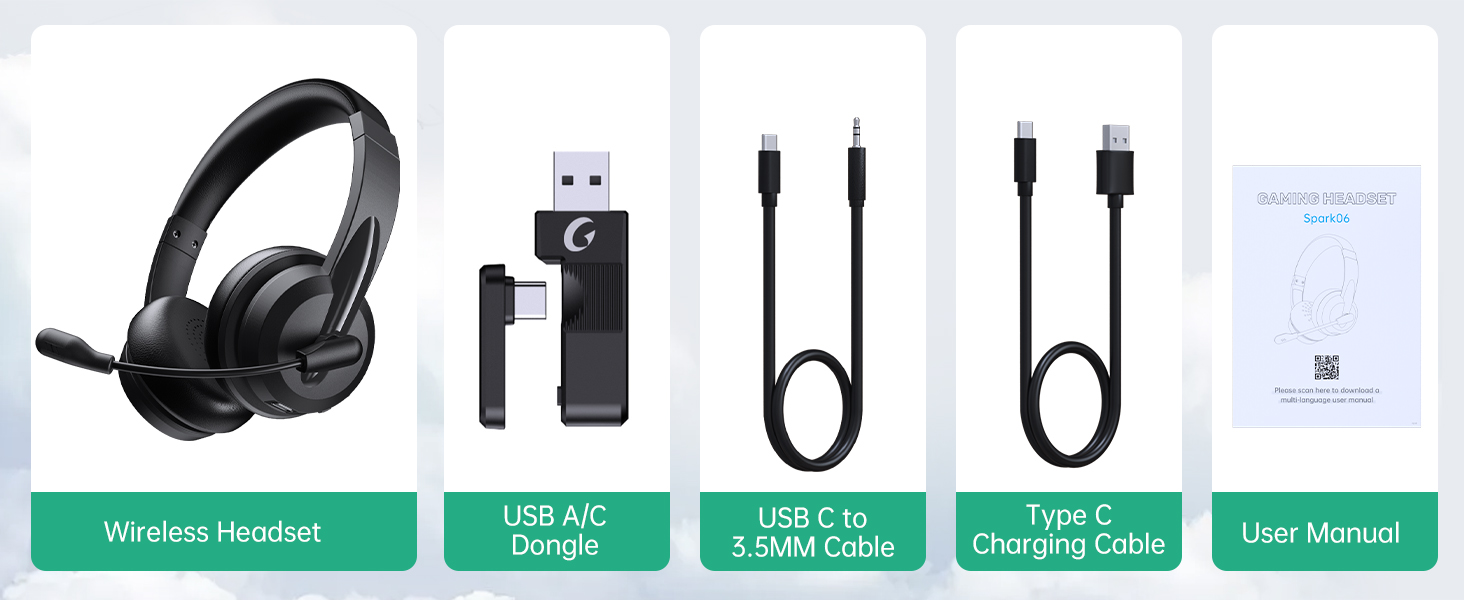
2 pav.: Pakuotės turinys.
Sąranka
Ausinių įkrovimas
Before first use, fully charge the headset. Connect the Type C Charging Cable to the headset's charging port and the other end to a USB power source (e.g., computer USB port, wall adapter). The charging indicator light will show the charging status.
- Viso įkrovimo laikas: apie 2.5 valandos
- Pokalbio laikas: iki 30 valandų
- Muzikos atkūrimo laikas: iki 25 valandų

Figure 3: Long Battery Life for Extended Use.
Ryšio režimai
The Masajoy headset supports three connection modes:
-
„Bluetooth V5.3“ ryšys:
For wireless connection to Bluetooth-enabled devices (e.g., smartphones, laptops). Ensure the headset is in pairing mode (refer to operating instructions for details). Ieškokite "Spark 06" in your device's Bluetooth settings and connect.
-
2.4G Wireless (USB A/C Dongle):
For wireless connection to computers without Bluetooth or for a dedicated connection. Plug the USB A or USB C dongle into an available USB port on your computer. The headset will automatically connect to the dongle.
-
Wired 3.5mm Audio Cable:
For a wired connection to devices with a 3.5mm audio jack. Connect one end of the USB C to 3.5MM Cable to the headset's USB-C port and the other end to your device's 3.5mm audio jack. This mode is useful when battery is low or for devices that do not support wireless connections.

Figure 4: Dual Connection Options (Bluetooth & 2.4G Wireless).
NOTE: This headset does not support dual device connection simultaneously.
Naudojimo instrukcijos
Maitinimo įjungimas/išjungimas
- To Power On: Press and hold the Power button until you hear a voice prompt.
- To Power Off: Press and hold the Power button until you hear a voice prompt.
Garsumo valdymas
Use the volume control buttons located on the headset to adjust the listening volume.
AI Noise Cancelling Microphone
The headset features advanced AI noise cancellation to reduce background noise during calls. This feature enhances clarity for the listener.
NOTE: This AI Noise Cancelling feature is only available when connected via Bluetooth.

Figure 5: AI Noise Cancelling in action.
Mikrofono nutildymo funkcija
To mute the microphone, simply rotate the microphone boom to the upright position. A voice prompt will confirm "MIC mute". To unmute, rotate the microphone boom back down.

Figure 6: Microphone Mute Control by Rotation.
Komfortas ir dizainas
The headset is designed for all-day wear with protein memory foam ear cups that are soft and breathable, preventing overheating. The adjustable and expandable headband ensures a comfortable fit for most head shapes.

Figure 7: Comfortable and Breathable Design.
Specifikacijos
| Funkcija | Detalė |
|---|---|
| Modelio pavadinimas | Kibirkštis 06 |
| Ryšio technologija | Wireless (Bluetooth V5.3, 2.4G), Wired (3.5mm) |
| Triukšmo valdymas | AI Noise Cancellation (Bluetooth mode only), Passive Noise Cancellation |
| Baterijos veikimo laikas (pokalbių laikas) | Iki 30 valandų |
| Baterijos veikimo laikas (muzikos atkūrimas) | Iki 25 valandų |
| Įkrovimo laikas | apytiksliai 2.5 valandas |
| belaidis diapazonas | Up to 36 feet (11 meters) for Bluetooth |
| Garso tvarkyklės dydis | 40 milimetrų |
| Mikrofono jautrumas | 43 dB |
| Ausinės Jack | USB-C (for charging/wired audio) |
| Suderinami įrenginiai | PC, Mac, Laptop, Chromebook, tablet, smartphones, MP3 players, PS5, PS4, Xbox one, gaming systems with an aux port |
| Medžiaga | Faux Leather, Polycarbonate (PC), Metal, Acrylonitrile Butadiene Styrene (ABS) |
| Prekės svoris | 10.2 uncijos |
| Spalva | Juoda |
Priežiūra
- Valymas: Ausinėms valyti naudokite minkštą, sausą šluostę. Nenaudokite abrazyvinių valiklių ar tirpiklių.
- Saugykla: Laikykite ausines vėsioje, sausoje vietoje, toliau nuo tiesioginių saulės spindulių ir ekstremalių temperatūrų.
- Akumuliatoriaus priežiūra: Norėdami pailginti baterijos veikimo laiką, venkite dažnai visiškai iškrauti ausines. Reguliariai jas įkraukite, net jei ilgą laiką nenaudojate.
- Tvarkymas: Avoid dropping the headset or subjecting it to strong impacts. Do not twist or bend the microphone boom excessively beyond its intended rotation.
Trikčių šalinimas
| Problema | Galima priežastis | Sprendimas |
|---|---|---|
| Ausinės neįsijungia. | Senka baterija. | Charge the headset fully using the provided Type C charging cable. |
| Nepavyksta prisijungti per „Bluetooth“. | Headset not in pairing mode; device Bluetooth off; out of range. | Ensure headset is in pairing mode. Turn Bluetooth on your device. Move headset closer to the device (within 36 feet). |
| Nėra garso iš ausinių. | Volume too low; incorrect audio output selected on device; headset not connected. | Increase headset volume. Check device's audio output settings. Re-establish connection. |
| Mikrofonas neveikia. | Microphone muted; incorrect input device selected; AI Noise Cancellation issue. | Ensure microphone boom is not in the upright (muted) position. Check device's microphone input settings. Note that AI Noise Cancellation is only active in Bluetooth mode. |
| Prasta garso kokybė / statinis triukšmas. | Trikdžiai; už diapazono ribų; išsikrovusi baterija. | Move away from other wireless devices. Move closer to the connected device. Charge the headset. |
Garantija ir palaikymas
Masajoy products are designed for reliability and performance. For warranty information and technical support, please refer to the official Masajoy website or contact customer service using the details provided in the original product packaging or purchase receipt.
Taip pat galite apsilankyti Masajoy Store on Amazon daugiau informacijos apie produktą ir pagalbos išteklių.


