1. Įvadas
Thank you for choosing the EvoFox Deathray v2 Pro Gaming Keyboard. This manual provides detailed instructions for setting up, operating, and maintaining your new gaming keyboard. Please read this manual carefully to ensure optimal performance and longevity of your device.
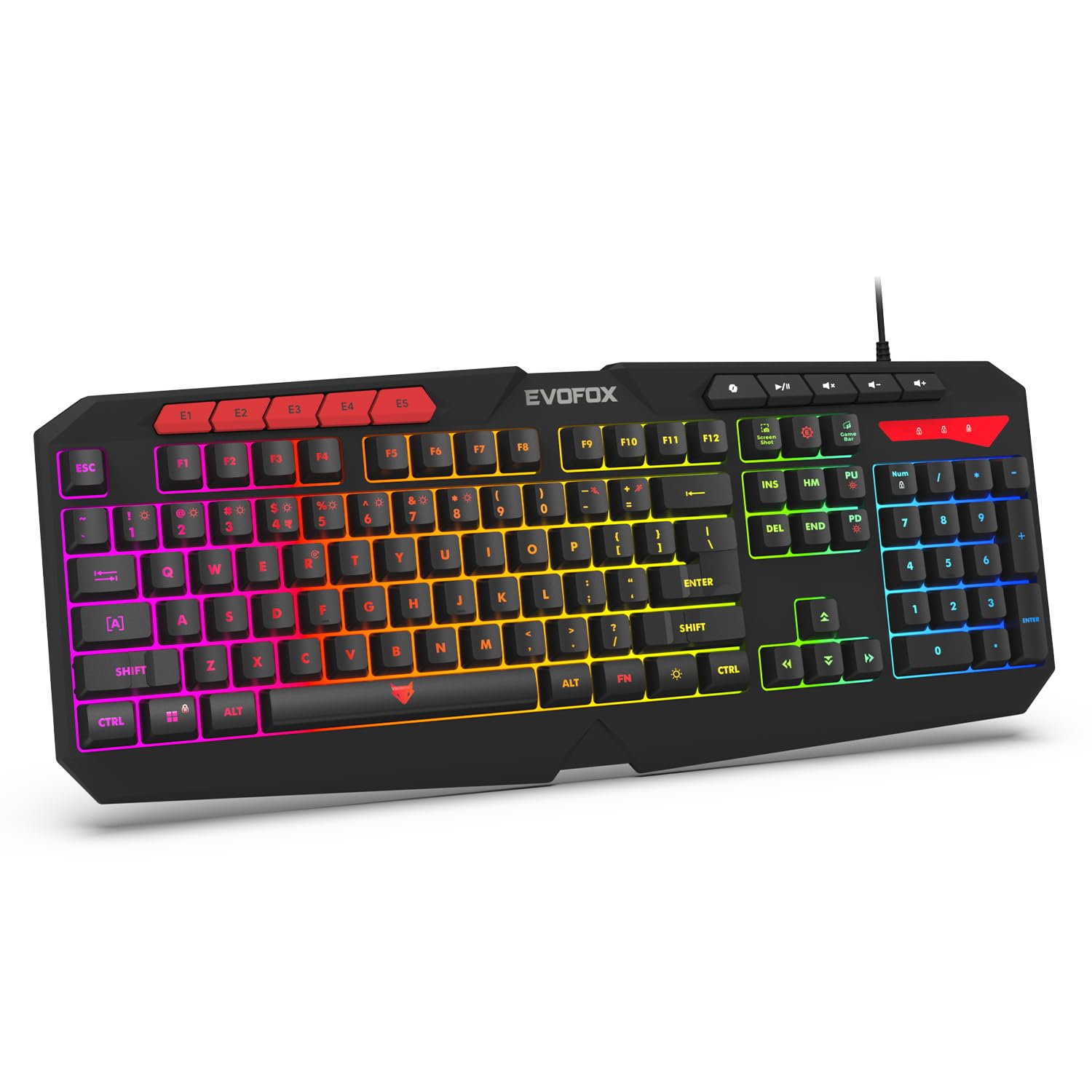
Image 1.1: EvoFox Deathray v2 Pro Gaming Keyboard overview.
2. Pakuotės turinys
- EvoFox Deathray v2 Pro Gaming Keyboard
- Vartotojo vadovas
3. Sąrankos instrukcijos
3.1 Klaviatūros prijungimas
- Unpack the EvoFox Deathray v2 Pro Gaming Keyboard from its packaging.
- Raskite laisvą USB prievadą savo kompiuteryje (asmeniniame kompiuteryje arba nešiojamajame kompiuteryje).
- Prijunkite klaviatūros USB jungtį prie USB prievado.
- Klaviatūra automatiškai įdiegs reikiamas tvarkykles. Šis procesas gali užtrukti kelias akimirkas.
- Once installed, the RGB backlighting will illuminate, indicating the keyboard is ready for use.
The keyboard features a durable 1.8m braided cable for reliable connectivity.

Image 3.1: Keyboard with durable braided cable and soft membrane keys.
4. Naudojimo instrukcijos
4.1 RGB foninio apšvietimo pritaikymas
The EvoFox Deathray v2 Pro features 6-zone customizable RGB backlighting with 8 dynamic lighting modes. You can personalize your gaming setup for an immersive experience.
- Apšvietimo režimų keitimas: Use the dedicated lighting control keys (often indicated by a sun or lightbulb icon, or through a combination with the Fn key) to cycle through the 8 available dynamic lighting modes.
- Individualus apšvietimas: Refer to the keyboard's software (if available, check the official EvoFox website) for advanced custom lighting profiles and per-key RGB customization.

Image 4.1: Keyboard showcasing 6-zone RGB backlighting with 7 lighting presets and 1 custom lighting option.

Image 4.2: Comparison illustrating the difference between RGB lighting with full color customization per zone and standard rainbow lighting with fixed color zones.
4.2 Programuojami makro klavišai
The keyboard includes 5 programmable macro keys (E1-E5) to streamline your gameplay with customizable macros for lightning-fast responses. These keys allow you to record and assign complex sequences of commands to a single key press.
- Makro įrašymas: Typically, macro recording is initiated by a dedicated macro recording key (often labeled 'MR' or similar, or accessed via Fn key combination). Follow the on-screen prompts or software instructions to record your desired key sequence.
- Assigning Macros: Once recorded, assign the macro to one of the programmable macro keys (E1-E5) using the keyboard's software.

Image 4.3: Highlight of the 5 programmable macro keys (E1-E5) for executing complex commands.
4.3 Specialiųjų funkcijų klavišai
Access essential tools quickly with dedicated shortcuts for Screenshot, Macro Recording, and Xbox Game Bar. These functions are typically accessed via specific keys or Fn key combinations.
- Ekrano kopijos raktas: Captures a screenshot of your display.
- Macro Recording Key: Initiates macro recording.
- Xbox Game Bar Key: Opens the Xbox Game Bar interface for gaming features.
- Antrojo piloto raktas: Activates the Copilot feature (if supported by your operating system).

Image 4.4: Illustration of special function keys for Screenshot, Macro Recording, Xbox Game Bar, and Copilot.
4.4 Apsaugos nuo šešėliavimo klavišai
The keyboard features 19 anti-ghosting keys, ensuring flawless input during high-stakes moments. This technology allows multiple key presses to be registered simultaneously and accurately, preventing missed commands.

Image 4.5: Keyboard layout highlighting the 19 anti-ghosting keys for precise, uninterrupted gameplay.
4.5 Ergonomic Full-Size Layout
Designed for comfort during extended gaming sessions, the keyboard features an ergonomic full-size layout with soft and silent membrane keys. This design aims to provide precision without sacrificing ease of use.
5. Priežiūra
5.1 Klaviatūros valymas
- Prieš valydami atjunkite klaviatūrą nuo kompiuterio.
- Šiek tiek naudokite minkštą, be pūkelių šluostę dampklaviatūros paviršių nuvalykite vandeniu arba švelniu valymo tirpalu.
- Dulkėms ir šiukšlėms tarp klavišų pašalinti naudokite suslėgtą orą.
- Venkite naudoti stiprias chemines medžiagas, abrazyvinius valiklius ar tirpiklius, nes jie gali pažeisti klaviatūros apdailą ir klavišų užrašus.
- Prieš prijungdami klaviatūrą prie kompiuterio, įsitikinkite, kad ji yra visiškai sausa.
6. Problemų sprendimas
6.1 Klaviatūra nereaguoja
- Patikrinkite USB jungtį: Įsitikinkite, kad USB laidas tvirtai prijungtas prie veikiančio kompiuterio USB prievado. Išbandykite kitą USB prievadą.
- Iš naujo paleiskite kompiuterį: Kartais paprastas paleidimas iš naujo gali išspręsti ryšio problemas.
- Tvarkyklės diegimas iš naujo: If the issue persists, try uninstalling the keyboard drivers from your computer's Device Manager and then reconnecting the keyboard to allow for automatic reinstallation.
6.2 RGB foninis apšvietimas neveikia
- Check Brightness Settings: Ensure the brightness level is not set to minimum or off. Use the dedicated lighting control keys to adjust brightness.
- Ciklo režimai: Cycle through different RGB modes to see if any mode activates.
- Programinės įrangos patikrinimas: Jei naudojate pasirinktinį profesionaląfiles, ensure the keyboard software is running and configured correctly.
6.3 Makro klavišų neveikimas
- Programinės įrangos konfigūracija: Verify that macros are correctly recorded and assigned to the desired keys within the keyboard's software.
- Programinės įrangos veikimas: Ensure the keyboard's macro software (if applicable) is running in the background.
7. Specifikacijos
| Funkcija | Specifikacija |
|---|---|
| Prekės ženklas | EvoFox |
| Modelis | 498 |
| Gaminio matmenys | 44.7 x 17.2 x 2.6 cm |
| Prekės svoris | 565 g |
| Aparatinės įrangos platforma | Windows |
| Suderinami įrenginiai | Nešiojamasis kompiuteris, kompiuteris |
| Ypatingos savybės | Compact Design, Silent Membrane Keyboard, True Prims RGB |
| Klaviatūros aprašymas | Žaidimas |
| Jungties tipas | USB |
| Medžiaga | ABS plastikas |
| Kilmės šalis | Kinija |
8. Garantija ir palaikymas
8.1 Informacija apie garantiją
The EvoFox Deathray v2 Pro Gaming Keyboard typically comes with a 1 metų ribota garantija nuo įsigijimo datos. Ši garantija taikoma gamybos defektams ir užtikrina, kad gaminys veikia taip, kaip numatyta, esant įprastam naudojimui. Išsaugokite pirkimo įrodymą, jei galėtumėte pateikti pretenzijas dėl garantijos.
8.2 Pagalba klientams
For technical assistance, warranty claims, or any product-related inquiries, please contact EvoFox customer support through their official website or the contact information provided with your product packaging. You may also refer to the Amkette helpline mentioned in some product documentation.


