1. Įvadas
Thank you for choosing the EvoFox Deathray V2 Gaming Keyboard and Mouse Combo. This manual will guide you through the setup, operation, and maintenance of your new gaming peripherals. Designed for precision and comfort, this combo enhances your gaming and productivity experience.

Image: The EvoFox Deathray V2 Gaming Keyboard and Mouse Combo, showcasing both devices connected via their braided cables.
2. Pakuotės turinys
- EvoFox Deathray V2 Gaming Keyboard
- EvoFox Deathray V2 Gaming Mouse
- Vartotojo vadovas (šis dokumentas)
3. Sąrankos instrukcijos
- Prijunkite klaviatūrą: Plug the USB connector of the EvoFox Deathray V2 Keyboard into an available USB port on your computer.
- Prijunkite pelę: Plug the USB connector of the EvoFox Deathray V2 Mouse into another available USB port on your computer.
- Tvarkyklės diegimas: Jūsų operacinė sistema turėtų automatiškai aptikti ir įdiegti reikiamas tvarkykles. Norint naudotis pagrindinėmis funkcijomis, paprastai nereikia diegti jokios papildomos programinės įrangos.
- Vieta: Place the keyboard and mouse on a flat, stable surface for optimal performance.
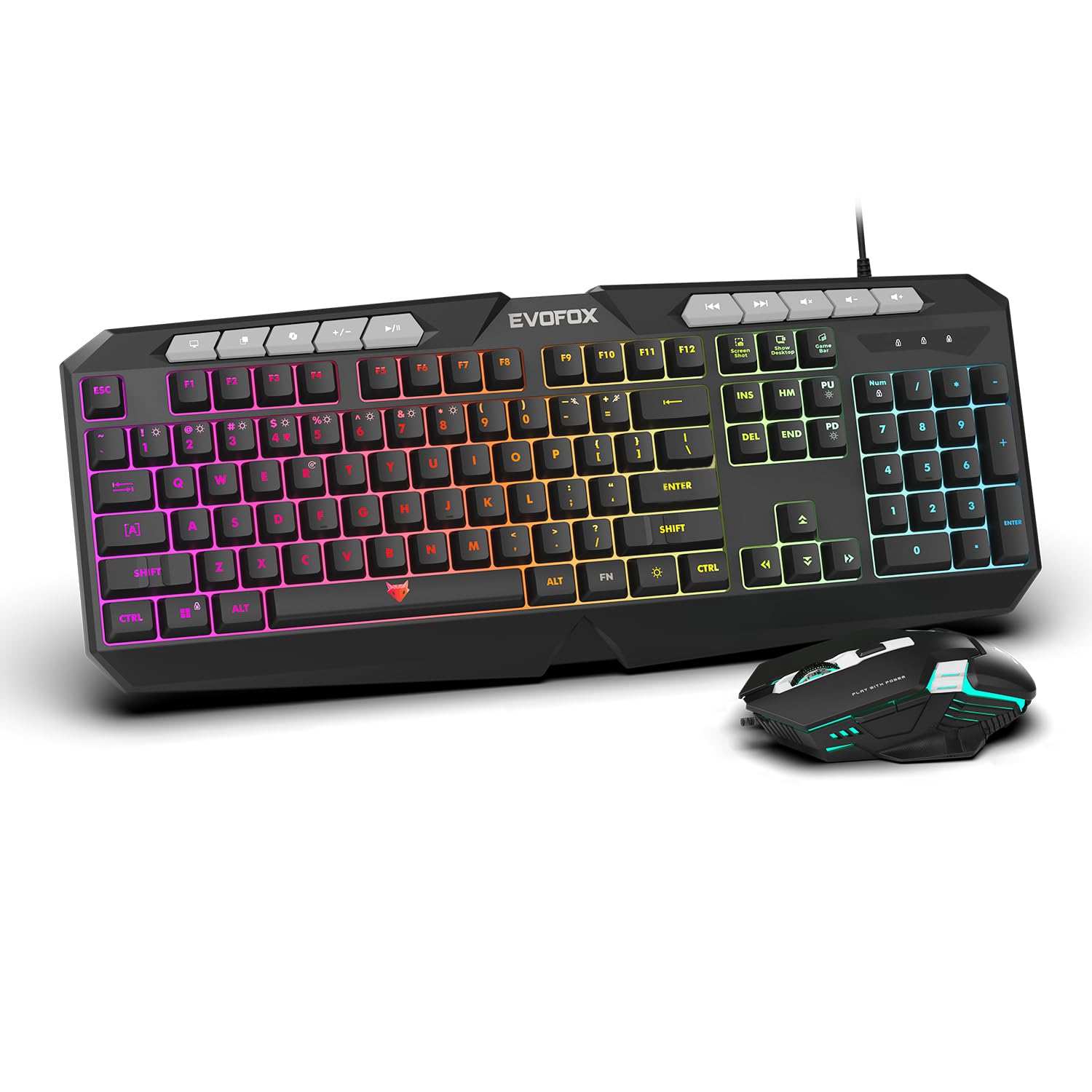
Vaizdas: Stambus planas view of the EvoFox Deathray V2 Keyboard and Mouse, illustrating their wired connection readiness.
4. Klaviatūros valdymas
4.1. Pagrindinės funkcijos
The EvoFox Deathray V2 Keyboard features a full-size layout with standard QWERTY keys, a numeric keypad, and function keys (F1-F12).
4.2. Multimedijos klavišai
Dedicated multimedia keys are located above the function keys for quick access to media controls:
- Garsumo didinimas / mažinimas / nutildymas: Valdykite garso lygius.
- Play/Pause, Previous/Next Track: Manage media playback.
4.3. Specialiųjų funkcijų klavišai
The keyboard includes special shortcut keys for enhanced productivity and gaming:
- Ekrano kopija: Captures a screenshot of your display.
- Rodyti darbalaukį: Minimizes all open windows to show the desktop.
- Xbox Game Bar: Opens the Xbox Game Bar for gaming features.
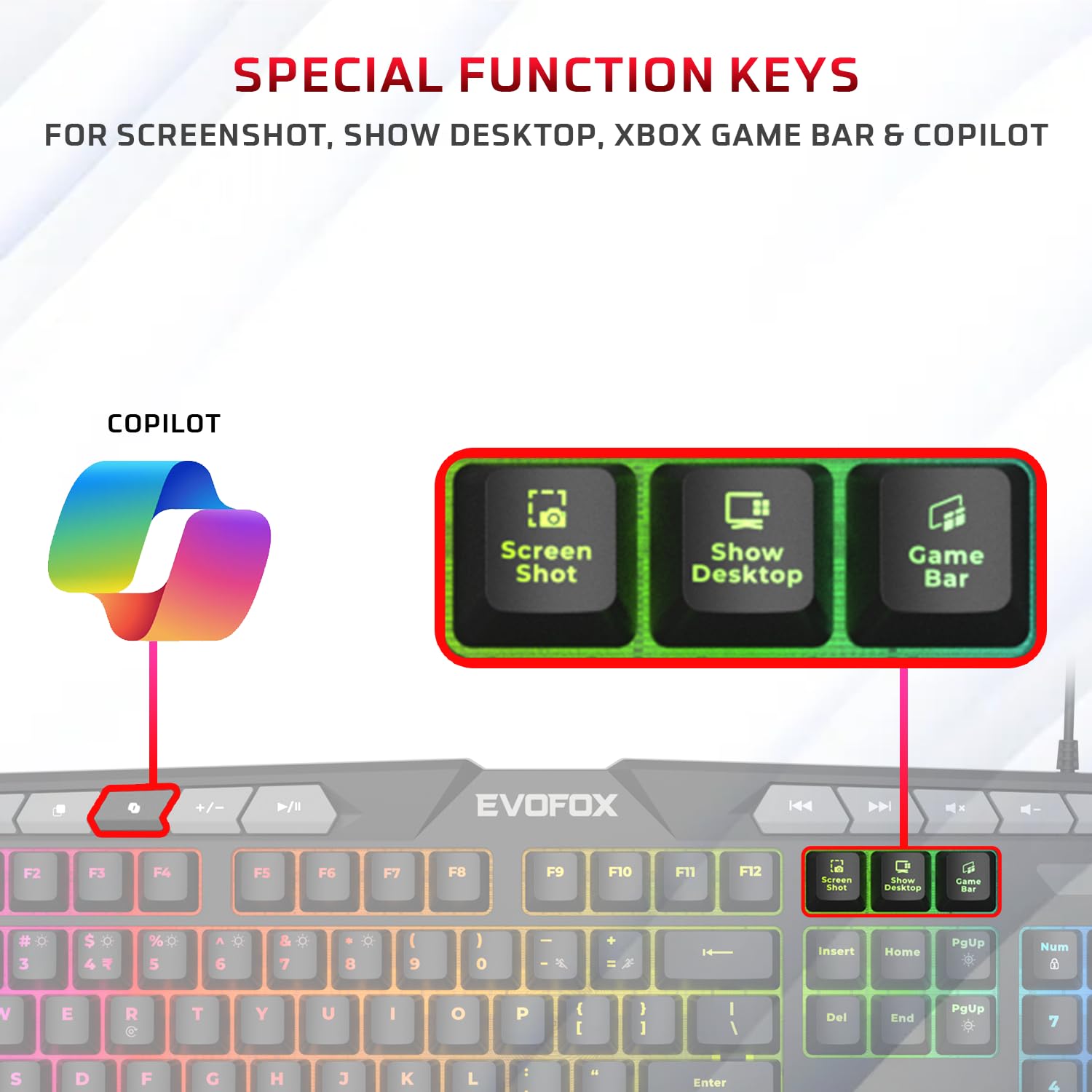
Paveikslėlis: detalus view of the EvoFox Deathray V2 Keyboard highlighting the dedicated Screenshot, Show Desktop, and Game Bar keys.
4.4. Anti-Ghosting Keys
The keyboard features 19 anti-ghosting keys, ensuring that multiple simultaneous key presses are registered accurately, which is crucial for gaming.

Image: The EvoFox Deathray V2 Keyboard, visually indicating the 19 anti-ghosting key zones for precise input.
5. Pelės valdymas
5.1. Mygtukai ir funkcijos
The EvoFox Deathray V2 Mouse features 6 buttons for versatile control:
- Kairiuoju pelės mygtuku spustelėkite
- Dešiniuoju pelės mygtuku spustelėkite
- Slinkties ratukas (spustelėjamas)
- DPI reguliavimo mygtukas
- Pirmyn mygtukas
- Mygtukas Atgal
5.2. DPI reguliavimas
The mouse offers adjustable DPI (Dots Per Inch) settings to change cursor sensitivity. Press the DPI button located behind the scroll wheel to cycle through the available DPI levels:
- 1200 DPI
- 1800 DPI
- 2400 DPI
- 3600 DPI
Each DPI level may be indicated by a specific LED light pattern or color change on the mouse.

Image: The EvoFox Deathray V2 Mouse, illustrating its ergonomic design and the DPI adjustment button.

Image: A close-up of the EvoFox Deathray V2 Mouse, highlighting its 6-button design, rugged braided cable, and magnetic ring for data transmission.
6. Lighting Customization
6.1. Keyboard RGB Backlighting
The EvoFox Deathray V2 Keyboard features 6-zone RGB backlighting with multiple lighting modes. Use the dedicated lighting control keys (often marked with a light bulb icon or specific function key combinations) to cycle through different effects and adjust brightness.
- 8 apšvietimo režimai: Cycle through various preset lighting effects.
- Individualus apšvietimas: Some modes may allow for custom color assignments or patterns.

Image: The EvoFox Deathray V2 Keyboard displaying its vibrant 6-zone customizable RGB backlighting.
6.2. Mouse LED Lighting
The EvoFox Deathray V2 Mouse features 7-color LED lighting, often with a breathing effect, which changes automatically. There are typically no user-adjustable settings for the mouse lighting beyond its default cycling pattern.

Image: The EvoFox Deathray V2 Mouse illuminated with its 7-color rainbow LED lighting, featuring a breathing effect.
7. Priežiūra
Proper maintenance ensures the longevity and optimal performance of your EvoFox Deathray V2 combo.
- Valymas: Klaviatūrą ir pelę nuvalykite minkšta, sausa šluoste. Įsisenėjusius nešvarumus lengvai nuvalykite.amp cloth can be used, ensuring no liquid enters the devices. Avoid harsh chemicals or abrasive materials.
- Dulkių šalinimas: Use compressed air to remove dust and debris from between the keyboard keys and around the mouse sensor.
- Kabelio priežiūra: Avoid sharp bends or excessive pulling on the braided cables to prevent damage.
- Saugykla: Kai prietaisai ilgesnį laiką nenaudojami, juos laikykite švarioje, sausoje vietoje, apsaugotoje nuo tiesioginių saulės spindulių ir ekstremalių temperatūrų.

Image: A close-up of the EvoFox Deathray V2 Keyboard, highlighting its durable design with a 1.8m braided cable and soft membrane keys.
8. Problemų sprendimas
| Problema | Galima priežastis | Sprendimas |
|---|---|---|
| Klaviatūra / pelė nereaguoja | Atsilaisvinęs USB ryšys, sugedęs USB prievadas, tvarkyklės problema. |
|
| Raktai neregistruojami arba rodomi šešėliai | Software conflict, physical obstruction, hardware issue. |
|
| Pelės žymeklis juda nereguliariai arba nejuda | Dirty sensor, unsuitable surface, faulty sensor. |
|
| RGB apšvietimas neveikia | Lighting mode off, brightness too low, software issue. |
|
9. Specifikacijos
| Funkcija | Detalė |
|---|---|
| Produkto modelis | V2 - 2 in 1 |
| Ryšys | Laidinis USB |
| Klaviatūros tipas | Membrane, Full-Size |
| Klaviatūros apšvietimas | 6-Zone RGB with 8 modes |
| Anti-Ghosting | 19 Raktai |
| Pelės mygtukai | 6 Buttons (Left, Right, Scroll Click, DPI, Forward, Backward) |
| Pelės DPI nustatymai | 1200 / 1800 / 2400 / 3600 DPI |
| Pelės apšvietimas | 7-Color LED Lighting (Breathing Effect) |
| Kabelio tipas | Braided Cable (1.8m for keyboard) |
| Pelės jungikliai | Huano switches, rated for 10 million clicks |
| Gaminio matmenys (klaviatūra) | 50 x 18 x 4 cm |
| Prekės svoris | 800 g |
| Kilmės šalis | Kinija |
10. Garantija ir palaikymas
EvoFox products are designed for durability and performance. For warranty information, technical support, or service inquiries, please refer to the official EvoFox websvetainėje arba susisiekite tiesiogiai su jų klientų aptarnavimo tarnyba.
Gamintojas: Allied Electronics & Magnetics Private Limited
Adresas: C-64/4, Okhla Phase - 2, New Delhi - 110020, India
Išsaugokite pirkimo įrodymą, kad galėtumėte kreiptis dėl garantijos.
11. Saugos informacija
- Do not expose the devices to liquid or excessive moisture.
- Venkite ekstremalių temperatūrų.
- Do not attempt to disassemble or repair the devices yourself. This will void the warranty.
- Laikyti vaikams nepasiekiamoje vietoje.


