1. Įvadas
This manual provides detailed instructions for the safe and efficient operation of the TOA Electronics BG-2060 5-Input Mixer Amplifier. The BG-2060 is designed for background music and general announcement applications, suitable for various commercial environments such as bars, retail stores, and banquet rooms. It features multiple inputs, flexible output options, and robust controls for optimal audio management.
2. Saugos informacija
Prieš naudodami įrenginį, atidžiai perskaitykite šias saugos instrukcijas. Išsaugokite šį vadovą ateičiai.
- Maitinimo šaltinis: Connect the unit only to the specified power supply (120 V AC, 60 Hz).
- Vėdinimas: Užtikrinkite tinkamą vėdinimą. Neužblokuokite ventiliacijos angų.
- Drėgmė: Saugokite įrenginį nuo lietaus ar drėgmės, kad išvengtumėte gaisro ar elektros smūgio.
- Aptarnavimas: Visus techninės priežiūros darbus patikėkite kvalifikuotiems techninės priežiūros darbuotojams. Nebandykite patys atlikti šio gaminio techninės priežiūros.
- Vieta: Pastatykite įrenginį ant stabilaus, lygaus paviršiaus. Venkite jo statyti šalia šilumos šaltinių arba tiesioginiuose saulės spinduliuose.
- Įžeminimas: Užtikrinkite tinkamą įžeminimą, kad išvengtumėte elektros smūgio.
3. Pakuotės turinys
Patikrinkite, ar pakuotėje yra visi toliau išvardyti daiktai:
- TOA Electronics BG-2060 Mixer Ampgyvybingesnis
- 5x Volume control cover YA-920
- 4x Removable terminal plug (2 pins)
- 2x Removable terminal plug (3 pins)
- 1x Removable terminal plug (4 pins)
- 1x Removable terminal plug (5 pins)
- Vartotojo vadovas (šis dokumentas)
4. Produktas baigtasview
4.1 Priekinis skydelis

4.1 pav.: Priekinio skydelio valdikliai
This image displays the front panel of the TOA BG-2060 Mixer Amplifier. Key features visible include five input volume knobs (Mic, Line 1/Tel, Line 2, Line 3, Module), Bass and Treble tone controls, Signal, Peak, and Power LED indicators, and the main power switch. The overall design is a sleek black chassis.
- Input Volume Controls (MIC, LINE 1/TEL, LINE 2, LINE 3, MODULE): Adjust the volume level for each corresponding input channel.
- BASS valdymas: Adjusts the low-frequency response of the audio output.
- TREBLE valdymas: Adjusts the high-frequency response of the audio output.
- SIGNALO šviesos diodas: Šviečia, kai yra garso signalas.
- PEAK LED: Illuminates when the output signal is clipping or nearing distortion.
- MAITINIMO LED: Indicates the power status of the unit (blue when ON).
- Maitinimo jungiklis: Įjungia arba išjungia įrenginį.
4.2 Galinis skydelis
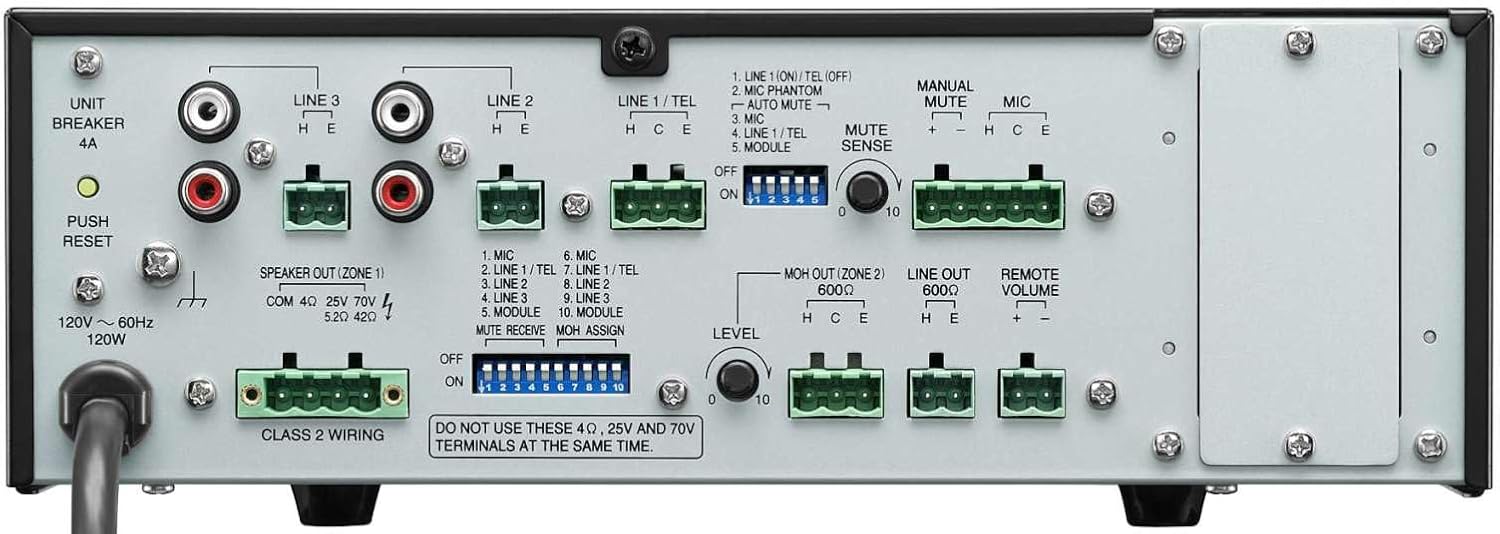
4.2 pav.: Galinio skydelio jungtys
This image shows the rear panel of the TOA BG-2060 Mixer Amplifier, detailing its connectivity options. Visible are the power input, speaker outputs (4 Ohms, 25V, 70V), various input terminals (Mic, Line 1/Tel, Line 2, Line 3, Module), MOH output, Line output, Remote Volume control, and DIP switches for configuration.
- Maitinimo įvestis: AC power cord connection.
- UNIT BREAKER: Resettable circuit breaker.
- Speaker Output (ZONE 1): Terminals for connecting speakers (4 Ohms, 25V, or 70V). Note: Do not use 4 Ohms, 25V, and 70V terminals at the same time.
- Įvesties gnybtai:
- MIC: Balanced input for microphones, with +24V DC phantom power option.
- LINE 1/TEL: Selectable input for line-level devices or telephone paging.
- LINE 2, LINE 3: Unbalanced inputs for line-level devices (e.g., CD players, media players).
- MODULIS: Input for optional modules.
- MOH OUT (ZONE 2): Music On Hold output, also assignable as a second zone output.
- IŠRIKIUOTI: Unbalanced line-level output for connecting to external ampkeltuvai ar įrašymo įrenginiai.
- NUOTOLINIO GARSUMAS: Terminals for connecting an optional remote volume control.
- DIP jungikliai: Configure various settings such as phantom power, input sensitivity, muting functions, and MOH assignment.
5. Sąranka
Follow these steps for initial setup of your BG-2060 Mixer Ampgyvesnis.
- Išjungti: Ensure the unit's power switch is in the OFF position and the power cord is disconnected.
- Garsiakalbio jungtis: Connect your speakers to the appropriate speaker output terminals (4 Ohms, 25V, or 70V) on the rear panel. Ensure correct polarity. Do not connect speakers to multiple output types simultaneously.
- Įvesties įrenginio jungtis: Connect your audio sources (microphones, music players, etc.) to the desired input terminals (MIC, LINE 1/TEL, LINE 2, LINE 3, MODULE) using appropriate cables and terminal plugs.
- DIP jungiklio konfigūracija: Refer to the rear panel diagram and the detailed instructions in the full manual for setting the DIP switches according to your specific needs (e.g., phantom power for microphones, mute settings).
- Pasirenkamos jungtys: If using, connect to the MOH OUT, LINE OUT, or REMOTE VOLUME terminals.
- Maitinimo jungtis: Once all connections are secure, plug the power cord into a suitable AC outlet.
6. Operacija
Operating the BG-2060 is straightforward.
- Maitinimas: Turn the POWER switch on the front panel to the ON position. The POWER LED will illuminate blue.
- Input Volume Adjustment: Slowly turn up the volume knob for the input channel you wish to use (MIC, LINE 1/TEL, etc.).
- Pagrindinis garsumo reguliavimas: Adjust the master volume control (if applicable, or use individual input volumes) to achieve the desired overall output level.
- Tono valdymas: Use the BASS and TREBLE controls to fine-tune the audio's low and high frequencies to your preference.
- Stebėjimas: Observe the SIGNAL and PEAK LEDs. The SIGNAL LED indicates audio presence. If the PEAK LED illuminates frequently or stays lit, reduce the input volume to prevent distortion.
- Nutildymo funkcija: If configured via DIP switches, utilize the manual or automatic mute functions as needed for paging or announcements.
7. Priežiūra
Proper maintenance ensures the longevity and optimal performance of your mixer ampgyvesnis.
- Valymas: Nuvalykite įrenginį minkštu, sausu skudurėliu. Nenaudokite abrazyvinių valiklių, vaško ar tirpiklių.
- Vėdinimas: Reguliariai tikrinkite, ar ventiliacijos angose nėra dulkių ir šiukšlių.
- Jungtys: Įsitikinkite, kad visos kabelių jungtys yra tvirtos ir be korozijos.
- Saugykla: Jei įrenginį ilgesnį laiką sandėliuosite, atjunkite jį nuo elektros tinklo ir laikykite vėsioje, sausoje vietoje.
8. Problemų sprendimas
Dažniausiai pasitaikančias problemas ir jų sprendimus žr. toliau pateiktoje lentelėje.
| Problema | Galima priežastis | Sprendimas |
|---|---|---|
| Nėra galios | Power cord disconnected; Unit breaker tripped; Power outlet issue. | Check power cord connection; Press UNIT BREAKER button on rear panel; Test power outlet with another device. |
| Nėra garso išvesties | Input volume too low; Speaker connections incorrect; Mute function active; Incorrect input selected. | Increase input and master volumes; Verify speaker wiring and impedance; Check DIP switch settings for mute; Ensure correct input source is active. |
| Iškraipytas garsas | Input signal too high (PEAK LED on); Incorrect impedance matching; Faulty cable. | Reduce input volume; Ensure speaker impedance matches amplifier output; Replace cables. |
| Dumbimas ar zvimbimas | Įžeminimo kilpa; Atsilaisvinusios jungtys; Trikdžiai iš kitų elektronikos prietaisų. | Ensure proper grounding; Check all cable connections; Move unit away from other electronic devices. |
9. Specifikacijos
| Funkcija | Detalė |
|---|---|
| Maitinimo šaltinis | 120 V kintama srovė, 60 Hz |
| Vardinė galia | 60W |
| Įėjimai | Mic: -60 dB, 600 Ohms, balanced; Line 1/TEL: -10 dB/-20 dB, 10 kOhms, balanced; Line 2, 3: -10 dB, 10 kOhms, unbalanced; Modules |
| Išėjimai | Speaker: 4 Ohms, 25 V (10 Ohms), 70 V (83 Ohms), balanced; MOH: 0 dB, 600 Ohms, balanced; Line: 0 dB, 600 Ohms, unbalanced |
| Produkcijos reglamentas | 2 dB or less, no load to full load (1 kHz) |
| Fantomo galia | On/Off switch for Mic, +24 V DC |
| Tono valdymas | Bass: +/- 10 dB at 100 Hz; Treble: +/- 10 dB at 10 kHz |
| pradingimą | Manual mute/Automatic mute |
| Rodikliai | Maitinimo šviesos diodas, signalo lygio šviesos diodas, didžiausio lygio šviesos diodas |
| Matmenys (PxAxG) | 10.39 x 3.71 x 10.52 colio |
| Svoris | 11.68 svaro |
10. Garantija ir palaikymas
For warranty information and technical support, please refer to the documentation provided with your purchase or visit the official TOA Electronics websvetainę.


