1. Įvadas
Thank you for choosing the FL ESPORTS GEO 65 HE Gaming Keyboard. This 60% mechanical keyboard features Hall Effect magnetic switches, rapid trigger functionality, and adjustable actuation for a highly customizable gaming experience. This manual provides detailed instructions for setup, operation, maintenance, and troubleshooting to ensure optimal performance.
2. Pakuotės turinys
Prašome patikrinti, ar pakuotėje yra visi reikalingi daiktai:
- FL ESPORTS GEO 65 HE Gaming Keyboard
- USB-C į USB-A laidas
- Klaviatūros traukiklis
- Jungiklio traukiklis
- Vartotojo vadovas

Image: Contents of the FL ESPORTS GEO 65 HE keyboard package, showing the keyboard, USB-C cable, keycap puller, and switch puller.
3. Sąranka
- Prijunkite klaviatūrą: Plug the USB-C end of the provided cable into the keyboard and the USB-A end into an available USB port on your computer. The keyboard will automatically be recognized by your operating system.
- Įdiekite programinę įrangą (nebūtina, bet rekomenduojama): For full customization of RGB lighting, key remapping, macros, and performance settings (including rapid trigger and actuation point adjustment), download and install the official FL ESPORTS software from the manufacturer's websvetainę.

Vaizdas: Viršview of the FL ESPORTS keyboard's features, including the software interface for customization and performance settings.
4. Naudojimo instrukcijos
4.1 Pagrindinės klavišų funkcijos
The GEO 65 HE features a compact 60% layout. Many standard functions are accessed via the Fn key in combination with other keys. Refer to the keyboard's keycaps for secondary functions (e.g., arrow keys, function row).
4.2 Hall Effect Switches and Rapid Trigger
This keyboard utilizes Hall Effect magnetic switches, allowing for precise control over actuation and rapid trigger functionality. Rapid Trigger enables keys to reset instantly upon release, allowing for faster repeated inputs.
- Reguliuojamas valdymas: The actuation point (the distance a key needs to travel to register an input) can be customized via the software. This allows you to set a shallow actuation for quick responses or a deeper one for more deliberate presses.
- Greitas paleidiklis: This feature can be enabled and configured through the software, allowing you to set the reset sensitivity for individual keys.
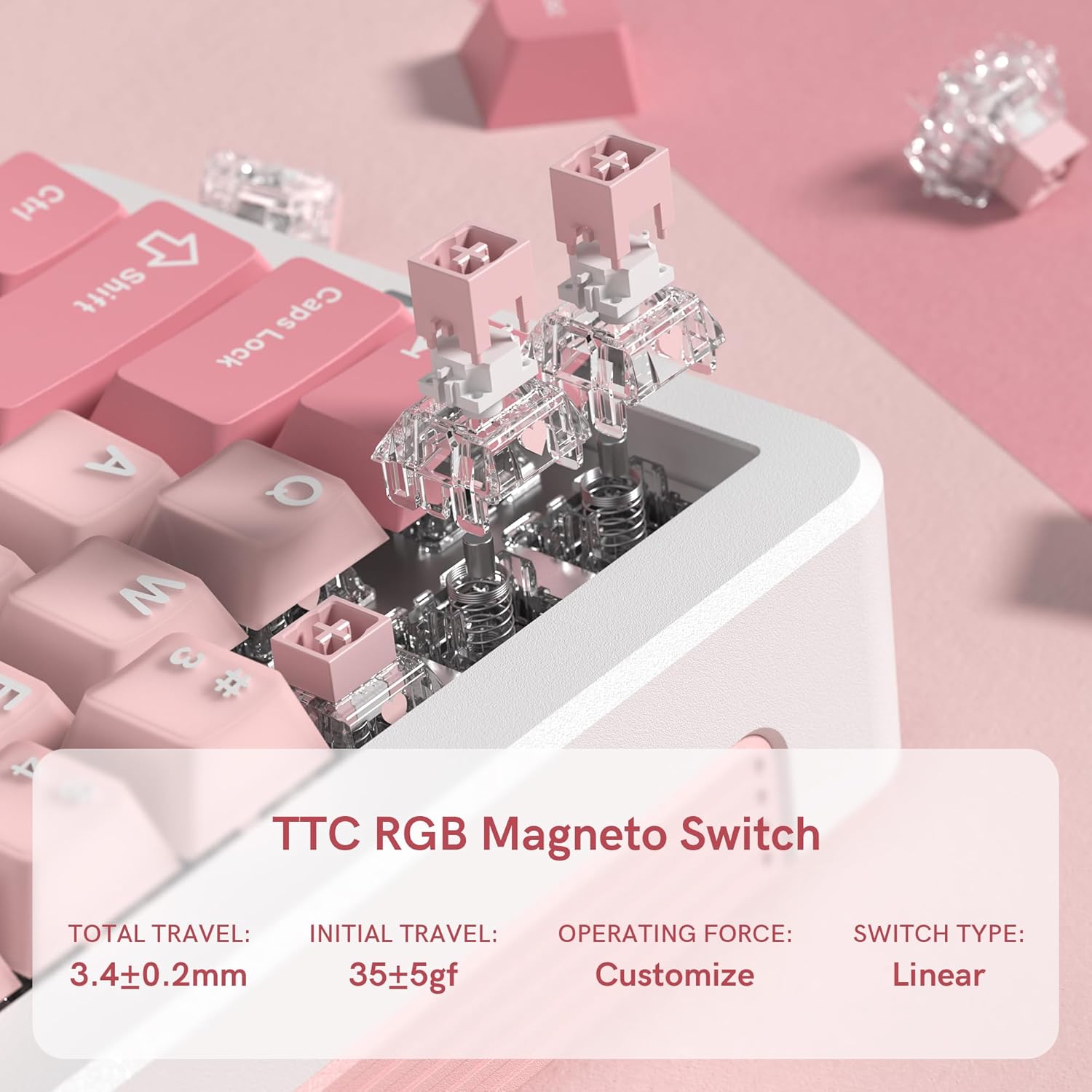
Vaizdas: Stambus planas view of the TTC RGB Magneto Switches, highlighting their design and key specifications such as total travel and operating force.
4.3 RGB apšvietimo pritaikymas
The keyboard features per-key RGB lighting. Lighting effects, colors, and brightness can be adjusted using the FL ESPORTS software. Some basic lighting modes may be accessible via Fn key combinations.
4.4 Programinės įrangos konfigūracija
The dedicated software provides comprehensive control over your keyboard:
- Raktų pertvarkymas: Assign custom functions to any key.
- Makro valdymas: Kurkite ir priskirkite sudėtingas makrokomandas žaidimams ar produktyvumui.
- Našumo nustatymai: Fine-tune actuation points, rapid trigger sensitivity, and polling rate.
- Apšvietimo nustatymai: Customize RGB effects, colors, and brightness.
- Firmware atnaujinimai: Keep your keyboard updated with the latest features and improvements.

Image: Multiple screenshots illustrating the FL ESPORTS software interface, showing options for key configuration, lighting settings, performance adjustments, and macro management.
5. Priežiūra
5.1 Valymas
Norėdami išlaikyti klaviatūros išvaizdą ir funkcionalumą:
- Klaviatūros paviršiui valyti naudokite minkštą, sausą šluostę.
- Norėdami giliau valyti, naudokite pridedamą klavišų dangtelių ištraukiklį, kad nuimtumėte klavišų dangtelius, ir išvalykite apačią suslėgtu oru arba mažu šepetėliu.
- Venkite naudoti stiprių cheminių medžiagų ar abrazyvinių medžiagų.
5.2 Klaviatūros dangtelio ir jungiklio nuėmimas
The keyboard supports hot-swappable switches. Use the provided tools for safe removal:
- Klaviatūros dangtelio nuėmimas: Gently attach the keycap puller to the keycap and pull straight up.
- Jungiklio pašalinimas: After removing the keycap, use the switch puller to grasp the top and bottom clips of the switch and pull straight up. Ensure the switch is properly aligned when reinserting.
6. Problemų sprendimas
- Klaviatūra nereaguoja:
- Įsitikinkite, kad USB-C laidas yra tvirtai prijungtas prie klaviatūros ir kompiuterio.
- Pabandykite prisijungti prie kito USB prievado.
- Iš naujo paleiskite kompiuterį.
- RGB apšvietimas neveikia / yra netinkamas:
- Check the lighting settings in the FL ESPORTS software.
- Įsitikinkite, kad klaviatūros programinė įranga yra atnaujinta.
- Raktai neregistruojami arba įvedami du kartus:
- Nuvalykite aplink pažeistą jungiklį visas šiukšles.
- If the issue persists, consider replacing the switch using the provided switch puller.
- Verify actuation settings in the software.
- Programinė įranga neaptinka klaviatūros:
- Įsitikinkite, kad programinė įranga yra naujausia versija.
- Pabandykite iš naujo įdiegti programinę įrangą.
- Laikinai išjunkite bet kokią antivirusinę ar užkardos programinę įrangą, kuri gali trukdyti.
7. Specifikacijos
| Funkcija | Specifikacija |
|---|---|
| Modelis | GEO 65 HE |
| Prekės ženklas | FL ESPORTS |
| Klaviatūros išdėstymas | 60% (QWERTY) |
| Jungiklio tipas | Hall Effect Magnetic Switches (TTC RGB Magneto Switch) |
| Įjungimas | Reguliuojamas |
| Ypatingos savybės | Rapid Trigger, Aluminum Alloy Case, RGB Backlighting, PBT Keycaps |
| Ryšys | USB-C (laidinis) |
| Suderinami įrenginiai | Kompiuteris („Windows“ / „Mac“) |
| Apklausos rodiklis | 8KHz |
| Nuskaitymo greitis | 256 tūkst |
| Mažas delsos laikas | 0.125 ms |
| Greitas paleidimas (RT) | 0.005 mm |
| Nulinė negyvoji zona | 0 |
| Prekės svoris | 1.2 svaro |
| Pakuotės matmenys | 10 x 2.7 x 2 colio |
| Keyboard Dimensions (Approx.) | 323.3 mm (ilgis) x 118.3 mm (plotis) x 34 mm (aukštis) |
Vaizdas: Viršus ir šonas views of the FL ESPORTS GEO 65 HE keyboard with approximate dimensions indicated in millimeters.
8. Garantija ir palaikymas
For warranty information and technical support, please refer to the official FL ESPORTS website or contact their customer service directly. Standard return policies typically allow for returns within 30 days of purchase. Extended protection plans may be available from your retailer.


