Įvadas
This manual provides essential information for the proper use and maintenance of your Maxcom MM835 4G VoLTE Flip Phone. Please read these instructions carefully before using your device to ensure optimal performance and longevity. This phone is designed for ease of use, featuring large displays and a simplified interface.
Produktas baigtasview
The Maxcom MM835 is a 4G VoLTE flip phone designed for clear communication and user convenience. It features a dual-screen design, large backlit keys, and essential functions like an SOS button and HAC (Hearing Aid Compatibility).
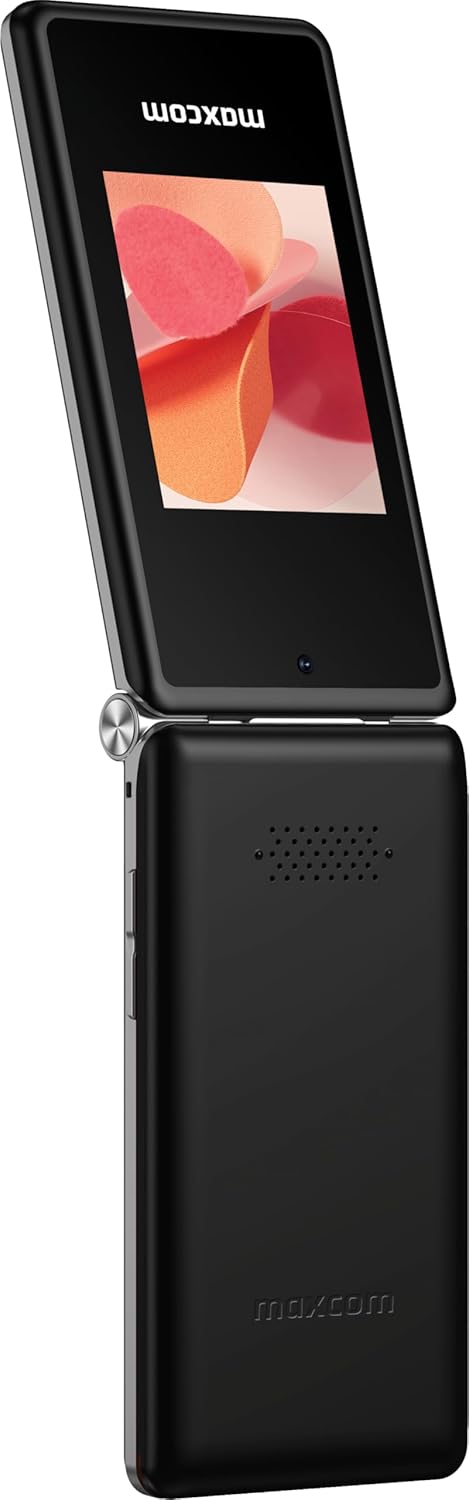
1 paveikslas: Maxcom MM835 Flip Phone (Closed View). The external 2.4-inch screen displays time, date, battery status, and missed calls without opening the phone.
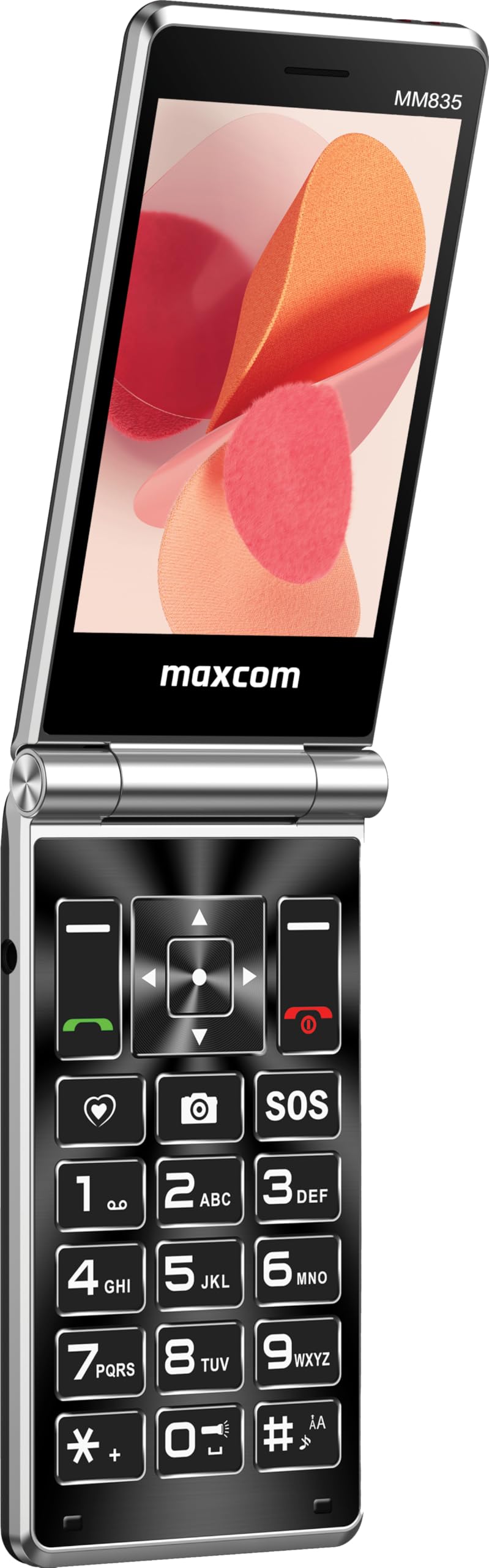
2 paveikslas: Maxcom MM835 Flip Phone (Open View). The internal 3.5-inch screen provides a clear interface for contacts and messages, complemented by large, comfortable keys.

3 paveikslas: Šoninė view of the Maxcom MM835, illustrating the volume control buttons for easy audio adjustment.

4 paveikslas: Apačia view of the Maxcom MM835, highlighting the USB-C charging port for convenient power connection.

5 paveikslas: Detail of the Maxcom MM835 keyboard, featuring the prominent SOS button for emergency contacts.

6 paveikslas: The Maxcom MM835 is Hearing Aid Compatible (HAC), ensuring clear audio for users with hearing aids.
Sąranka
1. Baterijos įdėjimas ir įkrovimas
- Atidarykite galinį dangtelį: Švelniai nuimkite telefono galinį dangtelį.
- Įdėkite bateriją: Place the included Lithium-ion battery into its compartment, ensuring the contacts align correctly.
- Pakeiskite galinį dangtelį: Saugiai pritvirtinkite galinį dangtelį.
- Įkraukite telefoną: Connect the provided USB-C cable to the phone's charging port (Figure 4) and to a compatible USB power adapter (not included). Allow the phone to charge fully before first use. The external screen will indicate charging status.
2. SIM kortelės montavimas
The Maxcom MM835 supports dual SIM cards.
- Nuimkite galinį dangtelį ir bateriją: Follow the steps above to access the SIM card slots.
- Įdėkite SIM korteles: Carefully slide your SIM card(s) into the designated slot(s). Ensure the gold contacts face downwards and the notched corner aligns with the slot.
- Reinstall battery and cover: Pakeiskite bateriją ir galinį dangtelį.
3. Įjungimas/išjungimas
- Norėdami įjungti: Paspauskite ir palaikykite maitinimo / skambučio baigimo mygtuką (raudoną mygtuką), kol ekranas užsidegs.
- Norėdami išjungti: Paspauskite ir palaikykite maitinimo / skambučio baigimo mygtuką, kol pasirodys išjungimo parinktys, tada pasirinkite „Išjungti“.
Naudojimo instrukcijos
1. Pagrindinė navigacija
- Vidinis ekranas: The 3.5-inch internal screen is your primary interface for menus and content.
- Išorinis ekranas: The 2.4-inch external screen shows essential information like time, date, battery, and caller ID when the phone is closed.
- Naršymo mygtukai: Use the directional keys (up, down, left, right) and the central OK button to navigate through menus.
- Minkštieji klavišai: The keys directly below the screen perform functions indicated on the display (e.g., "Menu", "Back").
- Skambinimo klavišai: The green button initiates calls, and the red button ends calls or powers the phone on/off.
2. Skambinimas ir skambučių priėmimas
- Norėdami paskambinti:
- Atidarykite telefoną.
- Surinkite numerį naudodami klaviatūrą.
- Norėdami pradėti skambutį, paspauskite žalią skambinimo mygtuką.
- Norėdami atsiliepti į skambutį:
- When the phone rings, open the flip or press the green Call button.
- Norėdami baigti skambutį: Paspauskite raudoną mygtuką Baigti skambutį.
3. Pranešimų siuntimas ir gavimas
- Eikite į meniu „Žinutės“.
- Select "New Message" to compose a text.
- Įveskite gavėjo numerį arba pasirinkite iš kontaktų.
- Įveskite pranešimą naudodami klaviatūrą.
- Paspauskite „Siųsti“.
4. SOS Button Functionality
The SOS button (Figure 5) is located on the main keypad and is designed for emergency situations.
- Sąranka: Before use, configure emergency contacts in the phone's settings. Refer to the "SOS Settings" section in the phone's menu.
- Aktyvinimas: In an emergency, press and hold the SOS button. The phone will automatically send pre-defined notifications to your emergency contacts and may initiate calls to them.
5. Fotoaparatas
The phone includes a basic camera for capturing photos.
- Pasiekite kamerą iš pagrindinio meniu.
- Kadruokite kadrą naudodami vidinį ekraną.
- Press the central OK button to take a picture.
6. FM radijas
Enjoy listening to FM radio stations on your device.
- Navigate to the "FM Radio" application in the menu.
- Connect headphones (not included) to act as an antenna for optimal reception.
- Norėdami ieškoti stočių arba derinti rankiniu būdu, naudokite naršymo mygtukus.
Priežiūra
- Valymas: Telefono išorę valykite minkšta, sausa šluoste. Venkite skystų valiklių ar abrazyvinių medžiagų.
- Akumuliatoriaus priežiūra: To prolong battery life, avoid extreme temperatures. Charge the phone regularly, but do not leave it fully discharged for extended periods.
- Saugykla: Kai nenaudojate, laikykite telefoną vėsioje, sausoje vietoje, toliau nuo tiesioginių saulės spindulių ir drėgmės.
- Programinė įranga: While software updates are not explicitly guaranteed, ensure your phone's settings are optimized for performance.
Trikčių šalinimas
If you encounter issues with your Maxcom MM835, refer to the following common solutions:
| Problema | Galimas sprendimas |
|---|---|
| Telefonas neįsijungia | Įsitikinkite, kad akumuliatorius tinkamai įdėtas ir visiškai įkrautas. Prijunkite įkroviklį ir bandykite dar kartą. |
| Negalima skambinti arba priimti skambučių | Patikrinkite, ar SIM kortelė tinkamai įdėta. Įsitikinkite, kad yra tinklo signalas. Jei problema išlieka, susisiekite su savo paslaugų teikėju. |
| Prastas akumuliatoriaus veikimo laikas | Ensure the phone is fully charged. Reduce screen brightness or close unused applications. Battery performance can degrade over time. |
| "Emergency Call Only" message | This indicates a lack of network signal or an issue with your SIM card/service. Try moving to an area with better reception or reinserting your SIM card. |
| Raktai nereaguoja | Restart the phone. If the issue continues, ensure no debris is obstructing the keys. |
Specifikacijos
| Funkcija | Detalė |
|---|---|
| Prekės ženklas | Maxcom |
| Modelio pavadinimas | MM835 |
| Produkto tipas | Apverskite telefoną |
| Spalva | Juoda |
| Operacinė sistema | Maxcom OS |
| Vidinis ekrano dydis | 3.5 colių |
| Išorinio ekrano dydis | 2.4 colių |
| Ryšys | 4G, VoLTE |
| Ypatingos savybės | Dual SIM, SOS Button, HAC (Hearing Aid Compatible), Large Keys |
| Baterijos sudėtis | Ličio jonų |
| Baterijos talpa | 1400 mAh |
| Įkrovimo prievadas | C tipo USB |
| Atminties talpa | 32 GB |
| CPU modelis | ARMv7 |
| Ekrano raiška | 640 x 360 |
| Belaidis nešiklis | Visi operatoriai (atrakinti) |
Garantija ir palaikymas
For warranty information and customer support, please refer to the documentation provided with your purchase or contact the seller directly. Maxcom strives to provide reliable products, and support is available for any manufacturing defects or operational queries.
- Gamintojas: Maxcom
- Pardavėjas: You Get - Innovation & Technology
- Grąžinimo politika: Typically 30 days for refund/replacement (check with seller for specifics).


