1. Įvadas
Welcome to the user manual for your GPD Pocket 4 Mini Laptop. This document provides essential information for setting up, operating, maintaining, and troubleshooting your device. The GPD Pocket 4 is a high-performance, ultra-portable 2-in-1 device designed for both productivity and entertainment, featuring an AMD Ryzen AI 9 HX 370 CPU and an 8.8-inch 2.5K 144Hz touchscreen display.
Please read this manual thoroughly before using your GPD Pocket 4 to ensure proper operation and to maximize its capabilities.
2. Saugos informacija
- Maitinimas: Use only the original power adapter provided with the device. Using unauthorized adapters may damage the device and void the warranty.
- Akumuliatoriaus priežiūra: Do not attempt to replace the battery yourself. Avoid exposing the device to extreme temperatures (below 0°C or above 35°C) or direct sunlight for prolonged periods.
- Vanduo ir drėgmė: Keep the device away from water, rain, and excessive humidity. Do not operate with wet hands.
- Vėdinimas: Ensure proper ventilation. Do not block the ventilation openings, especially during heavy use, to prevent overheating.
- Valymas: Prieš valydami atjunkite maitinimą. Naudokite minkštą, sausą šluostę. Venkite skystų valiklių ar aerozolių.
- Išardymas: Do not attempt to disassemble or repair the device yourself. This may cause damage and void the warranty. Contact authorized service personnel for repairs.
3. Pakuotės turinys
Išpakuodami patikrinkite pakuotės turinį. Jei trūksta kokių nors daiktų arba jie pažeisti, nedelsdami susisiekite su pardavėju.
- GPD Pocket 4 mini nešiojamas kompiuteris
- USB-C Power Adapter (100W PD Fast Charging)
- USB-C į USB-C laidas
- Vartotojo vadovas (šis dokumentas)
4. Produktas baigtasview
The GPD Pocket 4 is a versatile 2-in-1 device, combining a mini laptop with a tablet. It features a high-resolution touchscreen and a physical keyboard.
4.1 Pagrindinės savybės
- Procesorius: AMD Ryzen AI 9 HX 370 CPU (up to 5.1 GHz)
- Grafika: AMD Radeon 890M iGPU (RDNA 3.5 architecture)
- Ekranas: 8.8-inch 2.5K (2560x1600) IPS Touchscreen, 144Hz refresh rate
- Atmintis: 32GB LPDDR5X RAM (7500 MT/s)
- Saugykla: 2 TB M.2 NVMe PCIe 4.0 SSD diskas
- Operacinė sistema: Windows 11 Home
- Ryšys: „Wi-Fi 6E“, „Bluetooth 5.3“
- Baterija: 44.8Wh, up to 9 hours video playback
- Prievadai: HDMI 2.1, 2x USB-C (full-featured), USB-A, RJ45 Network Port, Earphone/Microphone Ports
- Modular IO: Support for 4G, MicroSD, KVM, and RS-232 modules.
4.2 Įrenginio išdėstymas

4.2.1 pav.: Šoninė ir galinė dalys view of the GPD Pocket 4 highlighting ports and features.
- Top/Rear: Charge Indicator, USB4, Memory Card Readers, Reset Button, HDMI 2.1, USB A 3.2 Gen 2, Speaker Port.
- Kairė pusė: Full-Featured USB-C, Air Outlet, RJ45 Network Port, Lanyard Hole, Earphone/Microphone Ports, USB-A, Power Button/Fingerprint.
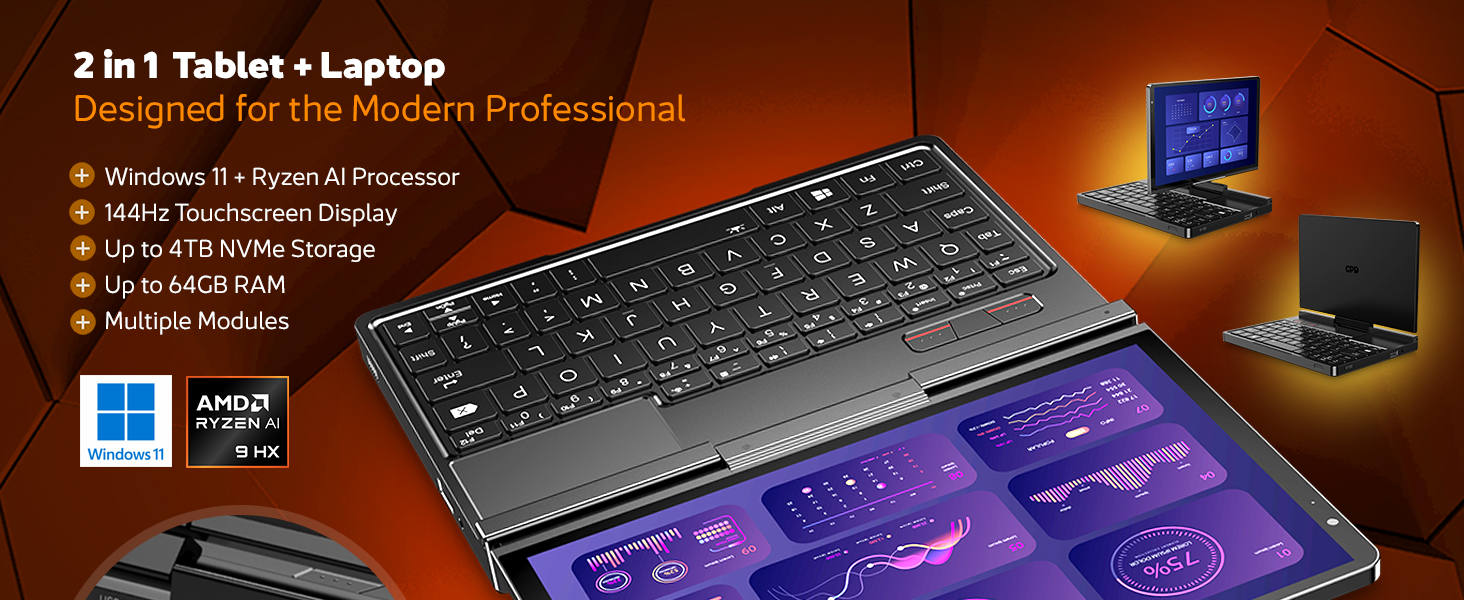
4.2.2 pav. Baigtaview of the GPD Pocket 4's core specifications and 2-in-1 design.
This image illustrates the device's key technical specifications, including its modular IO, screen, CPU, GPU, RAM, storage, OS, battery, and connectivity, emphasizing its nature as a pocket-sized modular AI PC.

Figure 4.2.3: Modular expansion options for the GPD Pocket 4.
The GPD Pocket 4 supports various modular expansions, including KVM, Memory Card Reader, 4G LTE, and RS-232 modules, enhancing its versatility for different professional needs.
5. Sąranka
5.1 Pradinis įjungimas
- Įkraukite įrenginį: Before first use, connect the GPD Pocket 4 to the power adapter using the provided USB-C cable. Plug the adapter into a wall outlet. The charge indicator light will illuminate.
- Maitinimas: Press and hold the Power Button (integrated with the fingerprint sensor) for a few seconds until the GPD logo appears on the screen.
- "Windows" sąranka: Follow the on-screen instructions to complete the Windows 11 Home setup process. This includes selecting your region, language, connecting to Wi-Fi, and creating a user account.
5.2 Išorinių įrenginių prijungimas
- Išorinis ekranas: Connect an external monitor via the HDMI 2.1 port or one of the full-featured USB-C ports.
- USB įrenginiai: Use the USB-A or USB-C ports for connecting external keyboards, mice, USB drives, or other peripherals.
- Tinklas: For a wired internet connection, connect an Ethernet cable to the RJ45 network port.
- Garsas: Connect headphones or external speakers to the 3.5mm earphone/microphone port.
6. Operating the GPD Pocket 4
6.1 Veikimo režimai
- Nešiojamojo kompiuterio režimas: Use the integrated keyboard and touchpad for traditional laptop functionality. The 8.8-inch display provides a compact yet clear workspace.
- Planšetinio kompiuterio režimas: Fold the screen back to transform the device into a tablet. The 10-point multi-touch display allows for intuitive navigation and interaction.

Figure 6.1.1: GPD Pocket 4 in tablet mode, showcasing its touch interface.
The device seamlessly transitions between laptop and tablet modes, offering flexibility for various tasks.
6.2 Klaviatūra ir jutiklinė planšetė
- The integrated keyboard is designed for comfortable typing in a compact form factor.
- Jutiklinė planšetė palaiko kelių lietimų gestus naršymui. Norėdami pritaikyti, žr. „Windows“ nustatymus.
- The power button doubles as a fingerprint sensor for secure login.

Figure 6.2.1: User interacting with the GPD Pocket 4's keyboard and touchpad.
This image highlights the comfortable keyboard and backlit trackpad, along with the integrated camera and microphone for meetings.
6.3 Akumuliatoriaus valdymas
- The GPD Pocket 4 features a 44.8Wh battery.
- For optimal battery life, adjust power settings in Windows.
- The device supports 100W PD fast charging. Use the provided charger for quickest recharge times.

6.3.1 pav. Vidinis view showing the 44.8Wh battery and device dimensions.
This image provides a visual representation of the device's internal battery and its compact dimensions, emphasizing its portability and power endurance.
7. Priežiūra
7.1 Valymas
- Always power off the device and disconnect the charger before cleaning.
- Use a soft, lint-free cloth to wipe the screen and chassis. For stubborn smudges on the screen, lightly dampNuvalykite šluostę vandeniu arba specialiu ekranui skirtu valikliu (nepurkškite tiesiai ant ekrano).
- Use a soft brush or compressed air to clean dust from the keyboard and ventilation openings.
- Venkite naudoti stiprias chemines medžiagas, abrazyvinius valiklius ar tirpiklius.
7.2 Programinės įrangos naujiniai
- Regularly check for Windows updates to ensure your system has the latest security patches and performance improvements. Go to Nustatymai > „Windows“ naujinimas.
- Periodically check the GPD official website for driver updates, especially for graphics (AMD Radeon 890M) and chipset drivers, to ensure optimal performance.
7.3 Saugojimo valdymas
- Reguliariai ištrinkite nereikalingus fileir programas, kad atlaisvintumėte vietos saugykloje.
- Apsvarstykite galimybę naudoti debesies saugyklą dideliems failams files, siekiant sumažinti vietinės saugyklos sunaudojimą.
- The 2TB M.2 NVMe SSD is expandable; consult GPD support for compatible upgrade options if needed.
8. Problemų sprendimas
| Problema | Galima priežastis | Sprendimas |
|---|---|---|
| Įrenginys neįsijungia. | Low battery; Power adapter not connected; Hardware issue. | Ensure the device is fully charged. Verify the power adapter and cable are securely connected. If issues persist, perform a hard reset (press and hold power button for 15 seconds). |
| Ekranas tuščias arba mirga. | Display driver issue; Incorrect resolution; Hardware fault. | Restart the device. Update graphics drivers. Check display settings in Windows. |
| Neveikia „Wi-Fi“ arba „Bluetooth“. | Wireless adapter disabled; Driver issue; Interference. | Check Wi-Fi/Bluetooth settings in Windows. Restart the device. Update wireless drivers. Ensure no physical obstructions or strong interference sources. |
| Įrenginys lėtas arba nereaguoja. | Per daug veikiančių programų; Maža vietos saugykloje; Perkaitimas. | Close unnecessary applications. Free up disk space. Ensure ventilation is not blocked. Check Task Manager for resource-intensive processes. |
| Touchscreen not responding. | Software glitch; Driver issue; Physical damage. | Restart the device. Check for touchscreen driver updates. If physically damaged, contact support. |
9. Specifikacijos
| Funkcija | Detalė |
|---|---|
| Prekės ženklas | GPD |
| Modelio pavadinimas | Pocket (RM-Pocket-4) |
| Procesorius | AMD Ryzen AI 9 HX 370 (5.1 GHz) |
| Grafikos koprocesorius | Radeon™ 890M |
| RAM | 32 GB LPDDR5X |
| Sandėliavimas | 2 TB NVMe PCIe Gen4 SSD |
| Ekrano dydis | 8.8 colių |
| Ekrano raiška | 2560 x 1600 pikselių (2.5K) |
| Atnaujinimo dažnis | 144 Hz |
| Operacinė sistema | Windows 11 Home |
| Belaidis tipas | 802.11ax (Wi-Fi 6E), „Bluetooth 5.3“ |
| Vidutinis baterijos veikimo laikas | 9 valandos (vaizdo įrašų atkūrimas) |
| Prekės svoris | 1.6 svaro (725 gramų) |
| Gaminio matmenys | 8.11 x 5.67 x 0.87 colio |
| Spalva | Juoda |
10. Garantija ir palaikymas
GPD products typically come with a limited manufacturer's warranty. Please refer to the warranty card included in your package or visit the official GPD websvetainėje, kurioje rasite išsamias garantijos sąlygas, taikomas jūsų regionui.
For technical support, troubleshooting assistance beyond this manual, or warranty claims, please contact GPD customer support through their official websvetainėje arba pardavėjo, iš kurio įsigijote įrenginį.
GPD Official Websvetainė: www.gpd.hk
Please have your product model number (RM-Pocket-4) and purchase information ready when contacting support.


