1. Įvadas
The INKBIRDPLUS Split-Type Temperature Controller (Model JK-TC810) is a versatile digital thermostat designed for precise temperature management. It features a split design with a separate display unit and power outlet, offering flexible installation and ease of use. This controller supports both heating and cooling modes, periodic timing control, and includes high/low temperature alarms. It is suitable for a wide range of applications, including greenhouses, reptile habitats, incubators, refrigeration units, and home brewing.
2. Produktas baigtasview
The INKBIRDPLUS JK-TC810 consists of a main control unit with an LCD display and a separate power outlet unit, connected by a 2.7-meter control cable. A temperature probe is also included for accurate measurement.

Image: The INKBIRDPLUS Split-Type Temperature Controller, showing the main display unit, the UK plug power outlet, and the temperature probe.
Pagrindinės funkcijos:
- Split-Type Design: Separate display and outlet for flexible placement.
- Heating/Cooling Modes: Automatically switches between modes based on set temperatures.
- 4 laikmačio režimai: Cycle timer, countdown ON, countdown OFF, and countdown ON/OFF.
- LCD ekranas su apšvietimu: Clear visibility of parameters in various lighting conditions.
- Temperatūros kalibravimas: Leidžia tiksliai sureguliuoti temperatūros rodmenis.
- Atminties funkcija: Išsaugo nustatymus po elektros energijos tiekimo nutraukimo.
- Platus temperatūros diapazonas: Operates from -40°C to 120°C (-40°F to 248°F).

Image: An illustration detailing the main features of the controller, including split-type design, heating/cooling, periodic timing, temperature calibration, backup memory, and backlit LCD screen.
3. Sąranka
- Išpakuoti: Atsargiai išimkite visus komponentus iš pakuotės.
- Prijunkite zondą: Insert the temperature probe into the designated port on the main control unit.
- Padėties zondas: Place the temperature probe in the environment where temperature needs to be monitored and controlled. Ensure it is not directly exposed to heating or cooling elements to get an accurate reading.
- Prijunkite: Connect the power outlet unit to a standard UK electrical socket. The main control unit will power on and display the current temperature.
- Prijunkite prietaisą: Plug your heating or cooling appliance (e.g., heater, fan, incubator) into the power outlet unit of the controller.
4. Naudojimo instrukcijos
4.1 Basic Temperature Control
The controller operates in two main modes: Heating and Cooling. The mode is determined by the relationship between the Start Temperature (ON) and Stop Temperature (OFF).
- Šildymo režimas: When Start Temp < Stop Temp. The appliance will turn ON when the measured temperature drops below the Start Temp and turn OFF when it reaches the Stop Temp.
- Aušinimo režimas: When Start Temp > Stop Temp. The appliance will turn ON when the measured temperature rises above the Start Temp and turn OFF when it drops to the Stop Temp.

Image: Visual representation of the controller used in both heating (e.g., with a space heater) and cooling (e.g., with an air conditioner) scenarios, demonstrating its versatility.
4.2 Setting Temperatures
- Paspauskite NUSTATYTI button once. The Start Temperature (ON) will flash.
- Naudokite UP/CLK ir ŽEMYN buttons to adjust the desired Start Temperature.
- Paspauskite NUSTATYTI button again. The Stop Temperature (OFF) will flash.
- Naudokite UP/CLK ir ŽEMYN buttons to adjust the desired Stop Temperature.
- Paspauskite NUSTATYTI button a third time to confirm and exit the setting mode, or wait a few seconds for it to auto-save.
4.3 laiko režimai
The controller offers four timing modes for advanced control. Press the REŽIMAS button repeatedly to cycle through these options (F01, F02, F03, F04).
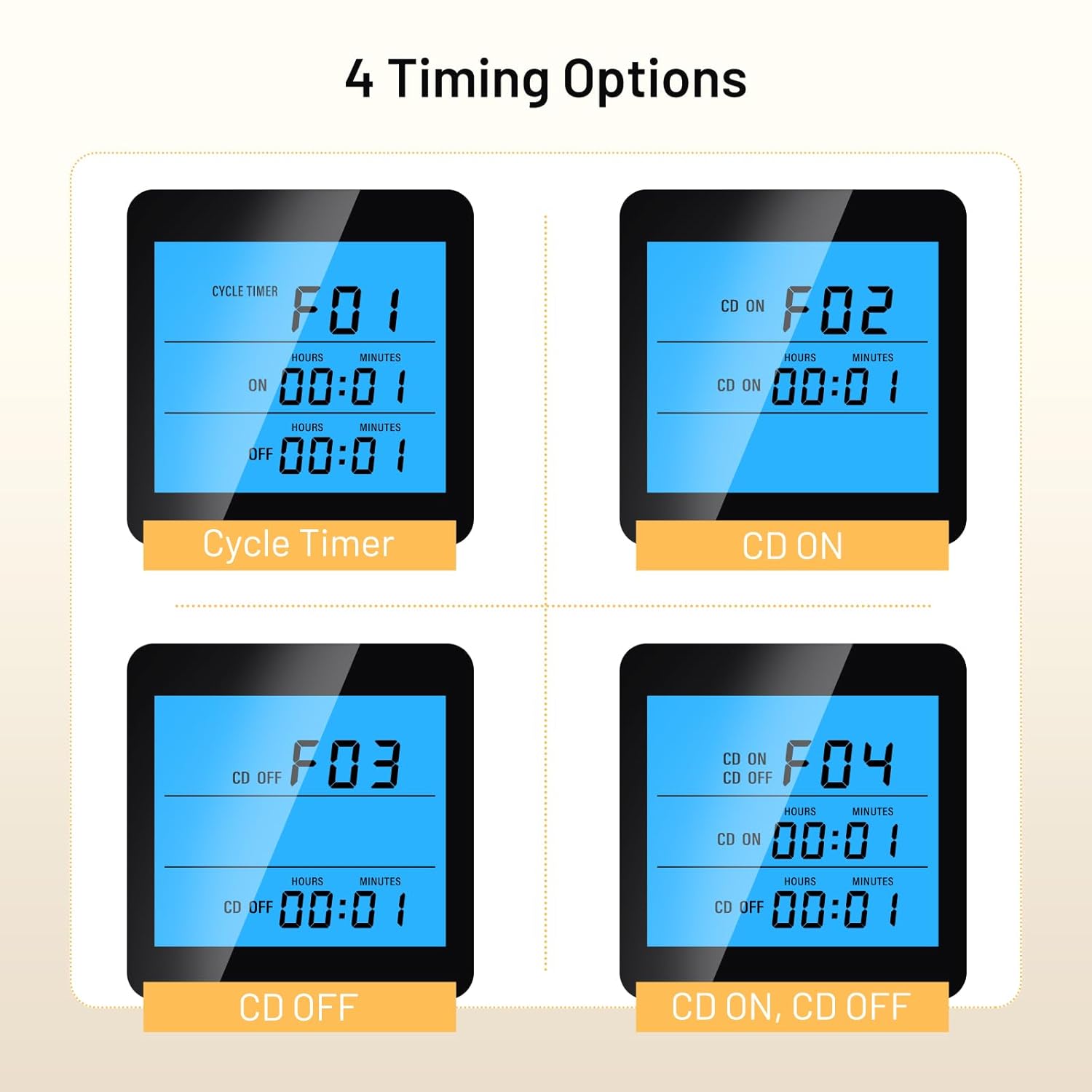
Vaizdas: Rodyti examples of the four timing modes (F01 Cycle Timer, F02 CD ON, F03 CD OFF, F04 CD ON, CD OFF) on the controller's LCD screen.
- F01: Cycle Timer (ON/OFF Cycle): Set an ON duration and an OFF duration for the appliance to cycle repeatedly.
- F02: Countdown ON: Set a countdown time after which the appliance will turn ON and stay ON.
- F03: Countdown OFF: Set a countdown time after which the appliance will turn OFF and stay OFF.
- F04: Countdown ON, Countdown OFF: Set a countdown for the appliance to turn ON, and then another countdown for it to turn OFF.
To set the times for each mode, select the desired mode using the REŽIMAS mygtuką, tada paspauskite NUSTATYTI ir naudoti UP/CLK ir ŽEMYN , kad sureguliuotumėte valandas ir minutes.
4.4 Temperatūros kalibravimas
If the measured temperature deviates from a known accurate thermometer, you can calibrate the controller:
- Įjungę įrenginį, paspauskite ir palaikykite NUSTATYTI button for approximately 3 seconds to enter the advanced settings menu.
- Naudokite UP/CLK or ŽEMYN to navigate to the temperature calibration setting (refer to the on-screen indicator or specific symbol in the full manual).
- Paspauskite NUSTATYTI , kad pasirinktumėte, tada naudokite UP/CLK or ŽEMYN to adjust the calibration value. A positive value increases the displayed temperature, a negative value decreases it.
- Paspauskite NUSTATYTI to confirm and exit, or wait for auto-save.
4.5 Foninio apšvietimo nustatymai
The backlight duration can be adjusted for energy saving or continuous visibility. Access this setting through the advanced settings menu (press and hold NUSTATYTI for 3 seconds) and adjust the backlight timer as needed.
5. Priežiūra
- Valymas: Wipe the controller and probe with a soft, dry cloth. Do not use abrasive cleaners or immerse the units in water.
- Zondų priežiūra: Ensure the temperature probe is clean and free from debris for accurate readings. Avoid bending or damaging the probe cable.
- Saugykla: When not in use, store the controller in a dry, cool place away from direct sunlight and extreme temperatures.
6. Problemų sprendimas
| Problema | Galima priežastis | Sprendimas |
|---|---|---|
| Valdiklis neįsijungia | No power to the outlet; faulty unit | Check the power socket; ensure the unit is properly plugged in. If issues persist, contact support. |
| Netikslus temperatūros rodmuo | Probe dirty or damaged; calibration needed; probe placed incorrectly | Clean the probe; perform temperature calibration (Section 4.4); reposition the probe away from direct heat/cold sources. |
| Appliance not turning ON/OFF as expected | Incorrect Start/Stop temperature settings; wrong mode (heating/cooling); appliance not plugged in or faulty | Verify Start and Stop temperature settings (Section 4.2); ensure the appliance is functional and correctly plugged into the controller's outlet. |
| Timing function not working | Incorrect timing mode selected or parameters set incorrectly | Review and adjust timing mode settings (Section 4.3). |
7. Specifikacijos
| Funkcija | Specifikacija |
|---|---|
| Modelio numeris | JK-TC810 |
| Temperatūros valdymo diapazonas | -40°C iki 120°C (nuo -40°F iki 248°F) |
| Kištuko tipas | JK kištukas |
| Prekės svoris | 256 gramų |
| Gaminio matmenys | 15.5 gylio x 8 pločio x 8 aukščio centimetrų |
| Control Cable Length | 2.7 metrų (apytiksliai) |
| Ekranas | LCD apšvietimas |
8. Garantija ir palaikymas
INKBIRDPLUS products are designed for reliability and performance. This product comes with a standard manufacturer's warranty against defects in materials and workmanship. Please refer to the warranty card included with your purchase for specific terms and conditions.
For technical support, troubleshooting assistance, or warranty claims, please contact INKBIRDPLUS customer service through their official websvetainėje arba mažmenininko, iš kurio įsigijote gaminį, adresu. Išsaugokite pirkimo kvitą kaip pirkimo įrodymą.
9. Paraiškos
The INKBIRDPLUS Split-Type Temperature Controller is suitable for a wide array of temperature-sensitive environments:

Image: A collage illustrating diverse applications for the temperature controller, such as home brewing, refrigeration, aquariums, reptile enclosures, e-bike charging, incubation, and general home temperature control.
- Home Brewing & Fermentation: Maintain precise temperatures for yeast activity.
- Šaldymas: Control cooling units for specific storage needs.
- Akvariumai: Reguliuokite vandens temperatūrą, kad būtų užtikrinta vandens gyvūnija.
- Roplių buveinės: Create optimal thermal environments for reptiles.
- Inkubacija: Ensure stable temperatures for egg hatching or cultures.
- Šiltnamiai: Manage climate for plant growth.
- Bendras naudojimas namuose: Control various heating or cooling devices.


