Įvadas
This manual provides detailed instructions for the setup, operation, and maintenance of your DAREU EK87PRO 80% TKL Wireless Mechanical Gaming Keyboard and DAREU A955 Wireless Gaming Mouse Combo. Please read this manual thoroughly before using the products to ensure optimal performance and longevity.
Pakuotės turinys
- DAREU EK87PRO Wireless Mechanical Gaming Keyboard
- DAREU A955 Wireless Gaming Mouse
- USB-C laidas (įkrovimui ir laidiniam prijungimui)
- 2.4 GHz USB imtuvas
- Vartotojo vadovas
Sąranka
Klaviatūros jungtis
The EK87PRO keyboard supports three connection modes: Bluetooth (BT 5.1), 2.4GHz wireless, and USB-C wired.

Image: Diagram illustrating the three connection modes (USB wired, 2.4GHz wireless, Bluetooth 5.1) for the DAREU EK87PRO keyboard, showing connection to a laptop, smartphone, and a digital clock device.
- 2.4 GHz belaidis režimas:
- Raskite 2.4 GHz USB imtuvą.
- Prijunkite imtuvą prie laisvo kompiuterio USB prievado.
- Ensure the keyboard's mode switch (usually on the back or side) is set to 2.4GHz mode. The keyboard should automatically connect.
- „Bluetooth“ režimas:
- Nustatykite klaviatūros režimo jungiklį į „Bluetooth“ režimą.
- On your device (computer, smartphone), enable Bluetooth and search for new devices.
- Select "DAREU EK87PRO" from the list of available devices to pair. The keyboard can connect to up to five devices simultaneously. Use Fn + 1/2/3 , kad perjungtumėte susietus „Bluetooth“ įrenginius.
- USB-C laidinis režimas:
- Prijunkite pateiktą USB-C laidą prie klaviatūros USB-C prievado.
- Kitą laido galą prijunkite prie kompiuterio USB prievado.
- Klaviatūra automatiškai persijungs į laidinį režimą ir pradės krautis.
Pelės jungtis
The A955 mouse also supports three connection modes: Bluetooth (BT 5.0), 2.4GHz wireless, and USB-C wired.

Image: Diagram showing the DAREU A955 mouse connecting via Bluetooth 5.0, 2.4GHz, and USB-C to various devices including Windows, Android, and Apple operating systems.
- 2.4 GHz belaidis režimas:
- Plug the 2.4GHz USB receiver (shared with keyboard or separate if provided) into your computer.
- Ensure the mouse's mode switch is set to 2.4GHz mode. The mouse should connect automatically.
- „Bluetooth“ režimas:
- Set the mouse's mode switch to Bluetooth mode.
- Savo įrenginyje įjunkite „Bluetooth“ ir ieškokite naujų įrenginių.
- Select "DAREU A955" from the list to pair.
- USB-C laidinis režimas:
- Connect the USB-C cable to the mouse's USB-C port and to your computer.
- The mouse will operate in wired mode and charge simultaneously.
Įkrovimas
Both the keyboard and mouse are equipped with rechargeable batteries.
- Keyboard (4000mAh): Connect the USB-C cable to the keyboard and a power source (computer USB port or USB wall adapter). A full charge provides approximately 45 days of playtime with lights off.
- Mouse (930mAh): Connect the USB-C cable to the mouse and a power source. The A955 mouse also supports charging via its magnetic charging dock (if included). A full charge provides approximately 120 hours of playtime.

Image: The DAREU A955 mouse on its RGB rainbow charging stand, connected via USB-C cable, highlighting magnetic fixation and 30 days playtime.
Operacija
Keyboard Features (EK87PRO)
- Gasket Mount & PCB Single Key Slotting: The keyboard features a gasket structure with a 1.2mm thick FR4 PCB and single key slotted design for enhanced resilience and stability. Six layers of padding reduce internal noise, providing a focused and crisp sound profile.

Vaizdas: Išsprogdintas view diagram of the DAREU EK87PRO keyboard's gasket structure, detailing layers like PBT keycaps, customized switch, top cover, center frame, PC positioning plate, latex foam, IXPE under shaft pad, silicone sleeve, PCB circuit board, latex backing foam, and EVA bottom pad.
- Karšto keitimo jungikliai: The EK87PRO is equipped with a hot-swappable PCB, supporting most 3-pin or 5-pin mechanical switches. This allows for easy customization and replacement of switches without soldering. It comes with pre-lubed Cloud linear switches.

Vaizdas: Stambus planas view of the DAREU EK87PRO keyboard's PCB hot-swappable sockets, showing compatibility with both 3-pin and 5-pin mechanical switches, and an image of a switch being removed with a puller.
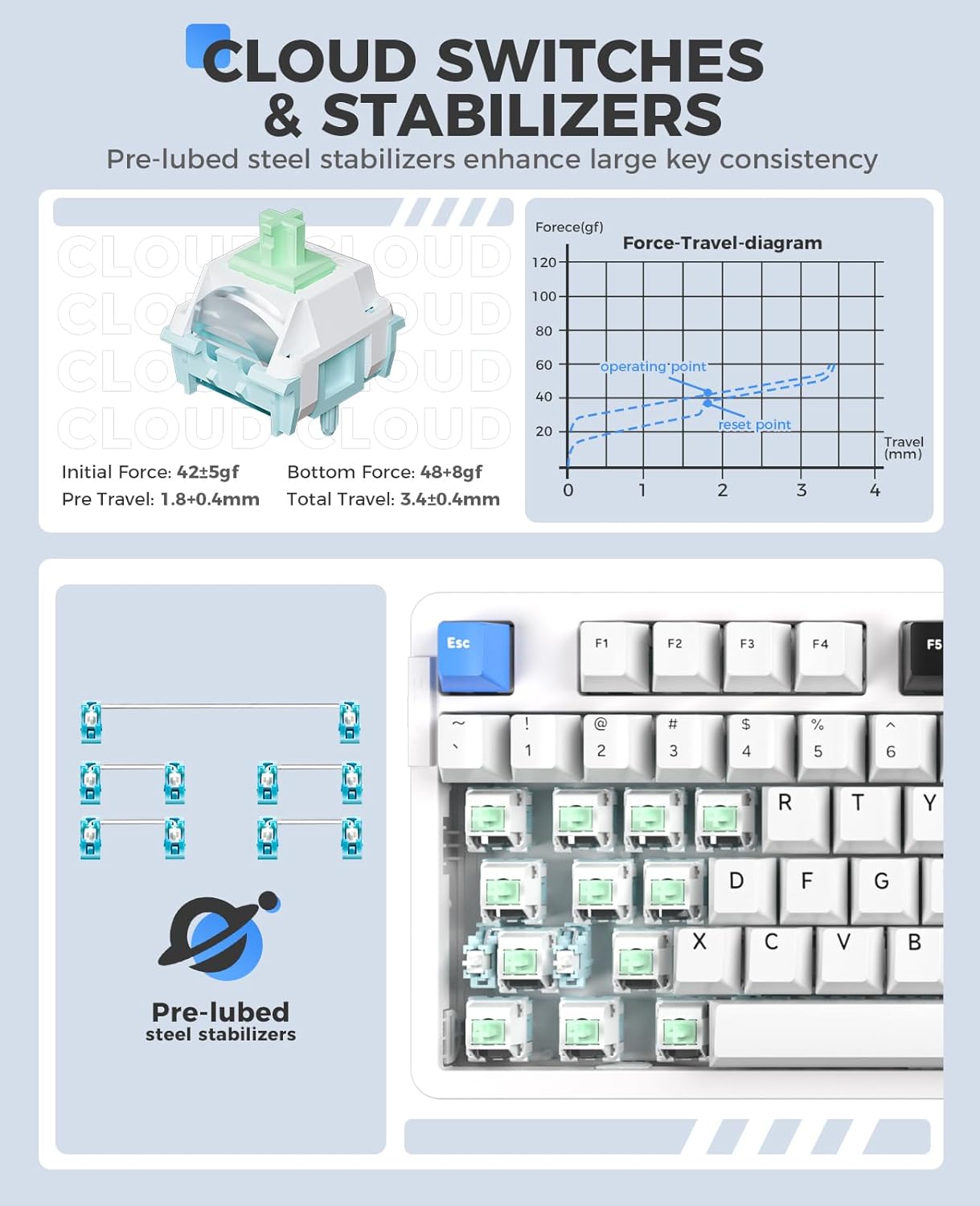
Vaizdas: Išsamus view of DAREU Cloud switches and pre-lubed steel stabilizers on the EK87PRO keyboard, including a force-travel diagram for the Cloud switch.
- South-Facing RGB Lighting: The keyboard features up to 26 backlight modes and 16.8 million colors. Brightness and speed can be adjusted via the driver software.
- Sureguliuokite ryškumą: Paspauskite Fn + rodyklė aukštyn (Brightness+) / Fn + rodyklė žemyn (Brightness-).
- Change Backlight Colors: Paspauskite Fn + { / Fn + }.
- More lighting effects and macros are customizable through the official DAREU driver software.

Image: The DAREU EK87PRO keyboard showcasing its 16.8 million RGB lighting with various color patterns, and key combinations for adjusting brightness and backlight colors.
- Rakto perkėlimas: All 87 keys are conflict-free, supporting N-key rollover for accurate input during fast typing or gaming.
Mouse Features (A955)
- High Performance Sensor: Equipped with an AIM-WL sensor, offering up to 12000 DPI, 300 IPS tracking speed, and 50G acceleration for precise control.
- KBS II Button: Specific button for enhanced click response.
- Programuojami mygtukai: The mouse buttons are programmable via the DAREU driver software.
- Lengvas dizainas: Weighs 88g for comfortable and agile movement.
- Patvarūs jungikliai: Rated for 80 million clicks.
- Custom RGB Light: Customize over 16.8 million colors and 6 lighting effects via software.

Image: The DAREU A955 mouse with a transparent bottom cover, showcasing its internal components and customizable RGB lighting effects.
Priežiūra
- Valymas:
- Use a soft, dry cloth to wipe the surfaces of the keyboard and mouse.
- Įsisenėjusiam purvui šiek tiek pamirkykiteampNuvalykite šluostę vandeniu arba švelniu valymo tirpalu. Venkite stiprių cheminių medžiagų.
- Use compressed air to remove dust and debris from between keycaps and mouse crevices.
- Switch Replacement (Keyboard):
- Išjunkite klaviatūrą arba atjunkite ją nuo kompiuterio.
- Norėdami atsargiai nuimti norimą klavišo dangtelį, naudokite pateiktą klavišo dangtelio traukiklį.
- Use the provided switch puller to gently extract the switch from its socket.
- Sulygiuokite naujo jungiklio kaiščius su spausdintinės plokštės skylėmis ir tvirtai spauskite, kol jis užsifiksuos. Įsitikinkite, kad kaiščiai nėra sulenkti.
- Uždėkite klavišo dangtelį.
- Akumuliatoriaus priežiūra:
- Venkite dažnai visiškai iškrauti akumuliatorių.
- Ilgesnį laiką nenaudojamus prietaisus laikykite vėsioje, sausoje vietoje.
Trikčių šalinimas
| problema | Galimas sprendimas |
|---|---|
| Įrenginys neprisijungia (belaidis) |
|
| Keys/Mouse clicks not responding |
|
| RGB apšvietimas neveikia / yra netinkamas |
|
| Mouse cursor erratic/lagging |
|
Specifikacijos
DAREU EK87PRO Keyboard
- Modelis: EK87PRO
- Išdėstymas: 80 % TKL (87 klavišai)
- Ryšys: „Bluetooth 5.1“, 2.4 GHz belaidis ryšys, USB-C laidinis ryšys
- Jungikliai: Pre-lubed Cloud Linear (Hot-swappable, supports 3/5 pin switches)
- Struktūra: Gasket Mount with FR4 PCB
- Baterija: 4000 mAh
- Apšvietimas: South-facing RGB (26 modes, 16.8 million colors)
- Rakto perkėlimas: N-Key Rollover (all 87 keys conflict-free)
- Suderinami įrenginiai: Nešiojamasis kompiuteris, asmeninis kompiuteris, išmanusis telefonas
DAREU A955 Mouse
- Modelis: A955
- Ryšys: „Bluetooth 5.0“, 2.4 GHz belaidis ryšys, USB-C laidinis ryšys
- Jutiklis: AIM-WL
- DPI: Iki 12000
- IPS: 300
- Pagreitis: 50G
- Jungikliai: 80 million clicks lifespan
- Baterija: 930mAh (120 hours playtime)
- Svoris: 88g
- Apšvietimas: Customizable RGB (16.8 million colors, 6 effects)
- Suderinami įrenginiai: Nešiojamasis kompiuteris, asmeninis kompiuteris, išmanusis telefonas
Garantija ir palaikymas
DAREU products are designed and manufactured to the highest quality standards. For information regarding warranty coverage, please refer to the warranty card included with your product or visit the official DAREU websvetainę.
If you encounter any issues or have questions not covered in this manual, please contact DAREU customer support through their official websvetainę arba mažmenininką, iš kurio įsigijote produktą. Kreipdamiesi į palaikymo tarnybą, turėkite paruoštą produkto modelį ir pirkimo informaciją.
Official DAREU Websvetainė: www.dareu.com (Pastaba: tai yra vietos rezervavimo ženklas URL(Teisingas palaikymo nuorodas rasite faktinėje produkto dokumentacijoje.)


