Įvadas
The MONODEAL Model 8818 is a versatile desktop portable CD player designed to provide a comprehensive audio experience. It integrates multiple functions including a CD player, Bluetooth 5.0 HiFi speaker, FM radio, USB flash drive player, and 3.5mm audio player. Additionally, it features wireless charging, an intelligent dual alarm clock, and a sleep timer, making it an ideal companion for various settings from home to office.

Image: The MONODEAL Model 8818 CD Player, showcasing its sleek black design, digital display, control buttons, and included remote control. A CD is visible in the player, and two vinyl records are placed next to it.
Kas yra dėžutėje
- CD grotuvas
- Vartotojo vadovas
- Nuotolinio valdymo pultas
- Maitinimo laidas
Produktas baigtasview
Familiarize yourself with the various components and controls of your MONODEAL CD Player.
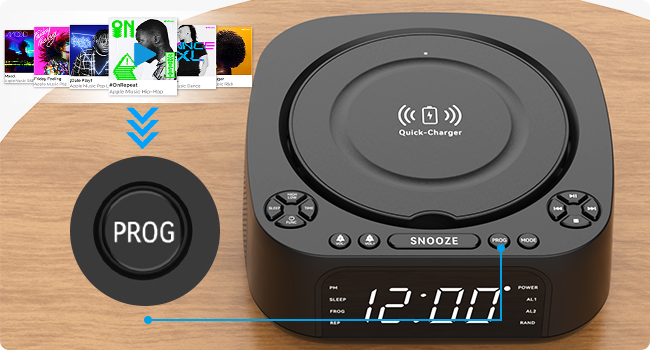
Image: A detailed diagram of the MONODEAL CD Player, highlighting its various buttons, ports, and features with corresponding numbers for easy identification.
| Nr. | Funkcija | Aprašymas |
|---|---|---|
| 1 | High/Low Brightness | Reguliuoja ekrano ryškumą. |
| 2 | Miego mygtukas | Activates/sets sleep timer. |
| 3 | Laikas nustatytas | Nustato dabartinį laiką. |
| 4 | Function/Shutdown | Switches modes or powers off. |
| 5 | Alarm Clock 1 / Volume - | Sets Alarm 1 or decreases volume. |
| 6 | Alarm Clock 2 / Volume + | Sets Alarm 2 or increases volume. |
| 7 | Įkroviklio bazė | Belaidžio įkrovimo padėklas. |
| 8 | Snaudimo mygtukas | Snoozes active alarm. |
| 9 | PROG (Program) | Programs CD tracks or FM presets. |
| 10 | Režimo mygtukas | Switches between playback modes (CD, Bluetooth, FM, USB, AUX). |
| 11 | Leisti / pristabdyti | Pradeda arba pristabdo atkūrimą. |
| 12 | Kitas / Greitas pirmyn | Peršoka į kitą takelį arba greitai peršoka į priekį. |
| 13 | Ankstesnis / Atsukti atgal | Peršoka į ankstesnį takelį arba atsuka atgal. |
| 14 | Sustabdymo mygtukas | Sustabdo atkūrimą. |
| 15 | USB Port (Data/Playback) | USB atmintinės įrašų atkūrimui. |
| 16 | USB prievadas (įkrovimas) | For charging external devices (5V/1A). |
| 17 | 3.5 mm įvestis | Audio input jack. |
| 18 | AUX prievadas | Pagalbinė garso įvestis. |
| 19 | Ekranas | Shows time, mode, and playback information. |
Sąranka
1. Maitinimo prijungimas
Connect the provided power cord to the DC IN port on the back of the CD player and plug the other end into a standard wall outlet. The display will light up.
2. Laiko nustatymas
- Paspauskite LAIKAS button (3) on the unit.
- Naudokite Ankstesnis / Atsukti atgal (13) ir Kitas / Greitas pirmyn (12) buttons to adjust the hour.
- Paspauskite LAIKAS dar kartą, kad patvirtintumėte valandas ir pereitumėte prie minučių.
- Naudokite Ankstesnis / Atsukti atgal (13) ir Kitas / Greitas pirmyn (12) buttons to adjust the minutes.
- Paspauskite LAIKAS once more to save the time setting.
3. Ekrano ryškumo reguliavimas
Paspauskite High/Low Brightness button (1) to toggle between high and low brightness modes for the display screen (19).

Image: Comparison of the display screen's brightness in daylight and night settings, demonstrating the high and low brightness modes.
Naudojimo instrukcijos
CD atkūrimas
- Atidarykite CD skyriaus dangtelį.
- Insert a CD (compatible with CD, CD-R, CD-RW, MP3, WMA formats) with the label side facing up.
- Uždarykite CD skyriaus dangtelį.
- Paspauskite Function/Shutdown button (4) to power on the unit, then press the Režimas button (10) until "CD" mode is selected.
- Paspauskite Leisti / pristabdyti mygtuką (11), kad pradėtumėte atkūrimą.
- Naudokite Ankstesnis / Atsukti atgal (13) ir Kitas / Greitas pirmyn (12) to navigate tracks.
- Paspauskite Sustok (14) to stop playback.

Image: The MONODEAL CD Player with a CD being inserted, illustrating the CD playback function.
Bluetooth Function (RX & TX)
The unit supports both Bluetooth reception (RX) to play audio from your phone/tablet and Bluetooth transmission (TX) to send audio to Bluetooth headphones/speakers.

Image: A visual representation of the two Bluetooth modes (RX and TX), showing the CD player receiving audio from a laptop and transmitting audio to headphones and a portable speaker.
Bluetooth Reception (RX Mode)
- Paspauskite Režimas button (10) until "BT" (Bluetooth) mode is selected. The display will show "BT" and flash, indicating pairing mode.
- On your smartphone or tablet, enable Bluetooth and search for "MONODEAL 8818".
- Select the device to pair. Once connected, "BT" will stop flashing.
- You can now play audio from your device through the CD player's speakers.

Image: A user connecting their smartphone to the MONODEAL CD Player via Bluetooth reception, illustrating how to stream music from a mobile device.
Bluetooth Transmission (TX Mode)
This feature allows you to transmit audio from the CD player (e.g., CD playback, FM radio) to external Bluetooth headphones or speakers.
- Ensure your Bluetooth headphones/speaker are in pairing mode.
- On the CD player, while in CD, FM, or USB mode, press and hold the Režimas button (10) for a few seconds to activate TX mode. The display will show "TX" and flash.
- The CD player will automatically search for and connect to nearby Bluetooth audio devices.
- Once connected, audio will be routed to your external Bluetooth device.
Note: This device does not support car Bluetooth connections.

Image: A user wearing Bluetooth headphones, connected wirelessly to the MONODEAL CD Player, demonstrating the Bluetooth transmission feature for private listening.
FM radijas
- Paspauskite Režimas button (10) until "FM" mode is selected.
- Ištieskite anteną, kad signalas būtų geresnis.
- Paspauskite ir palaikykite Leisti / pristabdyti button (11) to auto-scan and save available stations. The unit can store up to 40 stations.
- Naudokite Ankstesnis / Atsukti atgal (13) ir Kitas / Greitas pirmyn (12) buttons to cycle through saved stations.
- To manually tune, briefly press Ankstesnis / Atsukti atgal (13) arba Kitas / Greitas pirmyn (12).
- The unit supports FM stereo/mono switching.

Image: A woman and a child listening to the FM radio on the MONODEAL CD Player, with icons indicating various FM frequencies for different environments.
USB atkūrimas
- Įdėkite USB atmintinę, kurioje yra MP3 / WMA garso įrašų files into the USB data port (15).
- Paspauskite Režimas button (10) until "USB" mode is selected.
- Atkūrimas prasidės automatiškai.
- Naudokite Ankstesnis / Atsukti atgal (13) ir Kitas / Greitas pirmyn (12) to navigate tracks.

Image: The MONODEAL CD Player with a USB flash drive inserted for music playback and a tablet connected to the charging USB port, demonstrating simultaneous charging and playback.
AUX įvestis
- Connect an external audio device (e.g., MP3 player, mobile phone) to the AUX port (18) or 3.5mm input (17) using a 3.5mm audio cable.
- Paspauskite Režimas button (10) until "AUX" mode is selected.
- Audio from your connected device will now play through the CD player's speakers. Control playback from your external device.

Image: A smartphone connected to the MONODEAL CD Player via a 3.5mm audio cable, demonstrating the AUX-IN mode for playing audio from external devices.
Belaidis įkrovimas
The top of the CD player features a built-in wireless charging panel (7) for compatible smartphones.
- Place your wireless charging compatible smartphone directly on the charger base (7) on top of the unit.
- Ensure the phone is centered on the charging area.
- The phone should indicate that it is charging.
Note: For optimal charging, remove any thick phone cases. Charging time may vary (3-8 hours).

Image: A smartphone wirelessly charging on top of the MONODEAL CD Player, with an indicator showing the charging process and estimated time.
Žadintuvo funkcija
The unit features a dual alarm clock function, allowing you to set two separate alarms.
- Paspauskite ir palaikykite Žadintuvas 1 (5) arba Žadintuvas 2 (6) button. The hour will flash.
- Naudokite Ankstesnis / Atsukti atgal (13) ir Kitas / Greitas pirmyn (12) to adjust the hour, then press the corresponding alarm button again to confirm.
- Adjust the minutes similarly and press the alarm button to confirm.
- Select the alarm source (CD, FM radio, USB, Bluetooth) using the Režimas button (10) and confirm with the alarm button.
- To activate/deactivate an alarm, briefly press the corresponding alarm button. An alarm icon will appear/disappear on the display.
- Kai suskamba žadintuvas, paspauskite Snausti button (8) for a temporary pause, or press any other button to turn off the alarm.

Image: Two scenes depicting the sleep timer and morning alarm clock functions. One shows a person sleeping with the display showing 23:58, and the other shows a person waking up with the display showing 08:00.
Budėjimo laikmačio funkcija
The sleep timer allows the unit to play music for a set duration before automatically turning off.
- While playing audio (CD, FM, USB, Bluetooth), press the Miegoti button (2) repeatedly to cycle through sleep timer options (e.g., 15, 30, 45, 60, 90, 120 minutes).
- Įrenginys automatiškai išsijungs po pasirinkto laiko.
Nuotolinio valdymo pulto veikimas
The included remote control allows convenient operation from a distance of up to 5 meters.
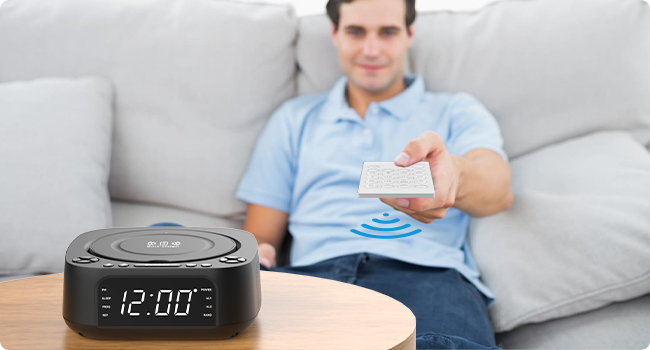
Image: A person using the remote control to operate the MONODEAL CD Player from a distance, highlighting the convenience of remote operation.
Most functions available on the unit's control panel are also accessible via the remote control. Refer to the remote control's button labels for specific functions (e.g., Mute, EQ, Repeat, etc.).
Priežiūra
- Valymas: Išorinį įrenginio paviršių valykite minkštu, sausu skudurėliu. Nenaudokite abrazyvinių valiklių ar tirpiklių.
- CD priežiūra: Kompaktinius diskus imkite už kraštų. Laikykite juos švarius ir nesubraižytus. Kompaktinius diskus valykite minkštu, nepūkuotu skudurėliu nuo centro į išorę.
- Saugykla: Kai ilgesnį laiką nenaudojate įrenginio, atjunkite jį nuo elektros tinklo ir laikykite jį vėsioje, sausoje vietoje.
- Vėdinimas: Užtikrinkite tinkamą vėdinimą aplink įrenginį, kad jis neperkaistų. Neužblokuokite ventiliacijos angų.
Trikčių šalinimas
| Problema | Galima priežastis | Sprendimas |
|---|---|---|
| Įrenginys neįsijungia. | Nėra maitinimo jungties. | Įsitikinkite, kad maitinimo laidas yra tvirtai prijungtas prie įrenginio ir veikiančio sieninio lizdo. |
| Nėra garso iš garsiakalbių. | Volume too low; incorrect mode; mute activated. | Increase volume; ensure correct mode (CD, BT, FM, USB, AUX); check if mute is on (remote). |
| Kompaktinis diskas praleidžia arba negroja. | Kompaktinis diskas yra nešvarus, subraižytas arba neteisingai įdėtas. | Clean CD; try a different CD; ensure CD is inserted label-side up. |
| „Bluetooth“ susiejimas nepavyksta. | Device too far; not in pairing mode; interference. | Ensure unit is in BT mode and flashing; bring devices closer; restart both devices. |
| Prastas FM radijo priėmimas. | Antena neišskleista; silpnas signalas. | Fully extend the FM antenna; try repositioning the unit. |
| Belaidis įkrovimas neveikia. | Phone not compatible; phone case too thick; phone not centered. | Ensure phone supports wireless charging; remove thick cases; reposition phone on the charging pad. |
Specifikacijos
| Funkcija | Detalė |
|---|---|
| Modelio numeris | 8818 |
| Gaminio matmenys (I x P x A) | 7.32 x 7.32 x 2.89 colio (186 x 186.5 x 73.5 mm) |
| Prekės svoris | 2.4 svaro |
| Ryšio technologija | Bluetooth, pagalbinis, USB |
| Garsiakalbio tipas | Stereo (2 x 1W speakers) |
| Palaikomi disko formatai | CD, CD-R, CD-RW, MP3, WMA |
| FM radijo dažnis | 87.5-108 MHz (up to 40 presets) |
| USB atkūrimas | Supports MP3/WMA from USB flash drives |
| Belaidžio įkrovimo išvestis | 5W/10W |
| USB įkrovimo išvestis | 5V/1A |
| Žadintuvo funkcijos | Dual alarm, 4 wake-up modes (CD, FM, USB, Bluetooth) |
| Miego laikmatis | 15-120 minučių |
| Nuotolinio valdymo pulto diapazonas | Iki 5 metrų |
| Gamintojas | MONODEAL |
| Kilmės šalis | Kinija |

Image: The MONODEAL CD Player with its dimensions (length, width, height) indicated in millimeters, showcasindėl savo kompaktiško dizaino.
Garantija ir palaikymas
MONODEAL is committed to providing quality products and customer satisfaction.
- 12 mėnesio pakeitimas: Your product is covered by a 12-month replacement policy for manufacturing defects.
- Palaikymas visą gyvenimą: MONODEAL offers lifetime technical support for this product.
For any questions or problems, please contact MONODEAL customer support. Contact information can typically be found on the product packaging or the official MONODEAL websvetainę.


