1. Įvadas
Ačiū, kad pirkoteasing the LEKATO FP-10 88-Key Foldable Digital Piano. This portable digital piano is designed for musicians of all levels, offering a full 88-key experience in a compact, travel-friendly design. This manual provides essential information for setting up, operating, and maintaining your instrument to ensure optimal performance and longevity.
Prieš naudodami gaminį, atidžiai perskaitykite šį vadovą ir išsaugokite jį ateičiai.
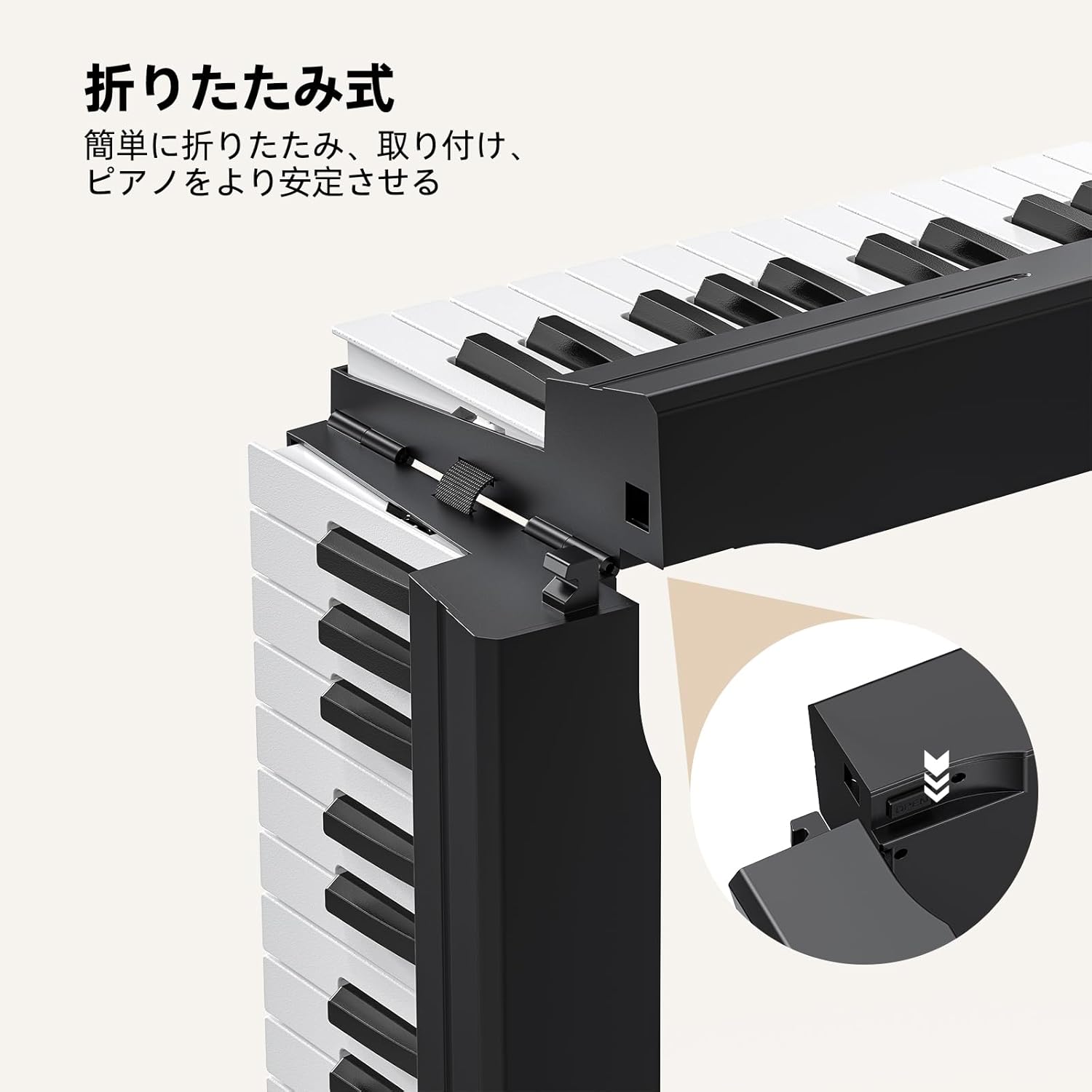
Figure 1: LEKATO FP-10 88-Key Foldable Digital Piano Overview
2. Pakuotės turinys
Įsitikinkite, kad pakuotėje yra visi daiktai:
- LEKATO FP-10 88-Key Foldable Digital Piano
- Muzikinis stendas
- Apsauginis nešiojimo krepšys
- Maitinimo adapteris
- USB kabelis
- Sustain pedalas
- Vartotojo vadovas (šis dokumentas)
- Lipdukai

2 pav.: Pridedami priedai
3. Produkto ypatybės
- 88-Key Foldable Design: Lightweight (2.9kg / 6.3 lbs) and easily folds for portability. Extended length: 125.5cm (49.4 inches), folded length: 62.5cm (24.6 inches).
- Universalus ryšys: Integrated Bluetooth for music applications and USB-MIDI for Digital Audio Workstations (DAW). Supports audio input and external headphones.
- Rich Sound and Functions: Features 128 rhythms, 128 tones, 21 demo songs, automatic chord, transpose, recording, metronome, and dual keyboard mode.
- Reaguojantys raktai: Wood grain design with high-speed rebound keys for an authentic playing feel.
- Patogi vartotojo sąsaja: Quick function buttons for convenient mode adjustment and function switching.
- Ilgas baterijos veikimo laikas: Approximately 10 hours of operation on a full charge.

3 pav.: Pagrindinės funkcijosview
4. Sąranka
4.1 Unfolding the Piano
- Place the folded piano on a flat, stable surface.
- Gently unfold the two halves of the keyboard until they are fully extended and locked into place. Ensure the locking mechanism is secure.

Figure 4: Unfolding Mechanism
4.2 Power Connection and Initial Charge
Connect the power adapter to the DC IN port on the piano and plug it into a wall outlet. For the first use, charge the piano for at least 6 hours. Subsequent full charges typically take about 4 hours.

Figure 5: Power and Connectivity Ports
4.3 Sustain pedalo prijungimas
Plug the included sustain pedal into the dedicated sustain pedal input port on the piano.
5. Naudojimo instrukcijos
5.1 Maitinimo įjungimas/išjungimas
Locate the power switch on the piano. Slide it to the "ON" position to power on the instrument. Slide it to "OFF" to power off.
5.2 Valdymo skydas baigtasview
The control panel features various buttons for selecting tones, rhythms, demo songs, and adjusting other functions. Refer to the detailed diagram below for button identification.

6 pav.: Valdymo skydas
5.3 Garsumo reguliavimas
Use the dedicated volume buttons (usually labeled "Vol+" and "Vol-") on the control panel to adjust the master volume of the piano.
5.4 Key Touch Sensitivity
The keys are designed with touch sensitivity, meaning the volume and timbre change based on how hard you press them. This allows for expressive playing. The piano features a wood grain design and high-speed rebound keys for an authentic feel.

Figure 7: Key Touch Sensitivity
6. Ryšys
6.1 Bluetooth ryšys
The FP-10 features integrated Bluetooth for wireless connection to music applications on your smartphone, tablet, or computer. This allows for interactive learning and practice.
- Turn on the piano and activate Bluetooth on your device.
- Ieškokite "GZUT-MUSIC" or "GZUT-MIDI" in your device's Bluetooth settings and connect. "GZUT-MUSIC" connects the piano as a Bluetooth speaker, while "GZUT-MIDI" connects it for MIDI data transfer with music apps.
- Once connected, you can use compatible music applications for learning or playback.

8 pav.: „Bluetooth“ ryšys
6.2 USB-MIDI Port
The USB-MIDI port allows you to connect the piano to a computer for use with Digital Audio Workstations (DAW) or other music software. Use the provided USB cable for connection.
6.3 Ausinių išvestis
For silent practice, connect standard headphones to the headphone jack. The piano's internal speakers will be muted automatically.

Figure 9: Headphone Use
7. Funkcijos
The FP-10 offers a variety of functions to enhance your playing and learning experience.
- Tones (128 options): Select from a wide range of instrument sounds. Use the "Tone+" and "Tone-" buttons to cycle through available tones.
- Rhythms (128 options): Choose from various rhythmic accompaniments. Use the "Rhythm+" and "Rhythm-" buttons to select a rhythm.
- Demo Songs (21 options): Play pre-recorded demo songs for enjoyment or learning. Use the "Demo" button to start/stop and cycle through songs.
- Automatic Chord: Engages automatic chord accompaniment based on your playing.
- Perkelti: Reguliuokite visos klaviatūros tono aukštį aukštyn arba žemyn.
- Įrašas: Record your performances. Consult the control panel for specific record/playback buttons.
- Metronomas: Provides a steady beat for practice. Adjust tempo using dedicated buttons.
- Dual Keyboard Mode: Splits the keyboard into two identical sections, allowing two players to play simultaneously or for a teacher and student to play together.

Figure 10: Dual Keyboard Mode

Figure 11: Rich Tones and Rhythms
8. Įkrovimas ir akumuliatorius
The LEKATO FP-10 is equipped with a rechargeable battery for portable use. A full charge provides approximately 10 hours of playing time.
- Pirmasis įkrovimas: For optimal battery health, charge the piano for at least 6 hours before its first use.
- Standartinis įkrovimas: Subsequent full charges typically take about 4 hours.
- Įkrovimo indikatorius: The display or an indicator light will show the charging status.

12 pav.: 10 valandų baterijos veikimo laikas
9. Priežiūra
- Valymas: Use a soft, dry cloth to clean the surface of the piano. Do not use abrasive cleaners or solvents.
- Saugykla: When not in use, fold the piano and store it in the protective carry bag in a cool, dry place away from direct sunlight and extreme temperatures.
- Tvarkymas: Avoid dropping the piano or subjecting it to strong impacts.
10. Problemų sprendimas
| Problema | Galima priežastis | Sprendimas |
|---|---|---|
| Nėra garso | Volume too low; headphones connected; piano not powered on. | Increase volume; disconnect headphones; ensure piano is powered on. |
| „Bluetooth“ ryšys nepavyksta | Įrenginyje neįgalintas „Bluetooth“ ryšys; pianinas neįjungtas susiejimo režimu; trukdžiai. | Ensure Bluetooth is on; restart piano and device; try connecting again. |
| Raktai nereaguoja | Pianinas neįjungtas; vidinė problema. | Įsitikinkite, kad pianinas įjungtas. Jei problema išlieka, susisiekite su klientų aptarnavimo tarnyba. |
11. Specifikacijos
- Modelis: FP-10 (BC3359)
- Raktai: 88, semi-weighted with wood grain texture
- Tonai: 128
- Ritmai: 128
- Demonstracinės dainos: 21
- Ryšys: Bluetooth, USB-MIDI, Audio Input, Headphone Output
- Baterijos veikimo laikas: apytiksliai 10 valandas
- Svoris: 2.9 kg (6.3 svaro)
- Prailgintas ilgis: 125.5 cm (49.4 coliai)
- Sulenktas ilgis: 62.5 cm (24.6 coliai)
12. Garantija ir palaikymas
The LEKATO FP-10 Digital Piano comes with a 1-year warranty from the date of purchase. If you encounter any quality issues with the product, exchanges are possible within the warranty period.
For any questions, concerns, or support needs, please contact our customer service. Refer to your purchase documentation for contact details.
13. Produkto demonstracinis vaizdo įrašas
Watch this video for a demonstration of the LEKATO FP-10's features and sound capabilities.
Video: Demonstration of LEKATO FP-10 Digital Piano sounds and features.