1. Produktas baigtasview
The TABWEE T20 is a versatile 10-inch Android tablet designed for both productivity and entertainment. It features a high-resolution Incell display, a powerful Octa-Core processor, and ample memory and storage, making it suitable for a wide range of applications from content creation to multimedia consumption.
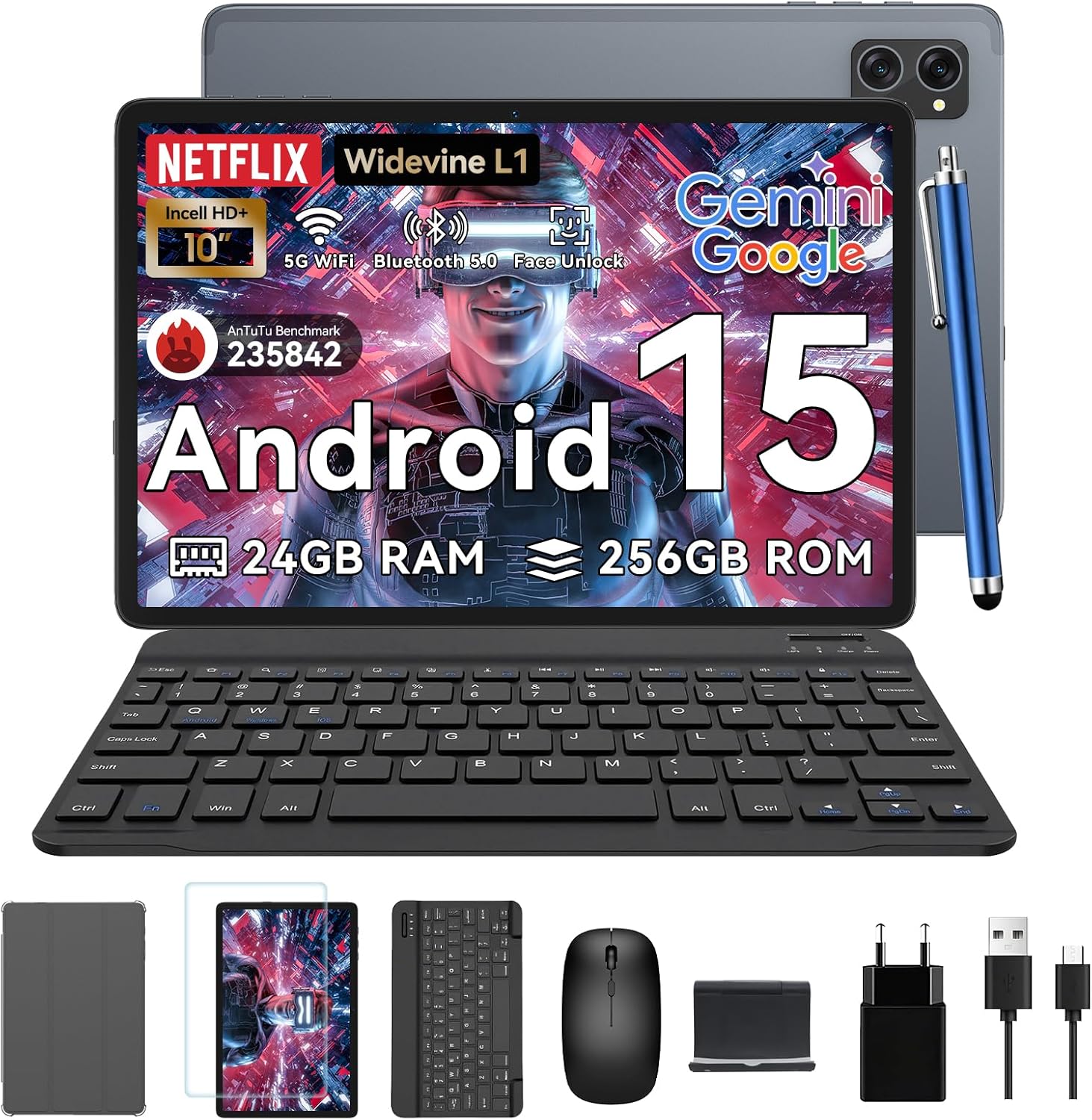
Figure 1.1: TABWEE T20 Tablet and its complete accessory package, including a Bluetooth keyboard, mouse, stylus, protective case, screen protector, charger, and USB cable.
Kas yra dėžutėje
Upon unboxing your TABWEE T20 Tablet, verify that all components are present:

Figure 1.2: Contents of the TABWEE T20 Tablet retail package.
- 1x TABWEE T20 Tablet
- 1x Bluetooth klaviatūra
- 1x pelė
- 1x rašiklis
- 1x apsauginis dėklas
- 1x ekrano apsauga
- 1x planšetinio kompiuterio stovas
- 1x pakrovėjas
- 1x USB laidas
2. Sąranka ir pirmasis naudojimas
Planšetės įkrovimas
Before first use, fully charge the tablet using the provided charger and USB cable. Connect the charger to a power outlet and the USB cable to the tablet's charging port. The charging indicator will illuminate.
Maitinimo įjungimas/išjungimas
- Norėdami įjungti: Press and hold the Power button until the TABWEE logo appears on the screen.
- Norėdami išjungti: Paspauskite ir palaikykite maitinimo mygtuką, kol pasirodys maitinimo parinkčių meniu. Pasirinkite „Išjungti“ ir patvirtinkite.
- Norėdami paleisti iš naujo: Maitinimo parinkčių meniu pasirinkite „Paleisti iš naujo“ ir patvirtinkite.
Pradinės sąrankos vedlys
Pirmą kartą įjungus planšetinį kompiuterį, bus pateiktas pradinio nustatymo vedlys. Vykdykite ekrane pateikiamus nurodymus, kad atliktumėte toliau nurodytus veiksmus.
- Pasirinkite savo kalbą.
- Prisijunkite prie „Wi-Fi“ tinklo.
- Prisijunkite naudodami „Google“ paskyrą arba sukurkite naują.
- Nustatykite ekrano užraktą (PIN kodą, šabloną, slaptažodį arba veido atrakinimą).
- Review ir sutikite su sąlygomis ir nuostatomis.
Priedų prijungimas
„TABWEE T20“ komplektuojamas su „Bluetooth“ klaviatūra ir pele, kad būtų užtikrintas didesnis produktyvumas.
- „Bluetooth“ klaviatūra:
- Įsitikinkite, kad klaviatūra yra įkrauta ir įjungta.
- Planšetiniame kompiuteryje eikite į Nustatymai > Prijungti įrenginiai > „Bluetooth“.
- Turn on Bluetooth and tap "Pair new device".
- Select the keyboard from the list of available devices and follow pairing instructions.
- „Bluetooth“ pelė:
- Įsitikinkite, kad pelė įjungta ir veikia poravimo režimu.
- Planšetiniame kompiuteryje eikite į Nustatymai > Prijungti įrenginiai > „Bluetooth“.
- Tap "Pair new device" and select the mouse from the list.
- Rašiklis: The included stylus can be used directly on the screen for navigation, drawing, and note-taking. It features palm-rejection precision.
3. Planšetinio kompiuterio valdymas
Android 15 operacinė sistema
The TABWEE T20 runs on Android 15, offering enhanced privacy controls, seamless cross-device collaboration, and improved multitasking capabilities.

Figure 3.1: Key features of the Android 15 operating system.
Gemini AI Integration
The tablet integrates Google Gemini AI, which intelligently optimizes tasks, from photo editing to document formatting, while prioritizing security with a dedicated encrypted privacy space.

3.2 pav. Baigtaview of Gemini AI capabilities on the tablet.
Display and Multimedia
The 10.1-inch Incell HD+ display (1280x800 resolution) provides vivid colors and crisp details. With Widevine L1 certification, you can enjoy 1080P streaming on platforms like Netflix, Disney+, and Hulu.

Figure 3.3: Display features and eye-friendly modes.
The tablet also features Dual Smart-K Box Speakers for an immersive audio experience.

Figure 3.4: Dual Smart-K Box Speakers for enhanced audio.
Kameros ypatybės
Equipped with an 8MP rear camera and a 5MP front camera, the tablet supports Google Lens integration for smart scanning and object recognition. Face Unlock is also supported for convenient security.

Figure 3.5: Camera specifications and features.

Figure 3.6: Smart Google Lens functionalities.
Ryšys
The TABWEE T20 supports dual-band 5G WiFi and Bluetooth 5.0 for fast and stable connections.
- „Wi-Fi“: Connect to 2.4GHz or 5GHz networks for seamless streaming and quick downloads.
- "Bluetooth 5.0": Pair with wireless earbuds, speakers, or other Bluetooth-enabled devices with 20% faster data transfer speed.
- OTG palaikymas: Allows for easy transfer of files to and from external storage devices.

Figure 3.7: Advanced Bluetooth 5.0 connectivity.

Figure 3.8: Lightning Fast WiFi 5 Technology.
4. Priežiūra ir priežiūra
Proper maintenance ensures the longevity and optimal performance of your TABWEE T20 Tablet.
Akumuliatoriaus valdymas
The 5000mAh battery provides extended usage times. To maximize battery life:
- Venkite ekstremalių temperatūrų.
- Use the provided charger.
- Enable smart power-saving modes in settings.
- Uždarykite nenaudojamas programas, veikiančias fone.

Figure 4.1: 5000mAh Mega Battery performance metrics.
Planšetinio kompiuterio valymas
- Ekranui ir korpusui valyti naudokite minkštą, nepūkuotą šluostę.
- Įsisenėjusioms dėmėms šiek tiek pamirkykiteampnuvalykite šluostę vandeniu arba ekrano valikliu.
- Venkite naudoti stiprių cheminių medžiagų ar abrazyvinių medžiagų.
Saugyklos ir atminties valdymas
The tablet comes with 256GB of internal storage and supports up to 2TB TF card expansion. It also features 24GB RAM (8GB physical + 16GB virtual) for smooth multitasking.

Figure 4.2: Storage and RAM expansion capabilities.
To optimize performance and storage:
- Regularly clear cache and temporary files.
- Pašalinkite nenaudojamas programas.
- Utilize the 2TB TF card slot for large files like 4K videos and design documents.
5. Problemų sprendimas
This section addresses common issues you might encounter with your TABWEE T20 Tablet.
| Problema | Galima priežastis | Sprendimas |
|---|
| Planšetinis kompiuteris neįsijungia. | Žema akumuliatoriaus įkrova; sistemos gedimas. | Kraukite planšetinį kompiuterį bent 30 minučių. Jei vis tiek nereaguoja, paspauskite ir 10–15 sekundžių palaikykite nuspaudę maitinimo mygtuką, kad priverstumėte įrenginį paleisti iš naujo. |
| „Wi-Fi“ ryšio problemos. | Incorrect password; router issues; out of range. | Verify Wi-Fi password. Restart your router. Ensure tablet is within Wi-Fi range. Forget the network and reconnect. |
| Bluetooth accessories not pairing. | Accessory not in pairing mode; Bluetooth off on tablet. | Ensure accessory is in pairing mode. Turn Bluetooth off and on again on the tablet. Restart both devices. |
| Lėtas veikimas arba programos gedimai. | Per daug veikiančių programų; mažai vietos saugykloje; pasenusi programinė įranga. | Close background apps. Clear app caches. Free up storage space. Check for system updates in Nustatymai > Sistema > Sistemos naujinimas. |
| Ekranas nereaguoja. | Laikinas programinės įrangos triktis. | Force restart the tablet by holding the Power button for 10-15 seconds. |
Jei problema išlieka ir išbandžius šiuos sprendimus, susisiekite su klientų aptarnavimo tarnyba.
6. Specifikacijos
Detailed technical specifications for the TABWEE T20 Tablet:
| Funkcija | Detalė |
|---|
| Modelio pavadinimas | T20 Tablet Tabwee |
| Operacinė sistema | Android 15 |
| Procesorius | Unisoc T606 Octa-Core (2 x A75@1.6GHz, 6 x A55@1.6GHz) |
| RAM | 24 GB (8GB Physical + 16GB Virtual) |
| Vidinė atmintis (ROM) | 256 GB |
| Išplečiama saugykla | Up to 2 TB via TF card slot |
| Ekrano dydis | 10.1 Inches Incell HD+ |
| Ekrano raiška | 1280 x 800 pikselių |
| Ekrano ir korpuso santykis | 84 % |
| Ryškumas | 350 nitų |
| Widevine palaikymas | L1 (for 1080P streaming) |
| Galinė kamera | 8 MP with Google Lens integration |
| Priekinė kamera | 5 MP |
| Baterijos talpa | 5000 mAh ličio polimeras |
| Wi-Fi | Dual-band 5G WiFi (Wi-Fi 5) |
| Bluetooth | Bluetooth 5.0 |
| Matmenys (I x P x A) | 24 x 16 x 1 cm |
| Svoris | 412 g |
| Spalva | Pilka |

Figure 6.1: Unisoc T606 Octa-core processor architecture.
7. Garantija ir palaikymas
TABWEE is committed to providing excellent customer service and support for your T20 Tablet.
Informacija apie garantiją
Your TABWEE T20 Tablet is covered by a 2 metų garantija from the date of purchase. This warranty covers manufacturing defects and ensures risk-free ownership.
Pagalba klientams
For any technical assistance, troubleshooting, or warranty claims, please contact our support team:
- Pagalba el. paštu: serviceplus.linda@gmail.com
- Online Call Support: Available 24/7 for US/CA customers.
- Repair Support: 2-Year Repair Support is provided.

Figure 7.1: TABWEE Customer Support Services.
Please have your purchase details and tablet model number ready when contacting support to expedite the process.


