1. Įvadas
The Raddy VP7 Wireless Weather Station provides comprehensive weather monitoring for your home and surroundings. This manual details the setup, operation, and maintenance of your device, ensuring accurate and reliable weather data.
2. Kas yra dėžutėje
Atsargiai išpakuokite visus komponentus ir įsitikinkite, kad yra šie daiktai:
- Instrukcijų vadovas
- Lauko jutiklis
- Vėjarodė
- Saulės skydas
- Vidaus ekrano konsolė
3. Produkto ypatybės
- 7.4 colio spalvotas ekranas: Provides detailed weather information including indoor/outdoor temperature and humidity, precipitation, 12-hour weather forecasts, atomic clock, RCC calendar, wind direction and speed, dew point, felt temperature, atmospheric pressure, and daily maximum/minimum temperatures.
- High-Precision Outdoor Sensors: Includes a rain funnel, wind vane, speed sensor, thermo-hygrometer with anti-radiation shield, and a solar panel. Designed for accurate data with a communication range of up to 100 meters and resistance to harsh weather.
- Pritaikomi įspėjimai: Configure alerts for maximum/minimum temperature and humidity, wind speed, and precipitation. Features two alarms for weekdays and weekends.
- Scalable Monitoring: Connect up to three additional Raddy R5 remote sensors to monitor up to five different areas (e.g., baby's room, garden, living room, kitchen).
4. Sąranka
4.1 Lauko jutiklio montavimas
Proper placement of the outdoor sensor is crucial for accurate readings. Choose an open location, free from obstructions, that allows for accurate wind, rain, and temperature measurements.
- Assemble the wind cups and wind vane onto the sensor unit.
- Mount the sensor using the provided hardware. Ensure it is level using a spirit level for accurate rain and wind measurements.
- Insert 3 AA batteries (not included) into the outdoor sensor's battery compartment.

Image: The Raddy VP7 outdoor sensor showing its main components: Wind Cups, Rain Funnel, Thermo-Hygrometer Radiation Shield, Solar Panel, and Wind Vane.

Image: Various mounting options for the outdoor sensor, including top, side, and pole mounting, along with a detailed view of the sensor's battery compartment and reset button.
4.2 Indoor Display Console Setup
- Place the indoor display console in a central location within range of the outdoor sensor (up to 100 meters).
- Connect the power adapter to the console and a power outlet. Alternatively, insert 3 AA batteries (not included) for backup power. Note that continuous backlight requires AC power.
- The console will automatically search for the outdoor sensor and synchronize data. This may take a few minutes.

Image: Illustration showing the wireless data transmission between the indoor display console and the outdoor sensor, highlighting the 330ft (100m) range.
5. Naudojimo instrukcijos
5.1 Ekranas baigtasview
The 7.4-inch color display presents various weather parameters. Familiarize yourself with the layout:
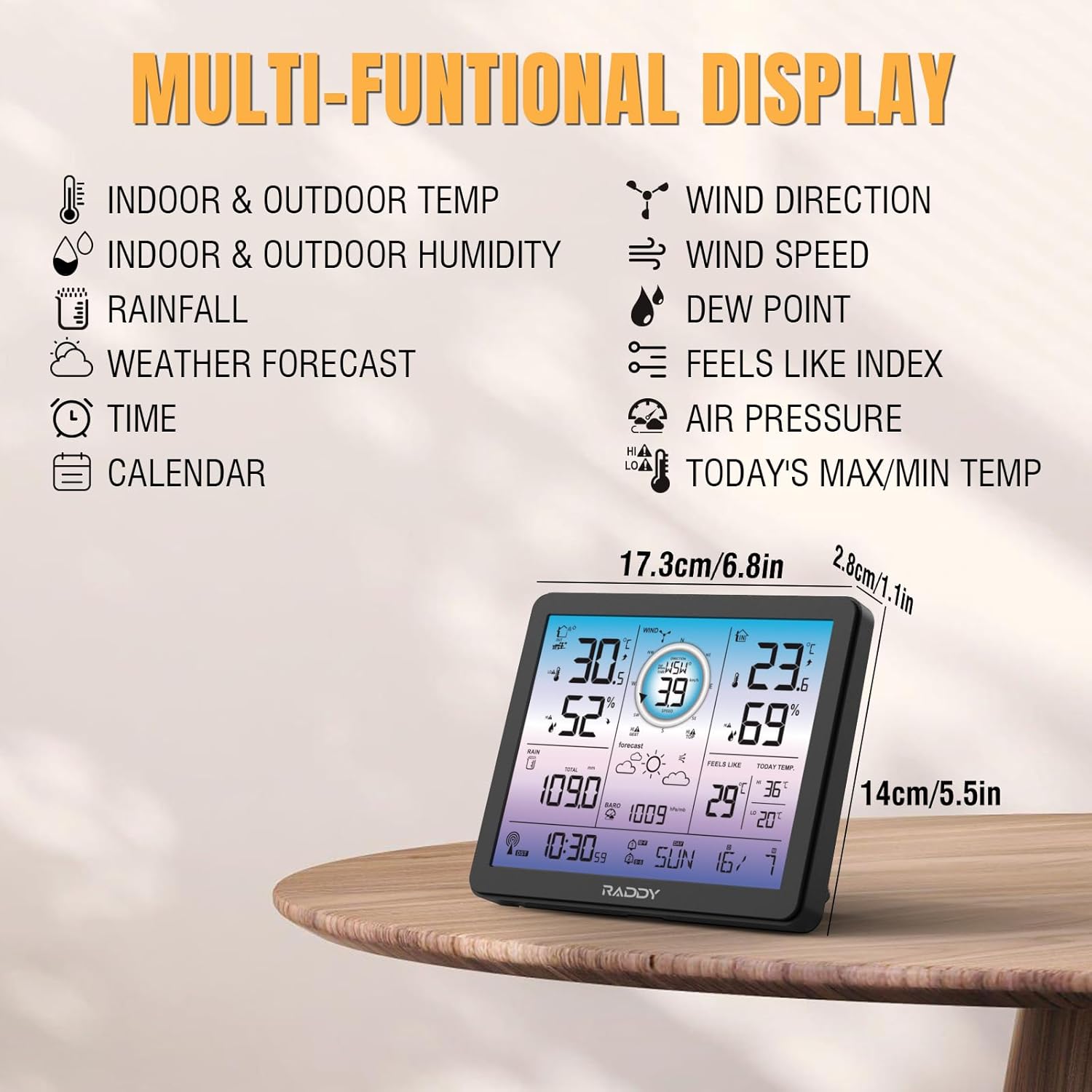
Image: The Raddy VP7 indoor display console showing its multi-functional display with various weather data points and dimensions.
- Viršuje kairėje: Indoor & Outdoor Temperature, Indoor & Outdoor Humidity
- Viršutinis dešinysis: Wind Direction, Wind Speed, Dew Point, Feels Like Index
- Vidurys: Rainfall, Weather Forecast, Air Pressure
- Apačia: Time, Calendar, Today's Max/Min Temperature
5.2 Laiko ir datos nustatymas
The Raddy VP7 features an atomic clock with DCF functionality for automatic time synchronization. If manual adjustment is needed:
- Norėdami įjungti laiko nustatymo režimą, paspauskite mygtuką „SET“.
- Use the '+' and '-' buttons to adjust values.
- Press 'SET' again to confirm and move to the next setting (e.g., year, month, day).

Image: The Raddy VP7 display console highlighting the atomic clock with DCF feature for precise timekeeping.
5.3 Understanding Weather Data
The display provides real-time and forecasted weather information:
- Temperatūra/drėgmė: Displays current indoor and outdoor readings.
- Vėjo duomenys: Shows current wind speed and direction.
- Krituliai: Tracks daily, weekly, and monthly precipitation.
- Orų prognozė: Provides a 12-hour forecast based on barometric pressure changes.
- Barometrinis slėgis: Rodo dabartinį atmosferos slėgį.
5.4 Įspėjimai
Set custom alerts for various weather conditions:
- Press the 'ALERT' button to cycle through alert settings (temperature, humidity, wind, rain).
- Use '+' and '-' to set desired high/low thresholds.
- Press 'ALERT' again to activate or deactivate the alert.
5.5 Foninio apšvietimo reguliavimas
The display features 4 adjustable backlight levels (LV0 to LV3) for optimal visibility in different lighting conditions.

Paveikslėlis: Keturi buvęamples of the Raddy VP7 display showing different backlight levels from LV0 (off) to LV3 (brightest).
6. Priežiūra
- Valymas: Wipe the display console and outdoor sensor with a soft, damp audinys. Nenaudokite abrazyvinių valiklių ar tirpiklių.
- Baterijos keitimas: Replace batteries in both the outdoor sensor and indoor console when the low battery indicator appears on the display.
- Outdoor Sensor Check: Periodically check the outdoor sensor for debris (leaves, dirt) that might obstruct the rain funnel or wind sensors.
7. Problemų sprendimas
| Problema | Galima priežastis | Sprendimas |
|---|---|---|
| Lauko duomenys nerodomi | Lauko jutiklis už diapazono ribų arba išsikrovusi baterija. | Relocate sensor closer to console. Replace sensor batteries. |
| Netiksli temperatūra/drėgmė | Jutiklis veikiamas tiesioginių saulės spindulių arba šilumos šaltinių. | Ensure sensor is in a shaded, well-ventilated area. |
| Neteisingas laikas / data | DCF signal interference or manual setting error. | Ensure console is away from electronic interference. Manually set time/date if automatic sync fails. |
| Rainfall not registering | Rain funnel blocked by debris. | Clear any obstructions from the rain funnel. |
8. Specifikacijos
| Funkcija | Detalė |
|---|---|
| Modelis | VP7 |
| Gamintojas | Raddy |
| Ekrano stilius | Skaitmeninis spalvotas ekranas |
| Ekrano dydis | 7.4 colių |
| Power Source (Console) | AC Adapter (included), 3x AA Batteries (not included) |
| Maitinimo šaltinis (jutiklis) | 3x AA Batteries (not included), Solar Panel |
| Ryšio technologija | Bevielis |
| belaidis diapazonas | Iki 100 metrų (330 pėdų) |
| Temperatūros tikslumas | ±1 °C |
| Įtraukti komponentai | Instruction Manual, Outdoor Sensor, Wind Vane, Solar Panel, Indoor Display Console |
| Matmenys (paketas) | 38.1 x 29.7 x 14.8 cm |
| Svoris (pakuotės) | 1.7 kilogramo |
9. Garantija ir palaikymas
Raddy provides lifetime technical support for the VP7 Wireless Weather Station. For any questions, issues, or assistance with installation and setup, please contact Raddy customer service. Refer to the product packaging or Raddy's official websvetainė, kurioje rasite kontaktinius duomenis.


