1. Produktas baigtasview
This CAMECHO car stereo is designed for Suzuki Swift models from 2011 to 2017. It features a 9-inch IPS touchscreen, runs on Android 13, and includes 6GB RAM and 128GB ROM. Key functionalities include wireless Carplay and Android Auto, GPS navigation, Bluetooth 5.0, FM/RDS radio, DSP sound processing, Mirror Link, and split-screen capability. A reversing camera and external microphone are included for enhanced functionality.

Image: Key features including Android 13, 6GB RAM + 128GB ROM, 8-Core Processor, and 2.5D IPS Screen.
2. Pakuotės turinys
Patikrinkite, ar pakuotėje yra visi toliau išvardyti daiktai:
- 1 x Car Stereo (with frame)
- 1 x radijo antena
- 1x GPS antena
- 1 x RCA kabelis
- 2 x USB kabeliai
- 1 x Reversing Camera (with cable)
- 1 x Vartotojo vadovas
- Diegimo įrankis
- Išorinis mikrofonas
- Accessories (brackets, etc.)

Image: Product dimensions, rear panel connections, and included accessories list.
3. Diegimo vadovas
Professional installation is recommended. Ensure the vehicle's power is disconnected before beginning installation. Refer to the wiring diagram for correct connections.
3.1 Laidų jungtys
- Maitinimo kabelis: Connect the main power harness to the vehicle's wiring. Ensure correct positive, negative, and ACC (accessory) connections.
- RCA kabeliai: Connect for audio output (e.g., external amplifier) ir vaizdo įvestis / išvestis.
- USB kabeliai: Prijunkite pridėtus USB laidus išoriniams USB įrenginiams arba įkrovimui.
- GPS antena: GPS anteną montuokite vietoje, kur nėra šviesos. view dangaus, paprastai ant prietaisų skydelio arba po priekiniu stiklu.
- Radijo antena: Prijunkite automobilio radijo anteną prie įrenginio.
- Atbulinės eigos kamera: Connect the reversing camera cable to the designated input. Ensure the trigger wire is connected to the vehicle's reverse light circuit.
- Išorinis mikrofonas: Prijunkite išorinį mikrofoną, kad skambučiai laisvomis rankomis būtų aiškesni.
- Vairo valdymas: Connect the steering wheel control wires according to your vehicle's wiring diagram. Configuration may be required in the unit's settings.
3.2 Įrenginio montavimas
Secure the car stereo unit into the dashboard opening using the provided brackets and screws. Ensure a snug fit and proper alignment with the vehicle's interior.
4. Pagrindinė operacija
4.1 Maitinimo įjungimas/išjungimas
The unit will power on automatically when the vehicle's ignition is turned to the ACC or ON position. To power off, turn off the vehicle's ignition.
4.2 Jutiklinio ekrano sąsaja
Navigate the system using the 9-inch IPS touchscreen. Tap icons to open applications, swipe to scroll, and use pinch-to-zoom gestures where supported.
4.3 Garsumo valdymas
Adjust the volume using the on-screen controls or the vehicle's steering wheel controls, if configured.
5. Pagrindinės savybės
5.1 Belaidis „Carplay“ ir „Android Auto“
Connect your compatible smartphone wirelessly to access navigation, music, messages, and more directly on the car stereo display. After initial pairing, the connection will be automatic.
- Įsitikinkite, kad jūsų išmaniajame telefone įjungti „Bluetooth“ ir „Wi-Fi“.
- Automobilio stereo sistemoje atidarykite „Carplay“ arba „Android Auto“ programėlę.
- Vykdykite ekrane pateikiamus nurodymus, kad susietumėte savo įrenginį.
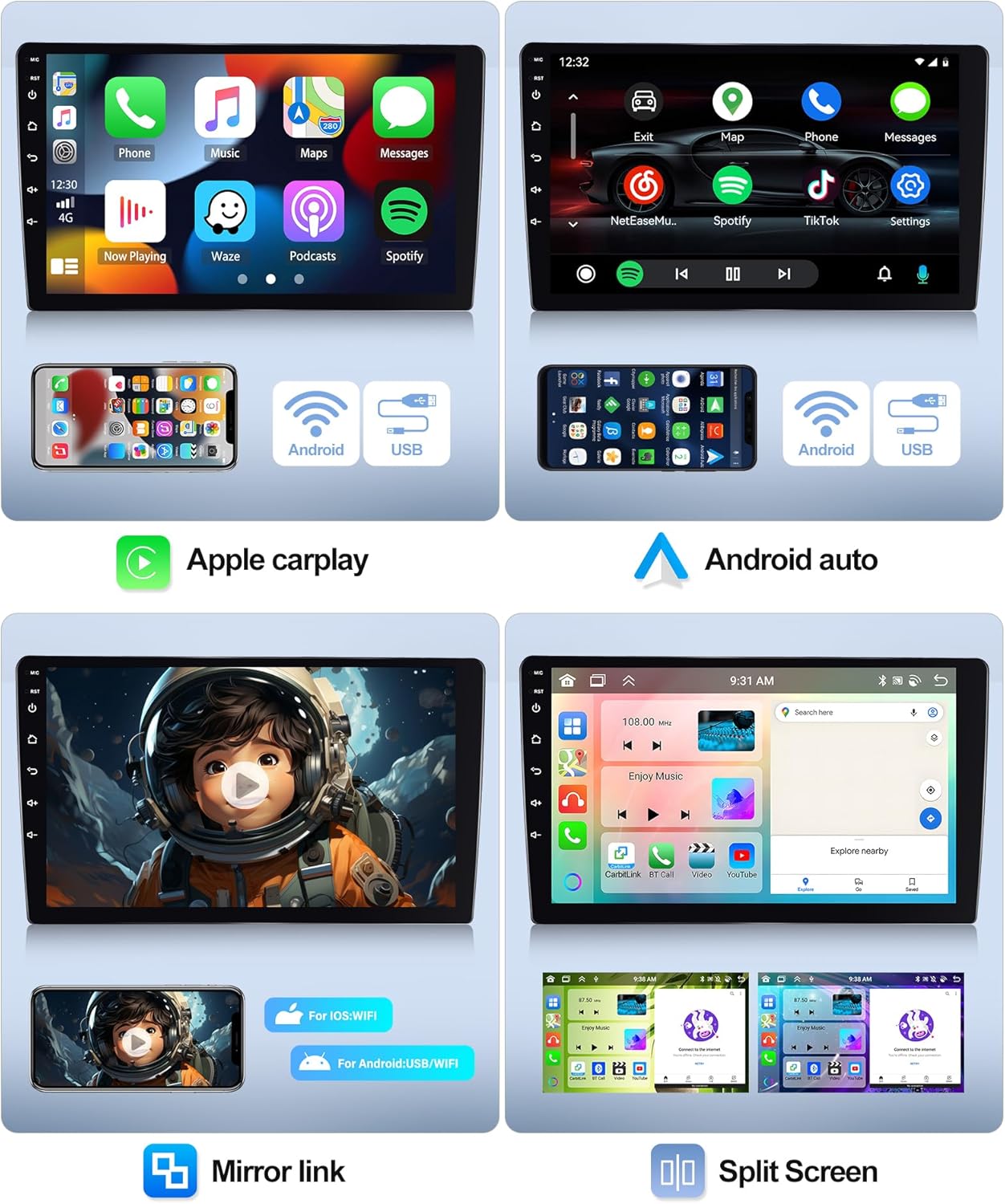
Image: Wireless Carplay, Android Auto, and Mirror Link features with split screen functionality.
5.2 GPS navigacija ir „Wi-Fi“
The unit comes with pre-installed offline maps. Connect to a Wi-Fi network to download additional map data, receive real-time traffic updates, and access online navigation services.
- Norėdami prisijungti prie „Wi-Fi“, eikite į Nustatymai > Tinklas ir internetas > „Wi-Fi“.. Select your network and enter the password.
- Open the Navigation app to set your destination.

Image: GPS Navigation and WiFi connectivity.
5.3 „Bluetooth“ ryšys 5.0
Susiekite savo išmanųjį telefoną per „Bluetooth“, kad galėtumėte skambinti laisvų rankų įranga ir transliuoti garsą.
- On the car stereo, open the Bluetooth app.
- Įjunkite „Bluetooth“ savo telefone ir ieškokite galimų įrenginių.
- Iš sąrašo pasirinkite automobilio stereo sistemą ir patvirtinkite susiejimą.
5.4 FM/RDS radijas
Access FM radio stations and receive RDS (Radio Data System) information, such as station names and traffic announcements.
- Atidarykite radijo programą.
- Norėdami rasti stotis arba rankiniu būdu suderinti dažnį, naudokite nuskaitymo funkciją.
- Išsaugokite mėgstamiausias stotis, kad galėtumėte jas greitai pasiekti.

Image: Bluetooth connectivity, DSP EQ settings, FM/RDS radio, and Internet radio.
5.5 DSP (skaitmeninis garso procesorius)
Utilize the built-in DSP to customize audio settings, including equalizer presets, balance, and fader, for an optimized listening experience.
5.6 Veidrodinis ryšys
Mirror your smartphone's screen onto the car stereo display. Supports one-way control for iOS devices and two-way control for Android devices.
- Open the Mirror Link app on the stereo.
- Follow the instructions for connecting your specific phone model via USB or Wi-Fi.
5.7 Padalytas ekranas
Run two applications simultaneously on the screen, such as navigation and music, for enhanced multitasking.
- While an app is open, long-press the recent apps button or drag the app to one side of the screen (depending on UI).
- Select a second app to open on the other side.
5.8 Atbulinės eigos kameros funkcija
When the vehicle is shifted into reverse gear, the display will automatically switch to the reversing camera view, teikiant pagalbą parkuojant ir manevruojant.
6. Specifikacijos
| Funkcija | Specifikacija |
|---|---|
| Sistema | Android 13 |
| Lustų rinkinys | 8257 (8-Core) |
| Ekrano dydis | 9 colių |
| Atmintis (RAM+ROM) | 6 GB RAM + 128 GB ROM |
| Ekrano raiška | 1280*720 |
| Radijo lustas | 8035 |
| Maitinimo išvestis | 4*45W |
| Bluetooth versija | 5.0 |
| Darbinė temperatūra | -20 ℃ iki 75 ℃ |
| Vairo valdymas | Palaikymas |
| Galia Ampkeltuvas Chip | 7388 YD |
| Radijo grupė | FM/RDS |
| Vaizdo išvestis | Palaikymas |
| Atbulinės eigos įvestis | AHD/CVBS |
| Išorinis mikrofonas | Palaikymas |
| Padalintas ekranas | Palaikymas |
| Žemėlapiai | Integruoti neprisijungus pasiekiami žemėlapiai (duomenims atsisiųsti reikalingas internetas) |
| WiFi | Palaikymas |
| USB | Dviguba USB sąsaja |
| Garso formatas | APE/FLAC/WAV/MP3/WMA ir kt |
| Vaizdo įrašo formatas | MKV/RMVB/AVI/MP4/MDV ir kt |
| Vaizdo formatas | PNG/JPEG/JPG/GIF/WBMP/BNP ir kt |
| Gamyklinių nustatymų raktinis žodis | 1234 |
| Palaikomos kalbos | Kinų / anglų / prancūzų / italų / korėjiečių / japonų / arabų / ispanų / portugalų / rusų / turkų / vietnamiečių / hebrajų / lenkų / vokiečių |
7. Problemų sprendimas
Jei kyla problemų dėl automobilio garso sistemos, žr. šias dažniausiai pasitaikančias problemas ir sprendimus:
- Nėra galios: Check all power connections, including the main power harness, ACC wire, and ground wire. Ensure the vehicle's fuse for the stereo is intact.
- Nėra garso: Verify speaker connections. Check volume levels and ensure the mute function is not active. Confirm RCA audio outputs are correctly connected if using an external ampgyvesnis.
- GPS signalo praradimas: Įsitikinkite, kad GPS antena sumontuota vietoje, kurioje nėra laisvos vietos. view dangaus ir yra saugiai prijungtas.
- „Bluetooth“ ryšio problemos: Įsitikinkite, kad „Bluetooth“ įjungtas ir stereo sistemoje, ir telefone. Ištrinkite ankstesnius susiejimus ir bandykite prisijungti iš naujo.
- Jutiklinis ekranas nereaguoja: Try restarting the unit by turning the vehicle's ignition off and on. If the issue persists, a factory reset might be necessary (Factory Setting Keyword: 1234).
- Atbulinės eigos kamera nerodoma: Check the camera's power and video signal connections. Ensure the reverse trigger wire is correctly connected to the vehicle's reverse light.
Jei problemos išlieka, kreipkitės į klientų aptarnavimo tarnybą.
8. Priežiūra
Norėdami užtikrinti automobilio garso sistemos ilgaamžiškumą ir optimalų veikimą, laikykitės šių priežiūros nurodymų:
- Valymas: Ekraną ir išorę valykite minkšta, sausa šluoste. Venkite abrazyvinių valiklių ar tirpiklių, kurie gali pažeisti paviršių.
- Programinės įrangos atnaujinimai: Periodically check for available software updates to ensure the system runs efficiently and has the latest features. Updates can typically be found on the manufacturer's websvetainėje arba per įrenginio nustatymus, jei prijungtas prie „Wi-Fi“.
- Temperatūra: Venkite ilgą laiką laikyti įrenginį ekstremalioje temperatūroje.
9. Informacija apie garantiją
This product comes with a manufacturer's warranty. Key warranty terms include:
- Garantinis laikotarpis: 2 metai nuo pirkimo dienos.
- Grąžinimai: 30-day return policy from the date of purchase.
- Palaikymo komandos atsakymas: Manufacturer aims to respond to inquiries within 24 hours.
Išsaugokite pirkimo įrodymą, kad galėtumėte kreiptis dėl garantijos.
10. Pagalba klientams
Dėl techninės pagalbos, trikčių šalinimo ar garantijos klausimų kreipkitės į CAMECHO klientų aptarnavimo tarnybą:
- El. paštas: bs_support21@126.com
Please provide your product model number and a detailed description of the issue when contacting support.

Image: Customer support representative available for online assistance.


