Įvadas
Transform your iPad into a versatile workstation with the Epico iPad Keyboard Case. This innovative accessory features a detachable keyboard with seven-colour backlighting, a multi-finger gesture touchpad, and comprehensive iPadOS shortcuts. Designed for both functionality and protection, it enhances your iPad experience for typing, watching, and browsing.

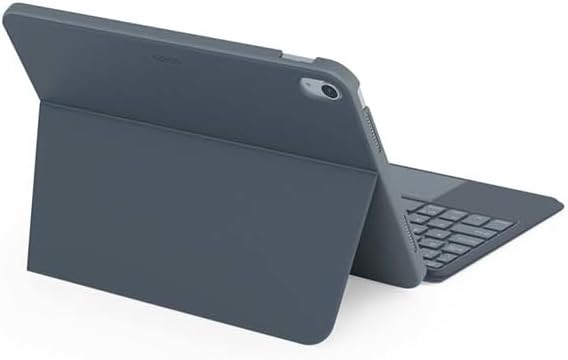
Image: The Epico iPad Keyboard Case with an iPad inserted, shown in a tilted typing position.
Savybės
- Apšviesta klaviatūra: Seven distinct backlight colours with adjustable brightness levels for comfortable typing in any lighting condition.
- Touchpad Functionality: Multi-finger gesture touchpad provides precise control and enhanced navigation capabilities.
- Shortcut Integration: Comprehensive range of iPadOS shortcuts built into the keyboard for efficient device control and workflow optimisation.
- Universalus dizainas: Includes detachable keyboard and tilted backside stand for multiple viewkampai ir naudojimo režimai.
- Maitinimo sprendimas: Equipped with Li-ion battery and USB-C charging capability, operating independently from iPad's power source.
Pakuotės turinys
- Epico iPad Keyboard Case
- USB-C į USB-C įkrovimo laidas
- Vartotojo vadovas (šis dokumentas)
Sąranka
1. Klaviatūros įkrovimas
Before first use, fully charge the keyboard. Connect the provided USB-C to USB-C charging cable to the keyboard's USB-C port and the other end to a compatible USB-C power adapter (not included).
Vaizdas: Šoninė view of the keyboard case, highlighting the USB-C charging port.
2. „iPad“ įdėjimas
- Gently align your iPad with the case's frame.
- Press firmly but carefully to secure the iPad into the protective shell. Ensure all edges are properly seated.

Vaizdas: Galinis view of the Epico iPad Keyboard Case, demonstrating the secure fit of the iPad.
3. Pairing with iPad
- Turn on the keyboard by sliding the power switch (usually located on the side or back of the keyboard).
- Savo „iPad“ įrenginyje eikite į Nustatymai > Bluetooth.
- Enable Bluetooth. The keyboard should appear in the "Other Devices" list as "Epico Keyboard" or similar.
- Tap on the keyboard name to pair. Follow any on-screen prompts.
- Once paired, the keyboard's indicator light will change, and it will be ready for use.
Naudojimo instrukcijos
Klaviatūros naudojimas
The keyboard functions like a standard QWERTY keyboard. Ensure the keyboard is paired with your iPad before typing.

Vaizdas: priekis view of the Epico iPad Keyboard Case, displaying the full keyboard layout and touchpad.
Foninio apšvietimo valdymas
- Paspauskite Lemputė key (often near the function keys) to cycle through backlight colours.
- Paspauskite Fn + lemputė key to adjust backlight brightness levels.
Jutiklinės dalies gestai
The integrated touchpad supports multi-finger gestures for enhanced navigation:
- Bakstelėjimas vienu pirštu: Kairysis spustelėjimas.
- Dviejų pirštų bakstelėjimas: Dešiniuoju pelės mygtuku spustelėkite (kontekstinis meniu).
- Dviejų pirštų slinkimas: Slinkite aukštyn / žemyn arba kairėn / dešinėn.
- Žiupsnelis, norint priartinti: Priartinti / atitolinti turinį.
- Refer to iPadOS settings for additional gesture customization.
iPadOS Shortcuts
The keyboard includes dedicated function keys for common iPadOS shortcuts. These may vary slightly by iPadOS version, but typically include:
- Pagrindinis puslapis: Grįžti į pagrindinį ekraną.
- Paieška: Activate Spotlight search.
- Ryškumo valdymas: Sureguliuokite ekrano ryškumą.
- Medijos valdymas: Play/Pause, Previous/Next track.
- Garsumo valdymas: Sureguliuokite sistemos garsumą.
- Užrakinti ekraną: Lock your iPad.
Priežiūra
Valymas
- Use a soft, lint-free cloth to wipe the exterior of the case and keyboard.
- Įsisenėjusioms dėmėms šiek tiek pamirkykiteamplt šluostę nuvalykite vandeniu arba švelniu, neabrazyviniu valikliu.
- Avoid getting moisture into the keyboard keys or ports.
- Nenaudokite stiprių cheminių medžiagų, tirpiklių ar abrazyvinių medžiagų.
Sandėliavimas
Kai ilgesnį laiką nenaudojate klaviatūros dėklo, laikykite jį vėsioje, sausoje vietoje. Įsitikinkite, kad klaviatūra yra išjungta, kad taupytumėte bateriją.
Trikčių šalinimas
- Klaviatūra neprisijungia:
Ensure the keyboard is charged and turned on. Check iPad's Bluetooth settings to confirm it's enabled and the keyboard is paired. Try unpairing and re-pairing the keyboard.
- Klavišai nereaguoja:
Check battery level. Restart both the keyboard and your iPad. Ensure no debris is lodged under the keys.
- Foninis apšvietimas neveikia:
Ensure the keyboard is on and charged. Cycle through backlight settings using the dedicated key.
- Jutiklinė planšetė nereaguoja:
Ensure the touchpad is enabled (some keyboards have a function key to toggle it). Check iPadOS settings for touchpad functionality.
Specifikacijos
| Prekės ženklas | Epico |
| Modelio pavadinimas | Epico Keyboard Case |
| Suderinami įrenginiai | Apple iPad |
| Ryšys | Bluetooth |
| Foninis apšvietimas | 7-Colour, Adjustable Brightness |
| Jutiklinė dalis | Multi-finger Gesture Support |
| Įkrovimo prievadas | USB-C |
| Maitinimo šaltinis | Integruota ličio jonų baterija |
| Prekės svoris | 15.9 uncijos (apie 450 g) |
| Gaminio matmenys (IxPxH) | 9.94 x 7.24 x 0.48 colio (apytiksliai 25.25 x 18.39 x 1.22 cm) |
| Medžiaga | Plastikas, Metalas |
Garantija ir palaikymas
This Epico product is covered by a manufacturer's warranty. Please refer to the warranty card included with your purchase or visit the official Epico websvetainėje, kurioje pateikiamos išsamios garantijos sąlygos.
For technical support, troubleshooting assistance, or inquiries about your product, please contact Epico customer service through their official websvetainėje arba pirkimo kvite pateiktą kontaktinę informaciją.