1. Įvadas
Thank you for choosing the TABWEE T80 10-inch Android Tablet. This manual provides essential information for setting up, operating, and maintaining your device. Please read it thoroughly before use to ensure optimal performance and safety.
The TABWEE T80 is a versatile Wi-Fi tablet featuring the latest Android 15 operating system with integrated AI capabilities. It boasts a vibrant 10.5-inch Incell IPS display, ample storage with 12GB RAM and 64GB ROM (expandable up to 2TB), and a long-lasting 6000mAh battery. With GMS certification, dual-band Wi-Fi, Bluetooth 5.0, and GPS, it is designed for both productivity and entertainment.
2. Saugos informacija
- Nelaikykite prietaiso ekstremaliose temperatūrose, tiesioginiuose saulės spinduliuose ar didelėje drėgmėje.
- Venkite planšetinio kompiuterio numetimo ar stiprių smūgių.
- Naudokite tik pateiktą įkroviklį ir priedus.
- Nebandykite patys išardyti ar taisyti įrenginio. Kreipkitės pagalbos į klientų aptarnavimo tarnybą.
- Keep the tablet away from children and pets to prevent damage or injury.
3. Pakuotės turinys
Patikrinkite pakuotę, ar joje yra šie daiktai:
- TABWEE T80 planšetė
- Kintamosios srovės adapteris
- C tipo USB kabelis
- Vartotojo vadovas
4. Produktas baigtasview
Familiarize yourself with the components of your TABWEE T80 tablet.

4.1 pav.: Priekinė ir galinė dalys view of the TABWEE T80 tablet, highlighting its sleek design and rear camera module.
Fiziniai komponentai:
- 10.5-inch Incell IPS Display: High-definition screen for vivid visuals.
- Priekinė kamera (2MP): Įsikūręs viršutiniame rėmelyje, skirtas vaizdo skambučiams ir asmenukėms.
- Galinė kamera (5MP): Located on the back for capturing photos and videos.
- Maitinimo mygtukas: On the side, used to turn the tablet on/off or wake/sleep the screen.
- Garsumo mygtukai: On the side, to adjust audio volume.
- C tipo USB prievadas: Įkrovimui ir duomenų perdavimui.
- 3.5 mm ausinių lizdas: For connecting wired headphones or external speakers.
- MicroSD kortelės lizdas: For storage expansion up to 2TB.
- Dvigubi garsiakalbiai: Located on the bottom edge for enhanced audio experience.
5. Sąranka
5.1 Pradinis įkrovimas
Before first use, fully charge your tablet. Connect the USB Type-C cable to the tablet's charging port and the AC adapter to a power outlet. The battery indicator on the screen will show charging status.
5.2 Maitinimo įjungimas/išjungimas
- Norėdami įjungti: Press and hold the Power button until the TABWEE logo appears.
- Norėdami išjungti: Paspauskite ir palaikykite maitinimo mygtuką, kol pasirodys maitinimo parinkčių meniu, tada pasirinkite „Išjungti“.
- Miegui / pabudimui: Trumpai paspauskite maitinimo mygtuką.
5.3 „Wi-Fi“ ryšys
Norėdami prisijungti prie interneto:
- Eikite į Nustatymai > Tinklas ir internetas > Wi-Fi.
- Turn on Wi-Fi. The tablet will scan for available networks.
- Iš sąrašo pasirinkite norimą tinklą.
- Jei būsite paraginti, įveskite slaptažodį, tada palieskite Prisijunkite.
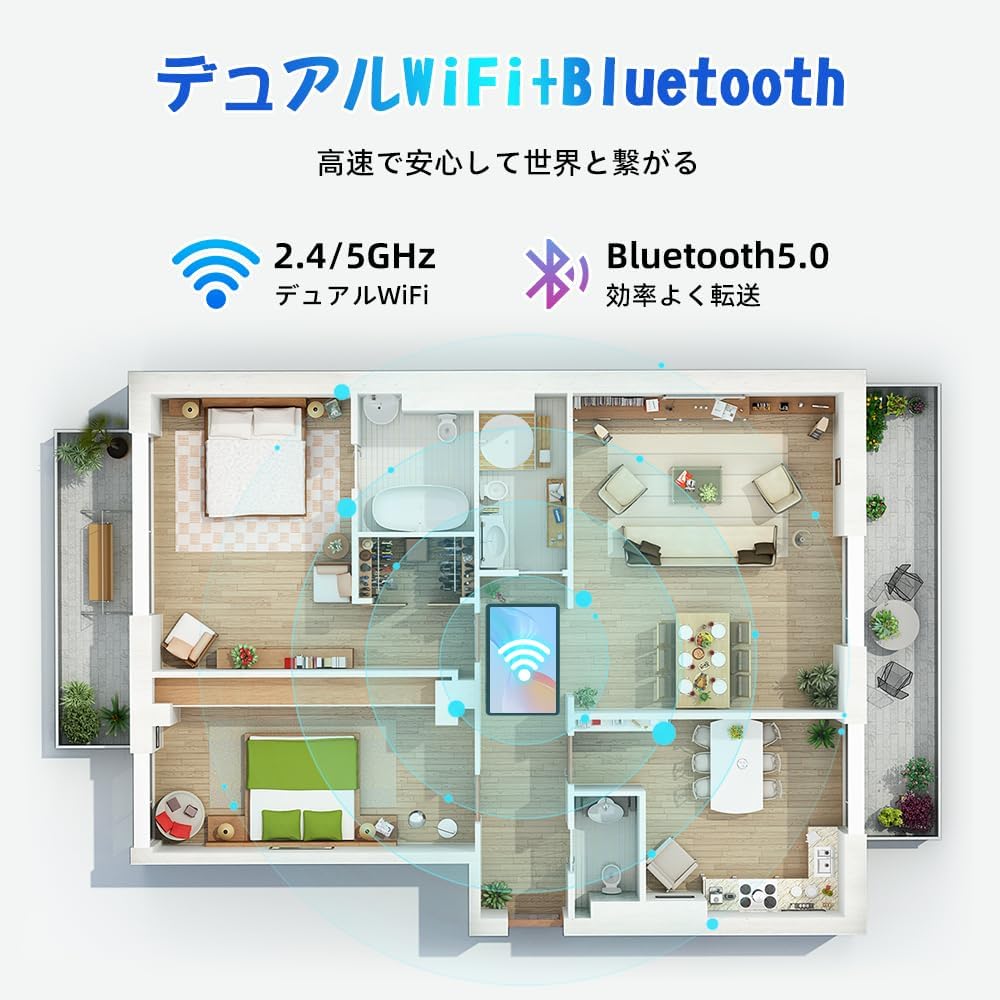
Figure 5.1: Diagram illustrating the tablet's dual-band 2.4G/5G Wi-Fi and Bluetooth 5.0 connectivity, ensuring fast and reliable connections throughout your home or office.
5.4 „Google“ paskyros sąranka
As a GMS certified device, you can access Google Play Store and other Google services. During initial setup, you will be prompted to sign in with your Google account or create a new one. This is essential for downloading apps and syncing data.
5.5 „MicroSD“ kortelės įdėjimas
To expand storage up to 2TB:
- Planšetinio kompiuterio šone raskite „MicroSD“ kortelės lizdą.
- Įdėkite „MicroSD“ kortelę į lizdą auksiniais kontaktais žemyn, kol ji spragtelės ir užsifiksuos.
- You may be prompted to format the card for use with the tablet.

Figure 5.2: Visual representation of the tablet's 12GB RAM and 64GB ROM, with support for up to 2TB MicroSD card expansion, allowing for vast storage of photos, videos, and music.
6. Naudojimo instrukcijos
6.1 „Android 15“ funkcijos
Your tablet runs on Android 15, offering an intuitive and enhanced user experience with improved security, customization, and AI capabilities.

6.1 pav. Baigtaview of Android 15 features, including enhanced security and privacy, expanded customization options, improved AI functions, and new gesture controls for a smoother operation.
6.2 Ekranas ir Viewrežimai
The 10.5-inch Incell IPS display provides vibrant colors and wide viewing angles. Optimize your viewing experience and reduce eye strain with various display modes:

Figure 6.2: The 10.5-inch Incell IPS display offers a 1280x800 resolution and a 16:10 aspect ratio for a wide and efficient viewpatirtį.

Figure 6.3: The tablet supports 1080P Full HD content, providing an immersive visual experience for movies and dramas from platforms like YouTube, Prime Video, Hulu, and HBO.

6.4 pav.: Vizualinis pavyzdysamples of different screen modes: Night mode for reduced blue light, Dark mode for eye comfort in low light, and Reader mode for a black-and-white paper-like display.
- Naktinis režimas: Reduces blue light emissions for comfortable viewing in low light conditions. Access via Quick Settings or Display settings.
- Tamsusis režimas: Changes the system UI and supported apps to a dark theme, reducing eye strain and saving battery on OLED screens. Access via Display settings.
- Skaitytojo režimas: Optimizes the display for reading, often by converting to grayscale and adjusting contrast. Access via Display settings or specific reading apps.
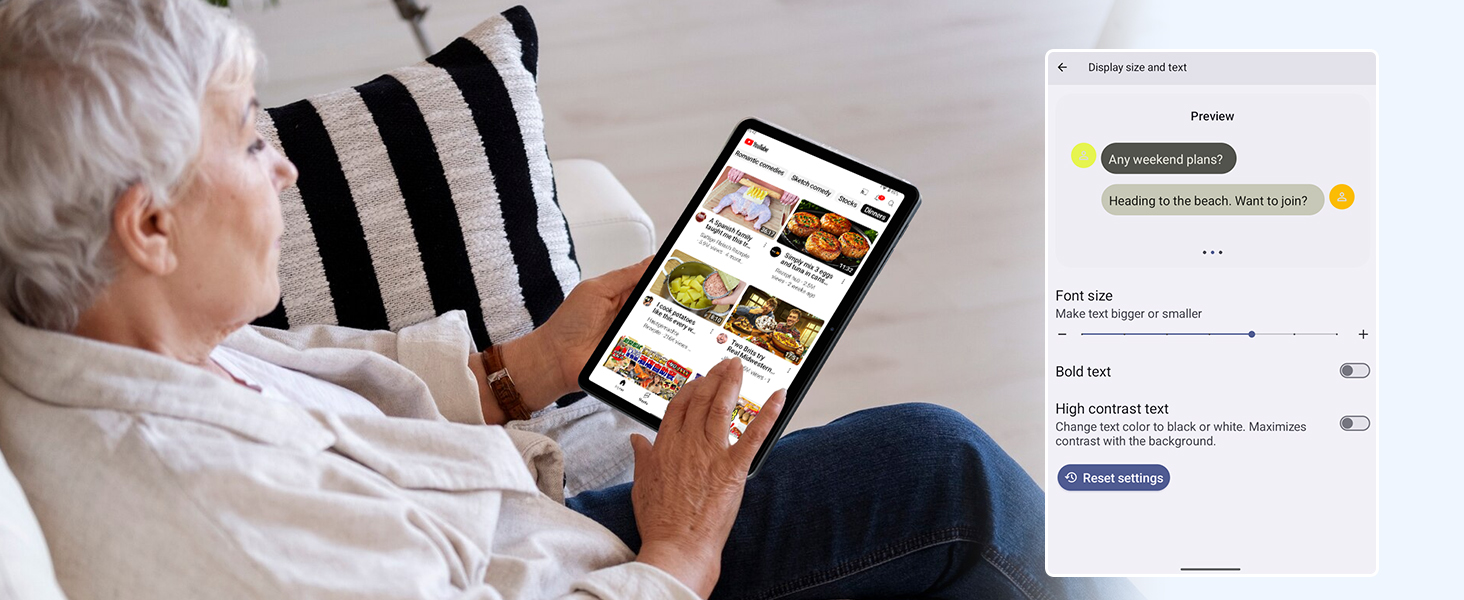
Figure 6.5: Screenshot showing display settings for adjusting text size and bold text, allowing users to customize readability.
6.3 Našumas
The TABWEE T80 is powered by a Unisoc T310 processor, ensuring smooth operation for daily tasks and multimedia consumption.
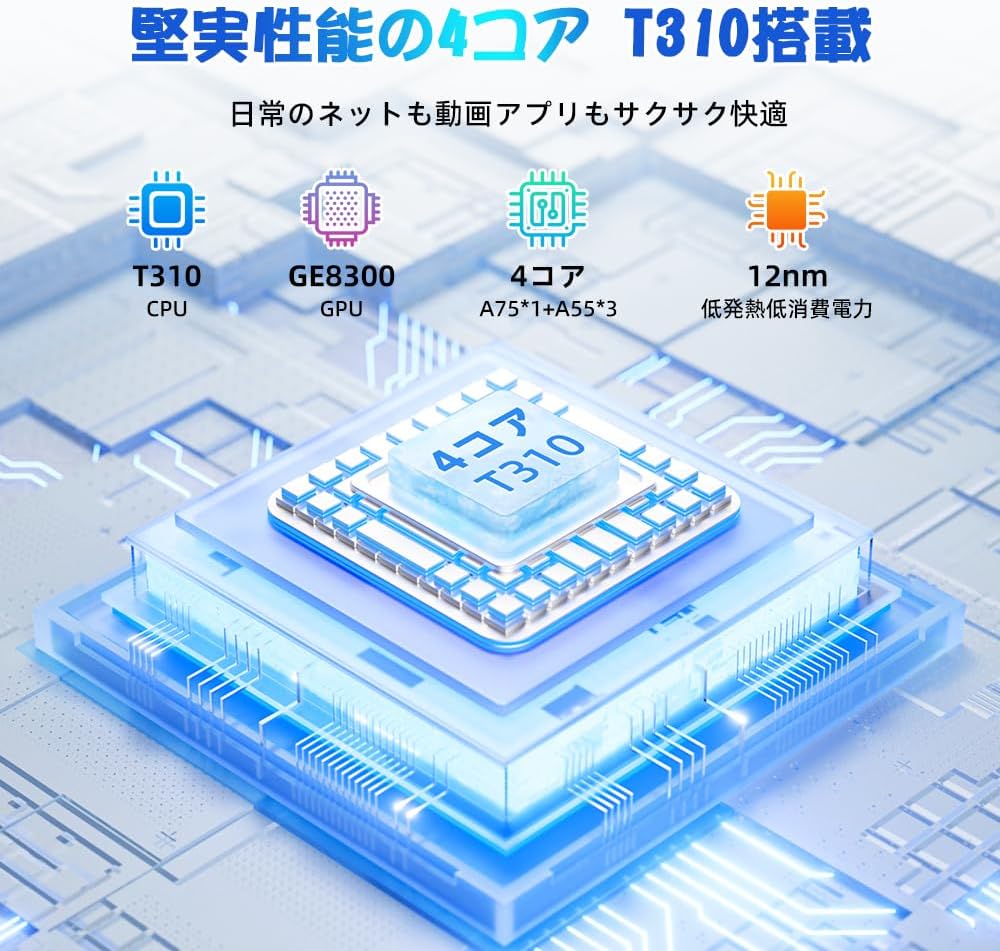
Figure 6.6: Diagram illustrating the T310 quad-core CPU architecture, featuring A75 and A55 cores, designed for efficient performance and low power consumption.

Figure 6.7: Comparison showing the Unisoc T310 processor's improved speed (up to 2.0 GHz) and lower power consumption compared to previous generation products.
6.4 Daugiaprogramis veikimas ir padalintas ekranas
For enhanced productivity, the tablet supports split-screen mode, allowing you to run two applications side-by-side.

Figure 6.8: Demonstration of the split-screen feature, allowing users to comfortably multitask by viewing two applications simultaneously, such as reading an e-book while checking messages.
- To activate split screen: Open an app, then swipe up slightly from the bottom and hold to reveal recent apps. Drag one app to the top or bottom of the screen, then select another app for the remaining space.
6.5 AI Features (Gemini AI)
Leverage the power of Gemini AI for enhanced productivity and convenience.

Figure 6.9: Visuals demonstrating Gemini AI 2.0 capabilities, including AI text-to-image generation, AI voice response, AI smart control, AI real-time conversation, and AI full-screen smart assistance.
Gemini AI can assist with real-time translation, smart text suggestions, and optimizing performance based on your usage habits. Explore AI-enhanced multi-tasking for learning, office work, and entertainment.
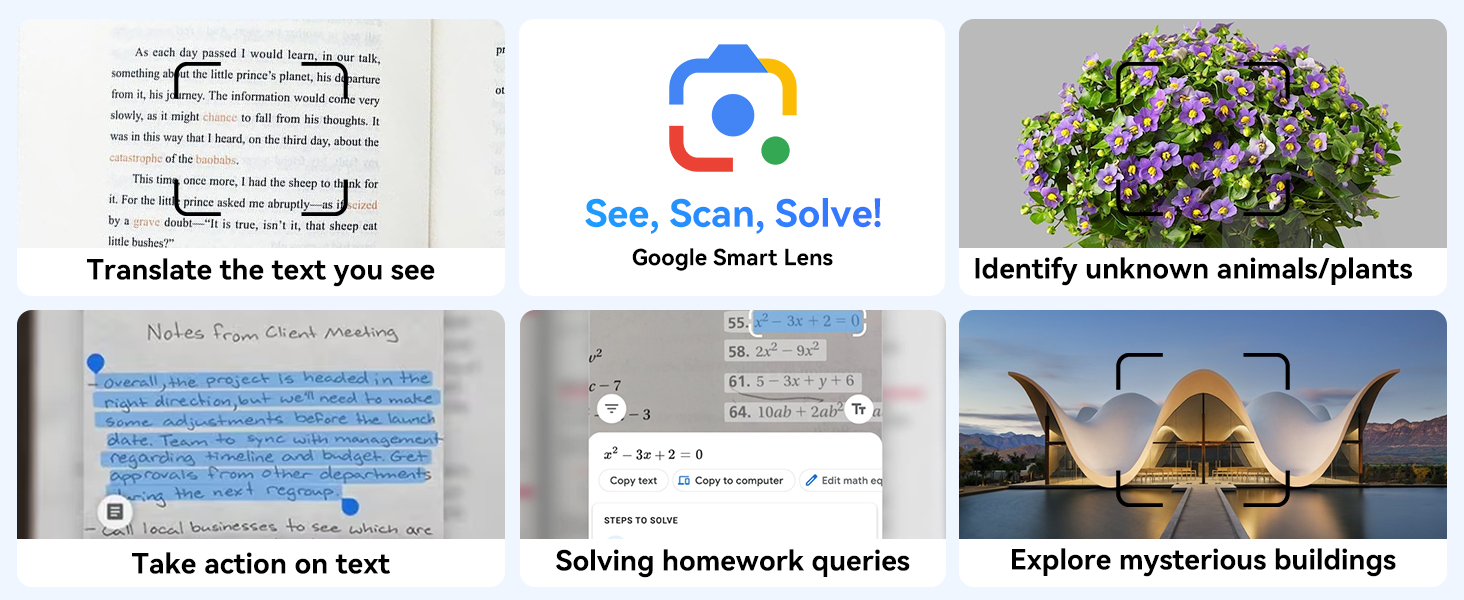
6.10 pav. Pvzamples of Google Smart Lens functions: translating text, identifying unknown objects/plants, taking action on text, solving homework queries, and exploring mysterious buildings.
6.6 Parental Controls (Kids Mode)
The tablet includes parental control features to ensure a safe environment for children.

Figure 6.11: Icons representing parental control features: usage time limits, break time settings, app usage restrictions, and content restrictions, all designed to protect children.
You can set time limits, restrict app access, and filter content. Navigate to Nustatymai > Skaitmeninė gerovė ir tėvų kontrolė to configure these features.
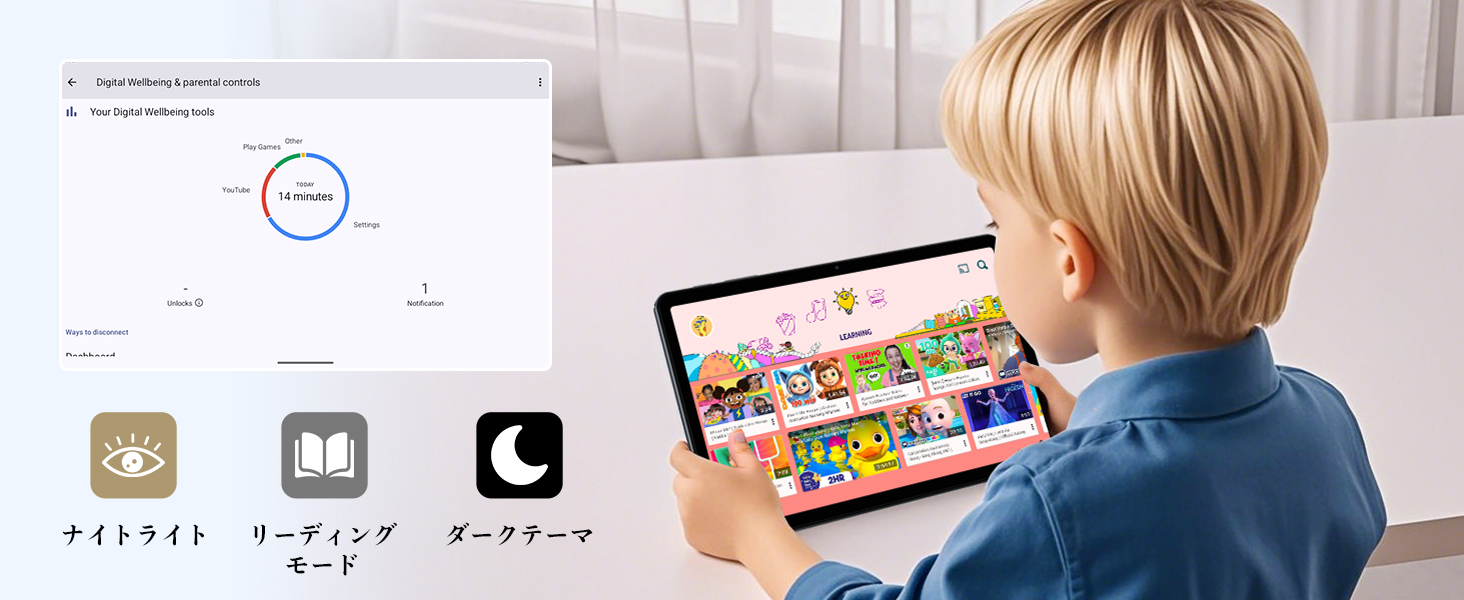
Figure 6.12: Screenshot of the Digital Wellbeing and parental controls interface, showing usage statistics and options for managing screen time and app access for children.
6.7 Belaidė projekcija
Mirror your tablet's screen to a compatible TV or monitor wirelessly.
- Ensure your TV/monitor supports wireless display (e.g., Miracast, Chromecast built-in).
- Planšetiniame kompiuteryje eikite į Nustatymai > Prijungti įrenginiai > Ryšio nuostatos > Aktoriai.
- Select your display device from the list to begin mirroring.
6.8 Kameros naudojimas
The tablet is equipped with a 2MP front camera and a 5MP rear camera.

Figure 6.13: Illustration of the tablet's 2-megapixel front camera and 5-megapixel rear camera, capable of autofocus for clear photos and video calls.
Open the Camera app to take photos or record videos. Tap the shutter button to capture an image or the record button to start/stop video recording. You can switch between front and rear cameras using the camera switch icon.
6.9 garsas
The tablet features dual speakers for an immersive audio experience and a 3.5mm headphone jack for private listening.

Figure 6.14: Diagram showing the location of the two powerful speakers on the TABWEE T80, providing a deep and immersive audio experience.
Adjust volume using the physical volume buttons on the side of the tablet or through the on-screen volume slider.
6.10 GPS navigacija
The integrated GPS system allows for accurate location tracking and navigation. Use pre-installed map applications or download your preferred navigation app from the Google Play Store.
7. Priežiūra
7.1 Valymas
Use a soft, lint-free cloth to clean the screen and body of the tablet. Do not use abrasive cleaners or solvents, as they may damage the surface.
7.2 Programinės įrangos naujiniai
Reguliariai tikrinkite, ar yra sistemos atnaujinimų, kad jūsų planšetiniame kompiuteryje būtų įdiegtos naujausios funkcijos ir saugos pataisymai. Eikite į Nustatymai > Sistema > Sistemos atnaujinimas.
7.3 Akumuliatoriaus priežiūra
Norėdami pailginti baterijos veikimo laiką:
- Venkite dažnai visiškai iškrauti akumuliatorių.
- Nepalikite planšetinio kompiuterio ilgai krautis po to, kai jis visiškai įkrautas.
- Ilgą laiką nenaudojamą tabletę laikykite vėsioje, sausoje vietoje.

Figure 7.1: Battery life estimates for the 6000mAh battery: 5 hours of web browsing, 4 hours of video playback, 4 hours of gaming, 21 hours of music, and 648 hours of standby time, supported by AI power-saving algorithms.
8. Problemų sprendimas
| Problema | Galima priežastis | Sprendimas |
|---|---|---|
| Planšetinis kompiuteris neįsijungia. | Žema akumuliatoriaus įkrova; sistemos gedimas. | Kraukite planšetinį kompiuterį bent 30 minučių. Paspauskite ir palaikykite maitinimo mygtuką 10–15 sekundžių, kad priverstumėte jį paleisti iš naujo. |
| Nepavyksta prisijungti prie „Wi-Fi“. | Neteisingas slaptažodis; maršrutizatoriaus problema; už diapazono ribų. | Patikrinkite „Wi-Fi“ slaptažodį. Paleiskite maršrutizatorių iš naujo. Priartėkite prie „Wi-Fi“ maršrutizatoriaus. |
| Programėlės veikia lėtai arba stringa. | Per daug veikiančių programų; mažai vietos saugykloje. | Uždarykite fonines programas. Išvalykite programų talpyklą. Atlaisvinkite vietos saugykloje. |
| Ekranas nereaguoja. | Laikinas programinės įrangos triktis. | Priverstinai paleiskite planšetinį kompiuterį iš naujo laikydami nuspaustą maitinimo mygtuką. |
9. Specifikacijos
| Funkcija | Detalė |
|---|---|
| Prekės ženklas | TABWEE |
| Modelio pavadinimas | T80 Tablet Tabwee |
| Operacinė sistema | „Android 15“ (sertifikuota GMS) |
| Ekrano dydis | 10.5 inches Incell IPS |
| Ekrano raiška | 1280 x 800 pikselių |
| Procesoriaus prekės ženklas | Unisoc |
| CPU greitis | 2 GHz |
| GPU prekės ženklas | ARM Mali-G57 |
| RAM | 12GB (4GB+8GB expansion) |
| Vidinė saugykla | 64 GB |
| Išplečiama saugykla | Iki 2 TB per „MicroSD“ kortelę |
| Baterijos talpa | 6000mAh Lithium-ion Polymer |
| Priekinė kamera | 2 MP |
| Galinė kamera | 5 MP |
| Ryšys | 2.4G/5G Wi-Fi (802.11ac), Bluetooth 5.0, GPS |
| Uostai | USB C tipo, 3.5 mm ausinių lizdas |
| Matmenys | 32.79 x 19.9 x 4.1 cm |
| Svoris | 910 g |
10. Garantija ir palaikymas
Your TABWEE T80 tablet comes with a 2 metų gamintojo garantija.
If you encounter any issues with your product, please contact us via email. We strive to respond promptly to ensure your satisfaction.
Kaip susisiekti su palaikymo komanda:
- Through your Amazon account: Go to Užsakymų istorija > Select the relevant order > Click Susisiekite su pardavėju.
- Through the product page: On the product page, click on the seller's name (TABWEE Official Store) below the "Add to Cart" button, then click "Ask a question" on the top right.
Support hours: 9:00 AM - 6:00 PM (excluding holidays). We will reply as soon as possible.

Figure 10.1: Image representing customer support availability for assistance.


