1. Įvadas
The Sonim Zenith H100 is a compact and powerful 4G mobile Wi-Fi hotspot designed to provide reliable internet connectivity on the go. With impressive download and upload speeds, LTE Cat-13 capabilities, Wi-Fi 5 features, and a color screen, the H100 allows you to connect up to 32 devices simultaneously. This manual provides essential information for setting up, operating, maintaining, and troubleshooting your Sonim H100 hotspot.

Figure 1: Sonim Zenith H100 Mobile Wi-Fi Hotspot. The device features a clear display showing connection details and signal strength.
2. Kas yra dėžutėje
Before you begin, please ensure all the following items are included in your package:
- Sonim Spot H100 4G mobilusis viešosios interneto prieigos taškas
- USB-C kabelis
- Baterija
- Įkroviklis
- Greitos pradžios vadovas
3. Įrenginys baigtasview
Familiarize yourself with the physical components of your Sonim H100 hotspot.
3.1 Priekis View

Figure 2: Front of the H100, featuring the display screen.
The front of the device primarily features the color display, which provides real-time information about network status, battery level, and connected devices.
3.2 pusė View and Power Button
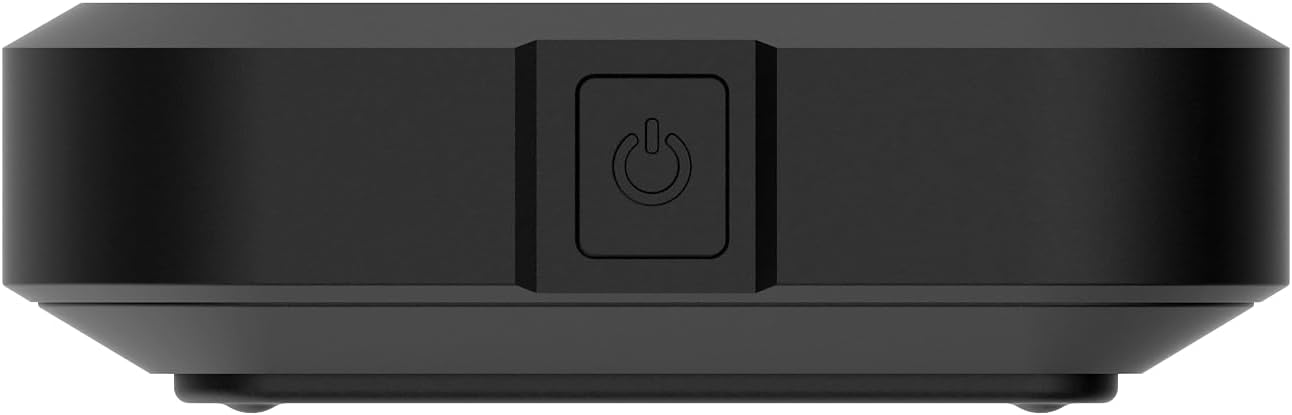
3 pav.: šonas view of the H100, showing the power button.
The power button is located on the side of the device. Press and hold to power on or off. A short press can wake the screen or navigate menus.
3.3 Atgal View

Figure 4: Back of the H100.
The back of the device features a removable cover, under which the battery and SIM card slot are located.
4. Sąranka
4.1 Įrenginio įkrovimas
Before first use, fully charge your Sonim H100. Connect the provided USB-C cable to the device's USB-C port and the other end to the charger. Plug the charger into a power outlet. The screen will indicate charging status.

Figure 5: USB-C charging port on the Sonim H100.
4.2 SIM kortelės įdėjimas
- Įsitikinkite, kad įrenginys išjungtas.
- Nuimkite galinį įrenginio dangtelį.
- Raskite SIM kortelės lizdą.
- Carefully insert your activated 4G LTE SIM card into the slot, ensuring correct orientation.
- Uždėkite galinį dangtelį.
4.3 Įjungimas / išjungimas
- Norėdami įjungti: Press and hold the power button (refer to Figure 3) until the Sonim logo appears on the screen.
- Norėdami išjungti: Press and hold the power button until the power-off options appear on the screen, then select "Power Off".
5. Naudojimo instrukcijos
5.1 Įrenginių prijungimas prie interneto prieigos taško
The Sonim H100 broadcasts a Wi-Fi network that other devices can connect to.
- Ensure the H100 is powered on and has an active cellular connection.
- Savo įrenginyje (išmaniajame telefone, nešiojamajame telefone, planšetiniame kompiuteryje) atidarykite „Wi-Fi“ nustatymus.
- Look for the Wi-Fi network name (SSID) displayed on the H100's screen.
- Select the H100's network and enter the Wi-Fi password (also displayed on the H100's screen).
- Dabar jūsų įrenginys turėtų būti prijungtas prie interneto per interneto prieigos tašką.

Figure 6: H100 screen displaying connection information.
5.2 Managing Connections (Primary and Guest)
The H100 supports both a primary and a guest Wi-Fi network. This allows you to provide internet access to guests without sharing your main network password or access to your primary connected devices.
- Pirminis tinklas: Your main Wi-Fi network, typically with full access and higher priority.
- Svečių tinklas: A separate Wi-Fi network with its own password, often with limited access or bandwidth, ideal for temporary users.
Navigate the H100's on-screen menu using the navigation button (often the power button or a dedicated navigation button) to view and manage settings for both networks.
5.3 Ekrano naudojimas
The color display provides crucial information at a glance. Use the navigation button to cycle through different screens, which may include:
- Network status (4G LTE, signal strength)
- Baterijos lygis
- Connected devices (Primary and Guest)
- „Wi-Fi“ SSID ir slaptažodis
- Duomenų naudojimas
5.4 Tinklo nustatymai
Advanced network settings can typically be accessed via a web interface. Connect a device to the H100's Wi-Fi, then open a web browser and enter the IP address displayed on the H100's screen (e.g., 192.168.1.1). Log in using the default credentials (usually found in the Quick Start Guide or on a sticker inside the device) to configure settings such as:
- Changing Wi-Fi SSID and password
- Setting up security protocols
- Prijungtų įrenginių valdymas
- Firmware atnaujinimai
6. Priežiūra
6.1 Akumuliatoriaus priežiūra
- Stenkitės, kad prietaisas nepatektų į ekstremalias temperatūras.
- Nereguliariai visiškai iškraukite akumuliatoriaus. Įkraukite jį, kol jis nenukris žemiau 20 %.
- If storing the device for an extended period, charge the battery to about 50% and power off the device.
6.2 Valymas
Use a soft, dry, lint-free cloth to clean the device. Do not use liquid cleaners or aerosols directly on the device. Avoid getting moisture into any openings.
6.3 Programinės įrangos naujiniai
Periodiškai patikrinkite, ar yra programinės įrangos atnaujinimų, per įrenginio web interface. Updates can improve performance, add new features, and enhance security. Ensure the device is fully charged before performing any updates.
7. Problemų sprendimas
If you encounter issues with your Sonim H100, refer to the following common problems and solutions:
| Problema | Galimas sprendimas |
|---|---|
| Nėra interneto ryšio |
|
| Nepavyksta prisijungti prie „Wi-Fi“ |
|
| Lėtas interneto greitis |
|
| Įrenginys neįsijungia |
|
8. Specifikacijos
Key technical specifications for the Sonim Zenith H100 Mobile Wi-Fi Hotspot:
| Funkcija | Detalė |
|---|---|
| Prekės ženklas | Sonimas |
| Modelio pavadinimas | H100 |
| Modelio numeris | 04.F010.373100-000 |
| Ryšio technologija | Wi-Fi, LTE |
| Belaidžio ryšio standartas | 802.11a/b/g/n/ac (Wi-Fi 5) |
| LTE kategorija | Katė-13 |
| Baterijos talpa | 3400 mAh |
| Maksimalus prijungtų įrenginių skaičius | Iki 32 |
| Spalva | Juoda |
| Prekės svoris | 149 gramų |
| Matmenys (I x P x A) | 15 x 20 x 15 centimetro |
| UPC | 096962278601 |
9. Garantija ir palaikymas
9.1 Gamintojo garantija
The Sonim Zenith H100 comes with a 2 metų gamintojo garantija. Please retain your proof of purchase for warranty claims. The warranty covers defects in materials and workmanship under normal use. It does not cover damage caused by misuse, accidents, unauthorized modifications, or natural disasters.
9.2 Pagalba klientams
For technical assistance, warranty claims, or further inquiries, please contact Sonim customer support. Refer to the official Sonim website or the Quick Start Guide for the most up-to-date contact information.
Note: Information regarding spare parts availability and software updates guaranteed until dates is not available at this time.


